Choosing a studio monitor controller for multiple speakers is one of the easiest ways to improve workflow, level matching, and A/B comparisons in the studio. The right unit helps you switch between monitors quickly without adding confusion or unnecessary noise.
Below, we focus on useful, buyer-first options for different studio setups, from passive desktop controllers to feature-rich models with headphone and USB connectivity.
Best 10 Studio Monitor Controller for Multiple Speakers Picks for 2026
Passive 2x2 Control
Mackie Big Knob Passive 2x2 Monitor Controller

- Passive audio path for clean attenuation
- 2 sources and 2 monitor pairs
- Mono, mute, and dim controls
Best For: Simple, transparent switching in compact studio setups
Bluetooth 2.1 Desktop Hub
PreSonus MicroStation BT Bluetooth Monitor Controller

- Bluetooth input for wireless playback
- Balanced TRS and stereo analog inputs
- Headphone/aux output with 2.1 support
Best For: Compact desks needing Bluetooth and subwoofer-friendly monitor control
Talkback Control Center
Behringer XENYX CONTROL2USB Studio Monitor Controller

- Master volume, source selection, and monitor switching
- Built-in talkback microphone with level control
- Includes USB audio interface
Best For: Sessions that need communication and monitor control in one unit
Passive Analog Router
DYNASTY PROAUDIO PMC-2 Passive Monitor Controller
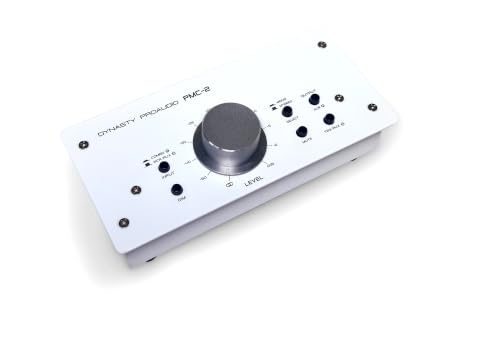
- Passive, transparent level control
- Balanced XLR, RCA, and 3.5mm inputs
- DIM, mute, and mono switches
Best For: Analog setups that need flexible inputs and simple passive control
Desktop Monitoring Hub
Behringer MONITOR2USB USB monitor controller
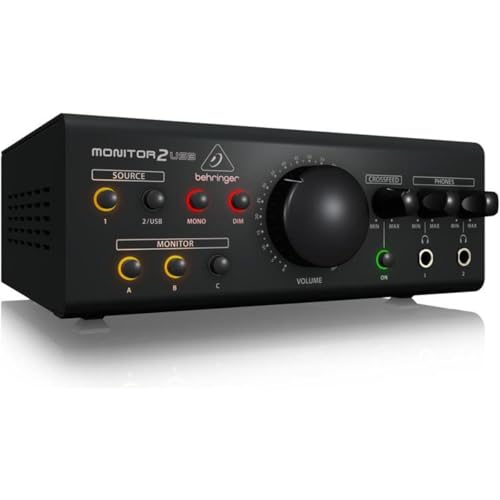
- Speaker and headphone monitoring in one unit
- VCA control for level management
- Built-in USB audio interface
Best For: Home studios that need basic monitor control plus USB audio
Multi-Speaker Control Center
PreSonus Monitor Station V2 multi-speaker controller

- Three selectable speaker outputs with level controls
- Four stereo inputs plus S/PDIF source selection
- Four headphone amps and built-in talkback
Best For: Studios needing source switching, speaker pair control, and talkback
Passive Desktop Volume Control
Behringer STUDIO M passive monitor controller

- Passive studio volume controller
- Dual pair input/output connectivity
- Compact desktop footprint
Best For: Minimal setups that want simple passive level control
Transparent Control Hub

- 3 stereo analog inputs and 2 S/PDIF inputs
- 3 stereo speaker outputs with select switches
- Passive path with talkback and LED metering
Best For: Studios needing flexible multi-speaker monitoring and remote control
Simple Passive Switcher
StudioMan M04 2-In 4-Out Controller

- 2 inputs and 4 outputs for flexible routing
- 100% passive design with no power required
- Mute button and damped volume knob
Best For: Small studios and desktop setups needing simple passive speaker switching
Multi-Source Monitor Hub

- Selects between 4 sources and 3 monitor pairs
- 192kHz/24-bit USB recording and playback
- Two Onyx mic preamps with phantom power
Best For: Project studios wanting monitor control plus USB interface features
Passive 2×2 Control – Mackie Big Knob Passive 2×2 Monitor Controller
If you want a straightforward studio monitor controller for multiple speakers, the Mackie Big Knob Passive focuses on clean signal handling and simple hardware control. Its passive audio path, 2×2 source and monitor switching, and dedicated Mono/Mute/Dim buttons make it a practical fit for small pro audio setups where you want to keep the workflow fast and the audio path transparent.
Best For: Engineers and creators who need a no-power, 2-source/2-monitor controller for basic studio switching.
Pros:
- Passive audio path supports pristine audio quality
- Switches between two sources and two monitor pairs
- Mono, mute, and dim buttons add fast control
- Sturdy metal build is designed for studio use
Cons:
- Passive design means no powered extras or built-in interface features
- More limited than controllers with talkback or Bluetooth
Overall, this is a solid choice when you want simple monitor control without adding color or complexity. It keeps the focus on attenuation, source selection, and reliable switching in a compact tabletop unit.
Bluetooth 2.1 Desktop Hub – PreSonus MicroStation BT Bluetooth Monitor Controller
The PreSonus MicroStation BT is a compact studio monitor controller for multiple speakers when you want Bluetooth added to a small desktop setup. It combines Bluetooth input, balanced and stereo analog inputs, and a subwoofer-focused 2.1 design, making it easy to move between wireless playback, pro gear, and casual listening without much desk space.
Best For: Small studios and home desks that need Bluetooth, headphone support, and simple 2.1 monitor control.
Pros:
- Bluetooth input adds wireless playback to any speaker setup
- Balanced 1/4-inch TRS and 1/8-inch TRS inputs support pro and consumer gear
- 2.1 layout is built with subwoofer use in mind
- Compact tabletop footprint with headphone/aux output
Cons:
- Designed for a pair of monitors plus sub rather than larger multi-speaker routing
- Feature set is focused on convenience rather than advanced studio switching
This is a practical pick if your priority is flexible desktop playback with a small footprint. It blends wireless convenience with the basic inputs and outputs needed for a compact monitoring setup.
Talkback Control Center – Behringer XENYX CONTROL2USB Studio Monitor Controller
If you need a studio monitor controller for multiple speakers that also handles communication, the Behringer XENYX CONTROL2USB is built as an all-in-one control center. It combines master volume control, source selection, monitor switching, USB audio, and a built-in talkback microphone, which makes it useful in sessions where you need both monitoring and direct communication.
Best For: Studios that want monitor switching, USB audio, and talkback in one desktop unit.
Pros:
- All-in-one master volume, source selector, and monitor switcher
- Built-in talkback microphone with level control
- USB audio interface adds extra connectivity
- Designed as a high-headroom, low-noise control center
Cons:
- Likely more complex than a basic passive controller
- May be more than you need if you only want simple monitor attenuation
This model stands out when communication matters as much as monitor control. It suits workflow-heavy studios that want fewer separate boxes on the desk.
Passive Analog Router – DYNASTY PROAUDIO PMC-2 Passive Monitor Controller
The DYNASTY PROAUDIO PMC-2 is a passive studio monitor controller for multiple speakers when you want precise analog level control without adding power or coloration. It sits between your source and active monitors or amplifier, and its balanced XLR, RCA, and 3.5mm options make it adaptable for a range of desktop and small studio setups.
Best For: Users who want a passive, metal-built controller with balanced and unbalanced connections for quick level trimming.
Pros:
- Passive design keeps the signal path transparent
- Balanced XLR, RCA, and 3.5mm inputs offer flexible connectivity
- DIM, mute, and mono switches add practical control
- Solid metal enclosure is built for home or road use
Cons:
- Requires manual control with no powered features
- Focused on 2×2 analog routing rather than advanced monitor management
For straightforward attenuation and source handling, the PMC-2 keeps the design simple and rugged. It is a sensible fit when you want reliable monitor control without changing the character of the audio.
Desktop Monitoring Hub – Behringer MONITOR2USB USB monitor controller
If you need a studio monitor controller for multiple speakers and headphone checks in a compact desktop setup, the Behringer MONITOR2USB is built around flexible monitoring control and USB audio interfacing. It combines speaker and headphone monitoring with VCA control, making it a practical pick for simple studio routing and level management.
Best For: Home studios that want a straightforward monitor controller with speaker, headphone, and USB integration.
Pros:
- Combines speaker and headphone monitoring in one unit.
- Uses VCA control for monitoring level management.
- Includes a USB audio interface for added connectivity.
Cons:
- The supplied details do not list multiple selectable speaker outputs.
- Less feature-dense than full monitor controllers with source and cue sections.
Overall, this is a practical option if your priority is a simple, centralized monitoring solution with USB support rather than a heavily featured multi-speaker control center.
Multi-Speaker Control Center – PreSonus Monitor Station V2 multi-speaker controller
For anyone shopping for a studio monitor controller for multiple speakers, the PreSonus Monitor Station V2 is the most fully featured option here. It offers three selectable speaker outputs, multiple stereo input sources, headphone amps, talkback, and front-panel controls that make everyday studio switching much easier.
Best For: Studios that need flexible source switching, three speaker pairs, and talkback in one desktop controller.
Pros:
- Three stereo pairs of individually selectable speaker outputs with level controls.
- Four stereo input pairs plus one S/PDIF digital input into three selectable sources.
- Four headphone amplifiers with volume controls and independent source selection.
- Includes a built-in talkback microphone with gain control and a Talkback button.
Cons:
- It is a larger desktop unit than simpler passive controllers.
- More features may be unnecessary if you only need basic volume control.
As a monitor controller for multiple speakers, this model stands out for routing flexibility and studio workflow tools. If you want one box to manage several sources, speaker pairs, and headphone monitoring, it is the most capable fit in this lineup.
Passive Desktop Volume Control – Behringer STUDIO M passive monitor controller
The Behringer STUDIO M is a simple passive studio controller for setups where you mainly want straightforward level adjustment. It is useful as a studio monitor controller for multiple speakers only in the broad sense of managing monitor volume, but its supplied details focus on passive volume control and basic input/output connectivity rather than elaborate speaker switching.
Best For: Minimal desktop setups that want passive volume control in a compact footprint.
Pros:
- Passive studio volume controller design.
- Supports dual pair input/output connectivity.
- Compact and lightweight desktop form factor.
Cons:
- The supplied notes do not list selectable multiple speaker outputs.
- Less suitable for advanced routing or source switching.
If your priority is clean, passive level control rather than a full-featured monitor management hub, this is the simplest option here. It makes the most sense in compact systems where basic monitoring control matters more than speaker switching.
Transparent Control Hub – PreSonus Central Station Plus
If you need a studio monitor controller for multiple speakers, the PreSonus Central Station Plus is built around flexible switching and a fully passive signal path. It offers 3 sets of stereo analog inputs, 2 sets of digital S/PDIF inputs, and 3 stereo speaker outputs with select switches and trim pots, making it a practical fit for studios that route between several sources and monitor pairs.
Best For: Studios that want multiple input options, speaker switching, and remote-controlled monitoring.
Pros:
- 3 stereo analog inputs plus 2 digital S/PDIF inputs for broad source compatibility
- 3 stereo speaker outputs with select switches and trim pots for multi-speaker setups
- Transparent passive audio path with no op amps or integrated circuits
- Built-in talkback mic, talkback input, and dual 30-segment LED metering
Cons:
- May be more controller than needed for simple single-pair monitor setups
- Relies on external connections and routing rather than a minimal control layout
The Central Station Plus focuses on clean routing and monitoring flexibility, so it makes sense when speaker management and source selection matter more than keeping the interface simple. The included remote adds convenience for everyday studio use.
Simple Passive Switcher – StudioMan M04 2-In 4-Out Controller
For a straightforward studio monitor controller for multiple speakers, the StudioMan M04 keeps the job simple with 2 inputs and 4 outputs. Its passive design uses 1/4″ unbalanced connectors, so it is aimed at users who want basic source switching, clean routing, and quick volume control without adding power or extra circuitry.
Best For: Small studios, podcast setups, and desktop rigs that need simple passive switching between multiple outputs.
Pros:
- 2 inputs and 4 outputs for flexible routing across several devices
- 100% passive design with no external power supply or battery
- One-click mute button plus smooth damped volume knob
- Low-loss signal path designed to avoid added coloration
Cons:
- Uses 1/4″ unbalanced connectors, which may not suit every studio wiring setup
- Does not include the wider feature set of more advanced monitor controllers
The M04 is a practical option if you mainly want uncomplicated switching and volume control across multiple outputs. It is less feature-heavy than larger controllers, but that also keeps the workflow direct and easy to manage.
Multi-Source Monitor Hub – Mackie Big Knob Studio Plus
Mackie Big Knob Series, 4x3 Studio Monitor Controller 192kHz USB I/O (BIG KNOB STUDIO PLUS)
Check Price On AmazonThe Mackie Big Knob Studio Plus works as a studio monitor controller for multiple speakers while also adding USB recording and playback. It supports selection between 4 sources and 3 monitor pairs, with a classic big knob volume control and independent trim on all sources and monitor outputs, making it a strong fit when you need both routing control and interface features in one unit.
Best For: Project studios that want monitor switching, USB audio I/O, and mic preamps in one device.
Pros:
- Switches between 4 sources and 3 monitor pairs for multi-speaker control
- Includes 192kHz/24-bit USB recording and playback
- Two Onyx mic preamps with phantom power for condenser mics
- Front-panel 1/8″ input for quick smartphone connection
Cons:
- Heavier and more feature-dense than a basic monitor-only controller
- Designed around USB I/O, which may be unnecessary for purely analog setups
This model makes sense if you want a monitor controller that also handles recording and playback duties. Its source flexibility and three monitor-pair support give it a strong place in compact professional studios.
How We Picked the Best Studio Monitor Controller for Multiple Speakers
We focused on controllers that make multi-speaker monitoring easier in real-world studio use. Priority went to clean signal handling, reliable speaker switching, easy level control, mute/dim functions, and input/output flexibility. We also considered whether each model suits passive or powered monitor setups, since the best choice depends on how your studio is wired.
Quick Comparison
In this roundup, the simpler passive units are best for straightforward monitor switching and transparent signal paths. Midrange desktop controllers add convenience features such as talkback, headphone routing, USB audio, or Bluetooth. More advanced control centers are better for studios that need multiple sources, multiple speaker pairs, and faster session management.
Key Buying Factors for a Studio Monitor Controller for Multiple Speakers
Speaker Count and Routing
Make sure the controller supports the number of monitor pairs you actually use. Some models are built for a basic 2×2 setup, while others offer more flexible routing for multiple outputs or additional cue paths.
Passive Vs. Active Control
Passive controllers are often favored for simplicity and transparency, especially when you want minimal circuitry in the path. Active designs can add features like headphone amp sections, VCA control, or USB playback, which may be worth the tradeoff if you need more functionality.
Connectivity and Source Matching
Check whether the unit matches your interface and monitor setup. Balanced I/O is usually preferable in professional environments, while USB, Bluetooth, and headphone outputs can be valuable for hybrid production rooms or content-creation setups.
Workflow Features
Mute, dim, mono, talkback, and instant speaker switching can save time during mixing and editing. If you regularly compare mixes across speakers, these controls matter more than extra bells and whistles.
Who Should Buy Which Studio Monitor Controller for Multiple Speakers?
If you want the cleanest, simplest solution, a passive controller is usually the best fit. If your studio needs Bluetooth, USB, headphone monitoring, or talkback, choose a feature-rich desktop control center. For engineers managing several speaker pairs or switching often during sessions, prioritize a unit with clear speaker selection, dependable level control, and enough routing flexibility to grow with the room.
In short, the best Studio Monitor Controller for Multiple Speakers is the one that matches your monitoring habits, not just your budget. Pick the model that gives you the routing you need with the fewest workflow compromises.