The Edifier QR65 review is easy to frame: it is a desktop speaker system for people who want more than plain stereo sound.
If you are comparing an Edifier QR65 RGB Desktop Monitor setup against ordinary computer speakers, the appeal is the mix of audio performance, charging, and desktop-friendly design.
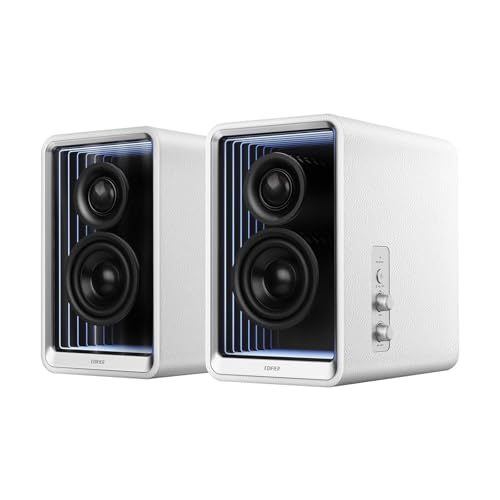
QR65 Review Summary
The Edifier QR65 makes the most sense for buyers who want their desk speakers to do multiple jobs at once.
It aims to be a compact audio upgrade, a device charger, and a visual accent in one package, and that combination is the whole reason to consider it.
If your desk setup needs cleaner cable management, higher-quality Bluetooth playback, and a speaker pair that can sit neatly beside a monitor, this is a strong fit.
Best for: desktop users who want serious sound, built-in charging, and a polished look.
Not ideal for: buyers who only need the cheapest possible speakers, or anyone who wants a full home-theater replacement.
Review Scorecard
| Category | Score | Buyer assessment |
|---|---|---|
| Sound quality potential | 9/10 | 70W RMS output, silk dome tweeters, and 2.75-inch long-throw drivers point to a more capable desktop soundstage than entry-level speakers. |
| Connectivity | 9/10 | Bluetooth 5.3 with LDAC, plus multi-input support and sub-out, gives it real flexibility for mixed setups. |
| Desk utility | 10/10 | The included stands, 10-degree angle, and USB-C charging make it especially practical on a crowded desk. |
| Convenience features | 9/10 | App control, playback adjustments, sound effects, and lighting customization add useful control without requiring extra hardware. |
| Visual appeal | 8/10 | The lighting system is a clear differentiator if you want a more expressive desk setup. |
| Value for the right buyer | 8/10 | It bundles several functions into one product, which is attractive if you would otherwise buy separate speakers and a charger. |
Key Features and Specifications of QR65
The QR65 is positioned as a powered desktop monitor speaker system with a feature set that goes beyond basic PC audio.
The listing highlights 70W RMS total output, class-D amplifier chips, 1.25-inch silk dome tweeters, and 2.75-inch long-throw aluminum diaphragm mid-low drivers.
On paper, that is a much more serious layout than the tiny drivers most people associate with desktop speakers.
The connectivity side is equally important.
Edifier lists Bluetooth 5.3 with LDAC support and a maximum bitrate of 990Kbps for high-resolution wireless audio transmission.
For wired use, the product supports multiple inputs and includes a sub-out, which matters if you want to grow the system later instead of replacing it.
The charging feature is one of the most distinctive parts of the package.
Each USB Type-C port can provide up to 65W of power, and the listing says TurboGaN charging is built in.
That means the speakers are not just sitting on the desk as audio gear; they can also help power a phone, tablet, or other compatible device.
The physical design is built for desktop placement.
Edifier includes aluminum speaker stands, and the 10-degree angle is meant to direct sound toward ear level while reducing colorations from desktop reflections.
The size also keeps them manageable for office or gaming setups: the listed dimensions are 8.25 inches deep, 5 inches wide, and 8.25 inches high, with a total weight of 11.6 pounds.
Notable facts from the listing:
- 70W RMS total output power
- 1.25-inch silk dome tweeters
- 2.75-inch long-throw aluminum diaphragm mid-low drivers
- Bluetooth 5.3 with LDAC
- Up to 990Kbps wireless high-resolution audio transmission
- 65W TurboGaN charging on each USB-C port
- Speaker stands included
- EDIFIER ConneX app support
- Two-year warranty
Pros and Cons of QR65
Pros
- Versatile desk function. It combines speakers, charging, and lighting in one product, which can simplify a desk setup.
- Strong feature density. Bluetooth 5.3, LDAC, multi-input support, sub-out, and app control make it unusually flexible for a desktop speaker pair.
- Built for desktop geometry. The included stands and angled orientation suggest the system is tuned for near-field listening.
- Better upgrade path. Sub-out support means the system can be expanded instead of replaced.
- More refined than generic speakers. The listed driver layout and power rating suggest a more ambitious sound design than basic multimedia speakers.
Cons
- Feature overlap may be unnecessary. If you only want simple speakers, the charging and lighting can feel like extra cost and complexity.
- Desktop-first design limits use cases. It is clearly aimed at near-field listening, not broad room coverage.
- App dependence for full customization. The lighting and some sound features rely on the EDIFIER ConneX app.
- Not a minimalist product. Buyers who prefer discreet hardware may not want the lighting and visual emphasis.
Who Should Buy QR65?
The QR65 is a smart buy for people building a serious desk setup.
That includes home office users who spend long hours at a computer, creators who want better reference audio than a laptop can provide, and gamers who want desk speakers that look as finished as the rest of the setup.
It also fits buyers who value convenience: the charging ports and app controls can reduce clutter and keep everything in one place.
It is also a good match for someone who already knows they want a more capable desktop audio system but does not want to piece together separate accessories.
The built-in charging and included stands make the product feel intentionally designed rather than cobbled together from separate purchases.
You should probably skip it if:
- You want the absolute lowest-cost speaker option.
- You do not care about lighting or app customization.
- You need a larger system for room-filling sound instead of a desktop-focused pair.
- You already have a separate DAC, charger, and speakers that do the job well.
Desktop Audio Fit
Near-Field Listening
The QR65 is built around desk use, and that matters more than raw wattage alone.
The included stands and angled positioning are a practical sign that Edifier expects you to listen from close range, with the speakers aimed at your ears instead of across a room.
That should help it sound more coherent on a desk than flat, un-angled speakers placed directly on the surface.
Wireless and Wired Sources
Bluetooth 5.3 with LDAC is the headline wireless feature, but the broader value is in having options.
If you listen from a laptop, desktop, tablet, or smartphone, the QR65 can slot into different workflows without forcing one connection method.
The listed multi-input support and sub-out make it feel more future-proof than a simple Bluetooth-only pair.
Charging as Part of the Product
The 65W USB-C charging ports are not a novelty add-on; they change how the speakers function on a desk.
A user who keeps a phone, tablet, or small laptop nearby may be able to reduce charger clutter and free up outlet space.
That said, this feature is most valuable when your workspace benefits from consolidation.
If you already have a dock or charging hub, the appeal is less dramatic.
Lighting and Customization
The lighting system is one of the QR65’s clearest differentiators.
Edifier says the app can control playback, sound effects, and lighting modes, with more than 16 million customizable light effects available.
That will matter a lot to buyers who want their desk to feel expressive and coordinated.
If you prefer a sober studio aesthetic, it is still useful to remember that lighting can usually be turned down or treated as optional flair.
Alternatives to QR65
If you want a different approach, the most sensible alternatives are other powered desktop speaker lines with strong reputations.
For a simpler desktop setup, compare it with Edifier desktop speakers.
If you want a more studio-leaning option, Audioengine speakers are worth a look.
If you want an affordable but widely known fallback, Creative Pebble speakers are a common starting point.
And if your priority is adding more low-end presence, search for powered speakers with sub out.
The main question is not whether the QR65 is the only good desktop speaker, because it is not.
The real question is whether you want this specific mix of sound quality, charging, and visual polish.
If yes, it stands out.
If not, a simpler pair may be a better use of your budget and desk space.
Is QR65 Worth It?
Yes, if you want desktop speakers that do more than play music.
The Edifier QR65 makes sense for buyers who value a cleaner workspace, appreciate app-based customization, and want a speaker pair that can also handle charging duties.
Its feature set is unusually practical, and the hardware choices suggest it is meant for real near-field listening rather than decorative desk audio.
If your priority is basic sound on a tight budget, skip it.
If you want a more polished desktop experience with stronger audio ambition and built-in convenience, the QR65 is worth serious consideration.