If you want a cleaner desk and a better place to power your gear, headphone stands with charging can do both at once. They store your headset neatly while adding USB, wireless, or outlet-based charging in the same footprint.
In this roundup, we focus on practical picks for gamers, work-from-home setups, and multi-device desks, with an emphasis on stability, charging options, and real everyday convenience.
Best 10 Headphone Stands with Charging Picks for 2026
Power Hub Pick
Cozoo Headphone Stand with Charger

- 3 USB ports plus 2 AC outlets
- Fast-charge support with USB-C
- Built-in safety protection
Best For: gamers and busy desks needing one charging hub
RGB Style Pick

- 7 RGB lighting modes
- Aluminum build with non-slip base
- USB-C and USB ports included
Best For: desk setups that want style plus light charging support
Wireless Charging Pick

- 15W wireless charging support
- Includes one USB charging port
- Foldable, space-saving design
Best For: phone users who want wireless charging beside their headset holder
Feature-Rich Pick
New Bee RGB Stand with Wireless Charging

- Wireless charging plus 3 USB ports
- 7 RGB lighting modes
- Aluminum build with non-slip base
Best For: users who want the most features in a single headset stand
Wireless Charging Desk Stand

- 15W wireless charging for supported phones and earbuds
- USB port adds extra charging flexibility
- Foldable stand helps reduce desk clutter
Best For: A compact desk organizer with wireless charging and headset storage
RGB Charging Organizer
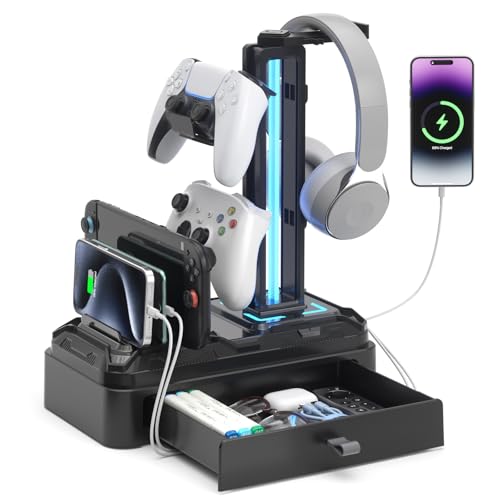
- 2 USB ports plus 1 Type-C port for multi-device charging
- 9 RGB lighting modes with memory function
- Drawer and device slot add useful desk storage
Best For: Gamers who want charging, lighting, and storage in one stand
4-in-1 Wireless Charge Dock
Suguder Multi-Device Headphone Stand
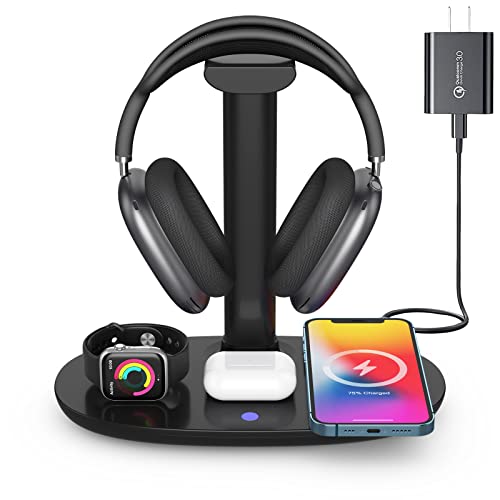
- Charges phone, watch, earbuds, and headphones together
- 15W wireless charging with device-specific modes
- Detachable stand supports many headphone types
Best For: A multi-device charging dock for busy desks
RGB Charging Hub Stand
KAFRI RGB Headphone Stand with USB A&C Charger

- 9 RGB lighting modes with touch control
- 3 USB charging ports plus 2 AC outlets
- Single stand with safety-focused power design
Best For: Gaming desks that need lighting and charging in one stand
Dual Desk Power Stand
KAFRI Dual Headphone Stand with USB Charger

- Holds two headsets at once
- 2 USB ports plus 2 AC outlets
- Simple desk-friendly power and storage setup
Best For: Dual-headphone setups that also need desk charging
RGB Dual Power Stand
KAFRI RGB Dual Headphone Stand with USB C Charger

- RGB lighting with 9 modes
- Dual headset holder with 3 USB ports
- 2 outlets and built-in safety protections
Best For: Gaming desks needing dual storage and charging
Power Hub Pick – Cozoo Headphone Stand with Charger
If you want headphone stands with charging that do more than just hold a headset, this COZOO model is built like a compact desk power hub. It combines a headphone hanger with 3 USB ports and 2 AC outlets, making it practical for gaming setups, work desks, and rooms where multiple devices need charging at once.
Best For: Gamers and desk setups that need a headphone stand plus extra USB and outlet charging in one spot.
Pros:
- 3 USB charging ports, including USB-C and fast-charge support
- 2 AC outlets rated up to 1250W for additional devices
- Built-in protection against overload, short-circuit, and over-current issues
- Designed to help keep desks organized and clutter-free
Cons:
- Bulkier than a simple standalone headphone holder
- Best suited to desks with enough space for a power-strip style accessory
Overall, this is a strong choice if you want charging convenience and headphone storage in one desktop accessory. It leans more toward utility than style, but that is exactly what many gaming and tech desks need.
RGB Style Pick – New Bee RGB Aluminum Stand
This option stands out among headphone stands with charging if you want a cleaner desktop with extra visual flair. The New Bee model pairs a sturdy aluminum headset holder with RGB lighting and two extension ports, so it works as both a display piece and a simple charging add-on for phones and other devices.
Best For: Users who want a stable headphone stand with RGB lighting and basic USB expansion.
Pros:
- 7 RGB lighting modes for a more personalized setup
- Aluminum construction for added stability
- USB-C and USB ports for charging or file transfer
- Non-slip pads and weighted base help keep it steady
Cons:
- Only provides two extension ports, so it is less of a power hub
- Does not include wireless charging
If you care about desk aesthetics as much as function, this is a good middle ground. It is best viewed as a stylish holder with useful USB expansion rather than a full charging station.
Wireless Charging Pick – Hiwe 2-in-1 Headset Holder
For headphone stands with charging that focus on convenience, this Hiwe 2-in-1 design adds wireless charging to a compact headset holder. It is aimed at keeping headphones stored neatly while letting compatible phones and wireless-charging accessories power up without extra cable clutter.
Best For: Anyone who wants a headphone stand with wireless charging for a phone-first desk setup.
Pros:
- 15W wireless charging for supported phones and devices
- USB charging port for additional wired charging needs
- Foldable design helps save desk space
- Soft leather contact surfaces and anti-slip base help protect headphones
Cons:
- Wireless charging only works with supported devices
- Less feature-heavy than multi-outlet charging stands
This is a practical pick if you want a cleaner desk and value wireless charging more than extra ports or outlets. Its mix of storage, cable reduction, and compatibility makes it useful for everyday desktop setups.
Feature-Rich Pick – New Bee RGB Stand with Wireless Charging
If you want one of the more feature-packed headphone stands with charging, this New Bee model combines RGB lighting, wireless charging, and multiple USB ports. It is designed for users who want a headset holder that also acts like a compact charging station for a desk or gaming area.
Best For: People who want a desktop headphone stand with wireless charging and multiple USB ports.
Pros:
- Wireless charging station plus 2 USB-C ports and 1 USB port
- 7 lighting modes for a customizable desk look
- Aluminum build with soft rubber contact points for added protection
- Non-slip silicone base helps keep the stand stable
Cons:
- More of a multifunction desk accessory than a minimalist stand
- Wireless charging still depends on device compatibility
This model makes sense if you want charging flexibility and a more decorative desktop presence. It is especially appealing for gaming setups where lighting, stability, and multiple charging options all matter.
Wireless Charging Desk Stand – Hiwe 2-in-1 Headset Holder
If you want headphone stands with charging that do more than just hold your headset, this Hiwe model combines a 15W wireless charging pad with a compact desktop stand. It is built for everyday desk use, with an anti-slip base, a sturdy aluminum alloy center pole, and a soft leather contact surface to help reduce scratches and preserve headphone shape.
Best For: Users who want a simple 2-in-1 desk stand with wireless phone charging and headset storage.
Pros:
- 15W wireless charging supports many iPhone, Samsung, Pixel, Huawei, AirPods, and other wireless-charging devices
- USB charging port adds flexibility for phones, tablets, headsets, and other USB devices
- Foldable design helps save space and reduce cable clutter
- Soft leather surface and anti-slip base add stability and help protect headphones
Cons:
- Wireless charging is limited to supported devices
- Some phones may not charge through certain cases or magnetic accessories
- Focuses more on charging and holding than on extra storage features
Overall, this is a practical pick if you want a clean desk setup with a dedicated headset holder and built-in wireless charging. It keeps the footprint small while covering the basics well.
RGB Charging Organizer – KDD Desk Headphone Stand
For shoppers comparing headphone stands with charging, this KDD model stands out by combining multiple USB power options with built-in storage and RGB lighting. It is designed as a desktop organizer, with a rotatable headset hook, detachable controller hooks, a device slot, and a drawer for small accessories.
Best For: Gamers or desk users who want charging ports, RGB lighting, and built-in storage in one organizer.
Pros:
- Includes 2 USB ports and 1 Type-C port for charging multiple devices
- 9 lighting modes with memory function for a customizable desk look
- Rotating headphone hook and detachable controller hooks improve flexibility
- Device slot and drawer help keep phones, tablets, and small items organized
Cons:
- Type-C port is not compatible with iPhone charging
- Plastic construction may feel less premium than metal alternatives
- Lighting may be unnecessary if you prefer a plain desk setup
This is a strong pick if you want more than a basic stand and need charging plus desk organization. The extra storage and RGB features make it especially useful for gaming setups.
4-in-1 Wireless Charge Dock – Suguder Multi-Device Headphone Stand
If you need headphone stands with charging that can handle several devices at once, this Suguder dock is built as a 4-in-1 wireless charging station. It supports a headset holder design plus charging for iPhone models, AirPods, and iWatch devices, and it adds a Type-C connection for AirPods Max charging.
Best For: Users who want a single charging dock for a phone, watch, earbuds, and headphones.
Pros:
- Charges multiple device types at the same time in a compact desktop layout
- Supports 15W wireless charging plus specific modes for iPhone, Samsung, AirPods, and iWatch
- Detachable headphone stand works with over-ear, in-ear, and gaming-style headphones
- Includes heat dissipation and multi-protection features for safer charging
Cons:
- Requires a stronger power adapter when charging multiple devices together
- Wireless charging is limited to supported devices and charging modes
- Designed more as a charging station than a minimalist headphone stand
This model makes sense if your desk needs a true multi-device charging hub instead of just a holder. It is the most feature-packed option here for users who want to power several accessories from one spot.
RGB Charging Hub Stand – KAFRI RGB Headphone Stand with USB A&C Charger
If you want headphone stands with charging that do more than just hold a headset, this KAFRI model is built like a compact desk hub. It adds RGB lighting, three USB charging ports, and two AC outlets, so it can help reduce cable clutter while keeping everyday devices within easy reach.
Best For: Gamers or desk setups that want a headphone stand with charging, lighting, and extra power outlets in one place.
Pros:
- 9 RGB lighting effects with touch control for a customizable gaming look.
- 1 USB-C port plus 2 USB-A ports for charging multiple smart devices.
- Includes 2 AC outlets rated up to 1250W total output.
- Fire-resistant shell and built-in protection circuitry for safer charging.
Cons:
- USB-C port is noted as not charging iPhone 15.
- Single-headphone design only, so it is not for dual headset storage.
- Bulkier than a basic stand because it adds power and outlet functions.
Overall, this is a strong pick if you want a headphone stand that doubles as a small charging station and fits a gaming-focused desk. The lighting and power features make it more versatile than a simple hanger.
Dual Desk Power Stand – KAFRI Dual Headphone Stand with USB Charger
Among headphone stands with charging, this KAFRI dual model is aimed at users who need to store two headsets and keep a few devices powered from the same spot. It combines a double hanger with two USB ports and two outlets, making it a practical desk organizer for shared gaming or work setups.
Best For: Anyone who needs a two-headphone stand with charging ports and outlet access on a desk.
Pros:
- Holds two headphones at once with a headband width up to 2.1 inches.
- Includes 2 USB charging ports for phones, tablets, and similar devices.
- Has 2 AC outlets for added desk power access.
- Compatible with many major headphone brands and gaming headsets.
Cons:
- No RGB lighting, so it is more functional than decorative.
- USB output is listed up to 1.5 amps per port, which is modest.
- Best suited to tabletop placement rather than compact travel use.
This is a straightforward choice if your main goal is storage plus charging, especially when you need room for two headsets. It keeps the design simple while still offering useful power options at the desk.
RGB Dual Power Stand – KAFRI RGB Dual Headphone Stand with USB C Charger
If you are comparing headphone stands with charging for a gaming desk, this dual KAFRI version adds both style and utility. It offers RGB lighting, two headset hooks, three USB charging ports, and two outlets, giving you a single spot for headset storage and everyday charging needs.
Best For: Gaming setups that want a dual headphone stand with charging, RGB lights, and extra outlets.
Pros:
- 9 RGB lighting modes with touch control for a more immersive desk setup.
- Supports two headphones with headbands up to 2.1 inches wide.
- Includes 1 USB-C port and 2 USB-A ports for charging multiple devices.
- Built-in safety protections and fire-resistant housing.
Cons:
- USB-C note says it is for iPhone 12 charging, so compatibility should be checked.
- Only one level and a fixed dual-hook layout, so there is no adjustable storage design.
- RGB features may be unnecessary if you just need a plain stand.
For users who want a more feature-rich charging stand, this model stands out with lighting and dual-headphone support. It is a good desk centerpiece when you want the stand to do more than store gear.
How We Picked the Best Headphone Stands with Charging
We prioritized stands that combine dependable headset support with useful charging features, not just flashy lighting. The strongest picks offer a stable base, enough clearance for larger headsets, and charging options that fit common desktop setups.
We also looked for a sensible mix of wireless charging, USB-A, USB-C, and AC outlet options so different users can match a stand to their devices and cable setup.
Quick Comparison of the Main Types
Wireless Charging Stands
Best for people who want a simple, cable-light charging spot for phones, earbuds, or accessories that support Qi charging.
USB Charging Stands
Good for users who need reliable charging for phones, controllers, or other everyday desk devices and already have compatible cables.
Multi-Function Gaming Stands
Ideal for larger setups where RGB lighting, extra ports, hooks, or outlet access matter as much as headset storage.
Key Buying Factors for Headphone Stands with Charging
Charging type: Make sure the stand matches your devices. USB-C is increasingly useful, but many desks still benefit from USB-A, wireless pads, or built-in outlets.
Stability: A weighted or non-slip base matters, especially for heavier gaming headsets or desks that see frequent movement.
Device support: Check whether the stand is meant only for headphones or can also handle phones, watches, earbuds, or controllers.
Desk space: Some models are compact and minimal, while others are larger charging hubs. Choose based on your available footprint and cable routing needs.
Extra features: RGB lighting, hooks, and device slots can add convenience, but they should not come at the expense of sturdiness or charging reliability.
Who Should Buy Which Headphone Stands with Charging?
If you want a clean, everyday desk upgrade, a simple USB or wireless model is usually enough. If you game often or keep multiple accessories nearby, a more feature-rich stand with RGB, multiple ports, or outlet support may be the better fit.
For shared spaces or compact desks, look for the most stable design with the fewest cables. For power users, choose a model that can serve as a small charging station rather than just a headset holder.
In short, the best Headphone Stands with Charging are the ones that match your devices, your desk size, and how many items you actually need to power at once.