The right portable SSD enclosure can turn an unused internal drive into fast, flexible external storage for backups, file transfers, gaming, and creative work. The key is matching the enclosure to your SSD type, connector, and performance needs.
We selected 10 options spanning NVMe and SATA drives, USB 10Gbps and 40Gbps interfaces, tool-free designs, compact travel cases, and models with added cooling. Use the guide below to narrow the choices before buying.
Best 10 Portable SSD Enclosures Picks for 2026
Best Hybrid M.2 Pick
UGREEN 20Gbps NVMe/SATA Enclosure

- Supports NVMe and SATA M.2 drives
- Up to 20Gbps with USB 3.2 Gen 2x2
- Aluminum case with thermal pad
Best For: Mixed M.2 drive collections and fast USB 3.2 Gen 2x2 systems
Best Budget 2.5-Inch Option
SABRENT Tool-Free SATA Enclosure

- Fits standard 2.5-inch SATA drives
- Tool-free, plug-and-play installation
- Up to 5Gbps over USB 3.0
Best For: Reusing laptop SATA SSDs or hard drives on a budget
Best High-Speed Cooling
Rosewill 40Gbps NVMe Enclosure
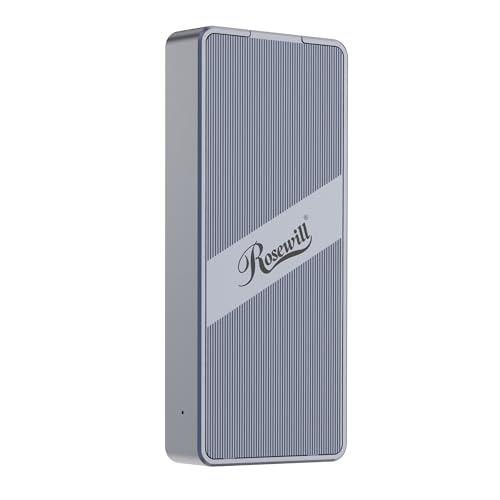
- 40Gbps Thunderbolt and USB4 support
- Built-in fan for sustained operation
- Supports NVMe drives up to 8TB
Best For: High-speed transfers and demanding mobile workflows
Best 2.5-Inch USB-C Choice
UGREEN Aluminum SATA Enclosure

- Fits 2.5-inch SATA SSDs and HDDs up to 6TB
- USB-C with UASP support
- Tool-free aluminum design
Best For: Portable SATA storage across computers and supported devices
Best Compact NVMe Pick

- USB 3.2 Gen 2 supports up to 10Gbps theoretically
- Tool-free sandwich design with thermal-pad contact
- Supports 2230 through 2280 NVMe drives, not M.2 SATA
Best For: Portable NVMe storage across Windows, macOS, and Linux
Best Protected NVMe Pick
UGREEN USB-C M.2 NVMe Enclosure

- 10Gbps USB 3.2 Gen 2 performance with compatible hardware
- Aluminum body, silicone case, and thermal pad included
- Supports up to 8TB NVMe drives in four common sizes
Best For: Portable NVMe use with added protection and cable flexibility
Best SATA Drive Pick
BENFEI 2.5-Inch SATA Enclosure

- Fits 2.5-inch SATA SSDs and hard drives up to 6TB
- Tool-free, plug-and-play installation
- Includes Type-C and Type-A connectivity with UASP support
Best For: Reusing a 2.5-inch SATA drive as portable storage
Premium RGB Pick
ASUS ROG Strix Arion NVMe Enclosure

- 10 Gbps USB 3.2 Gen 2 connectivity
- Supports 2230–2280 PCIe NVMe drives
- Aluminum body, thermal pads, and RGB lighting
Best For: ROG users wanting a stylish, heat-conscious NVMe enclosure
Most Versatile Drive Support

- Supports compatible NVMe and SATA M.2 drives
- 10 Gbps USB 3.2 Gen 2 with UASP and TRIM
- Includes two cables, thermal pads, and screwdriver
Best For: Users reusing different compatible M.2 drive types
High-Capacity Compact Pick

- Supports PCIe NVMe drives up to 8TB
- 10 Gbps USB 3.1 Gen 2 with UASP
- Compact body works with USB-C and USB-A hosts
Best For: High-capacity NVMe users seeking a portable enclosure
Best Hybrid M.2 Pick – UGREEN 20Gbps NVMe/SATA Enclosure
If you need flexible portable ssd enclosures, this UGREEN model supports both PCIe NVMe and SATA NGFF M.2 drives in sizes from 2230 through 2280. Its USB 3.2 Gen 2×2 interface can reach 20Gbps when paired with a compatible host port.
Best For: Users who want one enclosure for both NVMe and SATA M.2 SSDs, with high-speed connectivity and active heat management.
Pros:
- Supports NVMe and SATA M.2 SSDs up to 8TB.
- Offers up to 20Gbps over USB 3.2 Gen 2×2.
- Aluminum housing, thermal pad, UASP, and TRIM support help with sustained use and data handling.
- Plug-and-play design requires no separate power supply or driver.
Cons:
- Reaching 20Gbps requires a USB 3.2 Gen 2×2 host; Thunderbolt 4 runs at 10Gbps.
- Does not support mSATA drives.
- SSD is not included.
This is a versatile choice when your drive collection includes different M.2 types. Confirm your computer’s USB protocol before buying if maximum transfer speed matters.
Best Budget 2.5-Inch Option – SABRENT Tool-Free SATA Enclosure
For straightforward portable ssd enclosures, the SABRENT EC-UASP is a simple tool-free case for standard 2.5-inch SATA SSDs and hard drives. It connects over USB 3.0 and supports plug-and-play use across Windows and Mac systems.
Best For: Users upgrading, reusing, or transporting a 2.5-inch SATA drive without needing an M.2 enclosure.
Pros:
- Tool-free installation makes drive setup quick.
- Supports 2.5-inch SATA and SATA II notebook drives.
- USB 3.0 provides transfer rates up to 5Gbps, with UASP support for compatible SSDs.
- Backwards-compatible with USB 2.0 and USB 1.1.
Cons:
- Limited to 2.5-inch SATA drives rather than M.2 SSDs.
- Maximum speed depends on the connected USB port; USB 2.0 is limited to 480Mbps.
- Plastic enclosure construction is less focused on heat dissipation than aluminum alternatives.
The EC-UASP is a practical, low-complexity solution for older laptop drives and SATA SSDs. It is best suited to basic storage expansion, backups, or drive recovery rather than the highest-speed transfers.
Best High-Speed Cooling – Rosewill 40Gbps NVMe Enclosure
This Rosewill model is one of the fastest portable ssd enclosures in the group, pairing a 40Gbps interface with a built-in cooling fan. It is designed for M.2 NVMe SSDs from 2230 to 2280 and supports Thunderbolt 3/4, USB4, and other listed USB connections.
Best For: Mobile professionals and enthusiasts transferring large files on compatible 40Gbps Thunderbolt or USB4 systems.
Pros:
- Supports transfer speeds up to 40Gbps, with stated speeds up to 3187MB/s depending on the system and SSD.
- Built-in fan and vent design support up to four hours of full-speed operation.
- Compatible with M.2 NVMe drives up to 8TB in 2230–2280 sizes.
- Compact metal design includes a transparent back plate.
Cons:
- Maximum performance requires compatible 40Gbps hardware and a suitable NVMe SSD.
- Built-in fan may be less appealing for users seeking silent operation.
- SSD is not included.
Choose this enclosure when sustained performance and advanced connectivity matter more than simplicity. It makes the most sense for systems equipped with Thunderbolt 3/4 or USB4 rather than ordinary USB ports.
Best 2.5-Inch USB-C Choice – UGREEN Aluminum SATA Enclosure
This UGREEN enclosure gives 2.5-inch SATA SSDs and hard drives a portable USB-C connection. Among portable ssd enclosures, it stands out for its aluminum construction, tool-free installation, and compatibility with computers, consoles, routers, and other supported devices.
Best For: Users who want a portable 2.5-inch SATA enclosure with USB-C connectivity and broad device compatibility.
Pros:
- Supports 2.5-inch SATA I, II, and III SSDs and hard drives up to 6TB.
- USB 3.1 Gen 2 connection and UASP support enable fast transfers.
- Aluminum alloy helps with heat dissipation without a cooling fan.
- Tool-free, plug-and-play setup works with Windows, macOS, Linux, consoles, smart TVs, and routers.
Cons:
- Limited to 2.5-inch SATA drives, not NVMe or M.2 SSDs.
- The listed 6Gbps figure refers to the SATA interface; actual USB performance depends on the host device and connection.
- USB-A-only devices require an appropriate USB-C-to-USB-A cable.
This is a well-rounded choice for portable SATA storage and drive reuse. Its aluminum body and broad compatibility make it especially useful for backups, storage expansion, and accessing older 2.5-inch drives.
Best Compact NVMe Pick – FIDECO M.2 NVMe Enclosure
For shoppers comparing portable ssd enclosures, the FIDECO M210 is a compact choice for M.2 NVMe drives. It supports several common drive lengths, offers USB 3.2 Gen 2 connectivity, and includes a USB-C cable with a USB-A adapter for flexible use.
Best For: Travelers and users who need a tool-free enclosure for M.2 NVMe SSDs across Windows, macOS, and Linux.
Pros:
- Supports M.2 NVMe M and M+B Key drives in 2230, 2242, 2260, and 2280 sizes.
- USB 3.2 Gen 2 and UASP support allow theoretical transfer speeds up to 10Gbps.
- Sandwich-style, tool-free design improves installation and thermal-pad contact.
- Includes USB-C to USB-C cable with an attached USB-A adapter.
Cons:
- Does not support M.2 SATA SSDs.
- New SSDs may need to be initialized before the computer recognizes them.
The FIDECO stands out when portability and broad NVMe size support matter. Confirm that your drive uses the NVMe protocol before buying, since SATA-based M.2 drives are not compatible.
Best Protected NVMe Pick – UGREEN USB-C M.2 NVMe Enclosure
The UGREEN enclosure is a strong option among portable ssd enclosures for users who want fast USB-C connectivity and added protection. Its aluminum body, silicone case, tool-free installation, and included cables make it suitable for everyday carrying and flexible device connections.
Best For: Users seeking a portable 10Gbps NVMe enclosure with broad system support and protective features.
Pros:
- USB 3.2 Gen 2 supports data transfer rates up to 10Gbps with a compatible cable.
- Supports M/B and B+M Key NVMe drives in 2230, 2242, 2260, and 2280 sizes, up to 8TB.
- Includes an aluminum enclosure, silicone case, thermal pad, and USB-C-to-C and USB-C-to-A cables.
- RTL9210 chip provides short-circuit, over-current, and other protection features.
Cons:
- Does not support SATA NGFF or mSATA SSDs.
- Achieving 10Gbps requires a USB-C 3.2 Gen 2 data cable and compatible port.
Choose the UGREEN if you value a protective travel setup and included connection options. As with other NVMe-only enclosures, verify the SSD protocol before installation.
Best SATA Drive Pick – BENFEI 2.5-Inch SATA Enclosure
For 2.5-inch SATA drives, the BENFEI offers a straightforward alternative to M.2-focused portable ssd enclosures. Its tool-free shell accepts SATA SSDs or hard drives, includes Type-C and Type-A connectivity, and supports plug-and-play use without drivers.
Best For: Users converting a 2.5-inch SATA SSD or hard drive into a portable USB drive.
Pros:
- Supports 2.5-inch, 7mm or 9.5mm SATA I/II/III drives up to 6TB.
- Tool-free installation with a push-open cover and plug-and-play operation.
- USB Type-C and Type-A connection options support computers, laptops, phones, and tablets.
- Supports UASP and transfer rates up to 5Gbps, with USB 2.0 and 1.1 backward compatibility.
Cons:
- Designed for 2.5-inch SATA drives, not M.2 NVMe SSDs.
- Its stated maximum transfer rate is 5Gbps, below the 10Gbps rating of the NVMe options.
The BENFEI is the practical pick when you already have a 2.5-inch SATA drive to reuse. Its integrated-cable design and tool-free installation keep setup simple, while the 18-month warranty adds purchase protection.
Premium RGB Pick – ASUS ROG Strix Arion NVMe Enclosure
The ASUS ROG Strix Arion is a premium choice among portable ssd enclosures for users who want a durable aluminum build, broad M.2 size compatibility, and USB 3.2 Gen 2 connectivity. It supports PCIe NVMe M.2 drives in 2230, 2242, 2260, and 2280 sizes, and includes both USB-C and USB-C-to-A cables.
Best For: ROG users and anyone who wants RGB lighting alongside a compact, heat-managing NVMe enclosure.
Pros:
- USB 3.2 Gen 2 supports transfer rates up to 10 Gbps.
- Fits PCIe NVMe M.2 drives with 2230 through 2280 form factors.
- Aluminum alloy case and thermal pads help draw heat away from the drive.
- Includes USB-C and USB-C-to-A cables, plus a one-year warranty.
Cons:
- It supports PCIe NVMe drives, not a general range of M.2 drive types.
- The M.2 NVMe SSD is not included.
- RGB lighting may be unnecessary for buyers seeking a simple enclosure.
The Strix Arion stands out when appearance and construction matter as much as basic portability. Its drive compatibility, included cables, and thermal pads make it a well-equipped option for a single NVMe SSD.
Most Versatile Drive Support – SSK M.2 NVMe/SATA Enclosure
The SSK M.2 enclosure is one of the more flexible portable ssd enclosures because it supports both NVMe PCIe and SATA M.2 drives with M-Key or B+M connectors. Its USB 3.2 Gen 2 interface, aluminum shell, thermal pads, and dual cable options make it practical for upgrades, backups, and drive reuse.
Best For: Buyers who need one enclosure for compatible M.2 NVMe and SATA drives.
Pros:
- Supports compatible NVMe PCIe and SATA M.2 drives in 2242, 2260, and 2280 sizes.
- USB 3.2 Gen 2 offers up to 10 Gbps connectivity and supports UASP and TRIM.
- Includes USB-C and USB-A cables, two thermal pads, and a screwdriver.
- Bus-powered, plug-and-play design works with Windows, Linux, and Mac.
Cons:
- Does not support M.2 PCIe AHCI drives, mSATA drives, Wi-Fi cards, or capture cards.
- The SSD is not included and must be formatted before use.
- Actual performance depends on the drive and host connection.
Choose the SSK when compatibility is the priority. It covers more M.2 drive types than the NVMe-only alternatives, while retaining a compact aluminum design and useful installation accessories.
High-Capacity Compact Pick – ORICO M.2 NVMe Enclosure
The ORICO M2PV is a compact option among portable ssd enclosures, supporting PCIe NVMe M-Key drives up to 8TB. With USB 3.1 Gen 2 connectivity, UASP support, dual-host cable compatibility, and a portable aluminum-and-plastic body, it suits users who want a small external home for a high-capacity NVMe drive.
Best For: Owners of PCIe NVMe M.2 drives who want up to 8TB support in a small enclosure.
Pros:
- Supports PCIe NVMe M-Key drives in 2230, 2242, 2260, and 2280 sizes.
- Supports drives up to 8TB and theoretical USB transfer speeds up to 10 Gbps.
- Works with USB-C and USB-A hosts and supports Windows, Mac, and Linux.
- Compact design includes a thermal pad and supports UASP acceleration.
Cons:
- Does not support M.2 SATA, PCIe AHCI, or Mac SSDs.
- Cable packaging may vary between two separate cables and a 2-in-1 cable.
- The SSD is not included and requires formatting before use.
The ORICO is a sensible pick for portable NVMe storage when capacity and size matter. Confirm that your drive is PCIe NVMe M-Key before buying, since this enclosure is not designed for SATA-based M.2 SSDs.
How We Picked These Portable SSD Enclosures
We focused on enclosure compatibility, interface speed, construction, installation convenience, and practical use cases. The selection includes cases for M.2 NVMe drives, SATA-based 2.5-inch SSDs, and hybrid models that support more than one drive standard. We also considered whether each enclosure includes useful cables, tool-free access, thermal management, and broad compatibility with modern computers.
Rated transfer speeds are theoretical maximums. Actual performance depends on the SSD, host port, cable, operating system, file sizes, and thermal conditions.
Quick Comparison
| Drive Type | Typical Interface | Best Use | What to Watch |
|---|---|---|---|
| M.2 NVMe | USB 3.2 Gen 2 or faster | High-speed transfers and demanding workloads | Confirm M-key or B+M-key support and SSD length |
| 2.5-inch SATA | USB 3.0 or USB-C | Affordable upgrades and backup drives | Lower speeds than NVMe and possible cable requirements |
| Hybrid M.2 | USB 10Gbps-class | Flexible drive compatibility | Check whether SATA and NVMe modes are both supported |
| 40Gbps NVMe | USB4 or USB 3.2 Gen 2×2-class | Maximum external performance | Your computer and cable must support the faster standard |
Key Buying Factors for Portable SSD Enclosures
Drive Compatibility
Start by identifying the SSD interface and physical size. NVMe drives use PCIe and commonly come in 2230, 2242, 2260, or 2280 lengths. SATA M.2 drives are not interchangeable with NVMe models, even when their physical shape is similar. For 2.5-inch drives, choose a SATA enclosure rather than an M.2 case.
Speed and Host Ports
A 10Gbps enclosure is a strong choice for everyday transfers and most external SSD upgrades. Faster 20Gbps or 40Gbps models can reduce transfer times, but only when connected to a matching computer port and appropriate cable. Otherwise, the enclosure will operate at the slower connection speed.
Heat Management
NVMe SSDs can become hot during large file transfers. Aluminum shells, thermal pads, vents, and cooling fans can help sustain performance. A fan-equipped model may be worthwhile for frequent heavy workloads, while a passive enclosure is usually quieter and simpler for casual use.
Installation and Portability
Tool-free designs make drive installation easier and reduce the chance of losing tiny screws. Look for secure retention, a durable shell, and included USB-C or USB-A cables that suit your devices. A compact enclosure is convenient for travel, but it should still protect the connector and installed drive.
Who Should Buy Which Portable SSD Enclosures?
For an NVMe Upgrade
Choose a USB-C NVMe enclosure with 10Gbps or faster support. It is a practical way to reuse a spare M.2 drive for backups, project files, or a portable applications library.
For a 2.5-Inch SATA SSD or HDD
Select a SATA enclosure such as a 2.5-inch tool-free model. These are typically affordable and simple to install, making them suitable for older laptop drives, system migrations, and general storage.
For Mixed Drive Collections
A hybrid enclosure supporting both NVMe and SATA M.2 drives offers greater flexibility, provided its compatibility list matches your drive keys and sizes.
For Demanding Creators and Power Users
Prioritize higher bandwidth, reliable cooling, and a well-built aluminum chassis. Also verify that your computer supports the advertised speed; otherwise, a less expensive 10Gbps enclosure may deliver nearly the same real-world results.