The right enclosure can turn a spare SSD into fast external storage for backups, media libraries, file transfers, or Mac upgrades. However, compatibility varies widely between standard M.2 and 2.5-inch drives and proprietary SSDs removed from older MacBooks.
We’ve selected 10 options covering USB-C, USB4, Thunderbolt-compatible, SATA, NVMe, and 12+16-pin Mac SSD formats. Use the guide below to match enclosure speed and drive compatibility to your Mac and workflow.
Best 10 SSD Enclosures for Mac Picks for 2026
Best Overall NVMe Pick
UGREEN 10Gbps Enclosure for Mac mini

- 10Gbps USB 3.2 Gen 2 interface
- Supports common NVMe sizes up to 8TB
- Aluminum body with thermal pad
Best For: Mac mini users with M.2 NVMe SSDs
Best Budget SATA Option
BENFEI Tool-Free 2.5-Inch SSD Enclosure

- Tool-free installation
- USB Type-C and Type-A connectivity
- Supports 2.5-inch SATA drives up to 6TB
Best For: Repurposing older 2.5-inch SATA SSDs
Best High-Speed Choice
ACASIS 40Gbps NVMe Enclosure with Fan

- 40Gbps USB4 and Thunderbolt compatibility
- Built-in fan for active cooling
- Supports M.2 sizes from 2230 to 2280
Best For: Professional Mac users handling large transfers
Best for Older MacBook SSDs
Jorkar USB-C Enclosure for 12+16-Pin Drives

- Made for select 2013–2017 MacBook SSDs
- Up to 20Gbps with compatible hardware
- Includes adapter, cable, and screwdriver
Best For: Reusing compatible proprietary Apple SSDs
Fastest USB4 Pick
UGREEN 40Gbps M.2 NVMe Enclosure
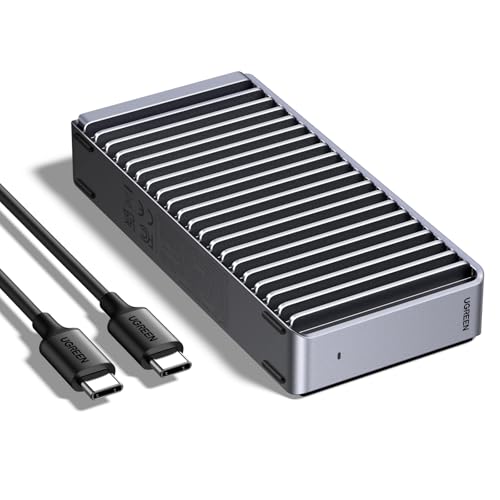
- Up to 3600MB/s with Thunderbolt 4 hardware
- Supports NVMe sizes through 8TB
- Fanless double-sided aluminum cooling
Best For: High-speed Mac and USB4 storage setups
Legacy Mac SSD Adapter
chenyang 7+17Pin USB-C Enclosure

- Made for select 2012 Mac SSDs
- USB 3.0 Type-C, up to 5Gbps
- Requires a matching 7+17-pin connector
Best For: Recovering or reusing compatible 2012 MacBook SSDs
Best Slim Design
Satechi USB4 Slim NVMe SSD Enclosure

- USB4 speeds up to 40Gbps
- Slim 16mm profile with hidden cable storage
- Supports NVMe drives up to 8TB
Best For: Portable Mac Mini and MacBook storage setups
Best Legacy Mac SSD Pick
Jorkar 12+16-Pin USB-C Enclosure

- Made for compatible 2013–2017 Mac SSDs
- Up to 20Gbps with supported hardware
- Includes adapter, cable, tools, and heat pad
Best For: Reusing a compatible older MacBook SSD
Best High-Speed Mac NVMe Pick
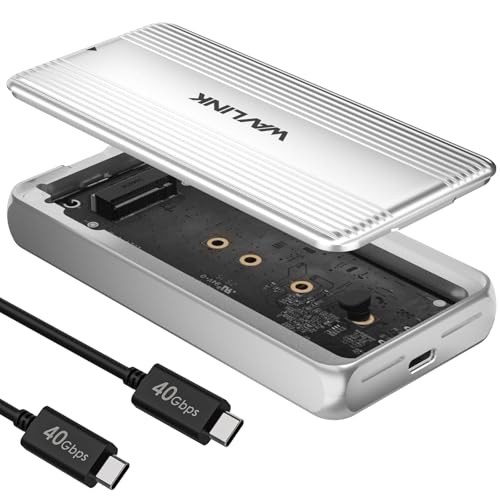
- USB4 supports up to 40Gbps
- Fits common 2230–2280 PCIe NVMe drives
- Built-in fan and thermal pad improve cooling
Best For: Fast external NVMe storage on modern Macs
Best Value Legacy Mac Reader

- Fits specified late-2013–2017 MacBook SSDs
- Up to 20Gbps with compatible USB hardware
- Includes cable, tools, screws, and heat pad
Best For: Turning a supported older Mac SSD into USB-C storage
Best Overall NVMe Pick – UGREEN 10Gbps Enclosure for Mac mini
For shoppers comparing ssd enclosures for mac, the UGREEN enclosure is a practical choice for M.2 NVMe drives. Its USB 3.2 Gen 2 interface supports transfers up to 10Gbps with the appropriate USB-C 3.2 Gen 2 cable, while the aluminum body and thermal pad help manage heat during extended use.
Best For: Mac mini users and anyone needing a portable enclosure for an M-key or B+M-key NVMe SSD.
Pros:
- Supports 2230, 2242, 2260, and 2280 NVMe SSDs up to 8TB.
- Aluminum housing, thermal pad, and included silicone case aid cooling and portability.
- RTL9210 chip provides UASP, TRIM, and multiple protection features.
Cons:
- Does not support SATA NGFF, mSATA, or SSDs with heatsinks.
- 10Gbps performance requires a compatible USB-C 3.2 Gen 2 data cable.
This is a well-rounded option when you have a compatible NVMe drive and want a compact Mac-friendly enclosure with useful thermal and data-protection features.
Best Budget SATA Option – BENFEI Tool-Free 2.5-Inch SSD Enclosure
The BENFEI enclosure is a straightforward choice for older 2.5-inch SATA SSDs when shopping for ssd enclosures for mac. It includes both USB Type-C and Type-A connection options, supports UASP, and uses a tool-free design for quick drive installation.
Best For: Mac users repurposing a 2.5-inch SATA SSD as a portable external drive.
Pros:
- Tool-free, plug-and-play installation with hot-swappable operation.
- Supports 2.5-inch SATA I/II/III drives up to 6TB and 7/9.5mm thicknesses.
- USB Type-C and Type-A connectivity works with a range of computers and devices.
Cons:
- Limited to 2.5-inch SATA drives rather than M.2 NVMe SSDs.
- Transfer speeds are up to 5Gbps over USB, below newer USB4 enclosure speeds.
Choose this model if simplicity and broad port compatibility matter more than maximum throughput. It is especially suitable for giving an existing 2.5-inch SATA SSD a second life.
Best High-Speed Choice – ACASIS 40Gbps NVMe Enclosure with Fan
For demanding Mac workflows, the ACASIS TBU405 Pro stands out among ssd enclosures for mac with a USB4 and Thunderbolt-compatible design. Its built-in fan and aluminum construction are intended to limit heat buildup, while the enclosure supports advertised read and write speeds of up to 2805 and 2734 MB/s with a suitable SSD and MacBook setup.
Best For: Video editors, professionals, and power users transferring large files or working from an external NVMe drive.
Pros:
- 40Gbps interface with compatibility for Thunderbolt 4, Thunderbolt 3, and USB 3.x.
- Built-in cooling fan and heat-dissipation holes help address thermal throttling.
- Supports M.2 sizes 2230, 2242, 2260, and 2280 on M1/M2/M3 Mac and PC systems.
Cons:
- Maximum performance depends on the SSD, computer, and compatible connection.
- The fan must be activated with its switch.
This is the performance-focused pick in the group. Its active cooling and high-speed interface make the most sense when sustained transfers justify a more advanced enclosure.
Best for Older MacBook SSDs – Jorkar USB-C Enclosure for 12+16-Pin Drives
The Jorkar enclosure targets a very specific upgrade and recovery need: using compatible Apple SSDs from select 2013–2017 MacBook models externally. For buyers searching for ssd enclosures for mac, its 12+16-pin adapter and USB-C connection make it more suitable for those proprietary drives than a standard SATA or NVMe enclosure.
Best For: Owners of compatible MacBook Air and MacBook Pro SSDs from the listed 2013–2017 models.
Pros:
- Designed for 12+16-pin SSDs used in specified MacBook Air and Pro models.
- USB 3.2 Gen 2×2 interface supports up to 20Gbps when the drive and computer also support it.
- Includes a USB-C cable, screwdriver, adapter, and silicone heat-dissipating pad.
Cons:
- Compatibility is restricted to listed Apple SSDs and is not universal for SATA or third-party SSDs.
- Some Macs may need a hub or docking station if USB power is insufficient.
- The SSD is not included.
This enclosure is a niche but useful solution for preserving data or reusing a compatible removable MacBook SSD. Verify the exact Mac model and pin layout before purchasing.
Fastest USB4 Pick – UGREEN 40Gbps M.2 NVMe Enclosure
For shoppers comparing SSD enclosures for Mac, the UGREEN 40Gbps model is a strong choice for USB4 and Thunderbolt setups. Its ASM2464PD chip supports up to 3600MB/s, while the aluminum double-sided fin design helps manage heat without a fan. The enclosure accepts 2230, 2242, 2260, and 2280 NVMe drives, but the SSD is not included.
Best For: Mac users who want high-speed external NVMe storage, especially with Thunderbolt 4 or USB4 hardware.
Pros:
- Up to 40Gbps connectivity and claimed speeds of up to 3600MB/s with the required Thunderbolt 4 setup
- Supports 2230, 2242, 2260, and 2280 NVMe SSDs up to 8TB
- Fanless aluminum cooling design for quiet operation
- Includes a USB-C cable, cooling pad, and disassembly kit
Cons:
- SSD must be purchased separately
- Does not support SATA NGFF or mSATA drives
- Some thicker SSDs may require a thinner thermal pad to fit properly
This UGREEN enclosure makes the most sense when your Mac and cable can take advantage of its 40Gbps interface. It is less compelling for basic USB 3 connections, where the available hardware will limit performance.
Legacy Mac SSD Adapter – chenyang 7+17Pin USB-C Enclosure
Among SSD enclosures for Mac, this chenyang adapter targets a very specific use: removing compatible SSDs from select 2012 MacBook Air and MacBook Pro models. It uses a 7+17-pin connector and a USB 3.0 Type-C interface with speeds up to 5Gbps. Check the SSD connector and dimensions carefully before ordering; the SSD is not included.
Best For: Owners of compatible 2012 MacBook Air or MacBook Pro SSDs who need a simple USB-C enclosure.
Pros:
- Designed for specified 7+17-pin Apple SSDs from supported 2012 Mac models
- Uses a USB 3.0 Type-C connection with up to 5Gbps transfer speeds
- Compact, lightweight design weighing about 0.02 kg
Cons:
- Not a general-purpose M.2 or standard SATA enclosure
- Only compatible with the specified 7+17-pin SSD format and listed dimensions
- Mac-formatted SSDs can only be read on macOS unless reformatted for Windows
This is a niche replacement or recovery accessory rather than a flexible everyday enclosure. Confirm your drive is a supported 7+17-pin model—and not rated 3.1A or higher—before purchasing.
Best Slim Design – Satechi USB4 Slim NVMe SSD Enclosure
The Satechi USB4 Slim is a polished option for shoppers seeking SSD enclosures for Mac that combine fast transfers with a tidy desk setup. It supports NVMe drives in 2230, 2242, 2260, and 2280 sizes, offers up to 40Gbps connectivity, and accepts storage up to 8TB. The enclosure includes cooling vents and a thermal pad, but the SSD is sold separately.
Best For: Mac Mini and MacBook users who want a slim, portable NVMe enclosure with a clean Apple-style design.
Pros:
- USB4 interface with claimed read speeds up to 3840MB/s and write speeds up to 3200MB/s
- Supports 2230, 2242, 2260, and 2280 NVMe SSDs up to 8TB
- Cooling vents and thermal pad help manage heat during demanding use
- Compact 16mm profile with a hidden cable compartment and 2-year limited warranty
Cons:
- SSD is not included
- Actual speed depends on the host device, system, configuration, and usage
- Included USB4 cable may be too short for some setups
Satechi’s enclosure is a good fit when appearance, portability, and high-speed Mac compatibility matter as much as raw performance. Its USB4 benefits are best realized with a compatible Thunderbolt or USB4 host.
Best Legacy Mac SSD Pick – Jorkar 12+16-Pin USB-C Enclosure
If you need an SSD enclosure for Mac and want to reuse a compatible drive from a mid-2013–2017 MacBook, this Jorkar model is built specifically for Apple SSDs with 12+16 pins. Its aluminum case is portable and helps with heat dissipation, while USB-C 3.2 connectivity can support up to 20Gbps when both the SSD and computer support that standard.
Best For: Owners of compatible MacBook Air or MacBook Pro SSDs from the listed 2013–2017 models.
Pros:
- Designed for 12+16-pin SSDs used in compatible MacBook Air and Pro models.
- Supports up to 20Gbps under suitable SSD and computer conditions.
- Includes a USB-C cable, screwdriver, adapter, and heat-dissipating silicone pad.
- Compact aluminum enclosure weighs about 90g.
Cons:
- Not compatible with all SATA, third-party, or 1TB wide SSDs.
- Limited to SSDs within the specified 22×80mm size and 12+16-pin layout.
- Windows users may need to locate the drive in Disk Management after formatting.
This is a specialized, practical choice rather than a universal enclosure. Confirm the pin layout, drive dimensions, and Mac model before buying, especially if you are converting an older Apple SSD for external use.
Best High-Speed Mac NVMe Pick – WAVLINK 40Gbps USB4 Enclosure
For modern Macs and PCIe NVMe drives, the WAVLINK enclosure is a high-performance option among SSD enclosures for Mac. Its USB4 interface is rated for up to 40Gbps, with claimed read and write speeds up to 3800MB/s when the computer and SSD are properly configured. A built-in fan, aluminum body, and thermal pad help manage heat during sustained transfers.
Best For: MacBook and Mac mini users with USB4, Thunderbolt 4, Thunderbolt 3, or compatible USB connections who want fast external NVMe storage.
Pros:
- USB4 connectivity supports data rates up to 40Gbps.
- Supports M-key and B+M-key PCIe NVMe SSDs in 2230, 2242, 2260, and 2280 sizes.
- Built-in fan, thermal silicone pad, and aluminum housing provide active cooling.
- Tool-free installation, plug-and-play operation, UASP, TRIM, and S.M.A.R.T. support.
Cons:
- Does not support AHCI SATA SSDs.
- Maximum performance depends on the Mac, connection, and SSD.
- The built-in fan may be less appealing for users seeking silent operation.
This enclosure makes the most sense when your Mac and NVMe drive can take advantage of USB4 performance. It offers broad size compatibility and stronger cooling than a basic passive enclosure, but it is not suitable for SATA or older Apple-specific SSDs.
Best Value Legacy Mac Reader – Jorkar 12+16-Pin USB-C Case
This Jorkar model is a straightforward SSD enclosure for MacBook Air and MacBook Pro drives from the late-2013–2017 period. It accepts the specified 12+16-pin Apple SSD format and connects over USB-C, with up to 20Gbps possible when the drive and host support USB 3.2 Gen 2×2. The aluminum enclosure and included heat pad are useful for portable file transfers and drive recovery.
Best For: Users converting a supported 12+16-pin MacBook SSD into a portable USB-C drive.
Pros:
- Compatible with listed MacBook Air A1466/A1465 and MacBook Pro A1502/A1398 models.
- USB-C 3.2 Gen 2×2 interface can support up to 20Gbps with compatible hardware.
- Includes cable, screwdriver, screws, heat-dissipation pad, and manual.
- Aluminum construction helps with portability and heat dissipation.
Cons:
- Does not support all SATA SSDs, third-party SSDs, or 1TB wide SSDs.
- Requires a compatible 12+16-pin drive within the specified dimensions.
- Some Apple computers may need a powered hub or docking station if power is insufficient.
Choose this enclosure only after verifying your SSD’s connector and physical size. For the right legacy Mac drive, it provides a focused and affordable path to external storage, but its compatibility is much narrower than a general NVMe enclosure.
How We Picked These SSD Enclosures for Mac
We compared the enclosure types represented here by drive compatibility, interface speed, installation method, cooling, portability, and Mac support. The selection includes common M.2 NVMe cases, 2.5-inch SATA enclosures, and specialized readers for proprietary SSDs found in certain 2012–2017 MacBook Air and MacBook Pro models.
Advertised transfer rates are maximum theoretical interface speeds. Actual performance depends on the SSD, host Mac, cable, file sizes, and whether the computer supports USB 3.2, USB4, or Thunderbolt. We also favored practical features such as tool-free installation, thermal management, broad cable support, and clear compatibility labeling.
Quick Comparison
- Best general-purpose choice: A 10Gbps M.2 NVMe enclosure offers a strong balance of speed, price, and compatibility for most Macs with USB-C.
- Best for maximum throughput: A 40Gbps USB4 enclosure can approach much higher speeds, provided your Mac, SSD, and cable support the standard.
- Best for older SATA drives: A 2.5-inch SATA-to-USB enclosure is inexpensive and suitable for repurposing laptop SSDs or hard drives.
- Best for removed MacBook drives: A 12+16-pin or 7+17-pin reader is required for specific proprietary Apple SSDs; standard M.2 cases will not work.
Key Buying Factors for SSD Enclosures for Mac
Drive Format and Connector
Check the SSD before buying. M.2 NVMe drives use an M-key or compatible connector and typically require an NVMe enclosure. A 2.5-inch SATA SSD needs a SATA enclosure. Older MacBook SSDs may use proprietary 12+16-pin or 7+17-pin connectors and need a dedicated adapter.
Speed and Host-Port Support
For everyday backups and documents, 5Gbps or 10Gbps is usually sufficient. Choose 40Gbps USB4 when moving large video files or working from an external drive, but confirm that your Mac has a matching USB4 or Thunderbolt-capable port. A faster enclosure cannot overcome a slower host connection.
Heat, Power, and Usability
NVMe drives can become hot during sustained transfers. A metal body, thermal pad, heatsink, or cooling fan can help maintain performance. Tool-free designs simplify installation, while included USB-C and USB-A cables improve compatibility with different Macs and accessories.
Format and MacOS Setup
After installation, use Disk Utility to erase and format the drive as APFS for Mac-focused use or exFAT for sharing with Windows. Always confirm that important data is backed up before formatting a previously used SSD.
Who Should Buy Which SSD Enclosures for Mac?
Choose a 10Gbps M.2 enclosure if you want a dependable external drive for general storage, backups, and photo libraries. Choose a 40Gbps model if your Mac supports the interface and you regularly transfer large projects. Choose a 2.5-inch SATA case for an older laptop SSD or hard drive. Choose a proprietary Mac SSD reader only after verifying the exact Mac model and connector; these products are designed for a narrower range of machines but are the correct solution for recovering or reusing those drives.