Fast, dependable storage is essential for photographers moving large RAW files, video projects, and catalog backups between computers. The right enclosure can turn a spare NVMe or SATA drive into a portable workspace without the cost of a prebuilt external SSD.
We selected 10 options across 10Gbps, 40Gbps, single-drive, rugged, phone-friendly, and multi-bay designs. Use the guide below to match enclosure speed, drive compatibility, durability, and workflow features to the way you shoot and store images.
Best 10 SSD Enclosures for Photo Storage Picks for 2026
Fast NVMe Pick
Tool-Free 10Gbps Photo Storage

- Tool-free flip-open NVMe installation
- USB 3.2 Gen 2 up to 10Gbps
- Supports M.2 sizes 2230–2280 up to 8TB
Best For: Fast portable photo backups with NVMe SSDs
Flexible SATA Value

- Tool-free 2.5-inch SATA installation
- Includes Type-C/Type-A connection support
- UASP-enabled transfers up to 5Gbps
Best For: Repurposed 2.5-inch SATA photo storage drives
Mobile Creator Setup

- Combines phone stand and NVMe enclosure
- 10Gbps USB-C for photos and 4K footage
- Supports up to 8TB SSD capacity
Best For: Mobile photo and video workflows with USB-C phones
Versatile NVMe Travel Case

- 10Gbps USB 3.1 Gen 2 with UASP
- Includes USB-C and USB-A connection options
- Supports M.2 NVMe sizes 2230–2280 up to 8TB
Best For: Portable NVMe photo storage across varied USB hosts
Best High-Speed Pick
Satechi USB4 Slim NVMe Enclosure

- USB4 speeds up to 40Gbps
- Supports NVMe sizes 2230–2280 and up to 8TB
- Cooling vents and thermal pad for sustained use
Best For: Fast photo transfers and large editing libraries
Best Budget SATA Option
SABRENT 2.5-inch SATA Enclosure

- Tool-free installation
- USB 3.0 speeds up to 5Gbps with UASP
- Works with 2.5-inch SATA SSDs and hard drives
Best For: Affordable backups using an existing 2.5-inch SATA drive
Best Portable 10Gbps Pick

- USB 3.2 Gen 2 speeds up to 10Gbps
- Tool-free support for M.2 sizes 2230–2280
- Includes USB-C and USB-A cables plus silicone protection
Best For: Portable NVMe photo storage and routine backups
Rugged Pick
- 10Gbps USB-C interface
- IP68 and drop resistance
- Supports NVMe and SATA M.2 SSDs
Best For: Traveling photographers and outdoor workflows
High-Capacity Workstation

- Four NVMe bays and up to 32TB
- 40Gbps USB Type-C connectivity
- Active cooling and backup tools
Best For: Large photo libraries and desktop studios
Portable Value Pick

- Compact single-drive design
- 10Gbps USB 3.2 Gen 2
- Tool-free installation for NVMe SSDs
Best For: Portable photo transfers with one NVMe drive
Fast NVMe Pick – Tool-Free 10Gbps Photo Storage
For photographers who want fast ssd enclosures for photo storage, the SABRENT EC-PNVO combines a tool-free design with USB 3.2 Gen 2 speeds. It supports M.2 NVMe drives in common lengths from 2230 to 2280 and uses an aluminum top with a thermal pad to help manage heat during longer transfers.
Best For: Creators and photographers using an M.2 NVMe SSD for quick backups, transfers, cloning, or portable editing.
Pros:
- Flip-open, tool-free installation makes swapping NVMe drives quick.
- Supports 2230, 2242, 2260, and 2280 M.2 NVMe SSDs up to at least 8TB.
- USB 3.2 Gen 2 supports up to 10Gbps, with aluminum-assisted cooling.
Cons:
- Supports NVMe SSDs only; M.2 SATA drives are not compatible.
- Requires a USB-C connection for its intended high-speed performance.
This is a strong choice when speed and easy drive access matter more than broad SSD compatibility. Its compact aluminum-and-ABS construction also suits mobile photo workflows.
Flexible SATA Value – 2.5-Inch USB SSD Enclosure
The BENFEI enclosure is a practical option for photographers using a 2.5-inch SATA SSD as an external photo drive. Its tool-free design accepts 7mm or 9.5mm drives, includes Type-C and Type-A connection options, and supports UASP for faster transfers than traditional USB 3.0 operation.
Best For: Users repurposing a 2.5-inch SATA SSD for photo backups across laptops, desktops, or compatible gaming and mobile devices.
Pros:
- Tool-free, plug-and-play installation requires no driver.
- Supports 2.5-inch SATA I/II/III SSDs and HDDs up to 6TB.
- Type-C/Type-A connectivity supports USB 2.0, USB 3.0, and USB 3.2 Gen 1 hosts.
Cons:
- Its up-to-5Gbps USB interface is slower than 10Gbps NVMe enclosures.
- Limited to 2.5-inch SATA drives rather than M.2 NVMe SSDs.
Choose this enclosure when you already have a 2.5-inch SATA drive and want an inexpensive, broadly compatible way to store or move photo files. It is less suited to maximizing the speed of newer NVMe media.
Mobile Creator Setup – Magnetic NVMe Phone Stand
For mobile photographers and video creators, the ACASIS enclosure combines an M.2 NVMe SSD case with a magnetic phone stand. Its 10Gbps USB-C connection is designed for high-bitrate files, while the stand supports hands-free filming, viewing, or editing with compatible USB-C phones, tablets, and computers.
Best For: iPhone, iPad, Android, and Mac users who want external NVMe photo or video storage integrated into a compact phone-stand setup.
Pros:
- Combines an NVMe enclosure and dual-sided magnetic phone stand.
- 10Gbps performance is suited to transferring photos and high-bitrate 4K footage.
- Aircraft-grade aluminum body offers three adjustable viewing angles and silicone stability pads.
Cons:
- SSD is not included.
- New drives must be formatted before use.
- External power is recommended for SSDs over 1TB or multiple connected devices.
This is a specialized choice for content creators who capture or manage media directly from a phone or tablet. Its stand functionality adds convenience, but photographers seeking a simple pocket enclosure may prefer a more conventional design.
Versatile NVMe Travel Case – ORICO 10Gbps M.2 Enclosure
The ORICO M2PV is a compact option for photographers who need fast, portable ssd enclosures for photo storage. Its USB 3.1 Gen 2 interface supports up to 10Gbps, and the included USB-C-to-C and USB-C-to-A cable options make it easier to connect an NVMe drive to different computers and devices.
Best For: Photographers carrying an M.2 NVMe SSD between Windows, macOS, Linux, laptops, smartphones, or other compatible USB hosts.
Pros:
- Supports M-Key NVMe SSDs in 2230, 2242, 2260, and 2280 sizes up to 8TB.
- USB 3.1 Gen 2 and UASP support can deliver read/write performance above 900MB/s with suitable media.
- Compact aluminum-and-plastic construction includes thermal pads and broad host connectivity.
Cons:
- Does not support M.2 SATA, M.2 PCIe AHCI, or SSDs from Mac systems.
- Drive installation uses a screw and may require careful handling.
- New SSDs must be formatted before use.
The ORICO stands out as a flexible travel enclosure for users who need both USB-C and USB-A compatibility. Confirm that your drive is an M-Key NVMe model before buying, since SATA-based M.2 drives are excluded.
Best High-Speed Pick – Satechi USB4 Slim NVMe Enclosure
For photographers moving large RAW libraries or batches of high-resolution images, the Satechi USB4 Slim NVMe SSD Enclosure is one of the fastest options among these ssd enclosures for photo storage. It supports USB4 transfer rates up to 40Gbps, with listed read speeds up to 3840MB/s and write speeds up to 3200MB/s, though actual performance depends on the host system, SSD, and setup.
Best For: Photographers and creative professionals who need fast transfers for large photo libraries, editing projects, and backups.
Pros:
- USB4 supports transfer speeds up to 40Gbps.
- Supports M.2 NVMe SSD sizes 2230, 2242, 2260, and 2280, with capacity support up to 8TB.
- Cooling vents and a thermal pad help manage heat during sustained use.
- Slim, portable design includes a hidden cable compartment and works without external power or additional drivers.
Cons:
- SSD is not included.
- Requires a compatible USB4 or Thunderbolt host to reach its highest performance.
- The included host cable may be too short for some setups.
This is the strongest choice for speed-focused photo workflows, particularly when paired with a fast NVMe drive and a USB4-capable computer. Its broad SSD-size support and thermal design add flexibility for heavy storage workloads.
Best Budget SATA Option – SABRENT 2.5-inch SATA Enclosure
The SABRENT EC-UASP is a straightforward choice for photographers using a 2.5-inch SATA SSD or notebook hard drive. Its tool-free design makes installation simple, while USB 3.0 and UASP support provide a practical balance of convenience and transfer speed for everyday photo storage and backups.
Best For: Users repurposing a 2.5-inch SATA SSD or hard drive for affordable photo backups and general file storage.
Pros:
- Tool-free installation and plug-and-play operation require no drivers.
- Supports standard 2.5-inch SATA and SATA II drives, including SSDs.
- USB 3.0 transfer rates reach up to 5Gbps and remain compatible with USB 2.0 and 1.1.
- Hot-swappable design works with Mac and Windows systems.
Cons:
- Limited to 2.5-inch SATA drives rather than faster M.2 NVMe SSDs.
- USB 2.0 connections are limited to up to 480Mbps.
- Plastic enclosure material may feel less premium than aluminum alternatives.
Choose this enclosure when you already have a 2.5-inch SATA drive and want an inexpensive way to access or reuse it. It is not the fastest option for demanding photo editing, but it is simple and well suited to routine backups.
Best Portable 10Gbps Pick – UGREEN USB-C NVMe Enclosure
The UGREEN USB-C M.2 NVMe SSD Enclosure is a compact middle ground for photographers who want faster performance than SATA without moving to USB4 hardware. Its USB 3.2 Gen 2 interface supports up to 10Gbps, and the included USB-C and USB-A cables make it convenient for connecting to newer and older computers.
Best For: Photographers who want a portable NVMe photo-storage enclosure for travel, backups, and regular file transfers.
Pros:
- USB 3.2 Gen 2 supports transfer rates up to 10Gbps.
- Tool-free design supports NVMe M and B&M key drives in 2230, 2242, 2260, and 2280 sizes.
- Supports capacities up to 8TB and includes USB-C-to-USB-C and USB-C-to-USB-A cables.
- Aluminum body, silicone case, thermal pad, and protective circuitry support portable use.
Cons:
- Does not support SATA NGFF or mSATA SSDs.
- Requires a USB 3.2 Gen 2 cable and host to reach 10Gbps speeds.
- USB 3.2 Gen 2 is slower than USB4 for the largest photo transfers.
This enclosure is a practical travel-friendly option for photographers building a fast external library around an NVMe SSD. Its broad M.2 size compatibility and included cables make it flexible, while the 10Gbps ceiling keeps it below USB4 performance.
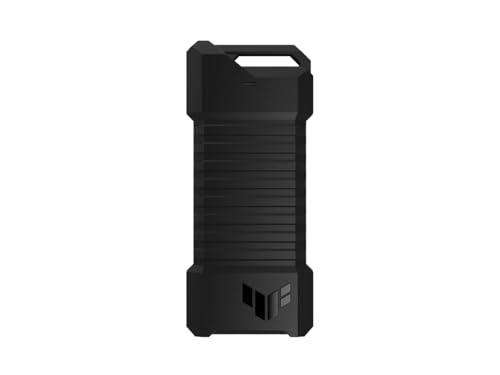
Rugged Pick – ASUS TUF Gaming A1
For photographers who need durable SSD enclosures for photo storage, the ASUS TUF Gaming A1 combines USB-C 3.2 Gen 2 connectivity with protection against drops, dust, and water. It supports both M.2 NVMe PCIe and SATA SSDs in common 2242, 2260, and 2280 sizes.
Best For: Photographers who travel, work outdoors, or want one enclosure for NVMe and SATA M.2 drives.
Pros:
- USB-C 3.2 Gen 2 supports transfer speeds up to 10Gbps.
- IP68 water and dust resistance plus MIL-STD-810H drop resistance add protection for mobile use.
- Tool-friendly Q-latch design simplifies SSD installation.
- Works with PCs, laptops, mobile devices, PS5, and Xbox Series X.
Cons:
- Maximum interface speed is lower than the 40Gbps option in this roundup.
- Its gaming-focused design may be more rugged than some desk-based photo workflows require.
The ASUS is a strong all-around choice when protecting a portable photo library matters as much as transfer speed. Its dual-interface support also gives photographers more flexibility when selecting an M.2 SSD.
High-Capacity Workstation – TERRAMASTER D4 SSD
The TERRAMASTER D4 SSD is built for photographers managing large libraries, multiple projects, or frequent backups. This diskless enclosure holds four M.2 NVMe 2280 SSDs and uses a 40Gbps USB Type-C connection for demanding transfers.
Best For: Desktop photo studios, large catalog management, video-and-photo professionals, and users who want up to 32TB of expandable external storage.
Pros:
- Four NVMe bays support up to 32TB total capacity.
- 40Gbps connectivity can deliver up to 3,224MB/s with four compatible SSDs.
- Temperature-controlled active cooling helps manage heat during heavy workloads.
- Supports automated backups through the TDAS Mobile App and TPC Backupper software.
Cons:
- It is diskless, so SSDs must be purchased separately.
- It has no built-in RAID; software RAID requires third-party tools.
- The larger multi-drive design is less pocket-friendly than a single-drive enclosure.
For photographers who have outgrown one external SSD, the D4 offers much more capacity and throughput than a typical portable enclosure. Its cooling and backup features make it especially suitable for a desk-based primary or secondary photo-storage setup.
Portable Value Pick – FIDECO M.2 NVMe Enclosure
The FIDECO M.2 NVMe enclosure is a compact option for photographers who want straightforward, portable SSD storage. Its USB 3.2 Gen 2 interface supports up to 10Gbps, while the tool-free sandwich design makes it easy to install compatible NVMe drives.
Best For: Photographers seeking a small, travel-friendly enclosure for one NVMe SSD and everyday photo transfers.
Pros:
- Supports M.2 NVMe SSDs in 2230, 2242, 2260, and 2280 sizes.
- USB 3.2 Gen 2 and UASP enable up to 10Gbps theoretical transfer speeds.
- Tool-free sandwich construction simplifies installation and improves thermal-pad contact.
- Includes a USB-C cable with an attached USB-A adapter for broader computer compatibility.
Cons:
- Does not support M.2 SATA SSDs.
- Holds only one SSD.
- A new SSD may need to be initialized before the computer recognizes it.
The FIDECO is a practical choice for photographers who prioritize portability and simple installation over multi-drive capacity. Check that your SSD is NVMe rather than SATA before buying.
How We Picked These SSD Enclosures for Photo Storage
We focused on enclosures that make practical sense for photographers, including models for common M.2 NVMe drives, 2.5-inch SATA SSDs, and multi-drive workflows. Key considerations included advertised interface speed, compatibility with drive sizes and key types, installation convenience, cooling, portability, and protection against everyday travel hazards.
Speed ratings are theoretical maximums. Actual transfers depend on the SSD, computer port, cable, file sizes, thermal conditions, and operating system. We also favored products with useful features such as UASP support, tool-free installation, magnetic stands, rugged construction, or broad USB-C and USB-A compatibility.
Quick Comparison
| Type | Typical advantage | Best suited to |
|---|---|---|
| 10Gbps NVMe | Good balance of speed, cost, and size | Everyday photo transfers and catalogs |
| 40Gbps USB4 NVMe | Higher throughput with compatible hardware | Large libraries, video, and active editing |
| 2.5-inch SATA | Broad compatibility and simple reuse | Older SSDs, backups, and budget storage |
| Rugged or magnetic designs | Better travel convenience and protection | Mobile shooting and phone-based workflows |
| Multi-bay NVMe | Several drives in one desktop enclosure | Editors and high-capacity storage setups |
Key Buying Factors for SSD Enclosures for Photo Storage
Drive and Interface Compatibility
Confirm whether your drive is NVMe PCIe or SATA. M.2 dimensions also matter: 2230, 2242, 2260, and 2280 support is not universal. A 2.5-inch SATA enclosure cannot accept an M.2 NVMe drive, while some M.2 cases support only one protocol. Check the enclosure’s keying requirements, capacity limit, and included cable before buying.
Real-World Speed
A 10Gbps enclosure is typically sufficient for photo imports, backups, and catalog work. USB4 or 40Gbps models can reduce transfer times and improve editing performance, but only when connected to a compatible USB4 or Thunderbolt-class port. A fast enclosure will not overcome a slower host connection or a low-performance SSD.
Heat, Durability, and Portability
Large transfers can heat compact NVMe drives and trigger throttling. Look for an aluminum body, thermal pad, ventilation, or another cooling strategy. For travel, prioritize secure drive retention, a sturdy connector, and water or drop resistance where available. Tool-free installation is convenient, but a firmly secured drive is more important for frequent movement.
Cables and Daily Workflow
USB-C is convenient, but USB-A support can be valuable when working across older computers. A short, properly rated cable helps maintain stable speeds. For phone or tablet workflows, check operating-system support, power requirements, and whether the enclosure’s stand or magnetic design fits your device.
Who Should Buy Which SSD Enclosures for Photo Storage?
Choose a 10Gbps NVMe enclosure for the best general-purpose balance of price, portability, and performance. Choose a 40Gbps USB4 model if you regularly move hundreds of gigabytes or edit directly from the external drive with compatible hardware. Choose a 2.5-inch SATA enclosure when reusing an older SATA SSD or keeping costs low.
Traveling photographers should prioritize rugged protection, secure installation, and compact dimensions. Mobile creators may prefer a magnetic stand or phone-oriented design. Advanced editors and studios should consider a multi-bay enclosure, while remembering that multiple-drive performance, backup strategy, and host-port bandwidth still determine the overall system.