Small businesses often need to clone drives for computer deployments, replace failing storage, preserve working configurations, or securely erase retired disks. The right duplicator can reduce downtime and make repeatable drive tasks far easier than relying on separate software and adapters.
This roundup compares 10 standalone duplicators and dual-bay docking solutions, from compact one-to-one units to higher-throughput systems designed for batch work, forensic handling, or mixed SATA and legacy drive environments.
Best 10 Hard Drive Duplicators for Small Businesses Picks for 2026
Best Overall Capacity
StarTech 4-Bay HDD/SSD Duplicator

- 1:3 standalone cloning
- Quick and secure erase modes
- USB/eSATA docking for SATA drives
Best For: Small-business IT teams managing multiple drives and sanitization
Best Touchscreen Workflow
EZ Dupe SOHO 1-to-1 Duplicator

- Standalone touchscreen operation
- Copy, compare, erase, and format
- Listed transfer speed up to 150 MB/s
Best For: Small offices needing simple 1-to-1 SATA drive tasks
Best Fast Dual-Bay Dock

- Up to 28 GB/min cloning
- Dual-bay 2.5/3.5-inch SATA support
- USB 3.2 Gen 2 docking function
Best For: Technicians needing fast 1-to-1 cloning and drive access
Best for Sanitization

- Standalone copying and erasing
- Supports 2.5/3.5-inch SATA drives
- DoD 5220.22-M erasure compliance
Best For: Businesses reusing and sanitizing SATA drives
Best Standalone SATA Copier
StarTech 1:1 SATA Duplicator and Eraser

- Clones or erases 2.5- and 3.5-inch SATA drives
- Offers three copy and four erase modes
- Includes Copy & Compare verification
Best For: Small-business IT teams managing SATA backups, deployments, and sanitization
Best Plug-and-Play Dock
ICY BOX Dual-Bay SATA Cloning Dock

- Accepts 2.5- and 3.5-inch SATA drives
- Provides tool-free offline cloning and drive access
- Works with Windows, macOS, and Linux
Best For: Small offices needing a versatile dual-bay SATA dock
Best for Batch Duplication
EZ Dupe HD Pal Pro 1-to-3 Duplicator

- Duplicates one source to three drives at once
- Supports SATA and IDE/PATA interfaces
- Includes logs, write blocking, and a protective case
Best For: Technicians handling repeat, multi-drive duplication projects
Best Overall
StarTech Dual-Bay SATA Duplicator

- Standalone sector-by-sector cloning
- Supports 2.5/3.5-inch SATA HDDs and SSDs
- USB 3.0 and eSATA drive access
Best For: Small-business IT teams needing a flexible SATA cloning dock
Best for Forensic Work
EZ Dupe 1-to-3 Forensic Duplicator
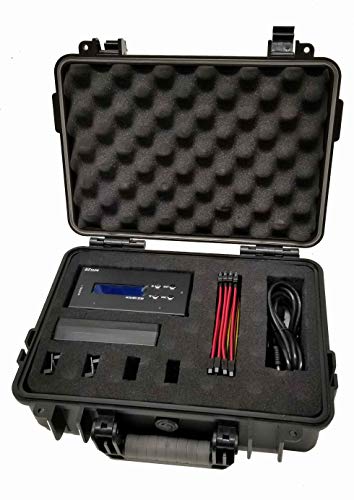
- Copies one source to up to three targets
- Includes source protection and hash functions
- Offers DoD-compliant erase modes
Best For: Forensic-style imaging and verified drive erasure
Best High-Capacity Dock

- Supports up to 48TB across two bays
- Offline cloning needs no computer
- Adds three USB 3.0 hub ports
Best For: Large-drive processing with extra USB connectivity
Best Overall Capacity – StarTech 4-Bay HDD/SSD Duplicator
For small businesses that need to clone, erase, and access several drives, this StarTech 4-bay unit is a versatile choice among hard drive duplicators for small businesses. It supports standalone 1:3 sector-by-sector cloning, quick or secure erasing, and USB or eSATA docking for 2.5- and 3.5-inch SATA drives.
Best For: IT teams handling drive duplication, recovery, data transfer, and NIST SP 800-88 Rev. 1 Purge-compatible sanitization.
Pros:
- Clones up to three target drives from one source without a computer.
- Four bays support simultaneous docking and flexible drive access.
- Includes quick erase and secure erase modes with LCD menu navigation.
- Works with SATA and supported IDE drives using included adapters.
Cons:
- Targets must be equal to or larger than the source drive.
- Its larger four-bay design may be more than occasional users need.
This is the most capable option here for businesses that combine deployment, drive wiping, and routine disk access. The two-year warranty and lifetime multilingual technical support add useful reassurance for professional environments.
Best Touchscreen Workflow – EZ Dupe SOHO 1-to-1 Duplicator
The EZ Dupe SOHO Touch provides a straightforward option for hard drive duplicators for small businesses that value simple operation. Its standalone touchscreen interface supports copying, comparing, erasing, and formatting without requiring a computer.
Best For: Small offices and technicians who want a compact 1-to-1 duplicator with touchscreen controls and on-screen drive information.
Pros:
- Standalone operation requires no computer or software.
- Touchscreen controls are designed for quick, user-friendly operation.
- Supports copy, compare, erase, and format functions.
- Source Analysis and real-time LCD details help guide tasks.
Cons:
- Its 1-to-1 design is less suited to higher-volume duplication.
- The supplied notes identify a SATA-focused interface rather than broad legacy-drive support.
With a compact form factor and an emphasis on touch-driven controls, this model fits businesses that perform occasional drive maintenance rather than large deployment runs. Its listed 150 MB/s read and transfer speed supports routine workflows.
Best Fast Dual-Bay Dock – StarTech SATA Duplicator Dock
For businesses needing quick one-drive-to-one-drive cloning, this StarTech dual-bay dock is a practical pick among hard drive duplicators for small businesses. It performs standalone sector-by-sector copies at speeds up to 28 GB per minute and can also connect drives to a computer over USB.
Best For: IT staff cloning 2.5- or 3.5-inch SATA HDDs and SSDs while retaining a convenient USB docking function.
Pros:
- Copies drives without a computer or operating system.
- Supports 2.5- and 3.5-inch SATA drives of any capacity, including 4Kn drives.
- USB 3.2 Gen 2 provides an optional 10 Gbps host connection.
- Tool-less bays, drive doors, eject buttons, TRIM, and included cables improve usability.
Cons:
- It supports one source and one target rather than multiple target drives.
- The optional IDE adapter is sold separately.
- Targets must be equal to or larger than the source.
This is a strong fit when speed and a small footprint matter more than multi-drive throughput. Its dual function as a standalone cloner and USB-to-SATA dock makes it useful for both deployment and everyday drive access.
Best for Sanitization – Systor 1:1 HDD/SSD Duplicator
The Systor SYS101HS-DP is a focused choice among hard drive duplicators for small businesses that need both copying and data removal. It operates standalone, accepts 2.5- and 3.5-inch SATA drives without an adapter, and supports whole-drive or data-only duplication plus DoD 5220.22-M-compliant erasing.
Best For: Businesses that regularly migrate, reuse, or sanitize SATA hard drives and SSDs.
Pros:
- Standalone design requires no computer or software.
- Handles 2.5- and 3.5-inch SATA drives without an adapter.
- Supports whole-drive copies, data-only copies, and drive erasing.
- Hot-swappable design and a stated 90 MB/s transfer rate support routine work.
Cons:
- Its 1:1 format is not intended for simultaneous multi-target duplication.
- The listed erasure standard is DoD 5220.22-M rather than the newer NIST SP 800-88 method.
This model makes the most sense for offices where drive turnover and sanitization are regular responsibilities. Its metal enclosure, hot-swap feature, and lifetime technical support complement its straightforward duplication and erasure functions.
Best Standalone SATA Copier – StarTech 1:1 SATA Duplicator and Eraser
For small businesses seeking hard drive duplicators for small businesses, the StarTech SATDUP11 is a practical standalone option for cloning or erasing one 2.5- or 3.5-inch SATA drive at a time. It offers sector-by-sector, system-and-file, and all-partitions duplication, plus multiple erase modes.
Best For: IT teams handling SATA drive backups, system deployments, recovery, and secure drive sanitation.
Pros:
- Supports 2.5- and 3.5-inch SATA HDDs and SSDs of any capacity.
- Includes three duplication modes and four erase modes, including a 3-pass overwrite option.
- Copy & Compare helps verify a completed clone.
- Works independently of an operating system through its push-button LCD menu.
Cons:
- Designed for SATA drives; IDE, eSATA, mSATA, and M.2 SATA require separately sold adapters.
- Copies one target drive at a time.
The SATDUP11 is a focused choice when reliability, verification, and drive-erasure features matter more than multi-drive production throughput. Its compact standalone design and two-year warranty suit routine small-business IT work.
Best Plug-and-Play Dock – ICY BOX Dual-Bay SATA Cloning Dock
The ICY BOX dual-bay dock is a convenient option for small businesses comparing hard drive duplicators for small businesses that also need everyday drive access. Its tool-free bays accept 2.5- and 3.5-inch SATA drives, while USB 3.0 with UASP supports computer-based transfers and backups.
Best For: Offices that need a simple dual-bay dock for drive access, backups, data recovery, and offline cloning.
Pros:
- Accepts both 2.5- and 3.5-inch SATA HDDs and SSDs without extra drive adapters.
- Tool-free plug-and-play design simplifies frequent drive changes.
- USB 3.0 offers transfer rates up to 5 Gbps, with UASP support for compatible systems.
- Works with Windows, macOS, and Linux without additional drivers.
Cons:
- Its computer-connected transfer speed is lower than the dedicated duplicators listed here.
- Supports SATA drives only; IDE/PATA compatibility is not listed.
This dock balances convenience and flexibility rather than emphasizing high-volume standalone duplication. It is well suited to a small office that wants one accessible station for cloning, file transfers, and rotating SATA drives.
Best for Batch Duplication – EZ Dupe HD Pal Pro 1-to-3 Duplicator
For businesses that regularly create several copies, the EZ Dupe HD Pal Pro is a high-throughput choice among hard drive duplicators for small businesses. Its 1-to-3 design duplicates 2.5- or 3.5-inch HDDs and SSDs at up to 36 GB per minute per channel, with SATA and IDE/PATA support.
Best For: IT departments, technicians, and production workflows that need multiple drive copies, detailed records, or mixed-interface support.
Pros:
- Copies one source to up to three target drives simultaneously.
- Supports SATA and IDE/PATA drives with included cables and adapters.
- Offers four copy modes, eight erase modes, and HPA/DCO duplication and removal.
- Includes a source write blocker, downloadable log files, label printing, and a rugged protective case.
Cons:
- Its specialized capabilities and 2.5-pound case make it less compact than basic cloning docks.
- It is a standalone unit and does not connect to other devices.
- The listed warranty is one year.
The HD Pal Pro is the strongest fit when copying volume, reporting, and broad drive compatibility justify a more specialized kit. Independent bandwidth design is intended to maintain speed while duplicating to multiple targets.
Best Overall – StarTech Dual-Bay SATA Duplicator
For small businesses that need dependable hard drive duplicators for small businesses, the StarTech SDOCK2U33RE combines standalone cloning with everyday drive access. Its dual-bay design handles 2.5- and 3.5-inch SATA HDDs and SSDs without requiring a computer for duplication.
Best For: IT teams that need a versatile cloning dock for SATA drive duplication, recovery, and routine drive access.
Pros:
- Standalone sector-by-sector cloning works with any file format.
- Supports SATA I/II/III 2.5- and 3.5-inch HDDs and SSDs of any capacity, with 4Kn compatibility.
- Also works as a USB 3.0 or eSATA drive docking station and adapter.
- Includes a universal power adapter, USB-A cable, and eSATA cable.
Cons:
- The target drive must be equal to or larger than the source drive.
- An IDE adapter is sold separately.
With a tool-free, top-loading layout, status LEDs, and a claimed copy speed of up to 22 GB per minute, this is a practical all-around choice for small-business IT work. Its two-year warranty and lifetime weekday technical assistance add useful support.
Best for Forensic Work – EZ Dupe 1-to-3 Forensic Duplicator
The EZ Dupe Forensic 1-to-3 is designed for small businesses that need specialized hard drive duplicators for small businesses with evidence-preservation and secure-erasure features. It supports standalone disk-to-disk or disk-to-file duplication for 2.5- and 3.5-inch drives.
Best For: Forensic-style imaging, source-drive protection, hash verification, and controlled drive erasure.
Pros:
- Duplicates up to three target drives from one source at up to 300 MB/s, subject to drive performance.
- Forensic duplication preserves source information in a raw bit-stream format.
- Source protection blocks modifications when the source drive is accessed through USB.
- Provides MD5 and SHA-1 hash calculation plus six erase functions, including DoD-compliant three- and seven-pass options.
Cons:
- The maximum copy speed depends on the source read speed and target write speeds.
- The supplied details identify USB 1.1 as the hard-disk interface.
This model is more specialized than a basic cloning dock. Its hash functions, write protection, raw duplication, and DoD-compliant wiping make it particularly useful where verification and controlled handling matter more than general-purpose connectivity.
Best High-Capacity Dock – MAIWO Dual-Bay SATA Cloner
For small businesses handling large disks, the MAIWO K3082H adds high-capacity support and extra USB connectivity to the usual hard drive duplicators for small businesses setup. It clones SATA drives offline and provides three USB 3.0 hub ports for connected accessories.
Best For: Offices that need offline cloning for large 2.5- or 3.5-inch drives alongside convenient USB hub expansion.
Pros:
- Supports up to 24TB per bay, with 48TB total stated capacity.
- Offline cloning requires no computer or drivers and includes progress indicators at 25%, 50%, 75%, and 100%.
- USB 3.0 provides up to 5Gbps bandwidth and is backward compatible with USB 2.0 and 1.1.
- Three USB 3.0 Type-A ports include one port supporting 2.4A phone charging.
Cons:
- It supports SATA drives rather than the separately connected IDE drives listed for some duplicators.
- The manufacturer warranty is one year.
The MAIWO is a strong fit when capacity and desk-side versatility are priorities. Its tool-free dual-bay design, independent 12V/3A power supply, and USB hub make it useful for both drive processing and everyday file access.
How We Picked the Best Hard Drive Duplicators for Small Businesses
We focused on practical business requirements rather than headline specifications alone. The products were selected across several useful categories: one-to-one and multi-drive duplication, standalone operation, SATA compatibility, drive-erasure features, cloning speed, portability, and added connectivity. We also considered whether a unit is better suited to occasional IT maintenance, repeated workstation deployment, repair-shop work, or evidence-sensitive data handling.
Advertised transfer rates are maximum figures and depend on the source drive, destination drive, interface, data type, and workload. A faster rating does not automatically make one device better for every office.
Quick Comparison
| Best For | Recommended Type | What to Prioritize |
|---|---|---|
| Occasional drive replacement | 1:1 duplicator or dual-bay dock | Simple controls and broad SATA support |
| Deploying several identical PCs | 1:3 or 1:3+ duplicator | Parallel copies and sustained throughput |
| IT service providers | High-speed standalone duplicator | Speed, compatibility, and repeatable operation |
| Secure device retirement | Duplicator with eraser functions | Supported erase standards and verification |
| Legacy or investigative work | Forensic or IDE/SATA-capable model | HPA/DCO handling, logging, and media support |
Key Buying Factors for Hard Drive Duplicators for Small Businesses
Drive Format and Interface
Confirm support for both 2.5-inch and 3.5-inch drives if your business handles desktops and laptops. Most current options here target SATA I, II, and III media, while some models also support IDE/PATA drives. Check whether bare drives fit directly or require a separate adapter.
Copy Speed and Workload
For a single replacement drive, convenience may matter more than maximum speed. For repeated deployments, a multi-target unit can save more time by copying several drives at once. Capacity, drive health, and small-file-heavy data can all make real-world performance lower than the advertised rate.
Standalone Controls and Verification
Standalone operation keeps cloning independent of a computer and can simplify an IT technician’s workflow. Look for clear status indicators, progress information, source-to-target safeguards, and verification options that help prevent copying in the wrong direction.
Erasure and Data Protection
If retired drives contain customer, employee, or business data, an eraser function can be valuable. Review the supported erase methods and whether the device reports completion or verification. Cloning and erasing are separate workflows, so confirm the controls are clearly distinguished.
Connectivity and Extra Features
Docking stations with USB or USB-C connectivity are useful when the same drives must also be accessed from a workstation. However, a dock may depend more heavily on host software and operating-system support than a fully standalone duplicator. Hubs, forensic controls, protective cases, and high capacity limits can be worthwhile for specialized teams.
Who Should Buy Which Hard Drive Duplicators for Small Businesses?
Small offices and internal IT teams: Choose a straightforward 1:1 duplicator or dual-bay dock for occasional drive upgrades, recovery preparation, and workstation maintenance.
Businesses deploying multiple computers: Select a 1:3 or larger standalone unit when several identical drives must be prepared in one session. Parallel duplication can reduce hands-on time and keep installations consistent.
Repair shops and managed service providers: Favor faster models with broad 2.5-inch and 3.5-inch SATA support, durable construction, and controls that make repeated jobs easy to track.
Compliance-focused organizations: Pick a model with clearly documented erasure modes and verification. For investigations or sensitive evidence, use a forensic-oriented unit and follow your organization’s documented chain-of-custody procedures.
Before ordering, verify the exact drive interfaces, target capacity, supported erase standards, and power requirements. Those details matter more than a peak speed figure when choosing among the best Hard Drive Duplicators for Small Businesses.