The best MIDI controllers for Ableton make it easier to launch clips, play instruments, shape effects, and control a session without relying on a mouse and keyboard. The right choice depends on whether you prioritize keys, pads, knobs, portability, or a more complete live-performance workflow.
We’ve selected 10 practical options for different setups, including compact controllers for travel, keyboard-focused models for melodies and chords, and dedicated surfaces for clip launching and mixing.
Best 10 Midi Controllers for Ableton Picks for 2026
Performance Hub

- 5x8 RGB clip-launch matrix
- Nine faders and eight knobs
- Assignable A/B crossfader
Best For: Ableton Live performance and clip-based production
Hybrid Control Center

- Eight faders and 24 endless encoders
- MIDI In, Out, and Thru connectivity
- Up to 15 Custom Modes with OLED feedback
Best For: Hybrid Ableton Live and hardware setups
Pad Performance Pick

- 16 velocity- and pressure-sensitive RGB pads
- 20 assignable buttons and four encoders
- Includes Ableton Live Lite and Studio One Artist
Best For: Beat making, sample triggering, and expressive pad performance
Compact Keyboard Choice
Novation Launchkey Mini 25 MK4

- 25 mini keys and 16 aftertouch pads
- Scale, Chord, and arpeggiator features
- Ableton integration with OLED display
Best For: Portable songwriting, clip launching, and compact Ableton setups
Portable Beat Control
Akai LPD8 USB MIDI Pad Controller

- 8 RGB MPC drum pads for sample and clip triggering
- 8 assignable knobs with 4 programmable preset slots
- Compact USB-powered design for Mac and PC
Best For: Mobile beat makers needing pads and knobs
Ableton Performance Hub
Akai APC Key 25 MK2 Controller

- 25 velocity-sensitive mini keys for melodic parts
- 40 RGB pads with Ableton clip and scene launching
- 8 knobs plus dedicated navigation and octave controls
Best For: Ableton performers needing keys and clip control
Clip Launching Specialist
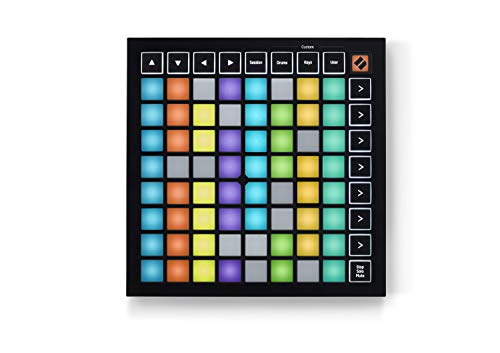
- 64 RGB pads mirror Ableton Live clips and scenes
- Stop, Solo, and Mute controls support performances
- Three Custom Modes enable flexible MIDI mapping
Best For: Portable Ableton clip launching and live control
Best Clip Launcher

- 64 RGB pads for Ableton clip launching
- Nine faders for mixer and device control
- Compact USB-powered design
Best For: Ableton Live looping, launching, and live mixing
Best Heavy-Duty Pick

- 25 velocity-sensitive mini keys
- Eight RGB MPC pads and eight assignable knobs
- Chord, Scale, and arpeggiator tools
Best For: Portable beat making and melodic production
Best 37-Key Option
Novation Launchkey Mini 37 MK4

- 37 mini synth-action keys
- 16 pads with polyphonic aftertouch
- Scale, Chord, and arpeggiator tools
Best For: Melodic Ableton performance with expanded key range
Performance Hub – Akai APC40 MKII
The Akai APC40 MKII is a dedicated choice for musicians seeking midi controllers for ableton with hands-on clip launching, mixing, and device control. Its Ableton-focused layout provides a 5×8 RGB clip grid, channel faders, knobs, and an assignable crossfader for live sets and production.
Best For: Ableton Live performers, clip-based producers, and DJ-style live mixing.
Pros:
- 5×8 clip-launch matrix with RGB feedback and Ableton Live mapping.
- Nine faders, eight knobs, and eight device controls for practical mixer and effect control.
- USB-powered setup includes Ableton Live Lite and additional software downloads.
Cons:
- Designed primarily around Ableton Live rather than broad standalone use.
- It does not include built-in keys for traditional keyboard playing.
The APC40 MKII is especially compelling when clip launching and mixer access matter more than piano-style input. Its dedicated performance layout makes it a substantial option for Ableton-centered workflows.
Hybrid Control Center – Novation Launch Control XL 3
The Novation Launch Control XL 3 is a flexible option among midi controllers for ableton, combining deep DAW integration with control for external hardware. Eight faders, 24 endless encoders, customizable buttons, an OLED display, and MIDI I/O support both computer-based and hybrid setups.
Best For: Producers who combine Ableton Live with hardware synthesizers, effects, or grooveboxes.
Pros:
- Offers eight faders, 24 endless encoders, and 16 assignable buttons.
- MIDI In, Out, and Out2/Thru ports support hardware without requiring a computer.
- Stores up to 15 Custom Modes and provides OLED feedback.
Cons:
- It is a control surface rather than a keyboard or pad-focused controller.
- Its extensive custom-mapping features may require setup time.
The Launch Control XL 3 stands out for users who want one surface to manage software and hardware. It offers broader routing and customization than a controller built solely for Ableton clip launching.
Pad Performance Pick – PreSonus ATOM
The PreSonus ATOM is a compact pad-focused option for anyone comparing midi controllers for ableton. Its 16 velocity- and pressure-sensitive RGB pads support clip and sample triggering, virtual instruments, and expressive performance, while assignable buttons and encoders add DAW navigation and control.
Best For: Beat makers, sample performers, and producers who want expressive pads in a compact format.
Pros:
- Sixteen full-size velocity- and pressure-sensitive RGB pads with eight assignable pad banks.
- Includes 20 assignable buttons, four endless rotary encoders, and Note Repeat mode.
- Compatible with Ableton Live and includes Studio One Artist, Live Lite, and Studio Magic software.
Cons:
- It does not provide piano-style keys or dedicated mixer faders.
- Some features depend on the connected application.
The ATOM is a practical fit when pad expression and sample triggering are the priority. Its compact footprint and bundled software make it a versatile entry point for beat production and live performance.
Compact Keyboard Choice – Novation Launchkey Mini 25 MK4
The Novation Launchkey Mini 25 MK4 combines mini keys, pads, and creative performance tools for musicians shopping for midi controllers for ableton. Its 25-key synth-action keyboard, 16 polyphonic-aftertouch pads, OLED display, and Ableton integration cover melodies, clip launching, chords, and sequencing in a compact design.
Best For: Mobile producers and beginners who want keys, pads, and Ableton control in one small controller.
Pros:
- Includes 25 mini synth-action keys and 16 pads with polyphonic aftertouch.
- Scale Mode, Chord modes, and an arpeggiator support creative performance.
- Works with Ableton and other major DAWs and includes Live Lite and additional software.
Cons:
- Mini keys provide less playing space than a full-size keyboard.
- Its compact layout offers fewer physical controls than larger dedicated surfaces.
The Launchkey Mini 25 MK4 is a well-rounded choice for users who do not want to choose between keyboard input and pad control. It is particularly useful for portable Ableton setups and sketching complete ideas quickly.
Portable Beat Control – Akai LPD8 USB MIDI Pad Controller
The Akai LPD8 is a compact option for producers looking for midi controllers for ableton without adding a full keyboard to the setup. Its eight RGB MPC-style pads and eight assignable knobs provide hands-on control for triggering samples, loops, and software instruments while mapping key DAW and effect parameters.
Best For: Mobile beat makers, DJs, and producers who want portable pad and knob control for Ableton Live.
Pros:
- Eight RGB-backlit, touch-sensitive MPC drum pads for triggering samples and clips.
- Eight assignable Q-Link knobs support tactile control of DAW parameters and effects.
- Four programmable preset slots make it easier to recall custom mappings.
- USB-powered plug-and-play operation works with Mac and PC without an AC adapter.
Cons:
- It has pads and knobs but no piano-style keys for melodic playing.
- The compact layout provides fewer physical controls than larger controllers.
The LPD8 is a focused, travel-friendly controller rather than an all-in-one workstation. Choose it when pad triggering and parameter control matter more than playing keyboard parts.
Ableton Performance Hub – Akai APC Key 25 MK2 Controller
The Akai APC Key 25 MK2 is one of the more integrated midi controllers for ableton, combining a 25-key velocity-sensitive keyboard with a 40-pad clip-launching matrix. It is pre-mapped for Ableton Live 11.2.7 and later, giving performers direct access to clips, scenes, device macros, and track controls.
Best For: Ableton Live users who want keyboard performance, clip launching, and hands-on mixing in one compact controller.
Pros:
- Forty RGB pads provide visual feedback for launching clips and scenes.
- Twenty-five velocity-sensitive mini keys cover chords, basslines, and leads.
- Eight assignable rotary knobs support volume, pan, sends, and device macros.
- Dedicated octave buttons, navigation controls, and USB bus power suit live use.
Cons:
- The mini-key format offers less playing space than a full-size keyboard.
- Its strongest integration is centered on Ableton Live rather than general-purpose control alone.
For users who want one device to play instruments and launch Ableton clips, the APC Key 25 MK2 is a versatile choice. Its compact footprint keeps it practical for both studio work and performance setups.
Clip Launching Specialist – Novation Launchpad Mini MK3
The Novation Launchpad Mini MK3 is a streamlined choice among midi controllers for ableton, built around a 64-pad RGB grid for launching clips and scenes. Its color feedback mirrors the Ableton Live session, while dedicated Stop, Solo, and Mute controls add practical performance access.
Best For: Ableton Live performers who prioritize visual clip launching and a compact grid-based workflow.
Pros:
- Sixty-four vibrant RGB pads reflect clip status for easier session navigation.
- Ableton Live integration supports clip and scene launching plus Stop, Solo, and Mute controls.
- Three Custom Modes allow MIDI mappings to be edited through Novation Components.
- Lightweight USB-C, bus-powered design fits portable and space-conscious setups.
Cons:
- It does not include piano-style keys, knobs, or faders for melodic or mixing control.
- The grid-focused layout may be less suitable for users seeking an all-purpose controller.
The Launchpad Mini MK3 makes the most sense when clip launching is the center of your Ableton workflow. Its small footprint and customizable modes add flexibility without requiring a larger control surface.
Best Clip Launcher – Akai APC Mini MK2
The Akai Professional APC Mini MK2 is built for producers who want direct Ableton Live control without a full-size console. For anyone shopping for midi controllers for ableton, its 8×8 RGB pad grid, assignable faders, and pre-mapped integration make it especially practical for clip launching, looping, and live mixing.
Best For: Ableton Live clip launching, live performance, looping, and compact home-studio mixing.
Pros:
- 64 RGB pads provide visual feedback for launching clips, samples, and loops.
- Eight assignable faders plus a master fader offer hands-on mixer and device control.
- Includes Drum and Note modes, with Smart Scale View for melodic playing.
- USB-powered plug-and-play setup works with Mac and Windows.
Cons:
- Designed primarily around Ableton Live rather than keyboard-style performance.
- It has no built-in piano keys for traditional melodic input.
The APC Mini MK2 is a focused choice when clip launching and mixer access matter more than a keyboard. Its compact, lightweight design also makes it easy to move between a studio and a live setup.
Best Heavy-Duty Pick – Akai MPK Mini IV
The Akai Professional MPK Mini IV combines a 25-key mini keyboard with MPC pads and hands-on controls in a portable format. Among midi controllers for ableton, it suits producers who need keys for melodies and chords alongside pads for drums, samples, and beat production.
Best For: Portable beat making, keyboard parts, songwriting, and compact Ableton Live setups.
Pros:
- 25 velocity-sensitive mini keys support piano-style parts, synth leads, and sample triggering.
- Eight velocity- and pressure-sensitive MPC pads provide RGB-backed finger drumming.
- Eight assignable 360-degree knobs, a color screen, and push/turn encoder improve hands-on control.
- Chord, Scale, and arpeggiator tools help generate musical ideas quickly.
Cons:
- The 25-key mini format offers less playing range than a larger keyboard.
- The supplied notes do not identify it as an Ableton-only controller, so some setup may vary by DAW.
The MPK Mini IV is a versatile all-in-one option for producers who want keys, pads, knobs, and creative performance tools without taking up much desk or travel space. Its included software and learning tools add value for new producers.
Best 37-Key Option – Novation Launchkey Mini 37 MK4
The Novation Launchkey Mini 37 MK4 gives Ableton users a larger keyboard-focused controller while retaining pads for clips, drums, and sequencing. It stands out among midi controllers for ableton with 37 mini synth-action keys, 16 responsive pads, and dedicated Scale, Chord, and arpeggiator features.
Best For: Ableton Live performance, melodic playing, clip launching, and creative songwriting with more key range.
Pros:
- Thirty-seven mini keys provide more range than compact 25-key controllers.
- Sixteen pads support drumming, clip launching, chord triggering, and step sequencing.
- Polyphonic aftertouch on the pads adds expressive performance control.
- Scale Mode, Chord Mode, and the arpeggiator support fast idea generation.
Cons:
- The larger 37-key layout is less compact than a 25-key controller.
- The supplied notes list a USB cable but do not specify bundled Ableton mapping details.
The Launchkey Mini 37 MK4 is a strong fit for players who want more keyboard range without moving to a full-size controller. Its broad DAW compatibility also makes it useful if your workflow extends beyond Ableton Live.
How We Picked the Best Midi Controllers for Ableton
We focused on controller types that suit common Ableton Live workflows: playing software instruments, launching clips, adjusting mixer levels, controlling effects, and performing live. The selection includes keyboards, pad controllers, grid controllers, and knob-heavy control surfaces rather than treating one format as ideal for everyone.
We also considered portability, control layout, connection convenience, software compatibility, and how much hands-on access each model provides. Ableton users should confirm the controller’s current integration features and included software before buying, since bundled licenses and firmware support can change.
Quick Comparison
| Controller Type | Best For | Main Strength |
|---|---|---|
| Keyboard controller | Playing instruments and melodies | Piano-style keys, pads, and performance controls |
| Pad or grid controller | Clip launching and finger drumming | Hands-on triggering and rhythmic performance |
| Control surface | Mixing and effect adjustment | Multiple knobs, faders, and dedicated controls |
| Compact mini controller | Travel and small desks | Low footprint with essential controls |
Key Buying Factors for Midi Controllers for Ableton
Choose the Right Control Layout
Keys are the most useful starting point if you play synths, bass, piano parts, or melodies. Pads are better for drums, sampling, and clip launching. Knob-focused surfaces can be faster for mixing, sends, and device parameters. If you do several of these tasks, look for a hybrid model with keys, pads, and assignable controls.
Think About Size and Portability
Mini keyboards and compact pad controllers fit travel bags and crowded desks, but their smaller controls may be less comfortable for extended sessions. Larger surfaces offer more immediate access and can reduce menu diving, though they require more desk space and are less convenient to transport.
Check Ableton Integration and Connectivity
Look for clear Ableton Live mapping, USB-C or USB connectivity that matches your computer, and dependable MIDI assignment options. Some controllers are designed around particular workflows or software ecosystems, so check operating-system support, power requirements, and whether a USB hub or external power supply may be needed.
Consider Your Performance Style
For live sets, dedicated clip-launch buttons and visual feedback can be more valuable than a traditional keyboard. For studio production, responsive keys, octave controls, transport buttons, and programmable knobs may matter more. If you record vocals or instruments, prioritize a controller that leaves room for your audio interface and other hardware.
Who Should Buy Which Midi Controllers for Ableton?
- Choose a compact keyboard if you need to play melodies, chords, and software instruments while keeping your setup portable.
- Choose a pad or grid controller if your Ableton sessions revolve around clips, drum racks, samples, and live triggering.
- Choose a knob-heavy control surface if you spend more time mixing, automating effects, and adjusting multiple parameters at once.
- Choose a hybrid keyboard controller if you want one device for playing, sequencing, clip control, and basic mixing.
- Choose a larger controller if you perform or produce at a fixed workstation and value immediate access over portability.
Before ordering, compare the control layout with your most common Ableton tasks. The best fit is not necessarily the controller with the most features; it is the one that puts your most-used commands within comfortable reach.