Building a reliable home server starts with choosing the right enclosure. The best NAS enclosures for PC give your drives adequate cooling, room to expand, and the motherboard, power supply, and connectivity options your storage setup requires.
This roundup covers compact external enclosures, hot-swappable drive cases, and full-size ATX chassis so you can match your storage goals, hardware, and budget to a practical NAS build.
Best 10 Nas Enclosures for PC Picks for 2026
Compact DIY NAS

- Eight 3.5-inch HDD bays plus one 2.5-inch SSD bay
- Mini-ITX design with hot-swap backplane
- Includes two 10cm HDD-compartment fans
Best For: Compact home servers and Mini-ITX NAS builds
High-Speed External Storage

- Four bays support 3.5-inch and 2.5-inch SATA drives
- USB-C 3.2 connectivity reaches up to 10Gbps
- Adds 4K HDMI output and temperature-controlled fans
Best For: Fast external storage expansion for desktops and laptops
Large ATX NAS Case

- Supports up to 13 total hard drives
- Accepts ATX, Micro-ATX, and Mini-ITX boards
- Includes four 120mm fans and 360mm radiator support
Best For: Expandable ATX storage servers and large home labs
Simple DAS Expansion

- Four bays support 2.5-inch and 3.5-inch SATA drives
- USB A/C 3.0 offers up to 5Gbps transfers
- Tool-free hot swapping with built-in cooling fan
Best For: Plug-and-play external storage without RAID or NAS features
Maximum DIY Storage

- Up to 11 3.5-inch HDD bays
- ATX and BTF motherboard support
- Mesh panel with four 140mm PWM fans
Best For: High-capacity DIY NAS and media servers
Flexible Hot-Swap Build
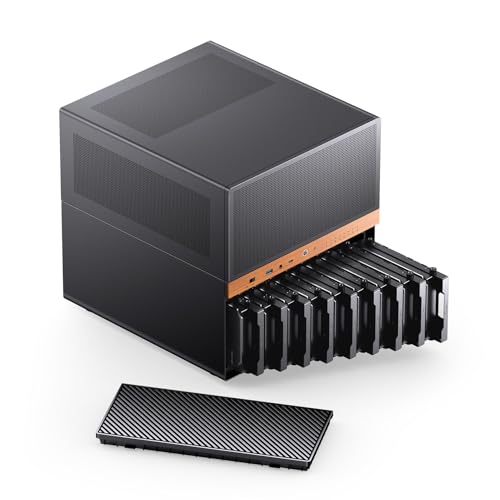
- Nine hot-swappable drive bays
- ATX/SFX PSU support
- Micro ATX and ITX compatible
Best For: Flexible home-server and NAS builds
Professional Expansion

- E-ATX full-tower platform
- Up to 11 HDDs or 13 SSDs
- Supports expansion cards up to 400mm
Best For: AI servers and workstation-class NAS systems
High-Capacity DIY Pick

- 8 hot-swappable 3.5-inch bays plus 2 SSD slots
- Supports Micro-ATX and Mini-ITX motherboards
- Compact case with ATX PSU compatibility
Best For: Large home NAS, media-server, and backup builds
Compact Flex-PSU Option
KCMconmey 4+1 Bay DIY NAS Case

- Four mixed-size drive trays plus one 2.5-inch bay
- Designed for Mini-ITX motherboards
- Includes hot-swap backplane and 80mm fan
Best For: Small private-cloud and home-server builds
Airflow-Focused Mid-Tower

- Supports up to eight 3.5-inch HDDs
- Fits ATX, Micro-ATX, Mini-ITX, and BTF boards
- Includes four 140mm PWM fans and mesh airflow
Best For: Spacious ATX NAS and media-server builds
Compact DIY NAS – JONSBO N3
For shoppers comparing nas enclosures for pc builds, the JONSBO N3 is a compact Mini-ITX chassis designed around high drive density. It accommodates eight 3.5-inch hard drives plus one 2.5-inch SSD, while its removable cover, pull-out drive structure, and separated compartments are intended to simplify assembly and cooling.
Best For: Home servers, office storage, and compact personal NAS builds using Mini-ITX hardware.
Pros:
- Provides eight 3.5-inch HDD bays and one 2.5-inch SSD bay.
- Includes a server-grade hot-swap backplane with dual D-type and SATA power connections.
- Supports SFX power supplies, GPUs up to 280mm, and CPU coolers up to 130mm.
- Built-in 10cm fans target direct airflow through the HDD compartment.
Cons:
- Limited to Mini-ITX motherboards and two expansion slots.
- Requires an SFX power supply with a maximum supported length of 105mm.
- Its compact layout may require more careful component planning than a larger tower.
The N3 stands out when drive capacity and a small footprint matter more than broad platform compatibility. Verify your motherboard, PSU, cooler, and GPU dimensions before building.
High-Speed External Storage – WAVLINK 4-Bay Enclosure
The WAVLINK 4-Bay Enclosure is an external option for shoppers seeking nas enclosures for pc storage expansion without assembling a complete computer case. It supports four 3.5-inch or 2.5-inch SATA drives, connects over USB-C at up to 10Gbps, and adds HDMI output for compatible host systems.
Best For: Desktop or laptop users who want high-capacity external storage, fast transfers, and convenient drive swapping.
Pros:
- Holds four SATA 6Gbps drives with stated capacity up to 4×32TB.
- USB 3.2 Type-C supports data transfer rates up to 10Gbps.
- Independent power switches allow individual bays to be managed separately.
- Temperature-controlled fans activate at 48°C, and the aluminum shell assists heat dissipation.
Cons:
- 2.5-inch drives require separate 2.5-to-3.5-inch mounting brackets.
- HDMI output requires a host USB-C port with video support and a USB-C-to-C cable.
- It is an external enclosure rather than a self-contained NAS computer.
This WAVLINK model is a flexible DAS-style storage hub with useful connectivity beyond drive expansion. Confirm host video support and the mounting requirements for smaller drives before purchase.
Large ATX NAS Case – DARKROCK Classico MAX
For a full-size build among nas enclosures for pc systems, the DARKROCK Classico MAX offers room for up to thirteen hard drives alongside standard desktop components. Its mesh front and side panels, four pre-installed 120mm fans, and support for a 360mm radiator provide a foundation for a storage-focused PC with substantial cooling needs.
Best For: ATX-based storage servers and high-capacity home systems that need extensive drive and cooling support.
Pros:
- Supports up to ten 3.5-inch HDDs and three 2.5-inch SSDs.
- Compatible with ATX, Micro-ATX, and Mini-ITX motherboards.
- Includes four pre-installed 120mm fans and mesh panels for airflow.
- Supports a 360mm radiator and vertical GPU mounting.
Cons:
- Full-tower dimensions require considerably more room than compact NAS cases.
- The supplied notes identify it as a computer case, not a dedicated NAS appliance or hot-swap enclosure.
- Its storage-focused layout may be more chassis than a small home file server needs.
The Classico MAX is a strong choice when you want a conventional PC platform with unusually high internal drive capacity. Its large format is best suited to permanent installations where expansion and cooling are priorities.
Simple DAS Expansion – CENMATE 4-Bay Enclosure
The CENMATE 4-Bay Enclosure suits buyers comparing nas enclosures for pc use who primarily need straightforward external storage. It accepts four 2.5-inch or 3.5-inch SATA drives, connects through USB 3.0 Type-A or Type-C cabling, and supports hot-swapping in a tool-free aluminum enclosure.
Best For: Personal or business users seeking plug-and-play multi-drive storage expansion for Windows, Mac, or Linux computers.
Pros:
- Supports four 2.5-inch or 3.5-inch SATA HDDs and SSDs.
- Offers a stated maximum capacity of up to 80TB, or 20TB per drive.
- Includes USB A/C 3.0 connectivity and supports transfer rates up to 5Gbps.
- Tool-free, hot-swappable design with an aluminum body and built-in fan.
Cons:
- This is a DAS enclosure and explicitly does not provide RAID or NAS functionality.
- The fan may produce approximately 40–50dB of noise.
- USB 3.0 is slower than newer 10Gbps USB-C storage interfaces.
CENMATE is best viewed as a practical direct-attached storage accessory rather than a networked NAS solution. It offers broad operating-system compatibility and simple drive access, but users needing RAID or network sharing will need additional hardware or software.
Maximum DIY Storage – Rosewill Helium NAS Max
The Rosewill Helium NAS Max is a strong option for builders comparing nas enclosures for pc with high drive capacity. Its ATX mid-tower layout supports up to 11 3.5-inch hard drives, while the mesh front panel and four 140mm PWM fans help maintain airflow.
Best For: DIY NAS systems, media servers, and small-business storage builds needing extensive 3.5-inch drive capacity.
Pros:
- Supports up to 11 3.5-inch HDDs.
- Compatible with ITX, Micro ATX, ATX, and BTF motherboards.
- Includes four 140mm PWM fans and a mesh front panel.
- Provides front USB 3.2 Type-C connectivity.
Cons:
- Its mid-tower dimensions may be too large for compact builds.
- It is designed primarily around 3.5-inch storage bays.
Choose this case when storage density and straightforward air cooling matter more than a compact footprint. The ATX compatibility also leaves room for flexible component selection.
Flexible Hot-Swap Build – JONSBO N6 NAS Case
The JONSBO N6 is a practical choice among nas enclosures for pc when hot-swappable storage and flexible power-supply placement are priorities. This Micro ATX case provides nine drive bays, supports ITX and Micro ATX boards, and offers multiple fan-mounting positions.
Best For: Home servers and NAS builds that need hot-swap drive access, compact Micro ATX compatibility, and configurable cooling.
Pros:
- Offers nine hot-swappable HDD or SSD bays.
- Supports both ATX and SFX power supplies in multiple positions.
- Includes two pre-installed fans and numerous additional fan positions.
- Supports a 240mm AIO cooler and front USB 3.2 Gen 2 Type-C.
Cons:
- Motherboard support is limited to ITX and Micro ATX.
- Backplane power connections require careful cabling and sufficient startup current.
- GPU clearance varies from 275mm to 320mm depending on configuration.
The N6 stands out for builders who value accessible drive maintenance and setup flexibility. Its power and cooling options are useful, but the backplane wiring instructions deserve close attention during assembly.
Professional Expansion – Rosewill Thor NAS
The Rosewill Thor NAS is built for buyers seeking nas enclosures for pc with full-tower scale and extensive expansion room. It supports E-ATX motherboards, up to 11 3.5-inch HDDs or 13 2.5-inch SSDs, and expansion cards up to 400mm long.
Best For: AI servers, workstations, media hubs, and SMB storage systems requiring large components and high-capacity drive support.
Pros:
- Supports E-ATX motherboards and large workstation configurations.
- Accommodates up to 11 3.5-inch HDDs or 13 2.5-inch SSDs.
- Provides expansion-card clearance up to 400mm.
- Includes USB 3.2 Type-C and SATA/SAS-capable storage features.
Cons:
- Its full-tower size is substantial for ordinary home setups.
- Only one 140mm PWM fan is supplied.
- Its broad expansion focus may be more than a basic NAS requires.
The Thor NAS is the most suitable option here for demanding, spacious builds. Its E-ATX support and generous storage and card capacity make it better suited to workstation-class infrastructure than compact home NAS projects.
High-Capacity DIY Pick – RGEEK PS100a 8-Bay NAS Case
For builders comparing NAS enclosures for PC use, the RGEEK PS100a emphasizes storage density in a compact mini-tower design. It combines eight hot-swappable 3.5-inch bays with two dedicated 2.5-inch SSD slots, making it suitable for substantial home NAS, media-server, and backup projects.
Best For: High-capacity DIY NAS builds that need hot-swap drive access and broad storage flexibility.
Pros:
- Provides 8 hot-swappable 3.5-inch HDD bays plus 2 dedicated 2.5-inch SSD slots.
- Supports Micro-ATX and Mini-ITX motherboards, with four full-height PCIe slots.
- Accepts ATX PSUs up to 170mm and supports up to four 120mm fans.
- Includes HDD handles, screws, and cable ties for a flexible DIY installation.
Cons:
- CPU cooler clearance is limited to 55mm.
- GPU length is limited to 240mm.
- The listed warranty is six months.
The PS100a is a strong option when drive capacity and hot-swap access matter more than large expansion-card or cooler clearance. Its compact footprint and dual-chamber layout make it practical for a desk or server shelf, but component dimensions should be checked carefully before building.
Compact Flex-PSU Option – KCMconmey 4+1 Bay DIY NAS Case
The KCMconmey 4+1 Bay case is a compact choice for shoppers seeking NAS enclosures for PC builds around a Mini-ITX motherboard. Its four mixed-size drive trays, internal 2.5-inch bay, and hot-swap backplane provide a straightforward foundation for a smaller private-cloud or home-server system.
Best For: Compact Mini-ITX NAS builds using a Flex or 1U power supply.
Pros:
- Offers four 2.5- or 3.5-inch drive trays plus one internal 2.5-inch bay.
- Supports Mini-ITX motherboards and Flex or 1U PSUs.
- Includes a single-slot full-height PCIe expansion position for a network or video card.
- Comes with two front USB 3.0 ports and a replaceable 80mm fan.
Cons:
- Motherboard support is limited to Mini-ITX.
- Expansion is limited to one single-slot full-height PCIe card.
- The compact layout requires a Flex or 1U power supply rather than a standard ATX PSU.
This case fits projects where a small footprint and modest drive count are priorities. Its power-supply and expansion limitations make it less suitable for larger or heavily expandable servers, but the included fan, USB 3.0 ports, and hot-swap backplane add useful practicality.
Airflow-Focused Mid-Tower – Rosewill Helium NAS Duo
The Rosewill Helium NAS Duo takes a conventional ATX mid-tower approach to NAS enclosures for PC users. It supports up to eight 3.5-inch hard drives while pairing a mesh front panel with four 140mm PWM fans, giving larger home-server and media-server builds room for both storage and cooling hardware.
Best For: Spacious NAS or media-server builds that need ATX compatibility, strong airflow, and room for large components.
Pros:
- Supports up to eight 3.5-inch HDDs.
- Compatible with ATX, Micro-ATX, Mini-ITX, and BTF motherboards.
- Includes a mesh panel and four 140mm PWM fans for airflow.
- Supports a 360mm AIO cooler and GPUs up to 390mm long.
Cons:
- The mid-tower measures about 18.5 inches deep and weighs 15 pounds.
- Its listed internal-bay quantity is six despite support for up to eight 3.5-inch HDDs, so the drive layout should be confirmed.
- It is less compact than dedicated small-form-factor NAS cases.
The Helium NAS Duo is the most flexible choice here for a full-size DIY server, especially when airflow and component clearance are important. Its larger chassis accommodates modern motherboard and cooling options, though buyers prioritizing a compact shelf footprint may prefer a smaller enclosure.
How We Picked These Nas Enclosures for PC
We compared these enclosures by the features that most affect a DIY NAS build: drive-bay count, supported motherboard and power-supply formats, cooling, hot-swap access, expansion room, and connection options. The list includes both standalone USB enclosures and cases designed to house a complete NAS computer, because those solutions serve different buyers.
We also considered practical installation details, including tool-free trays, SATA and SAS compatibility, fan placement, front-panel access, and whether the chassis can accommodate a growing storage pool. Always confirm current specifications and physical dimensions before ordering, particularly when combining a motherboard, backplane, PSU, and multiple hard drives.
Quick Comparison
- For a compact DIY NAS: Look for a Mini-ITX or Micro ATX case with several dedicated 3.5-inch bays and efficient airflow.
- For simple external storage: A USB-C enclosure can add multiple SATA drives without requiring a full custom server build.
- For maximum capacity: Full-tower and ATX cases provide more drive positions, expansion clearance, and cooling options.
- For frequent drive changes: Choose hot-swappable trays and a compatible backplane to simplify maintenance.
- For mixed hardware: Verify support for your motherboard size, PSU format, GPU clearance, and drive interface before buying.
Key Buying Factors for Nas Enclosures for PC
Drive Bays and Expansion
Count the number of 3.5-inch bays you need now, then leave room for future drives. Some cases also include 2.5-inch positions for SSD caching or boot drives. A larger bay count is useful only if the enclosure has enough power, cooling, and motherboard connectivity to support it.
Motherboard and PSU Compatibility
Check whether the enclosure accepts Mini-ITX, Micro ATX, ATX, or E-ATX boards. Power-supply compatibility is equally important: some compact cases require Flex or SFX units, while larger chassis support standard ATX PSUs. Confirm cable space and connector reach before assembling a multi-drive system.
Cooling and Noise
NAS hard drives generate heat during long transfers and rebuilds. Mesh panels, front-to-back airflow, PWM fans, and temperature-controlled cooling can help maintain drive health. If the server will sit near a workspace or bedroom, compare fan size and control options rather than focusing only on the number of fans.
Hot-Swap and Connectivity
Hot-swap bays are convenient for replacing or rotating drives, but the backplane must match your controller, SATA or SAS drives, and power connections. External USB models should be judged by USB-C speed, included power delivery, operating-system support, and whether each drive is independently accessible.
Who Should Buy Which Nas Enclosures for PC?
Choose a compact enclosure if you want a small media server, backup system, or low-power home NAS with limited expansion needs. Choose a 4-bay enclosure for a balanced setup using RAID, mirrored storage, or a modest file and media library. Choose an 8- to 11-drive chassis if you manage large media collections, surveillance footage, backups, or a server expected to grow over several years.
For the simplest upgrade, select an external USB enclosure. For greater control over file systems, networking, cooling, and future expansion, choose a complete DIY NAS case that matches your motherboard and PSU.