Choosing the right interface can make a studio feel more capable overnight. The best rackmount audio interfaces for professional studios give you cleaner signal paths, more I/O, and the routing flexibility needed for demanding sessions.
In this roundup, we focused on practical studio value: channel count, connectivity, monitoring options, conversion quality, and how well each unit fits real-world recording workflows.
Best 10 Rackmount Audio Interfaces for Professional Studios Picks for 2026
Large-Format Tracking Hub
Focusrite Scarlett 18i20 4th Gen

- 18-in/20-out I/O with eight mic preamps
- 24-bit/192kHz conversion and 122dB dynamic range
- Auto Gain, Clip Safe, and included software bundle
Best For: Project and professional studios needing flexible rack I/O
Rack Mount Monitoring Splitter

- 8 channels with stereo/mono mode support
- Up to 16 headphone outputs across front and rear
- 1U rack design with LED metering and level control
Best For: Studios needing multi-headphone monitoring from a rack
Hybrid DSP Console

- Sub-1 ms latency monitoring with AAX DSP
- Combines native CPU, FPGA, and eight HDX DSPs
- Built for Pro Tools-based studio workflows
Best For: Pro Tools users needing DSP-powered low-latency recording
Rack Preamp Utility Mixer

- Bluetooth, FM radio, USB, and SD playback support
- Front-panel tone and volume controls for easy adjustment
- RCA I/O plus headphone jack and recording mode
Best For: Workspaces wanting an all-in-one rack preamp and media source
Flagship Dante Recording Hub
Apollo x16D Rackmount Thunderbolt 3 Audio Interface

- 16 x 16 Dante I/O with Thunderbolt 3
- HEXA Core Processing for low-latency UAD mixing
- 24-bit / 192 kHz with Dual-Crystal Clocking
Best For: Dante-equipped studios needing premium clocking and outboard integration
Studio Control Center Bundle
AudioFuse 16Rig with Isolation Shield

- 16 inputs, 12 outputs, plus dual ADAT and wordclock
- Standalone mixing with two internal low-latency mixers
- Supports immersive monitoring up to Dolby Atmos 9.1.6
Best For: Flexible studios needing a 16-channel hub with immersive monitoring support
Rack-Style USB Workhorse
Volt 876 24x28 USB Audio Interface
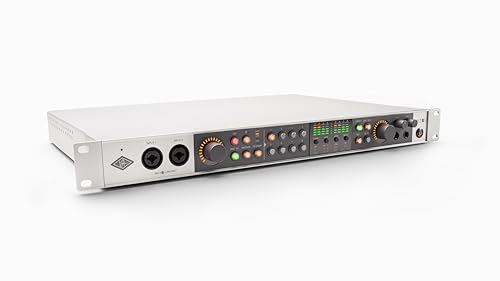
- 24x28 USB interface with 32-bit / 192 kHz conversion
- Eight Vintage preamps and classic compressor tone
- UAD Console app adds recall, auto-gain, and cue mixes
Best For: Recording and production setups wanting vintage-inspired UA workflow
Studio-Ready Multichannel Pick
Tascam US-16x08 Rackmount USB Interface

- 16 inputs for larger sessions
- Eight Ultra-HDDA mic preamps
- DSP mixer with EQ and compression
Best For: Studios needing high input count and low-latency monitoring
Compact Solo Recording Choice
Focusrite Scarlett Solo 4th Gen

- 120dB dynamic range with 24-bit/192kHz
- One mic preamp and one Hi-Z input
- Includes software and plugins
Best For: Solo recording setups for vocals and guitar
Portable Dual-Input Option

- Two combo inputs with phantom power
- 48kHz audio for clean recording
- USB/Direct monitoring switch
Best For: Small studios, streaming, and podcasting
Large-Format Tracking Hub – Focusrite Scarlett 18i20 4th Gen
If you’re comparing rackmount audio interfaces for professional studios, the Scarlett 18i20 4th Gen stands out as a practical 1U centerpiece for multitrack recording, music production, and podcasting. It offers 18 inputs and 20 outputs, plus eight mic preamps, dual Hi-Z inputs, ADAT, S/PDIF, MIDI, and Word Clock, so it can anchor a flexible studio routing setup.
Best For: Project and professional studios that need a high-I/O rack interface with built-in workflow tools.
Pros:
- 18-in/20-out layout with eight mic preamps for broad tracking and routing options
- 24-bit/192kHz conversion with 122dB dynamic range for detailed recordings
- Auto Gain and Clip Safe help speed up setup and protect against clipping
- Includes software such as Pro Tools Intro+, Ableton Live Lite, and Cubase LE
Cons:
- Best suited to users who will actually use the many rear-panel connections
- At 8 pounds, it is not the lightest rack unit to move around
The Scarlett 18i20 is a strong fit if you want one interface to handle tracking, expansion, and studio clocking in a single rack space. Its biggest advantage is depth of connectivity paired with simple tools that make day-to-day recording less fussy.
Rack Mount Monitoring Splitter – 8-Channel Rack Headphone Amp
For studios that need monitoring distribution alongside rackmount audio interfaces for professional studios, this 1U headphone amplifier is built to feed multiple players from a single rack space. It provides 8 independently controlled channels, stereo or mono operation, and up to 16 headphone outputs, making it useful for sessions where several musicians or engineers need their own feed.
Best For: Recording rooms, control rooms, and live setups that need multi-headphone monitoring from a rack.
Pros:
- 8 independent channels with stereo/mono switching for flexible monitoring
- Front and rear headphone outputs support up to 16 headphones total
- 6-segment LED meters and individual volume controls on each channel
- 1U rackmount design fits cleanly into studio racks or portable cases
Cons:
- It is a headphone distribution amp, not an audio interface or recorder
- Requires an external source and proper routing for each channel
This unit is best treated as a monitoring companion rather than a front-end recording device. If your studio already has interface I/O sorted out, it can make headphone routing far more manageable during sessions.
Hybrid DSP Console – Avid Pro Tools Carbon
Among rackmount audio interfaces for professional studios, the Avid Pro Tools Carbon is built for users who want tight Pro Tools integration and low-latency monitoring in a high-end workflow. It mixes and records through AAX DSP plugins with sub-1 ms latency monitoring, and it combines native CPU processing with HDX DSP and FPGA hardware for a hybrid studio setup.
Best For: Pro Tools studios that want DSP-powered recording, monitoring, and mixing.
Pros:
- Sub-1 ms latency monitoring with AAX DSP plugin processing
- Hybrid workflow uses native CPU plus HDX DSP at the same time
- High-performance FPGA and eight HDX DSPs for demanding sessions
- Designed with quiet thermal management and transparent preamp design
Cons:
- Supported software is listed as Pro Tools, so it is a specialized choice
- At 17 pounds, it is a substantial piece of rack hardware
Carbon is the most specialized option here, and that focus is its strength. If your studio workflow is centered on Pro Tools and you want DSP-assisted tracking with minimal latency, it delivers a purpose-built approach.
Rack Preamp Utility Mixer – Pyle PPRE70BT Rack Preamp
If you need a rack unit that does more than traditional studio routing, the Pyle PPRE70BT is a budget-friendly preamp and receiver with Bluetooth, FM radio, USB, SD, and recording mode. It is not a full rackmount audio interface for professional studios, but it can still serve as a practical utility box for playback, simple source switching, and basic monitoring tasks.
Best For: Studios or workspaces that want an all-in-one rack preamp with streaming and media playback features.
Pros:
- Built-in Bluetooth for wireless streaming and remote-style convenience
- FM tuner, USB flash, and SD card playback expand source options
- Front-panel controls for bass, treble, mid, balance, and master volume
- RCA inputs/outputs plus headphone jack and recording mode add flexibility
Cons:
- Only 2 channels, so it is not designed for multitrack studio interface work
- 15-watt output and consumer-style features limit its role in pro tracking chains
This Pyle unit is best viewed as a rackmount utility rather than a main studio interface. It makes sense when you want simple playback, source selection, and basic preamp control in one compact chassis.
Flagship Dante Recording Hub – Apollo x16D Rackmount Thunderbolt 3 Audio Interface
Universal Audio Apollo x16D Essentials+ 18 x 20 Audio Interface with Dante I/O and UAD DSP
Check Price On AmazonIf you’re shopping for rackmount audio interfaces for professional studios, the Apollo x16D is built for high-end routing, networked I/O, and low-latency monitoring in a serious control room. It combines 16 x 16 Dante network I/O, Thunderbolt 3 connectivity, and onboard HEXA Core processing so you can work with UAD plug-ins while keeping tracking latency low.
Best For: Studios that need Dante-based integration, premium clocking, and expandable outboard-friendly I/O.
Pros:
- 16 x 16 Dante I/O with AES67 mode support at 48 kHz
- Onboard HEXA Core Processing for near-zero-latency UAD plug-in mixing
- Dual-Crystal Clocking and 24-bit / 192 kHz resolution for high-end fidelity
- Includes monitor outs, word clock I/O, and stereo AES I/O for pro hardware integration
Cons:
- Designed for studio infrastructure, so it may be more interface than a simple project setup needs
- Focuses on digital and networked workflows rather than built-in mic preamp features
For professional rooms centered on Dante networking and UAD-based workflows, the Apollo x16D is a strong rackmount anchor. Its combination of conversion, clocking, and processing makes it especially practical when the interface has to fit into a larger studio system.
Studio Control Center Bundle – AudioFuse 16Rig with Isolation Shield
The Arturia AudioFuse 16Rig bundle is a flexible option for rackmount audio interfaces for professional studios that also need strong monitoring and MIDI connectivity. It offers 16 analog inputs, 12 analog outputs, dual ADAT I/O, wordclock, and internal low-latency mixers, making it useful as a central hub for complex sessions.
Best For: Studios that want a versatile 16-channel interface with immersive monitoring support and a bundled isolation shield.
Pros:
- 16 TRS inputs and 12 analog outputs with dual ADAT I/O and wordclock
- Two internal low-latency mixers allow standalone operation without a computer
- Supports immersive monitoring layouts up to Dolby Atmos 9.1.6
- Uses ESS and Cirrus Logic converters for 24-bit / 192 kHz recording
Cons:
- The bundle includes a microphone isolation shield, which may be unnecessary if you only need the interface
- Its feature set is broad, so simpler setups may not use everything on offer
For studios that need routing flexibility and advanced monitoring options, the AudioFuse 16Rig stands out as a practical control hub. The included isolation shield adds value, but the interface itself is the main draw for serious multi-output workflows.
Rack-Style USB Workhorse – Volt 876 24×28 USB Audio Interface
The Universal Audio Volt 876 is a rack-mount style USB interface aimed at recording and production setups that want a straightforward studio center with a premium analog flavor. It combines 24×28 USB connectivity, eight Vintage preamps, and classic compressor voicing, while the 32-bit / 192 kHz conversion keeps detail high across Mac, PC, iPad, and iPhone use.
Best For: Producers and recording studios that want a rack-style interface with vintage-inspired tone and easy session recall.
Pros:
- Eight onboard Vintage preamps with classic compressor inspiration from UA hardware
- 32-bit / 192 kHz conversion on Mac, PC, iPad, and iPhone
- UAD Console app supports Assistive Auto-Gain, session recall, and two low-latency cue mixes
- Can expand by combining up to three Volt 876 units or integrating with Apollo and ADAT gear
Cons:
- It is rack-mount style rather than a dense digital-routing hub like some higher-end studio interfaces
- Best suited to production and recording workflows, not specialized network audio setups
The Volt 876 is a practical pick when a studio wants multiple inputs, familiar UA software support, and a more hands-on recording workflow. It leans toward straightforward production use, but the expansion options make it scale well in larger systems.
Studio-Ready Multichannel Pick – Tascam US-16×08 Rackmount USB Interface
If you need rackmount audio interfaces for professional studios, the Tascam US-16×08 is built for tracking bigger sessions without giving up clarity. It brings 16 total inputs to your computer, including eight Ultra-HDDA mic preamps, eight line inputs, and balanced outputs for monitoring and routing.
Best For: Recording studios that need lots of mic and line inputs, low-latency monitoring, and simple rackmounted expansion.
Pros:
- 16 inputs total for handling larger recording sessions
- Eight Ultra-HDDA mic preamps with up to 56dB gain
- DSP mixer supports low-latency digital mixing
- Four-band EQ and compression on each channel for monitor mixes
Cons:
- Windows compatibility is listed in the supplied details
- Only two line outputs have front-panel level control
For studios that prioritize input count and practical monitoring tools, the US-16×08 offers a straightforward rackmount layout with enough flexibility for drums, bands, and multi-source recording.
Compact Solo Recording Choice – Focusrite Scarlett Solo 4th Gen
The Focusrite Scarlett Solo 4th Gen is not a rackmount audio interface for professional studios in the traditional multi-channel sense, but it is a strong compact option for single-source recording. It focuses on one mic and one Hi-Z instrument input, with high-resolution conversion and software support for quick studio sessions.
Best For: Solo artists, vocalists, and guitarists who want a simple, high-quality interface for personal recording setups.
Pros:
- 120dB dynamic range with 24-bit/192kHz support
- One XLR mic preamp plus one Hi-Z instrument input
- Air mode adds presence and harmonic drive to vocals and guitars
- Includes recording software and plugins for getting started quickly
Cons:
- Only 2 channels, so it is not built for larger studio tracking
- Not rackmountable based on the supplied dimensions and format
As a compact interface, the Solo excels at straightforward recording rather than studio expansion. If your workflow centers on one performer at a time, it delivers focused features in a very portable package.
Portable Dual-Input Option – M-AUDIO M-Track Duo Interface
The M-AUDIO M-Track Duo is a compact audio interface for users who want a simple recording path rather than a full rackmount audio interface for professional studios. It covers podcasting, recording, live streaming, and basic production with two combo inputs and straightforward monitoring controls.
Best For: Small home studios, streamers, and podcasters who need a lightweight two-input interface.
Pros:
- Two combo XLR/line/instrument inputs with phantom power
- 48kHz audio resolution for clean everyday recording
- USB/Direct switch enables zero-latency monitoring
- Includes MPC Beats software for production work
Cons:
- Only two inputs, so it is not designed for large sessions
- Portable desktop format rather than a rackmount design
This interface is best viewed as an affordable, flexible entry point for small setups. It handles core recording tasks well, but studios needing lots of channels will want a more expanded unit.
How We Picked the Best Rackmount Audio Interfaces for Professional Studios
We prioritized Rackmount Audio Interfaces for Professional Studios that balance sound quality, stability, and useful expansion. That means dependable drivers, enough analog and digital I/O for multitrack work, solid monitoring control, and a form factor that belongs in a proper rack or desk setup.
We also considered whether each interface makes sense for modern workflows such as hybrid tracking, podcast production, MIDI integration, and larger session routing.
Quick Comparison
Start by matching the interface to your workflow. If you need straightforward recording and monitoring, a smaller USB unit can be enough. If your studio handles band tracking, outboard gear, or complex headphone mixes, look for more inputs, more outputs, and better routing tools. For larger facilities, networked or expansion-friendly models can save time and future upgrade costs.
Key Buying Factors for Rackmount Audio Interfaces for Professional Studios
Input and Output Count
Count the sources you record at once, not just the number of microphones you own. A studio that tracks drums, ensembles, or multiple vocalists will benefit from additional mic preamps, line inputs, and outputs for monitoring and outboard inserts.
Connectivity and System Compatibility
USB remains the simplest choice for many studios, while Thunderbolt and Dante-based systems can be better for low latency or networked environments. Make sure the interface works smoothly with your DAW, computer ports, and existing studio hardware.
Monitoring and Headphone Distribution
Professional sessions often need more than one headphone mix. Look for direct monitoring, cue mixes, and enough headphone outputs or expansion paths to keep performers comfortable without creating latency issues.
Sound Quality and Preamps
Conversion quality matters, but so do the preamps and line stages feeding it. For vocal-heavy studios, transparent gain and low noise are important. For producers who want character, onboard coloration can be a plus.
Workflow and Expansion
Consider whether you need MIDI, ADAT, Dante, word clock, or software-based control. The best Rackmount Audio Interfaces for Professional Studios usually fit into a larger signal chain instead of limiting it.
Who Should Buy Which Rackmount Audio Interfaces for Professional Studios?
Choose a high-I/O rack unit if you record bands, drums, or multiple guests regularly. Pick a premium Thunderbolt or Dante interface if you want top-tier routing and low-latency performance in a larger production room. If your needs are simpler, a more compact interface may be the smarter value, especially for overdubs, vocals, and podcasting.
For most buyers, the best choice is the one that matches today’s sessions while leaving enough room for tomorrow’s studio growth.