If your room is coloring what you hear, even great monitors can lead you astray. The right studio monitors with room correction can help you hear a more truthful image, so your mix decisions translate better outside the studio.
In this roundup, we focus on options that improve accuracy through built-in DSP, calibration software, or bundled measurement tools—so you can choose the right setup for your space and workflow.
Best 10 Studio Monitors with Room Correction Picks for 2026
Compact ARC-Corrected Nearfield
IK Multimedia iLoud MTM MKII Pair

- Built-in ARC room correction
- 36 Hz to 32 kHz frequency range
- ARC X monitor emulation
Best For: Mixing and critical listening in compact rooms
Calibration Tool
Neumann MA 1 Alignment Microphone

- Automatic monitor alignment system
- Includes measurement mic and software
- Works with compatible Neumann KH speakers
Best For: Owners of compatible Neumann KH monitors and subwoofers
Value Room-Tuning Pair

- Room compensation via knobs and app
- 3-way active crossover design
- XLR, TRS, RCA, AUX, and Bluetooth
Best For: Creators wanting flexible tuning and broad connectivity
Reference-Grade Calibration Monitor
IK Multimedia iLoud Precision MTM MKII
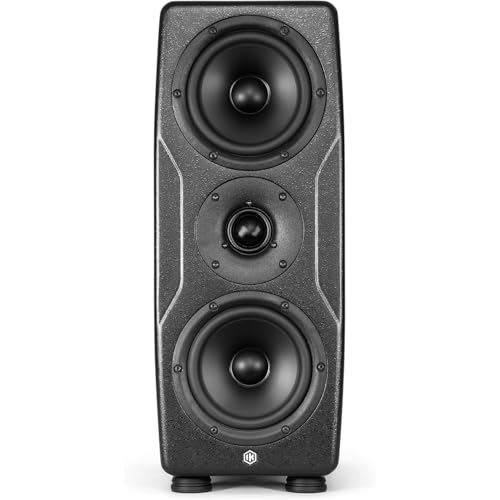
- ARC X auto calibration included
- Linear phase, ultra-flat response
- Dual 5-inch woofers plus graphene tweeter
Best For: Professional mixing and mastering with precise room calibration
Neumann DSP Nearfield Reference

- DSP control for nearfield monitoring
- Modeled waveguide for controlled dispersion
- Compact 4-inch reference monitor
Best For: Engineers needing a compact DSP-tuned monitor for small-room mixing
IK Multimedia Room Correction

- Includes mic, software, and processor
- Aims to improve balance and imaging
- Works with existing studio monitors
Best For: Mixers who want a dedicated correction system for existing monitors
PreSonus Adjustable Nearfield

- Built-in acoustic tuning controls
- Wide sweet spot from EBM waveguide
- 6.55-inch woofer for fuller nearfield sound
Best For: Home and project studios needing on-speaker room-aware tuning
Room Correction + Virtual Monitoring
IK Multimedia ARC X Room Correction & Speaker Emulation
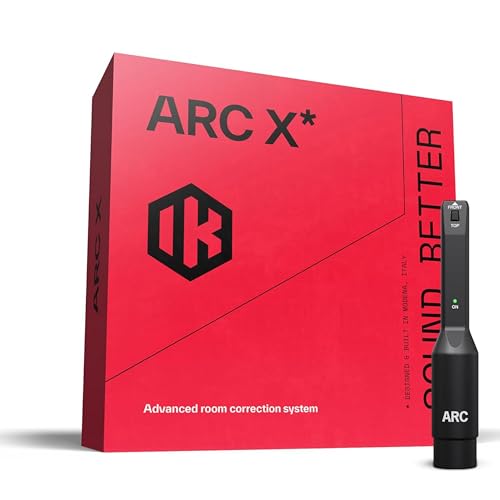
- Includes measurement mic and guided room analysis
- Zero-latency calibration via speaker or DAW plug-in
- Virtual monitoring with 20+ reference systems
Best For: Producers who want calibration and reference checking in one workflow
Coaxial Monitor Tuning

- Coaxial design for strong imaging and dispersion
- HF, midrange, and acoustic-space tuning controls
- Front port and 6.5-inch woofer for smooth bass
Best For: Mixers and immersive audio users needing speaker-based room compensation
Acoustic Space Control
Mackie HR824mk2 8-Inch Studio Monitor
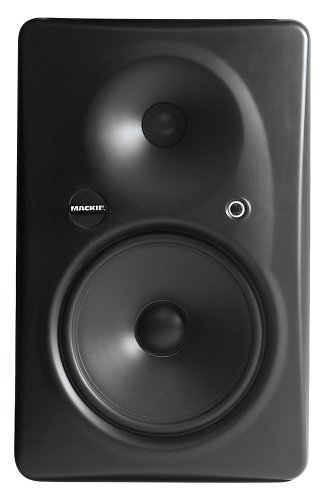
- Acoustic Space Control for room adaptation
- 8.75-inch LF driver for strong low-end output
- Waveguide and zero-edge baffle for natural sound
Best For: Engineers wanting a large powered monitor with basic room compensation controls
Compact ARC-Corrected Nearfield – IK Multimedia iLoud MTM MKII Pair
If you want studio monitors with room correction that can help you mix more confidently in a small or tricky space, the iLoud MTM MKII pair is built for that job. Its built-in ARC X room correction, linear phase design, and compact MTM layout aim to improve accuracy, imaging, and consistency right at the desk.
Best For: Critical listening, mixing, and production in compact studios where fast room calibration matters.
Pros:
- Built-in ARC room correction helps adapt the monitors to your room and placement.
- Ultra-flat response from 36 Hz to 32 kHz supports detailed, full-range monitoring.
- Time-aligned MTM design is intended to reduce phase distortion and ear fatigue.
- Includes ARC X speaker emulation for checking mixes across different reference styles.
Cons:
- ARC mic is sold separately according to the product notes.
- Compact 3.5-inch driver size may not suit users wanting larger nearfield monitors.
This is a strong fit if you need desk-friendly monitors with practical calibration tools and reference checking built in. The combination of room correction, speaker emulation, and flexible mounting makes it especially useful for focused production workflows.
Calibration Tool – Neumann MA 1 Alignment Microphone
The Neumann MA 1 is the most focused option here if you already own compatible Neumann KH DSP loudspeakers or subwoofers and want studio monitors with room correction through proper calibration. It pairs measurement hardware with alignment software for macOS and Windows, giving you a straightforward way to tune a monitoring system for studio use.
Best For: Neumann KH speaker owners who want automatic alignment and calibration in a studio monitoring setup.
Pros:
- Designed for automatic monitor alignment with compatible Neumann KH DSP speakers and subwoofers.
- Includes a measurement microphone and calibration software for macOS and Windows.
- XLR connectivity fits a studio monitoring workflow.
- Purpose-built for studio monitoring rather than general playback.
Cons:
- It is a calibration system, not a pair of speakers.
- Only works with compatible Neumann KH speaker systems.
If you already have the right Neumann hardware, this is a practical way to improve alignment without guessing at settings. It is a niche product, but for the right system it directly addresses room correction in a professional monitoring chain.
Value Room-Tuning Pair – Edifier MR5 Studio Monitors
The Edifier MR5 is a flexible choice if you want studio monitors with room correction without moving up to a more specialized calibration system. It combines a 3-way active design with rear tuning controls and app-based room compensation, which makes it easier to adapt the sound to your desk or nearfield setup.
Best For: Budget-conscious creators who want room-tuning controls, multiple inputs, and a compact studio monitor pair.
Pros:
- Rear knobs and the EDIFIER ConneX app provide room compensation options.
- 3-way active crossover with 5-inch woofer, mid driver, and silk dome tweeter.
- Versatile connectivity includes XLR, TRS, RCA, AUX, and Bluetooth 6.0.
- 110W RMS output is suitable for near-field use and mid-sized rooms.
Cons:
- Room correction is based on tuning and app presets rather than full automatic calibration.
- Large feature set may be more than needed for simple desktop listening.
The MR5 offers a practical blend of monitoring features and everyday flexibility. For users who want to shape their sound with room-aware controls and still keep plenty of input options, it is an easy monitor pair to consider.
Reference-Grade Calibration Monitor – IK Multimedia iLoud Precision MTM MKII
For buyers searching for studio monitors with room correction at a more reference-focused level, the iLoud Precision MTM MKII is the most advanced option in this group. It combines ARC X auto calibration, linear phase behavior, and a symmetrical MTM design to deliver accurate monitoring for mixing, mastering, and immersive audio work.
Best For: Professional mixing, mastering, and immersive audio setups that need precise calibration and strong imaging.
Pros:
- ARC X auto room calibration adapts the monitor to the listening space in seconds.
- Reference-grade response and linear phase design are built for accuracy.
- Dual 5-inch woofers and graphene tweeter support detailed imaging and clarity.
- High output and DSP tuning options suit demanding studio workflows.
Cons:
- Single-monitor listing means you are buying one unit, not a pair.
- More advanced features may be overkill for casual desktop use.
This model is aimed at serious monitoring rather than general listening. If you want a calibrated nearfield speaker with extensive DSP control and strong translation-focused design, it stands out as the most pro-oriented option here.
Neumann DSP Nearfield Reference – KH 80 DSP 4" Powered Monitor
If you want studio monitors with room correction for a compact nearfield setup, the Neumann KH 80 DSP is built around DSP control and a mathematically modeled dispersion waveguide. It’s aimed at professional reference use in project studios, music studios, broadcast centers, post-production rooms, and home studios where consistent imaging matters more than raw size.
Best For: Nearfield mixing and reference monitoring in small to medium rooms where DSP-based tuning and accurate dispersion are priorities.
Pros:
- DSP engine helps tailor performance for different monitoring environments.
- Mathematically modeled dispersion waveguide supports controlled nearfield imaging.
- Compact 4-inch design suits tabletop or floor-standing placement.
- Works with smartphone, tablet, desktop, laptop, and MP3 player connectivity.
Cons:
- Single 4-inch woofer limits low-end output compared with larger monitors.
- Maximum output power is 25 watts, so it’s not meant for high-volume rooms.
- Room-correction features are DSP-based rather than a bundled microphone-and-software system.
Overall, this is a focused reference monitor for buyers who want compact size, DSP control, and a professionally oriented nearfield listening experience. It makes sense when accuracy and placement flexibility matter more than big bass.
IK Multimedia Room Correction – ARC Studio Processor System
For studio monitors with room correction, the IK Multimedia ARC Studio is the most dedicated option here because it’s a complete correction system rather than a speaker. It includes a high-precision measurement microphone, advanced calibration software, and a stand-alone processor designed to improve frequency balance and stereo imaging in recording and home studio setups.
Best For: Producers and engineers who want a dedicated room-correction workflow for accurate monitor translation without relying on constant manual adjustments.
Pros:
- Includes measurement mic, correction software, and dedicated processor.
- Designed to improve frequency balance and stereo imaging.
- Compatible with studio monitors, desktop, laptop, and audio interface setups.
- Set-it-and-forget-it approach reduces day-to-day calibration work.
Cons:
- It is not a speaker, so it must be used with existing monitors.
- Room correction depends on setup and calibration workflow.
- Best value comes only if you already need a correction processor in your chain.
This is a practical pick when the priority is correcting the room instead of changing monitors. It fits buyers who want a hardware-based solution for more reliable mix decisions and monitor emulation options.
PreSonus Adjustable Nearfield – Eris E7 XT Active Monitor
PreSonus Eris E7 XT 2-Way Active Studio Monitor with EBM Waveguide (Pack of 1)
Check Price On AmazonThe PreSonus Eris E7 XT is a strong choice if you want studio monitors with room correction-style tuning controls built into the speaker itself. Its acoustic controls include Level, HPF, LF Trim, HF Trim, and Acoustic Space, while the EBM waveguide is designed to create a wide sweet spot and solid imaging for mixing in indoor studio spaces.
Best For: Home and project studios that want an active monitor with built-in acoustic tuning controls for adapting to the room.
Pros:
- Acoustic tuning controls help tailor the monitor to your space.
- EBM waveguide provides a wide sweet spot and stable imaging.
- 6.55-inch woofer and 1.25-inch tweeter offer a fuller-range nearfield design.
- Includes RCA, TRS, and XLR connectivity for flexible hookups.
Cons:
- Tuning is speaker-based, not a full external room-correction system.
- Single-monitor pack means stereo use requires purchasing a second unit.
- Large cabinet size may be less convenient for very small desks.
As a practical monitor, the Eris E7 XT gives you built-in adjustment options that can help you adapt to the room without extra hardware. It’s a good fit when you want flexible active monitoring and a wide listening area.
Room Correction + Virtual Monitoring – IK Multimedia ARC X Room Correction & Speaker Emulation
For studio monitors with room correction, IK Multimedia ARC X is built to help you hear a flatter, more reliable mix in real-world spaces. It measures your room with the included mic, applies phase-coherent correction, and adds virtual monitoring so you can check your work across multiple playback systems without changing speakers.
Best For: Producers and engineers who want calibration, virtual reference checking, and flexible target-curve control in one workflow.
Pros:
- Includes a measurement mic and guided multi-point room analysis for fast setup
- Offers on-speaker calibration or DAW plug-in correction with zero latency
- Virtual monitoring lets you audition mixes through 20+ speaker and device profiles
- Custom target curves, phase modes, and smoothing controls for detailed tuning
Cons:
- Requires measurement and setup before you can use the correction features
- Focuses on calibration and emulation rather than being a monitor speaker itself
ARC X is the most flexible option here if your priority is controlling how your room translates. It is especially useful in untreated or changing spaces where monitor calibration and reference simulation matter as much as the monitors themselves.
Coaxial Monitor Tuning – PreSonus Eris Pro 6
If you want studio monitors with room correction-style tuning controls built into the speaker, the PreSonus Eris Pro 6 is a practical choice. Its coaxial design is aimed at better phase alignment and imaging, while the rear controls let you adjust HF, midrange, low cutoff, and acoustic space to suit wall or corner placement.
Best For: Mixers and immersive audio users who need accurate imaging plus simple room-compensation controls.
Pros:
- Coaxial single-point-source design supports symmetrical dispersion and a wide sweet spot
- Built-in acoustic tuning controls help compensate for room placement
- 6.5-inch woofer and front-firing port provide smooth, extended low end
- Balanced XLR, 1/4-inch TRS, and RCA inputs offer flexible connectivity
Cons:
- Tuning options are speaker-based, not full software room correction
- Single monitor listing means you may need to buy a pair separately
The Eris Pro 6 is a strong fit if you want a monitor that can be adapted to your room without adding extra software. Its imaging and placement controls make it especially appealing for stereo and Dolby Atmos setups alike.
Acoustic Space Control – Mackie HR824mk2 8-Inch Studio Monitor
The Mackie HR824mk2 is a straightforward option for studio monitors with room correction features built into the hardware. Its Acoustic Space Control is designed to adapt the monitor to different rooms, while the zero-edge baffle and optimized waveguide are aimed at delivering more accurate and natural sound reproduction.
Best For: Engineers who want a large powered monitor with room-adaptation controls for recording and surround work.
Pros:
- Acoustic Space Control helps tailor the monitor to the room
- 8.75-inch LF driver supports substantial low-frequency output
- Zero Edge baffle and waveguide are designed for accurate, natural reproduction
- Suited to 5.1 and 7.1 surround applications as well as studio use
Cons:
- Heavier and larger than more compact nearfield monitors
- Uses RCA connectivity, which may be less flexible than balanced studio inputs
- Room controls are basic compared with software-based correction systems
If you want a bigger monitor with built-in room adaptation rather than a separate correction package, the HR824mk2 is worth a look. It leans toward accuracy and surround-friendly performance, with enough low end for serious production spaces.
How We Picked the Best Studio Monitors with Room Correction
We selected products based on room-correction capability, monitor accuracy, flexibility of the calibration workflow, and value for different studio sizes. We also considered whether the solution is built into the speaker, software-based, or designed as a separate calibration system.
Quick Comparison
Some options are full monitor systems with integrated correction, while others are room-calibration tools meant to improve an existing pair of speakers. If you want the simplest path, look for an all-in-one monitor. If you already own monitors you like, a calibration system may deliver more improvement for less money.
Key Buying Factors for Studio Monitors with Room Correction
Calibration Method
Built-in correction is convenient and fast. External systems can be more flexible and may work across multiple monitor models. Consider whether you want automatic calibration, manual tuning, or both.
Room Size and Placement
Smaller rooms usually benefit most from correction because boundary effects and reflections are harder to manage. Larger monitors are not always better if your room cannot support them.
Monitoring Goals
If you mix for clients, prioritizing translation and neutrality makes sense. If you also produce music, check for features like voicing presets, virtual monitoring, or speaker emulation that help you compare your mix across systems.
Connectivity and Workflow
Look at input options, software compatibility, and whether the system stores calibration profiles on the speaker or computer. A smoother workflow is more likely to get used consistently.
Who Should Buy Which Studio Monitors with Room Correction?
Choose compact, integrated Studio Monitors with Room Correction if you want a simple setup in a small room or desktop studio. Choose a calibration system if you already own monitors and want to improve what you have without replacing them. Choose larger biamped or coaxial monitors if you need more headroom, higher SPL, or a more serious mix environment.
For most buyers, the best choice comes down to balancing convenience, monitor quality, and how much your room needs help. The right correction system can make a major difference, but it works best when paired with sensible placement and basic acoustic treatment.