The right enclosure can turn an unused M.2 or 2.5-inch drive into a fast, portable external SSD. However, compatibility, USB speed, cooling, and drive format all matter before you buy.
We compared 10 USB-C SSD enclosures across NVMe and SATA support, transfer performance, durability, installation, and everyday convenience to help you choose a dependable match for your drive.
Best 10 USB C SSD Enclosures Picks for 2026
Rugged NVMe/SATA Pick

- 20Gbps USB-C 3.2 Gen 2x2 performance
- Supports M.2 NVMe and SATA drives
- MIL-STD-810H and IP68-tested protection
Best For: Gamers and travelers needing a durable, flexible M.2 enclosure
2.5-Inch SATA Value Pick
UGREEN USB-C 2.5-Inch Enclosure
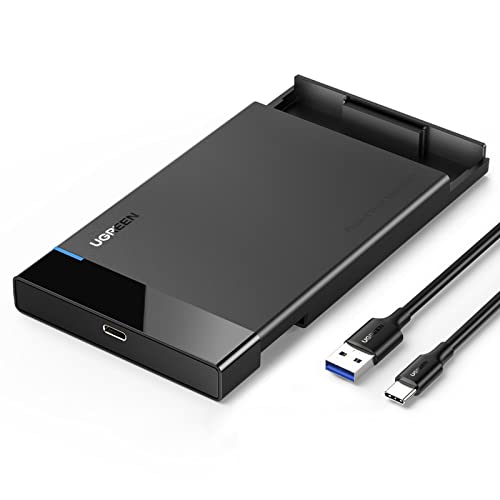
- Supports 2.5-inch SATA SSDs and HDDs
- UASP-enabled transfers up to 6Gbps
- Tool-free installation with included cable
Best For: Repurposing a 2.5-inch SATA drive on a budget
Tool-Free NVMe Pick

- Supports M.2 NVMe sizes from 2230 to 2280
- Flip-open, screw-free installation
- Aluminum cooling for steadier 10Gbps transfers
Best For: Frequent NVMe upgrades, cloning, and portable workloads
Clear 2.5-Inch SATA Pick

- Transparent tool-free 2.5-inch SATA design
- USB 3.1 Gen 2 with UASP and TRIM
- Supports drives up to 4TB and multiple platforms
Best For: Simple SATA drive reuse with visible, easy installation
Best NVMe Pick

- 10Gbps USB 3.2 Gen 2 interface
- Tool-free support for multiple M.2 NVMe sizes
- Includes USB-C and USB-A cables
Best For: M.2 NVMe SSD owners seeking portable storage
Best Simple SATA Adapter
Cable Matters 10Gbps Enclosure

- Supports 2.5-inch SATA drives up to 9.5mm
- Aluminum housing for protection and heat dissipation
- Supports UASP, TRIM, and S.M.A.R.T.
Best For: Backups, repairs, and repurposing 2.5-inch SATA drives
Best Tool-Free 2.5-Inch Pick

- Supports 2.5-inch SATA drives up to 6TB
- USB-C and USB-A connectivity with UASP
- Tool-free installation and hot-swapping
Best For: Portable 2.5-inch SATA SSD or HDD use
Best for 3.5-Inch Drives
ORICO Aluminum USB-C Enclosure

- Fits 3.5-inch and 2.5-inch SATA drives up to 20TB
- Aluminum housing with heat-dissipation vents
- Includes power adapter and USB-C-to-C/A cable
Best For: High-capacity desktop storage and backups
Best Portable Value

- Fits 7mm and 9.5mm 2.5-inch SATA drives
- UASP support with up to 5Gbps transfers
- Tool-free design with included USB-C-to-A cable
Best For: Portable drive transfers and everyday backups
Rugged NVMe/SATA Pick – ASUS TUF Gaming A2
The ASUS TUF Gaming A2 is a versatile choice among USB C SSD enclosures, supporting both M.2 NVMe PCIe and SATA drives in 2242, 2260, and 2280 sizes. Its USB-C 3.2 Gen 2×2 interface supports transfer rates up to 20Gbps, while the reinforced design is built for demanding travel and gaming use.
Best For: Gamers and mobile users who want broad M.2 compatibility and strong physical protection.
Pros:
- Supports both M.2 NVMe PCIe and SATA SSDs in three common lengths.
- MIL-STD-810H and IP68 testing, plus a silicone-rubber exterior, add drop, water, and dust resistance.
- Tool-free Q-Latch installation and an aluminum chassis with thermal pad simplify upgrades and cooling.
Cons:
- Its 20Gbps capability requires compatible host hardware and cables.
- At 279g, it is heavier than more basic portable enclosures.
The TUF Gaming A2 stands out when durability and drive flexibility matter as much as speed. It is a particularly capable option for users who may switch between supported NVMe and SATA M.2 drives.
2.5-Inch SATA Value Pick – UGREEN USB-C 2.5-Inch Enclosure
The UGREEN 2.5-inch enclosure is a straightforward option for turning a SATA SSD or hard drive into portable storage. Among USB C SSD enclosures, it focuses on broad compatibility, UASP-assisted transfers up to 6Gbps, and tool-free installation rather than M.2 NVMe support.
Best For: Users repurposing a 2.5-inch SATA SSD or HDD for computers, consoles, routers, or other compatible devices.
Pros:
- Supports 2.5-inch 7mm or 9.5mm SATA drives up to 6TB.
- UASP support can improve performance over traditional USB 3.0 transfers.
- Tool-free setup, LED status indicator, EVA protection, and a detachable 20-inch USB-A-to-USB-C cable are included.
Cons:
- The package does not include a USB-C-to-USB-C cable.
- It supports SATA drives, not M.2 NVMe SSDs.
- The plastic enclosure is less rugged than aluminum alternatives.
Choose this UGREEN model when your drive is a conventional 2.5-inch SATA device and dependable simplicity is the priority. Its included USB-A-to-USB-C cable makes it especially convenient for older computers and peripherals.
Tool-Free NVMe Pick – SABRENT USB-C NVMe Enclosure
The SABRENT EC-PNVO is a compact USB C SSD enclosure designed specifically for M.2 NVMe PCIe drives. Its flip-open, tool-free design and aluminum thermal interface make it well suited to drive upgrades, cloning, troubleshooting, and sustained portable transfers up to 10Gbps.
Best For: Creators, gamers, and technicians who need a simple, portable enclosure for M.2 NVMe drives.
Pros:
- Accepts M.2 NVMe drives in 2230, 2242, 2260, and 2280 sizes.
- Flip-open installation requires no screws or tools.
- Thermal pad contacts the aluminum cover to help maintain more stable performance during longer transfers.
- Includes a USB-C-to-USB-C cable and needs no external power or drivers.
Cons:
- It is NVMe-only and does not support M.2 SATA SSDs.
- Its interface is limited to 10Gbps rather than 20Gbps.
The EC-PNVO is a focused choice rather than a universal enclosure. If you have an NVMe drive and value quick tool-free access with practical cooling, its design is well matched to frequent drive handling.
Clear 2.5-Inch SATA Pick – POSUGEAR External Enclosure
The POSUGEAR external enclosure is a transparent, tool-free option for 2.5-inch SATA SSDs and hard drives. It delivers USB 3.1 Gen 2 connectivity with UASP and TRIM support, while its clear ABS shell lets you see the installed drive and built-in LED shows operating status.
Best For: Home users who want an easy-to-install 2.5-inch SATA enclosure with broad device compatibility and a visible design.
Pros:
- Supports 2.5-inch 7mm and 9mm SATA drives up to 4TB.
- Tool-free sliding installation with plug-and-play operation.
- UASP and TRIM support, automatic hibernation, and protection against overcurrent, overvoltage, and overheating.
- Works with Windows, Mac, Linux, Android, routers, TVs, PS5, and Xbox systems listed by the manufacturer.
Cons:
- It supports SATA drives, not M.2 NVMe SSDs.
- The stated capacity limit is 4TB.
- No warranty is listed in the supplied specifications.
The POSUGEAR is a practical choice for basic SATA drive reuse, especially if you like the convenience of a sliding tool-free design and transparent housing. It offers useful compatibility and protection features without adding installation complexity.
Best NVMe Pick – UGREEN 10Gbps M.2 Enclosure
The UGREEN USB-C M.2 NVMe enclosure is a strong choice for turning a compatible internal drive into fast portable storage. Its USB 3.2 Gen 2 interface supports up to 10Gbps when paired with a suitable USB-C 3.2 Gen 2 cable, while the tool-free design simplifies installation.
Best For: Users with an M.2 NVMe SSD who want a compact, travel-friendly USB-C enclosure.
Pros:
- Supports M-key and B&M-key NVMe drives in 2230, 2242, 2260, and 2280 sizes.
- Tool-free installation with plug-and-play operation.
- Includes USB-C and USB-A cables, a silicone case, and a thermal pad.
- RTL9210 chipset provides short-circuit, over-current, and other protections.
Cons:
- Does not support SATA NGFF or mSATA SSDs.
- Full 10Gbps performance requires a matching USB-C 3.2 Gen 2 data cable.
Choose this model when you need an enclosure for an NVMe M.2 drive rather than a 2.5-inch SATA disk. Its broad size support and included accessories make it a flexible option for computers, tablets, and compatible mobile devices.
Best SATA Versatility – ORICO 2.5-Inch USB-C Enclosure
The ORICO aluminum enclosure is designed for 2.5-inch SATA SSDs and HDDs, making it a practical option among USB C SSD enclosures for repurposing existing drives. It includes a USB-C to USB-A/C cable and supports drives up to 6TB in either 7mm or 9.5mm thickness.
Best For: Users who need broad device compatibility for a 2.5-inch SATA drive, including computers, PS5, TVs, and phones.
Pros:
- Supports 2.5-inch SATA SSDs and HDDs up to 6TB.
- Includes a 10Gbps USB-C to USB-A/C 2-in-1 cable.
- Aluminum housing and ventilation help with protection and heat dissipation.
- Tool-free, plug-and-play installation with automatic sleep mode.
Cons:
- Designed for 2.5-inch SATA drives, not M.2 NVMe SSDs.
- Actual drive performance is limited by the SATA III interface’s 6Gbps maximum.
This enclosure is especially useful if you switch between USB-C and USB-A devices. Its protection features, UASP support, and compatibility with several operating systems add convenience for storage expansion, gaming, and media use.
Best Simple SATA Adapter – Cable Matters 10Gbps Enclosure
The Cable Matters aluminum enclosure offers a straightforward way to use a 2.5-inch SATA SSD or HDD as external storage. It supports USB-C transfer rates up to 10Gbps with a compatible computer, while remaining compatible with Thunderbolt 3, Thunderbolt 4, and USB4 ports.
Best For: Laptop and desktop users who want a compact enclosure for diagnosing, backing up, or reusing a 2.5-inch SATA drive.
Pros:
- Supports 2.5-inch SATA SSDs and HDDs up to 9.5mm thick.
- Aluminum housing helps protect the drive and dissipate heat.
- Supports UASP, TRIM, and S.M.A.R.T. with compatible hardware and software.
- Works with Windows and Mac computers plus Thunderbolt ports.
Cons:
- Limited to 2.5-inch SATA drives rather than M.2 SSDs.
- Maximum SATA drive transfer rate is 6Gbps even though the enclosure supports 10Gbps USB.
Consider this model if you value a simple, portable SATA enclosure for backups or drive troubleshooting. Its broad port compatibility and support for common SATA SSDs make it a practical upgrade path without opening your laptop.
Best Tool-Free 2.5-Inch Pick – BENFEI USB-C SATA Enclosure
If you need a straightforward option among USB C SSD enclosures, the BENFEI model supports one 2.5-inch SATA SSD or HDD and offers both USB-C and USB-A connectivity. Its tool-free design makes drive installation quick for file transfers, backups, or external storage.
Best For: Users who want a lightweight, tool-free 2.5-inch SATA enclosure with flexible USB-C and USB-A connections.
Pros:
- Supports 2.5-inch SATA I/II/III drives up to 6TB.
- USB-C/USB-A design supports up to 5Gbps transfer rates with UASP.
- Tool-free, plug-and-play installation with hot-swapping support.
- Includes an 18-month unconditional warranty.
Cons:
- Only supports 2.5-inch drives, not 3.5-inch models.
- It houses one drive at a time.
The BENFEI is a practical choice for repurposing a laptop drive or carrying a 2.5-inch SSD between computers. Its integrated cable and compact 90-gram design add convenience, while UASP support can improve performance on compatible systems.
Best for 3.5-Inch Drives – ORICO Aluminum USB-C Enclosure
For larger drives, this ORICO model stands out among USB C SSD enclosures because it supports both 3.5-inch and 2.5-inch SATA HDDs and SSDs. The aluminum housing, included power adapter, and USB-C-to-C/A cable make it suited to desktop storage expansion and backups.
Best For: Users who need a powered enclosure for 3.5-inch drives, with compatibility for 2.5-inch SATA storage as well.
Pros:
- Supports 3.5-inch and 2.5-inch SATA drives up to 20TB.
- Aluminum shell and ventilation are designed to aid heat dissipation.
- Includes a 12V/2A power adapter and USB-C-to-USB-C/A cable.
- Offers tool-free, plug-and-play installation with multiple protection features.
Cons:
- Requires an external power adapter for operation.
- Its larger 3.5-inch design is less portable than a 2.5-inch enclosure.
- Drives should be safely ejected before unplugging to help avoid data loss.
This is the most versatile option here for desktop-style storage because it accommodates high-capacity 3.5-inch drives while also accepting 2.5-inch SATA media. Its broad OS and device compatibility makes it useful for backups, recovery, and expanded storage.
Best Portable Value – ORICO 2.5-Inch USB-C Case
This compact ORICO case is a convenient choice among USB C SSD enclosures for users moving a 2.5-inch SATA SSD or HDD between computers, consoles, TVs, and routers. It combines tool-free installation with a portable ABS shell and included USB-C-to-USB-A cable.
Best For: Portable 2.5-inch drive transfers, backups, storage expansion, and recovering data from an older drive.
Pros:
- Supports 2.5-inch 7mm and 9.5mm SATA I/II/III drives.
- USB-C interface supports UASP and up to 5Gbps transfer rates on compatible systems.
- Tool-free, plug-and-play installation with hot-swapping support.
- Lightweight ABS design includes an EVA foam pad to reduce drive movement.
Cons:
- Limited to one 2.5-inch drive and a stated capacity of up to 6TB.
- Uses a USB-C-to-USB-A cable rather than a USB-C-to-USB-C cable.
- The enclosure is plastic rather than aluminum.
The ORICO 25PW1-C3 is a sensible everyday enclosure when portability and easy access matter more than premium materials. It is well suited to repurposing an old laptop drive or creating removable storage for compatible computers and entertainment devices.
How We Picked the Best USB C SSD Enclosures
We focused on enclosure designs that offer a practical balance of compatibility, speed, durability, and value. The selection includes USB-C cases for M.2 NVMe drives, 2.5-inch SATA SSDs and hard drives, and models that support multiple drive formats. We also considered advertised USB standards, UASP support, included cables, tool-free installation, operating-system compatibility, and protection against heat, dust, or accidental drops.
Because an enclosure cannot transfer data faster than its drive and host connection allow, we treated headline speeds as theoretical maximums rather than guaranteed everyday results. Real performance depends on the SSD, USB port, cable, file sizes, and thermal conditions.
Quick Comparison
| Best For | Recommended Type | What to Look For |
|---|---|---|
| Modern NVMe SSDs | M.2 NVMe enclosure | USB 3.2 Gen 2 or faster, PCIe compatibility, thermal management |
| Older 2.5-inch SATA drives | 2.5-inch SATA enclosure | USB-C connection, UASP, 7mm or 9.5mm drive clearance |
| Large desktop drives | 3.5-inch enclosure | External power supply, adequate cooling, high-capacity support |
| Travel and field use | Rugged enclosure | Drop, water, and dust resistance plus secure drive retention |
Key Buying Factors for USB-C SSD Enclosures
Drive Compatibility
First identify the drive interface and physical format. M.2 NVMe drives use an M-key or B-key connector and require an NVMe-compatible enclosure; SATA M.2 drives are not interchangeable with NVMe models. A 2.5-inch SATA enclosure is the correct choice for most laptop SSDs and notebook hard drives. Some dual-mode enclosures support both NVMe and SATA, but verify the manufacturer’s compatibility list before purchasing.
USB Speed and Port Support
USB 3.2 Gen 2 enclosures commonly advertise up to 10Gbps, while Gen 2×2 models can advertise up to 20Gbps when connected to a compatible host port. A USB-C plug describes the connector, not necessarily the speed. Check the computer’s port standard and use the supplied or properly rated cable to reach the expected performance.
Cooling, Build, and Installation
NVMe drives can become hot during sustained transfers, so aluminum bodies, thermal pads, and ventilation are useful. Tool-free cases simplify drive swaps, while screw-secured designs may hold the drive more firmly. For travel, sealing and impact protection can matter more than maximum benchmark speed.
Who Should Buy Which USB C SSD Enclosures?
Choose an NVMe enclosure if you are repurposing a modern M.2 SSD for backups, game storage, or portable project files. Choose a 2.5-inch SATA enclosure for an older laptop drive or an affordable SATA SSD upgrade. Choose a dual-interface model if you regularly work with both NVMe and SATA drives and want one versatile case.
Choose a rugged model for commuting, photography, field work, or other situations where water and drops are realistic risks. Choose a 3.5-inch enclosure for a desktop hard drive, but remember that these drives generally need a dedicated power adapter and are less portable. Finally, confirm your drive size, connector key, operating system, cable type, and host USB speed before ordering.