Standalone USB duplicators can copy multiple flash drives at once without tying up a computer, making them useful for IT departments, installers, schools, retailers, and content distributors.
This roundup compares 10 options across port count, USB speed, erase functions, operating style, and workflow flexibility so you can choose the right duplicator for your volume and budget.
Best 10 Standalone USB Duplicators Picks for 2026
High-Capacity Workstation

- Standalone 1-to-15 duplication
- No PC or software required
- LCD feedback with asynchronous copying
Best For: High-volume USB deployment
Touchscreen Convenience
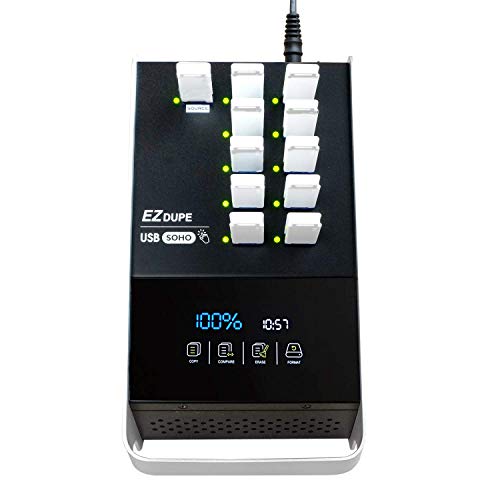
- Touchscreen copy and erase controls
- Supports USB 2.0/3.0/3.1 media
- Up to 35MB-per-second duplication
Best For: Easy daily USB media management
Sanitization Specialist

- Standalone seven-target copying
- Up to 2GB per minute
- Includes synchronous and asynchronous modes
Best For: USB duplication and sanitization
Portable Field Copier

- Standalone 1-to-2 USB copying
- Quick or bit-for-bit cloning modes
- Lightweight portable design
Best For: Small jobs and field deployment
High-Volume 15-Port Pick

- Standalone 1-to-15 duplication
- Up to 2GB/minute transfer rate
- Synchronous and asynchronous modes
Best For: Batch USB duplication for business and technical workflows
Maximum-Port Production Choice
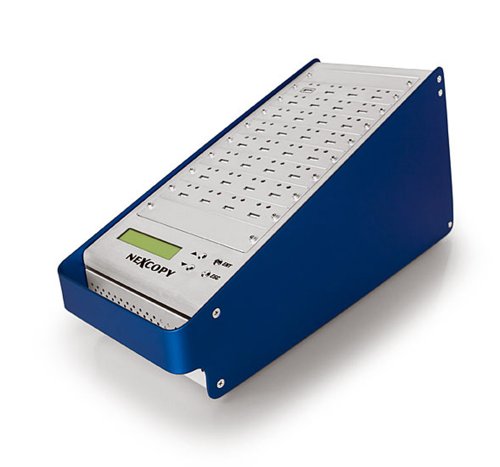
- Handles 31 target drives
- Standalone, no PC or software
- LCD status and performance feedback
Best For: High-volume USB duplication runs
23-Port Flexible Workflow Pick

- Standalone 1-to-23 duplication
- Up to 2GB/minute copying
- Supports synchronous and asynchronous modes
Best For: Medium-to-large batch duplication
High-Capacity PC Duplicator

- Copies to up to 16 USB targets
- Uses USB 3.0 transfer speeds
- Includes Drive Manager software
Best For: High-volume USB duplication from a PC
Standalone Workstation

- Works without a computer
- Copies and erases up to five drives
- Supports verification and overwrite modes
Best For: IT technicians managing USB duplication and sanitization
Compact Computer-Connected Option

- Duplicates up to 10 drives
- Supports Windows and Mac
- Copies from images, drives, or folders
Best For: Cross-platform users needing compact batch duplication
High-Capacity Workstation – 1-to-15 USB115SA Duplicator
For organizations that need to prepare many flash drives at once, this standalone USB duplicator provides a 1-master, 15-target configuration without requiring a computer or software. Its asynchronous operation and LCD status feedback support efficient batch work.
Best For: Businesses, IT teams, and deployment workflows that need high-volume USB duplication.
Pros:
- Duplicates one master to up to 15 target USB drives.
- Operates independently without a PC or software.
- Supports asynchronous duplication and real-time LCD status updates.
- USB sticks are immediately enumerated and ready after processing.
Cons:
- The 15-target desktop configuration may be more capacity than occasional users need.
- Asynchronous duplication is specified for masters up to 256MB/s.
The USB115SA is a practical choice when throughput and independent operation matter more than portability. Its large target count makes it especially useful for repeatable, high-volume distribution tasks.
Touchscreen Convenience – EZ Dupe SOHO Touch 1-to-10
The EZ Dupe SOHO Touch is a user-friendly standalone USB duplicator with a touchscreen menu for copying, comparing, formatting, and erasing flash media. It supports USB 2.0, 3.0, and 3.1 thumb drives and is designed for regular operation.
Best For: Users who want guided touchscreen control for recurring USB duplication and media-management tasks.
Pros:
- Touchscreen interface simplifies copy, compare, format, and erase functions.
- Supports up to 10 target USB drives.
- Handles USB flash media across file formats, file sizes, and drive capacities.
- Offers a stated duplication speed of up to 35MB per second.
Cons:
- At 3 pounds, it is less portable than compact duplicators.
- The touchscreen and advanced functions may be unnecessary for simple occasional copying.
With its independent interface and broad USB compatibility, the SOHO Touch balances capability with ease of use. It is a strong fit for teams that value straightforward daily operation and built-in verification and erase tools.
Sanitization Specialist – Systor 1-to-7 USB Duplicator
This standalone USB duplicator combines seven-target copying with sanitizer functionality, making it useful when drives must be cloned or cleared without a computer. It supports synchronous and asynchronous modes and delivers speeds up to 2GB per minute.
Best For: Businesses and IT departments that need repeatable USB duplication plus media sanitization.
Pros:
- Works independently without a computer or software.
- Copies one source to up to seven targets.
- Supports both synchronous and asynchronous duplication.
- Supports USB Type-C drives when used with an adapter.
Cons:
- Its 10-pound desktop form factor is not intended for frequent transport.
- USB Type-C drives require a separate adapter.
The SYS-USBD-7 is a capable middle ground for teams that need more than a small two-port copier but do not require a 15-target system. Its sanitizer features and lifetime technical support add value for ongoing operational use.
Portable Field Copier – BestDuplicator UB300 1-to-2
For smaller duplication jobs, the compact UB300 copies one USB flash drive to two targets without a computer. It offers quick data copying, bit-for-bit whole-media cloning, verification tools, and erase functions in a portable standalone design.
Best For: Technicians, schools, and field users who need a lightweight two-target USB duplicator.
Pros:
- Copies one source drive to two targets simultaneously.
- Supports both data-only Quick Copy and bit-for-bit Whole Media Copy.
- Includes capacity checks, device information, speed tests, and erase functions.
- Compact design weighs about 6.72 ounces.
Cons:
- Only supports two target drives at a time.
- Designed for USB 1.1 and USB 2.0 media rather than newer USB standards.
- Memory-card duplication requires a compatible USB card reader sold separately.
The UB300 is a sensible choice when portability and basic verification matter more than batch capacity. Its two copy modes make it flexible for routine file distribution or full-media cloning.
High-Volume 15-Port Pick – Systor SYS-USBD-15
The Systor SYS-USBD-15 is a practical choice for organizations seeking standalone USB duplicators without a computer or software. Its 1-to-15 layout supports bit-by-bit copying, with synchronous and asynchronous modes for different duplication workflows.
Best For: Businesses and technicians duplicating USB drives in batches of up to 15.
Pros:
- Standalone operation requires no PC or software.
- Copies at up to 2GB per minute, or 33MB per second.
- Supports synchronous and asynchronous copy modes.
- Includes a 1-year parts, 3-year labor warranty and lifetime technical support.
Cons:
- USB Type-C drives require an adapter.
- Its 15-port capacity may be limiting for larger production runs.
With consistent stated transfer performance even when all ports are loaded, this Systor model offers a balanced combination of batch capacity, flexible copy modes and support coverage.
Maximum-Port Production Choice – USB131SA 1-to-31
For buyers comparing standalone USB duplicators by port count, the USB131SA provides a 1-master, 31-target configuration. It works without a PC or software and adds asynchronous duplication plus LCD status feedback for production-oriented workflows.
Best For: High-volume duplication jobs requiring up to 31 target USB drives at once.
Pros:
- Supports a large 1-to-31 master-and-target configuration.
- Standalone design does not require a PC or software.
- Rated copy speed exceeds 1800MB per minute to each port.
- LCD provides real-time performance and status feedback.
Cons:
- Weighs 18 pounds, so it is less convenient to move.
- Asynchronous duplication is specified for masters up to 256MB.
The USB131SA stands out when throughput and maximum simultaneous targets matter most. Its large port count and LCD monitoring make it suited to repeatable, high-volume tasks.
23-Port Flexible Workflow Pick – Systor SYS-USBD-23
The Systor SYS-USBD-23 expands standalone USB duplication to 23 target drives while retaining a compact, computer-free workflow. It performs bit-by-bit copying at up to 2GB per minute and supports both synchronous and asynchronous modes.
Best For: Personal or business users who need more simultaneous copies than a smaller duplicator provides.
Pros:
- Duplicates drives without a computer or software.
- Provides up to 23 target ports.
- Supports synchronous and asynchronous duplication.
- USB Type-C drives are supported with an adapter.
Cons:
- USB Type-C use requires an adapter.
- The supplied specifications list a USB 1.1 interface.
- Its 23-port capacity may still be insufficient for the largest batches.
This model is a useful middle ground for buyers who need substantial batch capacity but do not require the 31-target configuration. Its bit-by-bit mode and flexible operating options support varied duplication needs.
High-Capacity PC Duplicator – 16-Target USB 3.0 Copier
For buyers comparing standalone usb duplicators, the Nexcopy SSUSB160PC is a PC-based option built to copy to as many as 16 USB targets. Its USB 3.0 interface is designed to use a flash drive’s maximum transfer speed, and included Drive Manager software simplifies the copying process.
Best For: Offices, technicians, and organizations that need high-volume USB duplication from a connected computer.
Pros:
- Supports up to 16 target USB drives.
- Uses USB 3.0 technology for fast copying.
- Includes Nexcopy Drive Manager software.
- Copies USB drives with a photocopier-like workflow.
Cons:
- PC-based operation requires a connected computer.
- At 12 pounds, it is less portable than compact duplicators.
The SSUSB160PC is a practical choice when throughput and target count matter more than portability. It fits production-style workflows better than occasional, small-batch copying.
Standalone Workstation – 1:5 USB Duplicator and Eraser
The StarTech USBDUP15 is one of the more flexible standalone usb duplicators for technicians who need both copying and drive sanitation without a computer. It supports USB 3.0 and 2.0 media, offers several erase modes, and uses an LCD interface to monitor operations and verify results.
Best For: IT professionals and technicians who need to clone, erase, compare, and manage up to five USB drives independently.
Pros:
- Duplicates or erases up to five USB drives without a computer.
- Supports file-based, sector-by-sector, quick-erase, and overwrite modes.
- LCD and LED indicators provide operation and error information.
- Copy-and-Compare can verify cloned drives.
Cons:
- Its 1-to-5 capacity is lower than larger multi-target units.
- External USB storage devices may require their own power source.
- Asynchronous copying requires source content under 64 MB.
With built-in erasing, verification, and no-computer operation, this StarTech model is especially useful for service desks and repeatable IT workflows. Its five-target limit keeps it suited to moderate rather than high-volume production.
Compact Computer-Connected Option – 10-Drive USB 3.0 Duplicator
This DupliM Mini offers a compact alternative for shoppers considering standalone usb duplicators but comfortable with computer-connected operation. It can duplicate up to 10 USB 3.0 or 2.0 drives at once using image files, a source flash drive, or selected files and folders through software for Windows and Mac.
Best For: Mac and PC users who need compact, 10-drive duplication with flexible source options.
Pros:
- Duplicates up to 10 USB drives simultaneously.
- Supports USB 3.0 and 2.0 media.
- Copies from image files, flash drives, or selected computer files.
- Works with Windows and Mac OS and includes the required cable and power adapter.
Cons:
- Computer-connected operation is required.
- It is not a fully computer-independent duplicator.
- Listed write speeds vary by specification, so actual performance may depend on the media and setup.
The DupliM Mini balances a 10-drive target count with flexible software-based source selection and cross-platform support. Choose it when compact size and Mac compatibility are more important than standalone operation.
How We Picked the Best Standalone USB Duplicators
We focused on the features that most affect real-world duplication work: target-port count, supported USB standards, rated transfer speed, standalone versus computer-connected operation, display and controls, and media-erasing capabilities. We also considered whether each unit suits occasional copying, recurring production runs, or higher-volume IT deployment.
Specifications such as advertised speed are useful for comparison, but actual performance depends on the source drive, target drives, file sizes, data type, and whether the devices share a USB bus. A duplicator that supports several generations of USB media may offer more flexibility, while a simpler model can be easier to operate and maintain.
Quick Comparison
- Small batches: Two- to five-target models are compact and practical for occasional duplication.
- Medium-volume work: Seven- to 16-target systems balance throughput, workspace, and cost.
- Large production runs: 23- and 31-target units reduce operator time when many drives must be prepared.
- Computer-assisted workflows: PC-based models may be preferable when duplication is part of a broader software-controlled process.
- Sanitization: Models with dedicated erase functions are better suited to reusable media and data-disposal procedures.
Key Buying Factors for Standalone USB Duplicators
Target Count and Throughput
Choose the number of target ports based on your normal batch size, not your occasional maximum. More ports can improve productivity, but they also increase the unit’s footprint and upfront cost. Check the rated copy speed and remember that the slowest drive often limits the batch.
USB Compatibility
Confirm support for the media you actually use, including USB 2.0, USB 3.0, or USB 3.1 devices. Backward compatibility is common, but connector type, drive capacity, and unusual flash-drive designs can still affect usability.
Standalone Controls and Verification
Standalone USB Duplicators should provide clear controls, status feedback, and a straightforward way to confirm a completed copy. LCD or touchscreen menus can simplify setup, especially when different operators share the machine. Look for verification options if data integrity matters more than maximum speed.
Erase and Security Features
If drives are reused, a built-in erase or sanitization mode can help standardize the workflow. Match the available erase methods to your organization’s policy and compliance requirements; a basic deletion function may not meet every security standard.
Power, Space, and Support
Account for power requirements, cooling, desk space, and replacement support. A larger duplicator is only useful if it can be installed where operators can safely load and unload drives. Warranty coverage and available documentation also matter for business-critical equipment.
Who Should Buy Which Standalone USB Duplicators?
Home users and small offices should favor compact, lower-port models that are easy to store and do not justify the cost of a production-scale system. IT teams and service providers may benefit from seven- to 16-target units with verification and erase features for repeatable deployment or refurbishment work.
Schools, retailers, installers, and content distributors handling frequent batches should consider higher-port systems to reduce operator time. Choose a PC-based duplicator when software integration or computer-managed workflows are important; choose a standalone model when simplicity, portability, and independence from a host computer are the priorities.