The best compact laptops balance easy portability with enough performance for schoolwork, office tasks, browsing, and streaming. This lineup includes small Windows notebooks, Chromebooks, convertibles, and renewed business laptops.
Before choosing, consider the operating system, screen size, keyboard comfort, storage, memory, battery expectations, and whether you need a touchscreen or 2-in-1 design.
Best 10 Compact Laptops Picks for 2026
Best Convertible Value
Dell 11-inch Touchscreen Laptop

- 11-inch convertible touchscreen
- 8GB RAM and 128GB SSD
- Windows 11 with HDMI and USB
Best For: Touchscreen portability and basic Windows tasks
Best Small-Desk Workhorse

- Lightweight 1.2 kg design
- 128GB SSD with 6GB RAM
- Mini HDMI and dual-band Wi-Fi
Best For: Remote work, school, and everyday documents
Best Touchscreen Chromebook

- 14-inch Full HD IPS touchscreen
- Eight-core MediaTek processor
- Wi-Fi 6 and slim 2.86-pound design
Best For: Students and browser-based productivity
Best Refurbished Windows Value

- 256GB NVMe SSD and 8GB RAM
- Windows 11 Pro on an 11.6-inch laptop
- Certified refurbished with 90-day warranty
Best For: Business, studying, and everyday Windows use
Everyday Value Pick

- Lightweight 14-inch design with anti-glare HD display
- Includes one-year Microsoft 365 Personal
- USB-C, HDMI, and fast charging
Best For: Basic home, school, and office tasks
Most Portable 2-in-1
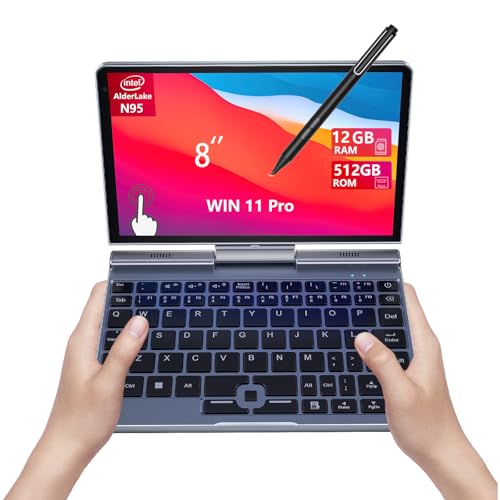
- 1.7-pound touchscreen 2-in-1 design
- Includes stylus support and backlit keyboard
- 12GB RAM, 512GB SSD, and Wi-Fi 6
Best For: Travel, note-taking, and ultra-portable computing
Best Battery Focus

- Up to 11 hours of video playback
- Microsoft 365 plus 1TB OneDrive storage
- Slim 14-inch design with broad port selection
Best For: Students, commuters, and cloud-based productivity
Best Convertible Pick
CHUWI 10.5-Inch 2-in-1 Mini Laptop

- Intel U300, 16GB RAM, and 512GB SSD
- 360-degree touch convertible design
- 2.03-pound body with backlit keyboard
Best For: Students and mobile workers needing maximum portability and flexibility
Best Budget Refurbished Option
Dell Latitude 3190 11.6-Inch 2-in-1

- 11.6-inch touchscreen convertible design
- Windows 11 Pro with 128GB SSD
- HDMI, USB ports, and stylus support
Best For: Budget-conscious students handling light productivity tasks
Best Large-Screen Value

- 15.6-inch Full HD anti-glare display
- Backlit keyboard and camera privacy shutter
- 42Wh battery with USB-C fast charging
Best For: Students wanting a larger screen for basic everyday computing
Best Convertible Value – Dell 11-inch Touchscreen Laptop
For shoppers seeking compact laptops with flexible functionality, this renewed Dell combines an 11-inch touchscreen with a convertible design. Its 8GB of RAM, 128GB SSD, Windows 11, and three USB ports suit basic browsing, entertainment, and everyday productivity in a small footprint.
Best For: Touchscreen portability, casual entertainment, and basic Windows tasks.
Pros:
- Convertible 11-inch touchscreen design
- 8GB RAM and a 128GB SSD
- Windows 11 with HDMI, USB, Bluetooth, and Wi-Fi connectivity
Cons:
- 1366 x 768 display resolution is modest
- Renewed product includes a 30-day warranty
- 128GB storage may be limited for large files
This Dell is a practical choice when a small Windows device and touchscreen flexibility matter more than high-end performance or a high-resolution display.
Best Small-Desk Workhorse – 14.1-inch Celeron Laptop
This lightweight 14.1-inch model is one of the compact laptops designed for small workspaces and everyday computing. It pairs a 1.2 kg chassis with 6GB of RAM, a 128GB SSD, dual-band Wi-Fi, and Mini HDMI for home, student, and remote-work use.
Best For: Remote work, online coursework, document editing, and video calls.
Pros:
- Lightweight 1.2 kg ultra-portable design
- 128GB SSD and 6GB DDR4 RAM
- Dual-band Wi-Fi, Mini HDMI, and two USB 3.0 ports
- Reported battery capacity supports up to five hours of use
Cons:
- Entry-level dual-core processor
- Display specifications are listed as 1366 x 768 despite Full HD marketing language
- Windows 10 is an older operating system
With a larger screen than many ultraportables but a relatively light body, this laptop offers a sensible balance for basic office, school, and home tasks.
Best Touchscreen Chromebook – Lenovo 14-inch FHD Chromebook
Among compact laptops for cloud-based work, this Lenovo Chromebook stands out with a 14-inch Full HD touchscreen, Chrome OS, Wi-Fi 6, and an eight-core MediaTek processor. Its slim 2.86-pound design is well suited to browsing, online classes, Google apps, and video meetings.
Best For: Students, web-based productivity, online learning, and Chrome OS users.
Pros:
- 1920 x 1080 IPS touchscreen with wide viewing angles
- Eight-core MediaTek Kompanio 520 processor
- Wi-Fi 6, 720p webcam, and privacy shutter
- Slim 0.73-inch profile with USB-C, USB-A, and microSD
Cons:
- 4GB RAM and 64GB eMMC storage are limited
- Chrome OS may not support traditional Windows applications
- External display connectivity may require an adapter
This is a strong fit for users comfortable with browser-based software who value a sharp touchscreen, modern wireless connectivity, and a simple Chrome OS experience.
Best Refurbished Windows Value – Dell Latitude 3190
This certified refurbished Dell Latitude 3190 is among the more capable compact laptops for everyday Windows use. The 11.6-inch model includes 8GB of DDR4 RAM, a 256GB M.2 NVMe SSD, Windows 11 Pro, and practical HDMI, USB, Bluetooth, Wi-Fi, and webcam connectivity.
Best For: Business tasks, studying, browsing, and buyers wanting more SSD capacity in a small Windows laptop.
Pros:
- 256GB NVMe SSD provides more storage than the other small Dell option
- 8GB DDR4 RAM for everyday multitasking
- Windows 11 Pro with HDMI, USB, Wi-Fi, Bluetooth, and webcam
- Certified refurbished with a minimum 90-day warranty
Cons:
- 11.6-inch 1366 x 768 display is compact but not Full HD
- Pentium Silver N5030 is intended for everyday rather than demanding workloads
- Refurbished units may arrive in generic packaging
The Latitude 3190 is a practical compact Windows machine when storage, memory, and business-friendly features are more important than a larger or higher-resolution screen.
Everyday Value Pick – HP 14-Inch N150 Laptop
For shoppers seeking compact laptops for everyday computing, this HP model combines a lightweight 14-inch design with Windows 11 Home, an Intel N150 processor, and practical connectivity. Its 4GB of RAM and 128GB of UFS storage are best suited to basic tasks rather than demanding workloads.
Best For: Home users, students, browsing, video calls, streaming, and basic office work.
Pros:
- Thin, 3.2-pound design with a micro-edge, anti-glare HD display.
- Includes a one-year Microsoft 365 Personal subscription.
- Fast Charge reaches approximately 50% in 45 minutes.
- Includes USB-C, two USB-A ports, HDMI, and a headphone/microphone combo jack.
Cons:
- 4GB of onboard RAM limits heavier multitasking.
- 128GB of storage is modest for large files and media libraries.
- The 1366 x 768 display is less sharp than a Full HD panel.
This is a sensible compact laptop for straightforward Windows tasks and mobile use. Buyers who regularly run demanding software or keep extensive local files should consider a model with more memory and storage.
Most Portable 2-in-1 – 8-Inch N95 Mini Laptop
This 8-inch 2-in-1 stands out among compact laptops with an ultra-portable 1.7-pound form factor, touchscreen controls, and included stylus support. The Intel N95 processor, 12GB of RAM, and 512GB NVMe SSD provide a stronger specification mix for multitasking in a very small package.
Best For: Travelers, students, note-taking, light creative work, and users who prioritize minimum size.
Pros:
- Extremely compact and lightweight at 0.78 kg.
- 8-inch 1280 x 800 10-point touchscreen supports a pressure-sensitive pen.
- 12GB RAM and 512GB NVMe SSD offer useful multitasking and storage capacity.
- Wi-Fi 6, Bluetooth 5.2, HDMI, and a backlit keyboard expand its usability.
Cons:
- The 8-inch screen may feel cramped for extended productivity.
- Listed battery life is approximately five hours.
- Its compact keyboard and display may require an adjustment period.
Choose this model when portability and touch interaction matter more than conventional laptop screen space. It is unusually versatile for travel and handwritten input, though an external display may be preferable for longer work sessions.
Best Battery Focus – HP Slim N150 Laptop
Among compact laptops for school, remote work, and everyday use, this HP slim model emphasizes mobility and battery endurance. It pairs an Intel N150 processor with a 14-inch anti-glare HD display, Wi-Fi 6, Windows 11, and Microsoft 365 with 1TB of OneDrive storage.
Best For: Students, commuters, remote workers, streaming, and cloud-based file storage.
Pros:
- Lightweight 3.2-pound chassis with a slim 0.7-inch profile.
- Rated for up to 11 hours of video playback or 7.5 hours of wireless streaming.
- Includes Microsoft 365 and 1TB of OneDrive cloud storage.
- Offers USB-C, two USB-A ports, HDMI, SD card reader, and Wi-Fi 6.
Cons:
- 4GB of RAM is limited for demanding multitasking.
- Local storage is only 128GB before relying on cloud storage.
- The 1366 x 768 resolution is basic for a 14-inch screen.
This HP is a practical choice for users who value battery life, familiar Windows software, and cloud access. Its hardware is well matched to everyday productivity, but demanding creators and power users will want more RAM and a higher-resolution display.
Best Convertible Pick – CHUWI 10.5-Inch 2-in-1 Mini Laptop
For shoppers seeking compact laptops with flexible form factors, the CHUWI 2-in-1 combines a 10.51-inch touch display with a 360-degree hinge. Its Intel U300 processor, 16GB of RAM, and 512GB SSD make it well suited to everyday productivity while keeping the design highly portable.
Best For: Students, mobile workers, and travelers who want a lightweight convertible for documents, browsing, video meetings, and media.
Pros:
- 360-degree hinge supports laptop, tablet, stand, and tent modes.
- 16GB RAM and a 512GB SSD provide responsive multitasking and useful storage.
- Lightweight 2.03-pound metal body includes a backlit keyboard, Wi-Fi 6, and dual USB-C ports.
- 1920×1200 touch display offers 100% sRGB coverage and 300cd/m² brightness.
Cons:
- The 10.51-inch screen may feel cramped for extended desktop work.
- It does not support an active stylus.
- Cooling vents can be blocked on soft surfaces.
This is the most capable and versatile option here for buyers prioritizing portability without giving up memory or solid-state storage. Its small display and lack of active-stylus support are the main trade-offs.
Best Budget Refurbished Option – Dell Latitude 3190 11.6-Inch 2-in-1
The renewed Dell Latitude 3190 is one of the more affordable compact laptops for basic schoolwork and everyday computing. It pairs an 11.6-inch touchscreen with a convertible design, Windows 11 Pro, and an SSD for straightforward browsing, documents, and online tasks.
Best For: Students and budget buyers who need a small touchscreen laptop for light productivity and classroom use.
Pros:
- Convertible 2-in-1 design with a capacitive multi-touch display.
- Windows 11 Pro, HDMI, two USB 3.1 ports, and a combo audio jack support common peripherals.
- Solid-state storage and a listed battery life of up to 11 hours.
- Includes stylus support and a webcam for remote learning and calls.
Cons:
- 4GB of RAM and the Intel Celeron N5030 limit demanding multitasking.
- The 1366×768 display is less sharp than a Full HD panel.
- At 4.4 pounds, it is relatively heavy for an 11.6-inch compact laptop.
The Latitude 3190 makes sense when low cost, touch input, and Windows 11 Pro matter more than speed or weight. Its modest processor, memory, and lower-resolution screen are best suited to basic workloads.
Best Large-Screen Value – ASUS Vivobook Go 15.6-Inch
The ASUS Vivobook Go offers a larger display in a slim notebook design, making it a practical choice among compact laptops for home study and everyday personal computing. Its Full HD matte screen, backlit keyboard, and USB-C fast charging add convenience, while the Celeron processor is aimed at entry-level use.
Best For: Students and home users who prefer a roomy Full HD display for browsing, documents, streaming, and video calls.
Pros:
- 15.6-inch 1920×1080 matte display provides more workspace than the smaller alternatives.
- Backlit ErgoSense keyboard and 720p camera with privacy shutter support daily use.
- 42Wh battery supports all-day use, with fast charging to 60% in 49 minutes.
- USB-C, Wi-Fi 5, Bluetooth 5.1, and enhanced SonicMaster audio add practical connectivity and media features.
Cons:
- 4GB RAM and 128GB eMMC storage are limited for heavier multitasking or large files.
- Intel Celeron N4500 is intended for basic rather than demanding workloads.
- Windows 11 Home in S mode may restrict software installation choices.
Choose this ASUS if screen size is more important than having the smallest possible footprint. It is a sensible entry-level study laptop, but its memory and eMMC storage favor light use over demanding applications.
How We Picked These Compact Laptops
We selected models across several price and use categories rather than treating every small laptop as interchangeable. The lineup includes 8- to 15.6-inch options, Windows and ChromeOS systems, traditional clamshells, touchscreen convertibles, new models, and renewed business laptops.
Our comparisons focus on practical specifications: processor class, RAM, storage type and capacity, display size, portability, operating system, included software, and overall suitability for common tasks. Small laptops often use entry-level processors, so we emphasize realistic workloads instead of overstating their capabilities.
Quick Comparison
| Best For | Look For | Recommended Type |
|---|---|---|
| Travel and note-taking | Small footprint, sturdy build, long battery life | 11- to 12-inch laptop or convertible |
| School and office work | At least 8GB RAM and an SSD | Windows laptop with a comfortable keyboard |
| Web, email, and streaming | Full HD display and simple maintenance | Chromebook or entry-level Windows model |
| Tablet-style use | Touchscreen, hinge flexibility, and low weight | 2-in-1 convertible |
| More local storage | 256GB or more SSD capacity | Windows model with an SSD |
Key Buying Factors for Compact Laptops
Size, Weight, and Keyboard
An 8- to 11-inch model is highly portable but can feel cramped for extended typing. A 13- or 14-inch laptop is often the better compromise for productivity, while a 15.6-inch model offers more screen room but is less compact. Check dimensions and weight, not just the advertised screen size.
Processor and Memory
Entry-level Intel, MediaTek, and similar processors are suitable for browsing, documents, video calls, and streaming, but they are not intended for demanding editing or gaming. Aim for 8GB of RAM when possible. Four gigabytes can work for light cloud-based tasks, though multitasking may feel limited.
Storage and Operating System
SSD storage generally feels more responsive than older hard drives. Capacity matters if you keep files locally: 64GB or 128GB can fill quickly, while 256GB or 512GB provides more breathing room. Chromebooks rely heavily on web apps and cloud storage; Windows offers broader software compatibility but may require more local space.
Display, Ports, and Battery
For comfortable reading and split-screen work, prioritize a Full HD display when available. Touch capability and a 360-degree hinge add flexibility but may increase cost. Also check USB ports, video output, headphone connectivity, Wi-Fi support, charger type, and manufacturer battery estimates. Real-world endurance varies with brightness and workload.
Who Should Buy Which Compact Laptops?
Frequent travelers and younger students should prioritize the smallest dependable model with a usable keyboard and durable design. Office users should favor 8GB of RAM, an SSD, and Windows if they depend on desktop applications. Streaming-focused buyers may prefer a Chromebook with a sharp display and straightforward setup.
Choose a 2-in-1 if touch interaction, presentations, reading, or tablet-style use matters more than maximum typing comfort. Renewed business laptops can offer strong value, but verify the seller’s return policy, battery condition, included accessories, and warranty before ordering. For demanding creative work, gaming, or heavy multitasking, consider a larger laptop with a faster processor and more memory instead of forcing a compact model beyond its strengths.