The best drum pads for home studios make it easier to practice, program beats, and expand a compact recording setup without the noise or footprint of a full acoustic kit.
This roundup covers quiet practice pads, MIDI controllers, sample pads, and multipads so you can match your choice to your workflow, software, and available space.
Best 10 Drum Pads for Home Studios Picks for 2026
Portable MPC Control

- 16 velocity-sensitive MPC pads with three banks
- 18 assignable knobs for DAW and instrument control
- Includes MPC Beats, Ableton Live Lite, and Drum Synth 500
Best For: Portable beat making and compact home-studio MIDI control
Standalone Sample Expansion

- Four velocity-sensitive pads for expressive triggering
- 25 built-in sounds across eight ready-to-play kits
- SD/SDHC sample loading and MIDI output
Best For: Compact sample triggering and percussion expansion
Wireless Portable Beat Making

- 16 RGB pads with polyphonic aftertouch
- Up to 10 hours of battery-powered use
- Wireless MIDI, USB-C, and multi-platform support
Best For: Portable home, mobile, and travel-based beat production
Full-Featured Sampling Hub

- Nine RGB velocity-sensitive pads and a 4.3-inch display
- Built-in sampler, looper, effects, and USB sample loading
- 32GB storage with over 6GB of included content
Best For: Studio and live users needing an expansive multipad workstation
Best Budget MIDI Controller

- 16 velocity-sensitive backlit pads
- Three banks provide up to 48 assignments
- Includes faders, knobs, courses, and Cubase LE
Best For: Affordable DAW-based beat making at home
Best Sound Library

- 1,061 drum, percussion, and effects sounds
- 216 keyboard sounds with mute and layer functions
- Supports user samples and five external pads
Best For: Expanded electronic percussion setups
Best Standalone Sample Pad

- Nine dual-zone velocity-sensitive pads
- 592 sounds and 30 preset drum kits
- MIDI, USB, looping, and trigger expansion
Best For: Flexible studio and electronic percussion use
Best Quiet Two-Sided Pad
Evans RealFeel 12-Inch Practice Pad
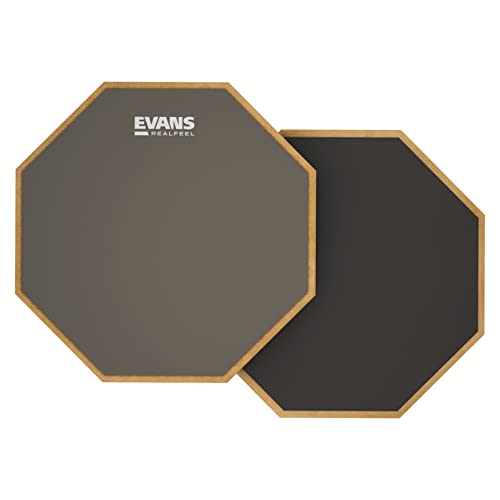
- Two surfaces offer different rebound responses
- Portable and quiet on many surfaces
- Made in the USA with a wear-resistant finish
Best For: Flexible home practice without a stand
Best Complete Stand Kit
GrowDaily 12-Inch Practice Pad Set

- Includes pad, adjustable stand, sticks, and bags
- Stand adjusts from 19.5 to 31.5 inches
- Rubber surface and cotton layer target a snare-like feel
Best For: Beginners building a ready-to-play practice station
Best Snare-Feel Features
Donner DTB-1 Quiet Practice Pad

- Removable simulator uses 800 steel balls
- Quiet 12-inch pad supports low-noise practice
- Includes sticks and 40 standard rudiments
Best For: Technique practice with optional snare-style feedback
Portable MPC Control – Akai Professional MPD218
The Akai MPD218 is a compact choice for drum pads for home studios, especially if you want hands-on beat triggering without taking up much desk space. Its 16 velocity-sensitive MPC pads, three pad banks, and assignable controls provide flexible MIDI control for drums, samples, effects, and virtual instruments.
Best For: Beat makers and producers who want a portable USB pad controller with classic MPC-style performance features.
Pros:
- 16 thick, velocity-sensitive MPC pads with three banks for 48 assignable pad locations
- 18 assignable 360-degree potentiometers across three banks
- Includes MPC Beats, Ableton Live Lite, and Drum Synth 500 software
- USB powered and compact for mobile or home-studio setups
Cons:
- Requires software or external equipment to produce and shape sounds
- iOS connectivity requires a separately sold Camera Connection Kit
The MPD218 emphasizes expressive pad playing and straightforward DAW control in a small footprint. It is a practical fit when portability and MPC-style workflow matter more than built-in sounds or standalone operation.
Standalone Sample Expansion – Alesis Sample Pad 4
The Alesis Sample Pad 4 offers a focused approach to drum pads for home studios by combining four velocity-sensitive pads with onboard sounds and SD-card sample expansion. It can add percussion, electronic sounds, and custom samples to an existing setup while also providing MIDI output for software or sound modules.
Best For: Producers and performers who want a compact sample pad with built-in sounds, custom sample loading, and MIDI connectivity.
Pros:
- Four velocity-sensitive pads for expressive triggering
- Includes 25 built-in percussion and electronic drum sounds across eight kits
- Standard SD/SDHC card slot supports adding custom samples
- Offers tuning, reverb, and MIDI output for external gear or software
Cons:
- Only four pads provide less hands-on control than larger controllers
- Its included sound library is more limited than multipad systems with extensive storage
The Sample Pad 4 is a sensible choice for adding sample triggering without committing to a large controller. Its SD-card support and MIDI output make it useful as either a compact sound source or an addition to a broader home-studio rig.
Wireless Portable Beat Making – Donner STARRYPAD PRO
The Donner STARRYPAD PRO brings flexible connectivity to drum pads for home studios, with 16 RGB velocity-sensitive pads, wireless MIDI, USB-C, and a built-in battery. It is designed for creating with a computer, tablet, or phone, while its knobs and transport controls add practical control over a compatible DAW.
Best For: Producers who want a portable, battery-powered MIDI pad controller that can move between desktop and mobile workflows.
Pros:
- 16 RGB velocity-sensitive pads with polyphonic aftertouch and three velocity curves
- Up to 10 hours of battery life for portable production
- Supports wireless MIDI and USB-C connections with Android, iOS, Mac, and Windows
- Includes eight assignable knobs, DAW transport controls, and Cubase LE, WaveLab LE, and Melodics
Cons:
- Does not produce audio by itself and requires DAW software
- Wireless and mobile workflows may require additional device-specific setup
The STARRYPAD PRO stands out for mobility and connection flexibility. Its rechargeable design and software bundle make it appealing for producers who want one controller for home, travel, and mobile beat-making sessions.
Full-Featured Sampling Hub – Alesis Strike Multipad
The Alesis Strike Multipad is a production-focused option for drum pads for home studios, combining nine RGB-lit velocity-sensitive pads with sampling, looping, onboard effects, and extensive storage. Its display and audio/MIDI interface support detailed editing as well as live and studio performance workflows.
Best For: Producers and performers who need sampling, looping, effects, and a broad library of sounds in one multipad system.
Pros:
- Nine velocity-sensitive RGB pads for one-shots, melodic parts, and loops
- Built-in looper and sampler with USB sample loading
- 32GB of storage with more than 6GB of included content and over 700 sounds
- Includes effects processors, a 4.3-inch display, USB audio/MIDI, Ableton Live Lite, and MPC Beats
Cons:
- Larger and heavier than compact pad controllers
- Its broad feature set may be more than needed for simple MIDI drum triggering
The Strike Multipad is the most comprehensive option here for users who want more than a MIDI surface. With built-in sampling, looping, effects, storage, and audio/MIDI connectivity, it can serve as a central performance and production tool.
Best Budget MIDI Controller – Donner STARRYPAD
The Donner STARRYPAD is a practical entry point for anyone looking for drum pads for home studios. Its 16 velocity-sensitive pads, three pad banks, and additional faders and knobs provide flexible hands-on control when working with a DAW.
Best For: Home producers who want an affordable USB MIDI pad controller with customizable lighting and extra controls.
Pros:
- Offers 16 backlit pads with three banks for up to 48 assignable pads.
- Includes two faders, two knobs, three buttons, and Shift-layer controls.
- Supports USB-C, MIDI input/output, Tap Tempo, and Note Repeat.
- Includes Melodics courses and a Cubase LE software kit.
Cons:
- Requires DAW software to produce sound and does not operate as a standalone instrument.
- The editor handles pad settings but does not record or arrange music.
- Connecting to an iPhone or iPad requires an Apple Lightning to USB adapter.
With broad computer and mobile compatibility, the STARRYPAD is well suited to beat-making, sample triggering, and learning workflows, provided you already have compatible DAW software.
Best Sound Library – Yamaha DTX-MULTI 12
The Yamaha DTX-MULTI 12 is a feature-rich choice among drum pads for home studios, combining a large onboard sound library with sequencing and external expansion options. It is designed for players who want more than a basic computer-only trigger surface.
Best For: Producers and percussionists who need extensive built-in drum, percussion, effects, and keyboard sounds.
Pros:
- Provides 1,061 drum, percussion, and effects sounds plus 216 keyboard sounds.
- Includes mute/layer functions, a sequencer, and preset loops.
- Offers 64MB of flash ROM for user samples.
- Supports five external pads, a foot switch, and a hi-hat controller.
Cons:
- Its listed dimensions and 3,300-gram weight make it less compact than a simple MIDI pad controller.
- The product’s supplied information does not specify the extent of modern DAW compatibility.
The DTX-MULTI 12 stands out for its built-in versatility and expansion connections. It is a stronger fit for a dedicated electronic percussion setup than for users seeking only lightweight MIDI triggering.
Best Standalone Sample Pad – LEKATO PD705
The LEKATO PD705 offers a fuller electronic percussion experience for home studios, with nine dual-zone velocity-sensitive pads, onboard sounds, looping, and sample support. Its MIDI, USB, and trigger connections also make it adaptable to a larger production or performance setup.
Best For: Users who want a versatile sample pad with built-in kits, external trigger expansion, and computer integration.
Pros:
- Includes nine dual-zone velocity-sensitive pads and 592 preset sounds across 30 drum kits.
- Provides MIDI in/out, USB MIDI, AUX, looper, and trigger inputs.
- Supports two additional dual-zone trigger pads or acoustic drum triggers.
- Allows custom kits and sample imports through WaveManager software.
Cons:
- At 3.17 kg, it is less lightweight than a compact USB-only pad controller.
- Some expansion features require additional pads, triggers, or a footswitch.
- The supplied notes do not specify the included storage capacity beyond support for a 32GB SD card or USB drive.
With its onboard sound library and broad connectivity, the PD705 bridges studio production and electronic percussion. It is a compelling option when standalone playback and future trigger expansion matter as much as DAW control.
Best Quiet Two-Sided Pad – Evans RealFeel 12-Inch Practice Pad
For drummers comparing drum pads for home studios, the Evans RealFeel offers a portable, quiet practice surface with two distinct rebound options. Its 12-inch format works on a table, carpet, lap, or inside a standard snare basket.
Best For: Home-studio players who want flexible, low-noise practice without a stand.
Pros:
- Two-sided design provides realistic rebound on natural gum rubber and firmer, lower-rebound practice on recycled rubber.
- Muted sound profile helps support practice without excessive noise.
- Portable design works on multiple surfaces and is made in the USA.
- Wear-resistant fabric finish helps protect the gum-rubber side.
Cons:
- The 12-inch model is not mountable.
- It does not include sticks, a stand, or a carrying bag.
The RealFeel is a straightforward, durable choice when quiet practice and rebound variety matter more than a complete kit. Choose it if you already have your accessories or prefer practicing on a desk, lap, or existing snare basket.
Best Complete Stand Kit – GrowDaily 12-Inch Practice Pad Set
For home studios needing a ready-to-play setup, this GrowDaily kit combines a 12-inch practice pad, adjustable snare stand, sticks, stick bag, and dedicated carrying bag. The rubber surface, poplar base, and shock-absorbing cotton are designed to provide a near-snare feel.
Best For: Beginners or home drummers who want a height-adjustable practice station with included accessories.
Pros:
- Includes a 12-inch pad, snare stand, three pairs of maple sticks, stick bag, and dedicated bag.
- Adjustable stand height ranges from 19.5 to 31.5 inches.
- Double-support tripod and adjustable basket are designed for stability.
- High-resilience rubber and shock-absorbing cotton aim for a realistic feel.
Cons:
- At 5.85 pounds for the listed product, it is less minimal than a pad-only setup.
- The stand and accessories add more components to store and transport.
This is the most convenient option for a home studio that needs both a pad and a playing position out of the box. Its included stand and accessories make it especially practical for newer players building a practice setup.
Best Snare-Feel Features – Donner DTB-1 Quiet Practice Pad
The Donner DTB-1 is a useful pick among drum pads for home studios when quiet practice and snare-style details are priorities. Its 12-inch pad includes a detachable snare simulator, standard-height rim, stick slot, maple sticks, and a guide to 40 rudiments.
Best For: Beginners and technique-focused players who want extra snare-style features in a compact pad.
Pros:
- Detachable simulator with 800 steel balls adds a snare-like sound option.
- Quiet construction is designed to reduce disturbance to family and neighbors.
- High-density wood, silicone playing surface, and non-scuff EVA bottom provide a durable build.
- Includes maple sticks and 40 standard rudiments for structured practice.
Cons:
- It does not include a stand.
- The included set lists one pair of sticks rather than multiple pairs.
- The snare simulator may be unnecessary for players seeking the simplest silent pad.
The DTB-1 adds more practice-oriented features than a basic pad while remaining compact and quiet. It is a strong fit for players who want rudiment guidance and optional snare simulation without committing to a full stand kit.
How We Picked the Best Drum Pads for Home Studios
We focused on the features that matter most in a home recording or practice environment: pad response, noise level, triggering consistency, connectivity, onboard sounds, portability, and ease of setup. The selection includes both controller-style products that rely on computer software and standalone electronic pads with built-in sounds. We also included traditional rubber practice pads for drummers who primarily need quiet technique work.
Because home studios vary widely, no single pad is ideal for every player. A beat maker may value velocity-sensitive zones and assignable controls, while a drummer practicing rudiments may care more about rebound, acoustic feel, and a stable stand.
Quick Comparison
- Best for computer-based beat making: Akai Professional MPD218 or a Donner 16-pad MIDI controller.
- Best for standalone sampling and triggering: Alesis Sample Pad 4, LEKATO Percussion Sample Pad, or Yamaha DTX Multi Pad.
- Best for advanced electronic performance: Alesis Strike Multipad.
- Best for quiet rudiment practice: Evans RealFeel, the snare stand practice-pad set, or Donner’s 12-inch practice pad.
Key Buying Factors for Drum Pads for Home Studios
Practice Pad or Electronic Controller?
A rubber practice pad is usually quieter, simpler, and more natural for stick-control exercises. It does not send MIDI or play samples. An electronic pad controller connects to a computer or module, making it better for recording beats, triggering instruments, and experimenting with sound design.
Velocity Response and Playing Surface
Velocity-sensitive pads respond to how hard you play, which helps produce more expressive grooves. Check the number of pads, surface size, sensitivity controls, and whether the layout suits finger drumming or sticks. A larger surface can be more comfortable, while compact grids save desk space.
Connectivity and Software
USB MIDI is useful for DAWs and virtual instruments. MIDI outputs can help connect to external hardware, while onboard sampling and audio outputs allow some multipads to work without a computer. Confirm included software, cable requirements, and compatibility with your operating system before buying.
Noise, Mounting, and Studio Space
Practice pads are quieter than acoustic drums but still produce stick impact. For shared spaces, consider surface material and placement on a damped table or stand. If you use sticks regularly, a stand-mounted pad may be more stable than a small desktop controller.
Who Should Buy Which Drum Pads for Home Studios?
Choose a compact MIDI pad controller if you mainly produce inside a DAW and want responsive pads, knobs, or faders in a small footprint. Choose a sample pad if you need quick access to one-shots, loops, or external samples without relying entirely on software. An advanced multipad is better for performers who need several triggering zones, deeper editing, and standalone flexibility.
For dedicated daily practice, select a two-sided or gum-rubber pad with a comfortable diameter and dependable mounting. Beginners and apartment players can start with an affordable 12-inch practice pad, while producers who also drum will benefit from combining a quiet practice pad with a MIDI controller. Before ordering, prioritize your main use—practice, beat production, live triggering, or sampling—then verify connection types, included accessories, and available desk or stand space.