Large-file cloning can expose the limits of ordinary docking stations, especially when you need to duplicate several drives, migrate between interfaces, or verify that data transferred correctly. The right standalone duplicator can simplify upgrades, backups, deployments, and drive-erasing workflows without relying on a host computer.
This roundup compares 10 hard drive duplicators for large files, covering multi-bay copiers, SATA and M.2 models, hybrid docks, and options designed for higher-volume use.
Best 10 Hard Drive Duplicators for Large Files Picks for 2026
Best Overall
StarTech 4-Bay HDD/SSD Duplicator

- Standalone 1:3 cloning at up to 4.2 GB/min
- Supports SATA drives plus included IDE adapters
- Adds secure erasing and USB/eSATA docking
Best For: IT teams handling cloning and drive sanitization
Fast Dual-Bay Pick

- Standalone cloning rated up to 28 GB/min
- Supports 2.5/3.5-inch SATA HDDs and SSDs
- Includes 4Kn, TRIM, and USB 3.2 Gen 2 support
Best For: Fast, no-PC cloning of large SATA drives
Best for Data Recovery
Vinpower 1-to-3 HDD/SSD Duplicator

- Smart Copy and Raw Mode for different cloning needs
- Skips read errors to preserve recoverable data
- Portable standalone design supports 2.5/3.5-inch drives
Best For: Technicians copying data from damaged or failing drives
Best Budget Dock
SABRENT Dual-Bay HDD/SSD Cloner

- Supports SATA HDDs and SSDs up to 10TB
- Offline cloning requires no computer or drivers
- USB 3.0 provides up to 5Gbps docked transfer
Best For: Occasional home and small-office cloning
Most Versatile
StarTech Dual-Bay M.2/SATA Duplicator

- Supports NVMe, M.2 SATA, and 2.5/3.5-inch SATA drives
- Clones at up to 7.5GB per minute without a computer
- Includes configurable duplication and secure erase modes
Best For: Professional users handling mixed drive formats and large migrations
Simple SATA Workhorse

- Standalone cloning requires no computer or software
- Supports 2.5- and 3.5-inch SATA HDDs and SSDs
- Copies at up to 90MB per second and supports drive erasure
Best For: Routine SATA drive cloning and sanitization
Best Docking-Station Hybrid
Rosewill Triple-Bay M.2/SATA Cloner

- Combines offline cloning with USB docking-station functionality
- Supports M.2 NVMe, SATA SSDs, and 2.5/3.5-inch HDDs
- Provides three tool-free bays and USB 3.2 Gen 2 connectivity
Best For: Flexible drive access, offline cloning, and USB-connected transfers
High-Capacity Hub Pick

- Offline cloning without a computer
- Up to 48TB total stated capacity
- Three USB 3.0 hub ports
Best For: High-capacity SATA backups with added USB connectivity
Type-C Convenience Pick

- USB 3.2 Gen 1 with UASP
- Includes USB-C-to-C and USB-C-to-A cables
- Offline cloning with two SATA bays
Best For: Modern computers needing flexible USB-C drive access
Professional SAS Pick
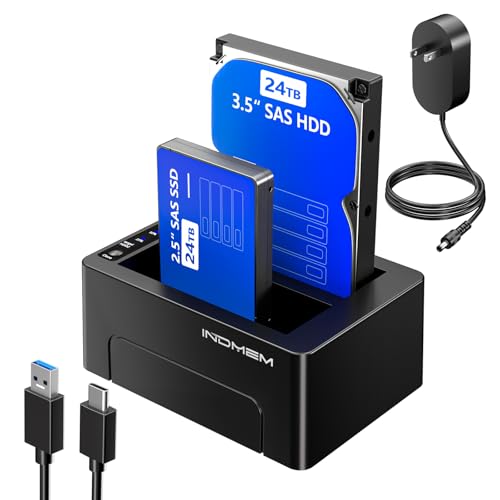
- Supports SAS and SATA drives
- Up to 48TB total stated capacity
- Copies to two targets simultaneously
Best For: Professional SAS/SATA duplication and batch backup workflows
Best Overall – StarTech 4-Bay HDD/SSD Duplicator
For buyers comparing hard drive duplicators for large files, the StarTech SATDOCK4U3RE stands out as a versatile four-bay unit with standalone sector-by-sector cloning, drive erasing, and USB or eSATA docking. It supports 2.5- and 3.5-inch SATA drives and includes IDE adapters for additional compatibility.
Best For: IT professionals who need multi-drive cloning, secure erasing, and flexible drive access.
Pros:
- Clones standalone at up to 4.2 GB/min.
- Supports up to three target drives from one source.
- Offers Quick Erase and Secure Erase aligned with NIST SP 800-88 Rev. 1 Purge.
- Works as a USB 3.0 or eSATA SATA docking station.
Cons:
- Target drives must be equal to or larger than the source.
- Its four-bay design may be more equipment than occasional users need.
This is the strongest all-around choice when large-drive workflows also involve sanitization, recovery, or repeated cloning jobs. Its broad drive support and four-bay layout add practical flexibility for professional use.
Fast Dual-Bay Pick – StarTech SATA Duplicator Dock
The StarTech SDOCK2U313R is a compact option for hard drive duplicators for large files, combining standalone cloning with a dual-bay docking design. It supports 2.5- and 3.5-inch SATA HDDs and SSDs, 4Kn drives, TRIM, and USB 3.2 Gen 2 connectivity when used with a computer.
Best For: Users who want fast, straightforward cloning of large SATA drives without connecting a PC.
Pros:
- Rated for standalone copying speeds up to 28 GB/min.
- Copies the entire drive sector by sector, including empty sectors.
- Supports SATA I, II, and III drives of any capacity and is 4Kn compatible.
- Tool-less top-loading design includes drive doors and eject buttons.
Cons:
- Only two drive bays are provided.
- IDE drives require a separately sold adapter.
- The destination drive must be equal to or larger than the source.
Choose this model when speed and simplicity matter more than multi-drive capacity. Its dual-bay layout is easier to manage than a larger duplicator while retaining useful professional features.
Best for Data Recovery – Vinpower 1-to-3 HDD/SSD Duplicator
The Vinpower HDDMINI is a portable standalone choice for hard drive duplicators for large files, with Smart Copy for accessible data and Raw Mode for bit-by-bit duplication. Its read-error skip feature can continue copying around bad sectors, making it particularly useful when working with troubled drives.
Best For: Field technicians and recovery-focused users copying data from potentially failing 2.5- or 3.5-inch drives.
Pros:
- Operates without a computer.
- Smart Copy transfers accessible data, while Raw Mode performs bit-by-bit duplication.
- Read-error skip can preserve recoverable data from drives with bad sectors.
- Supports secure erasing and optional CF support with an add-on module.
Cons:
- Its listed media speed is 90 MB/s, slower than the fastest options here.
- CF support requires an optional interface module.
- The supplied notes do not specify a cloning speed in GB/min.
The HDDMINI is less about headline speed and more about flexibility when source media is unreliable. Smart Copy, Raw Mode, and error skipping give it a useful recovery-oriented feature set in a compact package.
Best Budget Dock – SABRENT Dual-Bay HDD/SSD Cloner
The SABRENT EC-HD2B is a simple dual-bay docking station for hard drive duplicators for large files, supporting standard 2.5- and 3.5-inch SATA HDDs and SSDs up to 10TB. It provides offline cloning without drivers and can also connect to a computer over USB 3.0.
Best For: Home users and small offices that need occasional offline cloning and drive access.
Pros:
- Supports 2.5- and 3.5-inch SATA drives.
- Handles hard drives up to 10TB.
- Offers plug-and-play operation with no drivers required.
- Provides USB 3.0 transfer speeds up to 5Gbps when docked to a computer.
Cons:
- Offline cloning is listed at up to 60Mbps, considerably below its USB 3.0 interface rate.
- It has only two bays.
- Its stated compatibility is limited to standard SATA drives.
This is a practical entry-level pick for users who want a straightforward cloning dock rather than a professional duplicator with advanced erasure features. The 10TB support is useful for large-capacity household or office drives.
Most Versatile – StarTech Dual-Bay M.2/SATA Duplicator
For buyers comparing hard drive duplicators for large files, the StarTech SM2DUPE11 stands out for its broad drive support and configurable cloning modes. It works offline and can duplicate M.2 NVMe, M.2 SATA, and 2.5/3.5-inch SATA drives at speeds up to 7.5GB per minute.
Best For: IT departments and technicians handling mixed drive types, large migrations, or secure drive sanitization.
Pros:
- Supports M.2 NVMe, M.2 SATA, and 2.5/3.5-inch SATA drives.
- Offers System/File, All Partitions, Whole Drive, and Percentage Duplication modes.
- Includes five erase modes, including Secure Erase aligned with NIST SP 800-88 Rev. 1.
- Standalone operation with an on-screen display and tool-less design.
Cons:
- Its many configuration options may be more than casual users need.
- It supports two drives at a time, so it is not intended for multi-drive batch cloning.
This is the strongest choice when compatibility and control matter as much as capacity. Adjustable HPA settings and multiple duplication modes make it particularly useful for professional workflows involving large or varied drives.
Simple SATA Workhorse – Systor 1:1 HDD/SSD Duplicator
The Systor SYS101HS-DP is a straightforward standalone option for hard drive duplicators for large files when your source and destination drives use SATA. It handles 2.5- and 3.5-inch HDDs and SSDs without an adapter and copies at up to 90MB per second, or 5.4GB per minute.
Best For: Small businesses and technicians cloning or sanitizing standard SATA HDDs and SSDs.
Pros:
- Works without a computer or software.
- Accepts both 2.5- and 3.5-inch SATA drives without an adapter.
- Supports system/file copying as well as whole-drive duplication.
- Includes DoD 5220.22-M-compliant drive erasure.
Cons:
- It does not list support for M.2 or NVMe drives.
- Its 90MB-per-second transfer rate is lower than the fastest options in this roundup.
- The supplied digital storage capacity is listed as 3TB.
Choose the Systor when you want uncomplicated SATA cloning and erasure rather than broad modern-drive compatibility. Its adapter-free 2.5/3.5-inch support and standalone design keep routine duplication tasks easy to manage.
Best Docking-Station Hybrid – Rosewill Triple-Bay M.2/SATA Cloner
The Rosewill RS-N2S-CL combines offline cloning with docking-station use, making it a flexible pick among hard drive duplicators for large files. Its triple-bay, tool-free design accepts M.2 NVMe, SATA SSDs, and 2.5/3.5-inch HDDs, while USB 3.2 Gen 2×1 provides up to 10Gbps for host-connected transfers.
Best For: Users who want one compact device for offline cloning, drive access, and USB-connected data transfers.
Pros:
- Supports M.2 NVMe, SATA SSDs, and 2.5/3.5-inch HDDs.
- Provides three bays for flexible drive handling.
- Offers offline cloning without a host computer.
- Works as both a duplicator and a USB 3.2 Gen 2 docking station.
Cons:
- The enclosure is plastic rather than metal.
- Its 10Gbps figure describes USB interface speed, not a guaranteed cloning speed.
- Offline cloning controls and supported duplication modes are not detailed in the supplied notes.
The Rosewill is appealing if you need more than a dedicated cloner. Its three-bay layout and dual dock/duplicator role offer practical flexibility, especially for users regularly moving between M.2 and conventional SATA storage.
High-Capacity Hub Pick – MAIWO Dual-Bay SATA Cloner
For buyers seeking hard drive duplicators for large files, the MAIWO combines dual-bay offline cloning with up to 48TB of stated total drive capacity. It supports 2.5- and 3.5-inch SATA HDDs and SSDs, while its USB 3.0 hub adds practical connectivity for file transfers and storage access.
Best For: Users who need a high-capacity SATA duplicator with offline cloning and extra USB-A ports.
Pros:
- Supports 2.5- and 3.5-inch SATA HDDs and SSDs, with up to 24TB per bay.
- Performs offline cloning without a computer or drivers.
- Includes three USB 3.0 Type-A ports, including one with 2.4A charging support.
- Progress LEDs show 25%, 50%, 75%, and 100% clone stages.
Cons:
- Limited to SATA drives rather than SAS drives.
- The supplied details list USB 3.0 transfer bandwidth up to 5Gbps, so performance depends on the connected drives and interface.
Its independent 12V 3A power supply and tool-free setup make this a flexible choice for backup, data processing, and recovery workflows. The built-in hub is particularly useful when you want the duplicator to serve as a general desktop storage station.
Type-C Convenience Pick – FIDECO Dual-Bay SATA Dock
The FIDECO is a straightforward option for hard drive duplicators for large files, pairing dual-bay SATA support with USB 3.2 Gen 1 and UASP. Its included USB-C-to-C and USB-C-to-A cables make it easier to connect the dock to newer laptops, desktops, and other compatible systems.
Best For: Users who want a dual-bay SATA dock with USB-C connectivity and simple offline cloning.
Pros:
- Works with 2.5- and 3.5-inch SATA I/II/III HDDs and SSDs.
- Supports offline cloning without a computer when the target drive is equal to or larger than the source.
- Includes both USB-C-to-C and USB-C-to-A cables.
- Compatible with Windows, macOS, and Linux, with no driver required.
Cons:
- Cloning requires the target drive to be at least as large as the source.
- Supports SATA drives only and does not provide the higher stated capacity of the 48TB models in this roundup.
With up to 5Gbps USB 3.2 Gen 1 transfer rates and UASP support, the FIDECO is well suited to routine drive access and cloning. Its Type-C-focused cable bundle gives it an advantage for modern computers, while backward compatibility keeps it usable with USB 2.0 connections.
Professional SAS Pick – INDMEM Dual-Bay SAS Cloner
For hard drive duplicators for large files in professional or business workflows, the INDMEM adds SAS compatibility to a dual-bay offline cloner. It supports 2.5- and 3.5-inch SAS and SATA drives, up to 24TB per bay, and can create two target copies simultaneously according to the supplied specifications.
Best For: IT teams and professionals handling high-capacity SAS or SATA duplication and batch backup tasks.
Pros:
- Supports both 2.5- and 3.5-inch SAS and SATA HDDs and SSDs.
- Offers stated support for up to 48TB total capacity.
- Offline cloning works without a PC and can write to two target drives simultaneously.
- Includes a 12V 4A power adapter and LED progress indicators.
Cons:
- The supplied package does not include SAS drives.
- The listed operating-system requirement specifies Windows 7 or later.
- Its connection details list a USB 3.0 interface, while the SAS interface is cited for drive transfers.
The ability to duplicate one source to two targets makes this the most workflow-oriented option here for distribution, batch processing, and backup. Its SAS support and stronger 12V 4A power supply broaden compatibility, though buyers should verify their drive type and connection setup before ordering.
How We Picked These Hard Drive Duplicators for Large Files
We selected models based on the features that matter most when moving substantial amounts of data: sustained transfer performance, drive compatibility, simultaneous copy capacity, offline operation, connection standards, and practical handling of both 2.5-inch and 3.5-inch drives. We also considered whether a unit supports SSDs, M.2 media, SAS drives, drive erasing, and source-to-target cloning without a computer.
Rated speed is only a starting point. Real-world results vary with the source drive, target drive, interface, file structure, thermals, and whether the duplicator performs verification or sector-by-sector copying.
Quick Comparison
- Multi-drive production: Four-bay and 1:3 duplicators are better suited to repeated deployments or batch work.
- Mixed drive formats: Hybrid models accommodate combinations of M.2, SATA, 2.5-inch, and 3.5-inch drives.
- Simple home or office cloning: Dual-bay docks offer an easier, lower-capacity setup for one source and one target.
- Security and disposal: Models with erasing functions are useful for preparing reused or retired drives.
- Specialized storage: SAS support is important when working with enterprise SAS disks rather than standard SATA drives.
Key Buying Factors for Large Files
Drive Compatibility and Capacity
Confirm the duplicator supports your exact media before buying. SATA HDDs and SSDs are common, but M.2 drives may use SATA or NVMe protocols, which are not interchangeable. Check supported physical sizes, maximum capacity, sector formats, and whether the device can clone drives with different capacities. The target generally needs to be at least as large as the source, though some advanced tools can clone only used sectors.
Speed, Interfaces, and Cooling
Look for a published copy rate, but treat it as a best-case figure. USB 3.0, USB 3.2, eSATA, and dedicated offline cloning paths can have different limits. For large transfers, adequate ventilation and a stable power supply matter because thermal throttling or interrupted power can undermine performance.
Offline Cloning and Verification
Offline operation keeps the source and target independent of a computer and is convenient for migrations. A display, progress indicator, verification mode, or clear status LEDs can make long jobs easier to monitor. If data integrity is critical, choose a model with verification or plan to validate the cloned drive separately.
Erasing and Workflow Features
DoD-style or multi-pass erasing can help organizations prepare drives for reuse, but erasing standards and implementation vary. Also consider one-to-many copying, standalone controls, USB hub functions, and whether the unit can be used as a reader after cloning.
Who Should Buy Which Hard Drive Duplicators for Large Files?
IT departments and repair shops should prioritize multi-bay duplicators with one-to-many copying, broad drive support, and erasing tools. Frequent system upgraders will benefit from a dual-bay or hybrid SATA/M.2 model that handles current SSD formats. Home users and small offices can usually choose a straightforward dual-bay dock for occasional disk migration and backups. Enterprise storage technicians should select a model explicitly supporting SAS if their source drives use that interface. For the largest files and repeated workloads, favor the unit with the strongest combination of compatible interfaces, cooling, capacity support, and workflow controls rather than choosing solely by its advertised transfer rate.