The best MIDI interfaces under $300 make it easier to connect keyboards, synthesizers, drum machines, and computers without overspending. The right model depends on how many MIDI ports you need, whether you require routing or merging, and how portable your setup is.
We selected 10 practical options ranging from compact USB-to-MIDI cables to multi-port interfaces and dedicated MIDI thru and merge boxes. Use the guide below to narrow the list by compatibility, connectivity, and workflow.
Best 10 Midi Interfaces Under 300 Picks for 2026
Best All-in-One Pick

- USB audio interface with 5-pin MIDI I/O
- 48V phantom power and Loopback feature
- Includes software bundle and five-year warranty
Best For: Home studios needing audio recording and MIDI in one compact interface
Best MIDI Distribution Hub

- Routes one MIDI input to five outputs
- Supports clock, SysEx, MPE, and timecode
- USB-C provides power; MIDI uses 5-pin DIN
Best For: Hardware rigs that need reliable one-to-five MIDI signal distribution
Best Budget Multiport Option
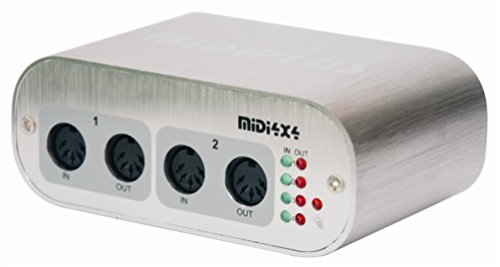
- Four MIDI inputs and four MIDI outputs
- USB powered with no driver required
- Activity indicators for every MIDI port
Best For: Mac and Windows users connecting several MIDI devices to a computer
Best Routing Features

- Standalone 3-in/3-out MIDI routing
- Merge, split, filter, and mapping functions
- Works with major desktop and mobile operating systems
Best For: Hybrid setups requiring advanced MIDI routing across computers and hardware
Flexible MIDI Routing

- Three MIDI inputs with direct hardware routing
- Supports clock, time code, SysEx, and standard MIDI commands
- Durable metal construction with anti-slip feet
Best For: Multi-device keyboard and MIDI hardware setups
High-Output MIDI Distribution

- Sends one MIDI input to seven MIDI outputs
- Two-MCU design targets stable, reliable operation
- LEDs indicate MIDI signal and power
Best For: Windows users distributing one source to multiple MIDI devices
Configurable USB MIDI Hub

- Configures as 1-in/3-out, 2-in/2-out, or 4-out
- Standalone split and merge modes
- Includes Bitwig 8-Track DAW and software instruments
Best For: Flexible home-studio routing across computers and mobile devices
Best Compact 2x2 Interface
Midiplus 2x2 USB MIDI interface

- 2 MIDI inputs and 2 MIDI outputs
- USB powered with no external supply
- Driver-free Mac and Windows compatibility
Best For: Home studios needing two-way MIDI connectivity
Best Feature-Rich MIDI Cable

- Filtering, mapping, and routing support
- Plug-and-play across major operating systems
- Supports all MIDI channels and messages
Best For: Portable single-instrument MIDI setups
Best USB-C MIDI Cable
LEKATO MIDI to USB-C Interface

- USB-C connection with one MIDI in and out
- Plug-and-play Windows and Mac operation
- LEDs show power and signal activity
Best For: Single-instrument USB-C MIDI connections
Best All-in-One Pick – Arturia MiniFuse 1
For shoppers comparing midi interfaces under 300, the Arturia MiniFuse 1 is a compact choice that combines USB audio recording with standard 5-pin MIDI input and output. It is suited to recording vocals, guitar, synths, and other sources while keeping setup simple.
Best For: Home studios, beginners, vocalists, guitarists, and producers who need both audio and MIDI connectivity.
Pros:
- Includes 5-pin MIDI input and output alongside USB audio connectivity.
- Offers 48V phantom power, balanced line outputs, and a headphone output with volume control.
- Supports sample rates up to 192 kHz and includes a useful Loopback feature.
- Comes with extensive music software and a five-year warranty.
Cons:
- Provides one audio channel, so it is not designed for larger multi-input recording setups.
- Its USB hub supplies up to 250mA, which may limit power-hungry accessories.
The MiniFuse 1 stands out when you want a beginner-friendly audio interface that also handles MIDI hardware. Its software bundle and long warranty add value for a compact setup.
Best MIDI Distribution Hub – CME MIDI Thru5 WC
CME MIDI Thru5 WC 1-in-5-out MIDI Thru | 5-pin DIN, High-speed, Optional Bluetooth
Check Price On AmazonAmong midi interfaces under 300, the CME MIDI Thru5 WC is a specialized option for distributing one MIDI input to five outputs. It is designed for setups that need dependable synchronization across multiple MIDI devices rather than computer-based MIDI control.
Best For: Studio racks, live rigs, and pedalboards that need one-to-five MIDI signal distribution.
Pros:
- Provides one MIDI input and five MIDI outputs through standard 5-pin connectors.
- Supports MIDI channels and messages including notes, controllers, clock, SysEx, timecode, and MPE.
- Uses high-speed optocouplers for low-latency, low-jitter transmission and ground-loop isolation.
- Compact housing can fit in space-constrained studios, road rigs, and pedalboards.
Cons:
- It is a MIDI Thru box, not a USB MIDI interface for direct computer data connectivity.
- The USB-C connection is for power only.
The Thru5 WC makes sense when reliable MIDI duplication is the priority. Its five outputs can simplify larger hardware chains, but computer users should choose a model with actual USB MIDI data support.
Best Budget Multiport Option – MIDI 4×4 USB MIDI Interface
This MIDI 4×4 interface is a practical contender among midi interfaces under 300 for musicians who need several simultaneous MIDI connections. It provides four inputs and four outputs, connects to Mac or Windows by USB, and does not require a separate power supply.
Best For: Computer-based setups with multiple keyboards, controllers, synths, or other MIDI hardware.
Pros:
- Offers four MIDI inputs and four MIDI outputs for up to 64 MIDI channels.
- Uses a high-speed USB connection and is USB powered.
- Requires no driver according to the supplied product information.
- Includes MIDI activity indicators for each port.
Cons:
- Compatibility is specified for Mac and Windows rather than a wider range of operating systems.
- Uses a USB-B connection, which may require an appropriate cable or adapter for newer computers.
- The supplied notes do not identify advanced routing or filtering functions.
With four dedicated inputs and outputs, this model is a straightforward way to expand a computer MIDI setup. It is especially appealing if you want multiple ports without adding an external power supply.
Best Routing Features – CME U6MIDI Pro
The CME U6MIDI Pro is a strong choice among midi interfaces under 300 when routing flexibility matters. Its three-in, three-out design works with computers and mobile devices, while included tools support MIDI merging, splitting, filtering, and mapping.
Best For: Producers and performers who need advanced MIDI routing across computers, tablets, and standalone hardware.
Pros:
- Provides standalone 3-in/3-out MIDI operation with router and filter functions.
- Supports USB-C plug-and-play connectivity across macOS, iOS, Windows, Android, Linux, and Chrome OS.
- Handles MIDI notes, controllers, clock, SysEx, timecode, and MPE with low latency and low jitter.
- Includes UxMIDI Tools for routing, filtering, and mapping configuration.
Cons:
- It has three inputs and three outputs, fewer physical ports than a 4×4 interface.
- The product is MIDI-only and does not provide audio inputs or outputs.
- Advanced configuration depends on the UxMIDI Tools software.
The U6MIDI Pro is the most flexible option here for shaping MIDI traffic rather than simply passing it through. Its broad device compatibility and standalone routing make it useful in hybrid hardware and mobile setups.
Flexible MIDI Routing – MERGE-3 MIDI Merge Interface
For musicians comparing MIDI interfaces under 300, the MERGE-3 offers flexible routing with three MIDI inputs and two MIDI outputs. Its hardware-based direct processing is designed to avoid interference and delay while supporting standard MIDI commands, including MIDI clock, MIDI time code, and SysEx.
Best For: Keyboard players and MIDI setups that need multiple inputs, direct hardware routing, or merge functionality.
Pros:
- Three MIDI inputs and one direct MIDI output for hardware routing.
- Supports standard MIDI commands, including clock, time code, and SysEx.
- Aluminum-alloy and metal construction with silicone anti-slip feet.
- Works with Android, Linux, Windows, iOS, and macOS.
Cons:
- The supplied specifications do not detail the exact output-routing configurations.
- Its feature set is focused on MIDI rather than audio inputs or outputs.
The MERGE-3 is a practical choice when dependable hardware MIDI routing matters more than extra software features. USB connectivity and broad operating-system support also make it adaptable for computer- and mobile-based setups.
High-Output MIDI Distribution – MIDITECH MDI Thru7 V2
Among MIDI interfaces under 300, the MIDITECH MDI Thru7 V2 is designed for distributing one MIDI input signal to seven MIDI outputs. Its two-MCU hardware design is intended to provide more reliable and stable signal handling than the previous version.
Best For: Windows-based rigs that need to send one MIDI source to several downstream devices.
Pros:
- Routes one MIDI input to seven MIDI outputs.
- Uses two MCUs for improved reliability and stability over version 1.
- LED indicators show MIDI input signal and power status.
Cons:
- It is a thru box rather than a flexible multi-input MIDI interface.
- The supplied operating-system information lists Windows only.
The MDI Thru7 V2 suits users who need straightforward, high-count MIDI distribution. With seven outputs and status LEDs, it can simplify larger hardware setups where one MIDI source must reach multiple devices.
Configurable USB MIDI Hub – Nektar MIDIFLEX4
For shoppers seeking MIDI interfaces under 300, the Nektar MIDIFLEX4 combines USB connectivity with configurable four-port routing. It can operate as one input to three outputs, two inputs to two outputs, or four outputs, and it can also provide standalone MIDI split or merge functions.
Best For: Computer- and mobile-based MIDI setups that need adaptable routing and included music-production software.
Pros:
- Supports 1-in/3-out, 2-in/2-out, and 4-out configurations.
- Automatic port detection with LED indicators.
- Standalone mode supports 1–3 MIDI splitting or 2–1 MIDI merging.
- Includes Bitwig 8-Track DAW with more than 50 software instruments and effects.
Cons:
- The supplied routing options emphasize outputs, with no listed multi-output configuration beyond four outputs.
- Its included Bitwig software is specified for up to eight audio or MIDI project tracks.
The MIDIFLEX4 is a versatile option for users whose routing needs may change between projects. Its broad operating-system support, lightweight design, and included Bitwig 8-Track package add flexibility beyond basic USB MIDI connectivity.
Best Compact 2×2 Interface – Midiplus 2×2 USB MIDI interface
For musicians comparing MIDI interfaces under 300, the Midiplus 2×2 is a straightforward USB-powered option with two MIDI inputs and two MIDI outputs. It works with Mac and Windows computers without requiring a driver, making it practical for a basic keyboard, synthesizer, or other MIDI setup.
Best For: Home studios and computer-based MIDI setups needing two inputs and two outputs.
Pros:
- Provides 2 MIDI inputs and 2 MIDI outputs across 32 MIDI channels.
- USB powered, so no external power supply is required.
- Compatible with Mac OS X and Windows XP or later without a driver.
- Includes a USB cable and carries a 12-month warranty.
Cons:
- Requires a computer with USB connectivity.
- Designed for MIDI connectivity rather than audio recording inputs.
The Midiplus 2×2 emphasizes simple, two-way MIDI connectivity in a compact package. Choose it when you need multiple DIN MIDI connections and prefer USB bus power over a more feature-heavy interface.
Best Feature-Rich MIDI Cable – CME U2MIDI Pro USB MIDI Cable
Among MIDI interfaces under 300, the CME U2MIDI Pro stands out as a one-in/one-out USB MIDI cable with filtering, mapping, and routing features. Its plug-and-play support for major desktop and mobile operating systems makes it useful for connecting a single MIDI instrument to a computer or compatible mobile device.
Best For: Players and producers who want a portable one-in/one-out connection with advanced MIDI management.
Pros:
- Supports filtering, mapping, routing, and merge/split functions through UxMIDI Tools.
- Works without drivers on macOS, iOS, Windows, Android, Linux, and ChromeOS.
- Supports all MIDI channels and messages, including clock, SysEx, MTC, and MPE.
- Uses smart LED indicators and a 6.5-foot cable with integrated technology.
Cons:
- Offers one MIDI input and one MIDI output rather than multiple ports.
- Uses a USB-A connector, which may require an adapter for some newer devices.
The U2MIDI Pro is more than a basic cable because its software tools add practical control over MIDI routing and filtering. It is a strong fit for streamlined setups, but users with several instruments may need a multi-port interface.
Best USB-C MIDI Cable – LEKATO MIDI to USB-C Interface
For shoppers seeking MIDI interfaces under 300 with a USB-C connection, the LEKATO MIDI Cable provides one MIDI input and one MIDI output for keyboards, synthesizers, digital pianos, and drum pads. Its plug-and-play design, status LEDs, and Windows and Mac compatibility keep basic recording and editing setups easy to monitor.
Best For: USB-C users connecting one standard MIDI instrument to a computer or iPad.
Pros:
- Provides 1 MIDI input and 1 MIDI output with support for up to 16 channels.
- USB-C connection supports computers and compatible iPad setups.
- Plug-and-play operation requires no special drivers for supported Windows and Mac systems.
- LED indicators show power and MIDI signal activity.
Cons:
- Limited to one MIDI input and one MIDI output.
- Some older, vintage, or specific instruments may require particular driver settings or proprietary interfaces.
- Device compatibility should be checked before purchase.
The LEKATO is a practical cable-style interface for a single-instrument workflow, especially when USB-C connectivity is important. Its indicators make troubleshooting easier, while the one-in/one-out design keeps it best suited to simple MIDI chains.
How We Picked the Best Midi Interfaces Under 300
We focused on useful connectivity, dependable computer integration, practical port layouts, and suitability for common home-studio, live-performance, and hardware-synth setups. The selection includes USB MIDI interfaces, multi-input and multi-output units, MIDI thru boxes, merge devices, and compact cables.
Because MIDI requirements vary widely, we did not treat the interface with the most ports as the automatic winner. A small cable can be the better choice for one keyboard, while a multi-port box is more appropriate for several synthesizers or a hardware sequencing rig.
Quick Comparison
| Best for | Look for | Typical choice |
|---|---|---|
| One keyboard or synth | Compact USB-to-MIDI connection | CME U2MIDI Pro or LEKATO USB-C cable |
| Several MIDI devices | Multiple inputs and outputs | 4×4 or 3×3 MIDI interface |
| Sending one signal to many devices | Dedicated MIDI thru outputs | CME MIDI Thru5 or MIDITECH Thru7 |
| Combining MIDI sources | MIDI merge functionality | MIDI Merge-3 |
| Computer plus hardware setup | USB host support and flexible routing | Nektar MIDIFLEX4 or CME U6MIDI Pro |
Key Buying Factors for MIDI Interfaces Under $300
Port Count and Direction
Check both the number of MIDI inputs and outputs. A 1-in/1-out interface is enough for a single controller, but a 2×2 or 4×4 model gives you room for multiple keyboards, synths, and drum machines. If you need to duplicate one MIDI signal, choose a thru box rather than a conventional interface.
Routing, Merging, and Filtering
Basic interfaces pass MIDI between devices, while more advanced models may merge inputs, filter unwanted data, or map messages. These features matter when combining a computer with hardware sequencers, pedals, or several controllers.
Computer and Device Compatibility
Confirm the connector your computer uses, especially if it has USB-C ports. Some products are class-compliant and plug and play, while others may rely on configuration software. For iPad or mobile use, verify power and adapter requirements before buying.
Power and Reliability
USB-powered models are convenient, but larger setups may benefit from dedicated power or a stable powered hub. Look for secure connectors, clear status indicators, and a design that suits either permanent studio installation or travel.
Who Should Buy Which Midi Interfaces Under 300?
Choose a compact USB-to-MIDI cable if you need the simplest connection between one computer and one keyboard or synthesizer. Pick a 2×2 or 4×4 interface if you expect to expand your hardware setup or need simultaneous MIDI inputs and outputs.
Dedicated MIDI thru units are best for distributing one controller or sequencer signal to multiple devices. A merge box is the better fit when two MIDI sources must feed a shared output. For larger computer-based rigs, prioritize flexible routing, filtering, and mapping over the lowest price.
Before buying, count every MIDI source and destination you use today, then add at least one spare connection if your budget allows. That small amount of headroom can prevent an upgrade when your setup grows.