Choosing among multiport MIDI interfaces depends on more than counting inputs and outputs. Your ideal setup may need broad DIN connectivity, signal merging, MIDI distribution, USB hosting, wireless control, or a combination of these.
We selected 10 versatile options for musicians, producers, live performers, and hardware-focused studios, covering dedicated MIDI routers, splitters, USB hosts, and audio interfaces with MIDI support.
Best 10 Multiport Midi Interfaces Picks for 2026
Flexible Studio Hub

- Eight adaptable MIDI ports with automatic configuration
- Integrated USB 3.0 hub with three connectors
- Standalone routing, merging, and Windows driver support
Best For: Expansive studio and live MIDI systems
Dedicated MIDI Merger

- Combines up to five MIDI inputs
- Routes merged data to two MIDI outputs
- Supports filtering and standalone operation
Best For: Computer-free hardware MIDI rigs
Audio Production Hub
Focusrite Scarlett 4i4 4th Gen

- MIDI I/O plus four-in/four-out audio connectivity
- Two mic preamps and two Hi-Z instrument inputs
- Includes recording software and performance-focused features
Best For: Home studios combining MIDI and audio recording
Large-Scale MIDI Distribution
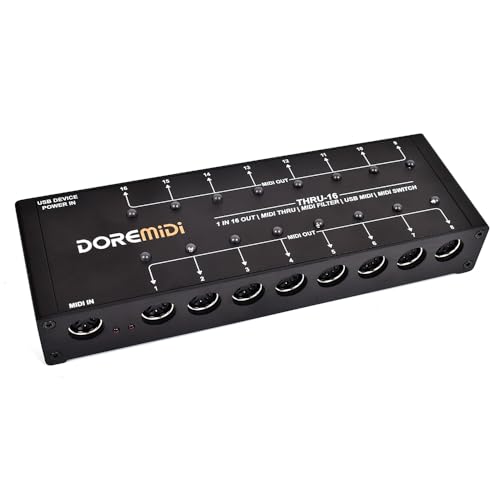
- Splits one MIDI input into 16 outputs
- Editable filters for every MIDI output
- Individual output switches and indicator lights
Best For: Large hardware rigs needing MIDI distribution
Best for Complex MIDI Rigs
mioXL Multiport MIDI Interface

- 8 MIDI inputs and 12 outputs
- 10 USB-MIDI host ports
- 22 assignable RTP-MIDI network ports
Best For: Large studios and networked MIDI setups
Best Wireless MIDI Upgrade

- Bluetooth MIDI for USB-MIDI gear
- USB-C host and client ports
- Supports SysEx and MPE messages
Best For: Cable-free studio and live MIDI connections
Best Simple MIDI Splitter
MIDI Thru-6 USB MIDI Interface

- One MIDI input and six outputs
- Duplicates messages to every output
- USB-powered with no batteries
Best For: Distributing one MIDI source to six devices
Best Standalone USB Host

- Hosts up to eight USB MIDI devices
- Advanced routing, filtering, and mapping
- 5V USB or 9V DC standalone power
Best For: Hybrid MIDI rigs, pedalboards, and live performers
Best Audio-and-MIDI Combo

- Combines two audio inputs with MIDI I/O
- Includes balanced outputs and headphone monitoring
- Comes with a five-year warranty and creative software
Best For: Home studios recording vocals, guitars, and MIDI instruments
Best Compact MIDI Router

- Hosts up to eight USB MIDI devices
- 32-bit processing supports complex MIDI data
- Compact body with routing and preset control
Best For: Space-conscious hybrid rigs and MIDI pedalboards
Flexible Studio Hub – ESI M4U eX
For musicians comparing multiport MIDI interfaces, the ESI M4U eX stands out as a flexible 8-port USB 3.0 option. Its ports configure automatically as inputs or outputs, while the integrated USB hub and standalone routing make it useful in both computer-based and hardware-focused setups.
Best For: Studios and live rigs that need adaptable MIDI routing, multiple ports, and extra USB connectivity.
Pros:
- Eight automatically configurable MIDI ports with colored LED status indicators.
- Built-in USB 3.0 hub provides three additional USB connections.
- Standalone merging and routing support, with Windows driver options for complex setups.
- Class-compliant operation supports plug-and-play use on Windows and macOS.
Cons:
- Its extensive routing features may be more than a simple MIDI setup requires.
- The optional Windows driver is needed for advanced multi-device and multi-client operation.
The M4U eX is a strong choice when port flexibility matters. It combines broad connectivity with standalone functionality, making it particularly practical for larger MIDI systems.
Dedicated MIDI Merger – MERGE-5 Pro
The MERGE-5 Pro is a focused option among multiport MIDI interfaces, designed to combine up to five MIDI input signals into one data stream. It can operate without a computer and sends the merged signal through two MIDI outputs, making it suited to hardware-based control setups.
Best For: Hardware rigs that combine several keyboards, controllers, or other MIDI sources.
Pros:
- Merges up to five MIDI inputs into a single MIDI data stream.
- Provides two MIDI outputs for distributing the merged signal.
- Works standalone without requiring a computer.
- Supports filtering and standard MIDI data including notes, CC, PC, clock, MTC, and SysEx.
Cons:
- It is specialized for MIDI merging rather than audio interfacing.
- Filtering and configuration may require more setup than a basic MIDI connection.
If your main challenge is combining multiple hardware MIDI sources, the MERGE-5 Pro offers a direct solution. Its standalone operation keeps the setup independent of a computer.
Audio Production Hub – Focusrite Scarlett 4i4 4th Gen
For buyers who need multiport MIDI interfaces alongside audio recording, the Focusrite Scarlett 4i4 4th Gen combines MIDI I/O with a broader USB-C studio hub. It offers microphone, instrument, and line connections, plus 4-in/4-out audio and software intended for modern music production.
Best For: Home studios that need MIDI connectivity together with mic, instrument, and line-level recording.
Pros:
- Includes MIDI input and output alongside four line inputs and four line outputs.
- Two mic preamps and two Hi-Z instrument inputs support varied recording setups.
- 120 dB dynamic range, Air mode, Auto Gain, and Clip Safe support practical recording workflows.
- Includes bundled software such as Ableton Live Lite, Cubase LE, and Pro Tools Intro+.
Cons:
- Its MIDI connectivity is part of an audio interface rather than a dedicated multiport MIDI unit.
- It has one MIDI input and one MIDI output, so it may not suit large hardware MIDI networks.
The Scarlett 4i4 is the most versatile choice here for recording-focused users. Choose it when audio inputs and outputs are as important as basic MIDI connectivity.
Large-Scale MIDI Distribution – THRU-16 MIDI Splitter
The THRU-16 takes a different approach to multiport MIDI interfaces by splitting one MIDI input across 16 outputs. Each output has an editable filter, switch, and indicator light, giving larger hardware setups practical control over which destinations receive MIDI data.
Best For: Performers and installations that need to distribute one MIDI source to many instruments.
Pros:
- Converts one MIDI input into 16 MIDI outputs.
- Provides editable MIDI filters for each output.
- Individual switches and indicator lights make output control straightforward.
- Supports notes, CC, PC, clock, MTC, and SysEx, with firmware upgrade support.
Cons:
- It distributes one input rather than merging multiple MIDI sources.
- Its 16-output design may be unnecessary for smaller setups.
Choose the THRU-16 when broad MIDI distribution is the priority. Independent filtering and output switching make it especially useful for complex rigs with many receiving devices.
Best for Complex MIDI Rigs – mioXL Multiport MIDI Interface
For large studios needing versatile multiport MIDI interfaces, the iConnectivity mioXL combines eight MIDI inputs, 12 outputs, 10 USB-MIDI host ports, and extensive network connectivity. Its routing software and front-panel controls make it suitable for managing a substantial hardware setup.
Best For: Large MIDI studios, multi-computer setups, and users connecting DIN, USB, and network MIDI equipment.
Pros:
- Provides 8 MIDI inputs and 12 MIDI outputs through 5-pin DIN connections.
- Supports 10 USB-MIDI host ports for class-compliant peripherals.
- Offers RTP-MIDI networking with 22 assignable virtual network ports.
- Includes OLED monitoring, rotary control, and Auracle routing presets.
Cons:
- Its extensive routing features may be more than a small setup requires.
- iOS connectivity may require a CCK, network hardware, or a wired connection method.
The mioXL is the most capable option here for centralized MIDI routing and expansion. It is a strong fit when you need many physical ports, USB hosts, and network connections in one device.
Best Wireless MIDI Upgrade – CME WIDI Uhost
The CME WIDI Uhost takes a different approach to multiport MIDI interfaces by adding wireless Bluetooth MIDI to class-compliant controllers and computers. It includes USB-C host and client connections, making it useful for reducing cables in compatible studio or live setups.
Best For: Musicians who want wireless connections between USB-MIDI equipment, computers, mobile devices, and Bluetooth MIDI controllers.
Pros:
- Adds Bluetooth MIDI connectivity to compatible class-compliant USB-MIDI devices.
- Provides USB-C host and client ports for a broad range of operating systems.
- Supports MIDI messages including SysEx and MPE.
- Offers claimed 3 ms latency between two WIDI devices and up to 65 feet of line-of-sight range.
Cons:
- Compatibility depends on Bluetooth MIDI support or additional bridge software.
- Pairing requires the WIDI-specific process; ordinary Bluetooth pairing does not work.
- It is not a large bank of physical DIN inputs and outputs.
The WIDI Uhost is best viewed as a compact wireless connectivity tool rather than a traditional high-port-count interface. It makes sense when cable reduction and Bluetooth MIDI flexibility matter more than numerous DIN connections.
Best Simple MIDI Splitter – MIDI Thru-6 USB MIDI Interface
For a straightforward distribution task, this MIDI Thru-6 is one of the simpler multiport MIDI interfaces. It takes one standard 5-pin MIDI input and duplicates the incoming messages across six outputs, letting one controller or synth feed multiple devices.
Best For: Basic MIDI splitting for keyboards, controllers, and synth setups that need one input distributed to up to six devices.
Pros:
- Provides one MIDI input and six MIDI outputs.
- Passes incoming MIDI messages to all six outputs.
- Supports standard 16-channel MIDI communication.
- Uses 5V DC USB power and requires no batteries.
Cons:
- It does not provide multiple MIDI inputs or programmable routing.
- The unit is designed for signal duplication rather than merging or advanced interfacing.
This box is a practical choice when the goal is simply to send one MIDI stream to several devices. Choose a more advanced interface if you need computer integration, multiple inputs, filtering, or configurable routing.
Best Standalone USB Host – CME H4MIDI WC
For musicians comparing multiport midi interfaces, the CME H4MIDI WC stands out as a flexible hub for connecting USB MIDI gear to traditional MIDI hardware. It can host up to eight USB MIDI devices through a standard hub while also providing computer-based MIDI connectivity.
Best For: Guitarists, producers, and performers building compact hybrid or pedalboard MIDI setups.
Pros:
- Supports up to 8-in/8-out USB MIDI host ports with a hub.
- Offers MIDI routing, splitting, merging, mapping, and filtering.
- Works standalone from 5V USB or 9V DC power and supports four presets.
- Compatible with macOS, Windows, iOS, Android, Linux, and ChromeOS.
Cons:
- WIDI Bluetooth MIDI requires the optional WIDI Core module.
- Only one 5-pin MIDI input and output pair is specified.
- Its advanced routing features may be more than a simple setup needs.
The H4MIDI WC is a strong choice when standalone USB hosting and advanced MIDI processing matter more than basic computer-to-MIDI conversion. Its compact size and dual-power design also suit mobile and live rigs.
Best Audio-and-MIDI Combo – Arturia MiniFuse 2
The Arturia MiniFuse 2 is a practical option among multiport midi interfaces for creators who also need audio recording. It combines 5-pin MIDI input and output with two combo audio inputs, balanced outputs, headphone monitoring, and a USB hub.
Best For: Beginners, guitarists, vocalists, and home producers who need audio and MIDI in one compact interface.
Pros:
- Includes 5-pin MIDI input and output for synths, controllers, and drum machines.
- Provides two combo mic/instrument/line inputs with 48V phantom power.
- Offers balanced line outputs, headphone volume control, and a USB-A hub.
- Includes Ableton Live Lite and additional Arturia, Native Instruments, and Splice software.
Cons:
- USB MIDI expansion is not specified as a standalone host function.
- Its two-input design may be limiting for larger recording sessions.
- Listed compatibility focuses on Windows and macOS.
Choose the MiniFuse 2 if your MIDI needs are part of a broader recording workflow. It is less specialized than the CME host interfaces, but its audio connections and included software make it a versatile starter studio centerpiece.
Best Compact MIDI Router – CME H2MIDI Pro
The CME H2MIDI Pro is a compact pick for multiport midi interfaces when you want to connect USB MIDI equipment with traditional 5-pin hardware. Its USB host mode supports up to eight devices through a hub, while USB-C provides computer connectivity without requiring a computer for standalone operation.
Best For: Producers and guitarists who need a small, fast MIDI bridge for modern and legacy equipment.
Pros:
- Connects up to eight USB MIDI devices using a standard USB hub.
- Handles complex MIDI data including clock, SysEx, MTC, and MPE.
- Provides routing, filtering, mapping, and splitting through HxMIDI Tools.
- Its 2.95-inch width and dual-power design suit compact setups.
Cons:
- Provides one 5-pin MIDI input and output pair.
- Computer-connected virtual MIDI is limited to 2-in/2-out.
- It lacks the H4MIDI WC’s expanded 4-in/4-out client connectivity.
The H2MIDI Pro is the better fit when space and precise MIDI handling are priorities. It delivers much of the routing flexibility of a larger interface in a notably smaller enclosure, though users needing more computer-side MIDI ports may prefer the H4MIDI WC.
How We Picked the Best Multiport Midi Interfaces
We compared these models by looking at connection count, port types, routing flexibility, compatibility, standalone operation, and practical use cases. Dedicated MIDI interfaces were assessed for DIN input and output capacity, while audio interfaces were considered for their combined recording and MIDI functionality.
We also considered whether each product supports USB hosting, merging, filtering, wireless MIDI, plug-and-play operation, or high-speed signal distribution. The best choice depends on your equipment and workflow rather than on port count alone.
Quick Comparison
| Best For | What to Prioritize |
|---|---|
| Large hardware studios | High DIN port count and flexible routing |
| MIDI distribution | Multiple outputs, filtering, and reliable timing |
| Connecting USB gear | USB host compatibility and device support |
| Wireless setups | Bluetooth MIDI range and low-latency performance |
| Recording plus MIDI | Audio inputs, MIDI I/O, and driver compatibility |
Key Buying Factors for Multiport Midi Interfaces
Port Count and Connection Types
Count the MIDI inputs and outputs you will use now, then allow room for expansion. Five-pin DIN remains dependable for hardware, while USB host ports can connect controllers and modern devices without a computer. Remember that an advertised output count may refer to physical ports, not independent routing destinations.
Routing, Merging, and Filtering
Look for programmable routing if you need to send different controllers to different instruments. Merge functions combine multiple MIDI sources, while channel filters and switches help prevent unwanted notes, clock data, or control messages from reaching selected devices.
Computer and Standalone Operation
Class-compliant models are generally easier to use across current computers, but confirm operating-system support and the required USB connection. Standalone functionality matters when you want hardware routing without leaving a computer powered on.
Timing and Reliability
For live rigs and large hardware systems, stable clock handling, optocoupled inputs, and dependable power are important. Check whether the interface requires a separate power supply, especially when connecting several USB devices.
Who Should Buy Which Multiport Midi Interfaces?
Choose a high-port-count DIN interface if you run several synthesizers, drum machines, or effects units. A MIDI splitter is better when one source must feed many destinations with minimal configuration. Pick a merger when multiple controllers or sequencers need to share one MIDI stream.
USB host models suit computer-free setups that connect USB controllers directly to traditional MIDI hardware. Wireless options are useful for compact controller arrangements, while audio/MIDI interfaces such as the Scarlett 4i4 or MiniFuse 2 make more sense if you also need microphone, instrument, or line-level recording. Before buying, map every device in your rig and confirm the interface provides the exact inputs, outputs, power, and routing controls you need.