Adding an M.2 cache can make a NAS feel more responsive when several users access files, run applications, or stream media at the same time. The right enclosure also needs dependable drive support, useful networking, adequate cooling, and software that fits your workflow.
We selected 10 NAS options spanning compact two-bay systems, four- and six-bay designs, hybrid SATA/NVMe enclosures, and all-flash platforms. Use the guide below to narrow the choices by performance, capacity, noise, expandability, and ease of management.
Best 10 Nas Enclosures with M2 Cache Picks for 2026
Best Overall

- Four M.2 NVMe slots and two SATA bays
- Intel N100, 16GB RAM, and 10GbE
- Unraid starter license included
Best For: Fast, flexible home labs and media servers
Best for Creators

- 10GbE with Ryzen R2514 processor
- Two M.2 slots plus SATA and U.2 support
- RAM expandable from 8GB to 64GB
Best For: Creators, freelancers, and smart-home storage
Best External Enclosure

- Two SATA bays and three M.2 NVMe slots
- USB 3.2 Gen 2 with four RAID modes
- Supports up to 68TB combined capacity
Best For: Flexible direct-attached hybrid storage
Best for Media

- Four M.2 NVMe slots for cache or flash storage
- Dual 2.5GbE and HDMI 2.0b output
- 4K playback and hardware transcoding support
Best For: Home media libraries and creator workflows
Networked Creator Choice
Asustor Lockerstor 2 Gen2+ NAS
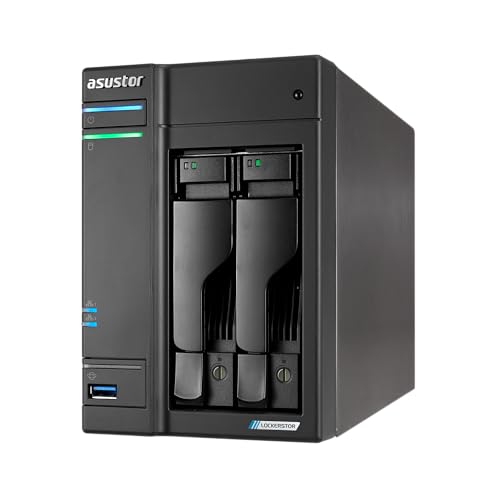
- Four PCIe 3.0 M.2 NVMe slots
- Dual 5GbE networking
- Two-bay NAS with expandable DDR4 memory
Best For: Creators and small businesses needing networked NVMe caching
Maximum NVMe Expansion

- Accommodates six M.2 NVMe SSDs
- Up to 48TB stated capacity
- USB 3.2 Gen 2 with aluminum cooling design
Best For: High-density external NVMe expansion
Best with Extra Features

- Four-bay design with up to two M.2 SSDs
- Dual 10GbE networking for fast transfers
- Docker, VMs, surveillance, and media support
Best For: Creators, offices, and advanced home users
Best Flexible Hybrid

- Two HDD bays plus two M.2 NVMe slots
- Dual 2.5GbE and HDMI connectivity
- Virtual machines, Docker, and 4K media tools
Best For: Home users and NAS experimenters
Best All-Flash

- Four M.2 NVMe slots for all-flash storage
- Intel Core i5 processor and 10GbE networking
- Supports RAID 0, 1, 5, 6, and 10
Best For: Video editors and performance-focused users
Best Overall – LincStation N2 6-Bay NAS
The LincStation N2 is a flexible choice among NAS enclosures with M.2 cache, combining two 2.5-inch SATA bays with four M.2 NVMe slots. Its Intel N100 processor, 16GB of memory, and 10GbE networking make it well suited to fast file transfers, backups, and media-server workloads.
Best For: Enthusiasts, creative users, and small offices building a fast Plex, Docker, private-cloud, or Unraid system.
Pros:
- Four M.2 NVMe slots plus two SATA bays support mixed high-speed and bulk storage.
- Intel N100, 16GB LPDDR5 RAM, and 10GbE support demanding multitasking and rapid transfers.
- Includes an Unraid starter license, 30-day trial, and 2-year warranty.
- Compact metal design includes HDMI 2.0, USB-C, and 24/7 technical support.
Cons:
- Only two dedicated SATA bays limit traditional hard-drive expansion.
- Diskless configuration requires purchasing compatible drives separately.
For buyers prioritizing NVMe expansion and software flexibility, the N2 offers an unusually capable compact platform. Its four M.2 slots are especially attractive when fast storage matters more than a large number of hard-drive bays.
Best for Creators – UGREEN DXP2800 GT NAS
The UGREEN DXP2800 GT is a creator-focused option among NAS enclosures with M.2 cache, pairing 10GbE networking with two SATA bays and two M.2 SSD slots. Its Ryzen Embedded processor, expandable DDR4 memory, and Docker and virtual-machine support make it suitable for demanding personal-cloud workflows.
Best For: Freelancers, creators, and smart-home users who need fast transfers, local backups, surveillance storage, and self-hosted applications.
Pros:
- 10GbE and Ryzen R2514 performance support large files and multi-device workflows.
- Two M.2 SSD slots and support for compatible U.2 NVMe drives provide expansion flexibility.
- 8GB DDR4 RAM can be expanded to 64GB.
- UGOS Pro supports Docker, virtual machines, Plex, and local camera recording.
Cons:
- Drives are not included.
- Plex requires manual setup through Docker.
- Pre-installed memory is non-ECC; ECC requires a compatible upgrade.
The DXP2800 GT is a strong all-around platform when networking speed and application support are priorities. Its two M.2 slots are useful for fast storage expansion, while the two-bay design keeps the system relatively compact.
Best External Enclosure – Cenmate Hybrid RAID Enclosure
The Cenmate hybrid enclosure stands out among NAS enclosures with M.2 cache as a direct-attached storage solution rather than a complete network NAS. It accommodates two 2.5/3.5-inch SATA drives and three M.2 NVMe SSDs, connecting to a computer over USB 3.2 Gen 2.
Best For: Users who want a flexible USB storage enclosure combining high-capacity SATA drives with several NVMe SSDs.
Pros:
- Supports two SATA drives and three M.2 SSDs in one enclosure.
- Offers RAID 0, RAID 1, JBOD, and Normal modes.
- USB 3.2 Gen 2 supports up to 10Gbps connectivity and includes USB-A and USB-C cables.
- Tool-free drive trays and aluminum construction simplify installation and cooling.
Cons:
- It is a USB enclosure, not a standalone network-attached NAS.
- The always-on fan may be unsuitable for noise-sensitive environments.
- RAID configuration can result in data loss if set up incorrectly, and macOS has no RAID software support according to the notes.
This enclosure is best viewed as a high-capacity DAS companion for a computer or server. It provides impressive drive-format flexibility, but buyers wanting remote access, apps, or built-in NAS software should choose a dedicated NAS instead.
Best for Media – Asustor AS5402T 2-Bay NAS
The Asustor AS5402T is a media-oriented choice among NAS enclosures with M.2 cache, offering four M.2 NVMe slots alongside two drive bays. Its Intel N5105 processor, dual 2.5GbE ports, HDMI 2.0b output, and hardware transcoding support target home entertainment and content workflows.
Best For: Home media libraries, Plex users, content creators, and video editors who want NVMe caching or all-flash storage options.
Pros:
- Four M.2 NVMe slots can be used for caching or full-flash storage.
- Dual 2.5GbE ports support fast transfers and link aggregation.
- Intel N5105 quad-core processor supports multitasking and media workloads.
- HDMI 2.0b and hardware transcoding support direct playback and 4K media use.
Cons:
- Includes only 4GB of RAM, though it can be upgraded to 16GB.
- Two drive bays provide less bulk-storage expansion than larger NAS systems.
- Its 2.5GbE networking is slower than the 10GbE connections on some alternatives.
The AS5402T is a well-balanced option for buyers who want substantial NVMe flexibility in a compact media NAS. Its four M.2 slots are particularly useful for improving responsiveness or creating an all-SSD setup.
Hybrid Capacity Pick – CENMATE SATA and 3-Bay M.2 Enclosure
For shoppers comparing NAS enclosures with m2 cache, this CENMATE model offers a flexible hybrid approach: one 2.5/3.5-inch SATA drive bay plus three M.2 NVMe slots. It combines bulk HDD or SATA SSD storage with faster NVMe media in a compact USB 3.2 Gen 2 enclosure.
Best For: Users who want to combine a large SATA drive with multiple NVMe SSDs for expandable desktop storage.
Pros:
- Supports one SATA HDD/SSD and three M.2 2230, 2242, 2260, 2280, or 22110 NVMe SSDs.
- Offers a stated maximum capacity of 46TB across the four drives.
- Includes USB-A and USB-C 3.2 Gen 2 connectivity, tool-free installation, and continuous fan cooling.
Cons:
- Advertised full-load read rates are 200–300MB/s despite the 10Gbps interface.
- The fan runs continuously and may be unsuitable for noise-sensitive setups.
- This is a direct-attached enclosure rather than a standalone NAS with networking or NAS software.
The hybrid layout is the main attraction: it gives capacity-focused buyers a SATA bay while retaining room for three NVMe drives. Choose it when USB-attached storage fits your workflow and continuous cooling noise is acceptable.
Networked Creator Choice – Asustor Lockerstor 2 Gen2+ NAS
Among NAS enclosures with m2 cache, the Asustor Lockerstor 2 Gen2+ stands out as a true networked storage platform. Its two-bay NAS design pairs four PCIe 3.0 M.2 NVMe slots with dual 5GbE ports, making it suited to faster file access, caching, and creator-focused workflows.
Best For: Content creators and small businesses that need network storage, NVMe caching, and fast Ethernet connectivity.
Pros:
- Provides four M.2 NVMe slots for cache acceleration or an all-flash storage pool.
- Uses dual 5GbE ports for faster network transfers than standard Gigabit NAS systems.
- Includes an Intel Celeron N5105 quad-core processor, 4GB DDR4 RAM expandable to 16GB, and 4K media-server support.
Cons:
- Has only two primary NAS drive bays.
- NVMe SSDs and additional storage are not indicated as included.
- Compatibility should be checked against Asustor’s supported-device list.
This is the strongest fit for buyers who specifically want networked storage rather than a USB enclosure. The four NVMe slots provide unusual flexibility for caching or all-flash use, while dual 5GbE helps justify the platform for demanding shared-storage environments.
Maximum NVMe Expansion – CENMATE Six-Bay M.2 Enclosure
For buyers seeking NAS enclosures with m2 cache or simply a high-density NVMe expansion box, this CENMATE enclosure accommodates six M.2 drives at once. It connects over USB 3.2 Gen 2 and supports a stated maximum of 48TB, making it the most capacity-focused option in this group.
Best For: Desktop users who need simultaneous access to multiple M.2 NVMe SSDs in a single external enclosure.
Pros:
- Holds six M.2 2230, 2242, 2260, 2280, or 22110 NVMe SSDs.
- Supports up to 8TB per SSD and a stated maximum total capacity of 48TB.
- Includes USB-A and USB-C 3.2 Gen 2 support, tool-free installation, aluminum construction, and continuous fan cooling.
Cons:
- The advertised full-load read rate is 200–600MB/s, below the interface’s theoretical 10Gbps maximum.
- Continuous fan operation may produce unwanted noise.
- It is a USB-attached enclosure, not a standalone NAS with built-in network services.
Six M.2 bays make this the most ambitious direct-attached enclosure here. It is a practical choice for consolidating several NVMe drives, provided your host system and workflow can make effective use of USB connectivity and you are comfortable with active cooling.
Best with Extra Features – UGREEN NAS DXP4800 GT
For buyers comparing NAS enclosures with m2 cache, the UGREEN NAS DXP4800 GT stands out as a versatile four-bay system with dual 10GbE networking and support for up to two M.2 SSDs. Its Ryzen processor, expandable memory, Docker and virtual-machine support make it suitable for demanding storage and self-hosted workflows.
Best For: Creators, small offices, and advanced home users who need high-speed networking, expandable storage, and broad software support.
Pros:
- Four SATA bays plus support for up to two M.2 SSDs and up to 144TB total capacity.
- Dual 10GbE ports support fast transfers and link aggregation on compatible equipment.
- Ryzen four-core/eight-thread processor and expandable 8GB DDR4 RAM support multitasking.
- Includes SD-card backup, surveillance features, Docker, and virtual-machine support.
Cons:
- Drives are not included, so the full storage setup requires additional purchases.
- Some advanced networking benefits depend on compatible network equipment.
The DXP4800 GT is a strong all-rounder when you want HDD capacity alongside M.2 acceleration, fast wired networking, and room to expand into media, surveillance, or self-hosted applications.
Best Flexible Hybrid – ORICO MetaBox HS200
The ORICO MetaBox HS200 is a compact two-bay option for shoppers seeking NAS enclosures with m2 cache, combining two HDD slots with two M.2 NVMe slots. It also adds dual 2.5GbE, virtual-machine support, Docker tools, remote access, and media-library features for a flexible home or small-office setup.
Best For: Home users and experimenters who want a hybrid HDD/SSD NAS with virtualization, containers, remote sharing, and 4K media playback.
Pros:
- Supports two HDDs and two M.2 NVMe SSDs, with advertised capacity up to 64TB.
- Dual 2.5GbE ports, USB connectivity, and HDMI provide practical expansion options.
- Supports virtual machines, Docker deployments, Time Machine, and cloud synchronization.
- Offers 4K@60Hz playback, automatic movie organization, and AI album search features.
Cons:
- Only two mechanical-drive bays are available for bulk storage.
- Remote-access performance depends on the WAN connection, listed at up to 10MB/s.
- The unit is diskless and requires separate HDD and SSD purchases.
The HS200 is appealing if you value flexibility more than maximum bay count. Its two M.2 slots can complement HDD storage while the included software features make it a capable multimedia and experimentation platform.
Best All-Flash – UGREEN NAS DXP480T Plus
For users prioritizing SSD performance, the UGREEN NAS DXP480T Plus is an all-flash four-bay enclosure built around four M.2 NVMe slots. It combines a 12th Gen Intel Core i5 processor, 10GbE, Wi-Fi 6, and support for RAID configurations, making it especially well suited to demanding creative file workflows.
Best For: Video editors and performance-focused users who want an all-SSD NAS for fast access to active projects.
Pros:
- Four M.2 NVMe slots provide an all-flash storage architecture with up to 32TB capacity.
- 12th Gen Intel Core i5 processor with 10 cores and 12 threads supports demanding workloads.
- 10GbE, Wi-Fi 6, Thunderbolt 4 connectivity, and 8K HDMI broaden workflow options.
- Supports JBOD, RAID 0, 1, 5, 6, and 10 for different storage and redundancy needs.
Cons:
- All-flash storage capacity is limited to the supported SSD configuration and advertised 32TB maximum.
- SSDs are not included, adding to the initial setup cost.
- Actual speeds depend on the network, processor, drives, and file sizes.
The DXP480T Plus is the most performance-oriented choice here for an M.2-focused setup. Its four NVMe bays and powerful processor favor fast project access, while RAID and multiple high-speed connection options add flexibility.
How We Picked the Best Nas Enclosures with M2 Cache
We focused on systems that support M.2 NVMe storage for caching or primary storage, while also considering drive-bay flexibility, networking, cooling, operating-system features, and likely use cases. The lineup includes traditional NAS appliances, hybrid SATA/NVMe enclosures, and DIY-friendly hardware for buyers who want more control over software and upgrades.
We also looked for practical differences between two-bay, four-bay, and six-bay designs. A smaller enclosure can be easier to place and less expensive to populate, while additional bays provide better capacity growth and more options for RAID layouts.
Quick Comparison
| Best For | Recommended Type | What to Prioritize |
|---|---|---|
| Home media and backups | Two-bay NAS | RAID 1 support, quiet cooling, remote access, and media apps |
| Creators and editors | Four-bay or all-flash NAS | 10GbE or faster networking, NVMe capacity, and strong multitasking |
| Small offices | Four-bay business-oriented NAS | Snapshots, user permissions, backup tools, and reliable expansion |
| DIY users | Modular NAS server or enclosure | Upgrade access, operating-system compatibility, and community support |
Key Buying Factors for NAS Enclosures with M.2 Cache
Cache Design and NVMe Compatibility
Check whether the M.2 slots support read cache, write cache, storage pools, or all three. Cache is most useful for repeated access and small-file workloads; it does not automatically make large sequential transfers faster. Confirm the supported M.2 key type, drive length, capacity limits, and whether matched SSDs are recommended.
Drive Bays and RAID
Two bays are suitable for a mirrored RAID 1 setup, but four or more bays offer better capacity efficiency and room to expand. RAID is not a backup, so plan a separate local, cloud, or off-site copy for important files.
Networking and Ports
Match the NAS network connection to your infrastructure. A 2.5GbE port is a useful step up from gigabit Ethernet, while 10GbE is more appropriate for high-resolution editing, large project files, and multiple concurrent users. USB 3.2 ports can also help with external backups.
Cooling, Software, and Noise
NVMe drives and high-capacity hard disks produce heat, making active cooling important. Review fan placement, drive access, and expected noise. Also check the operating system for snapshot support, synchronization, containers, media servers, user controls, and mobile or remote-access tools.
Who Should Buy Which Nas Enclosures with M2 Cache?
Choose a two-bay system if you want straightforward mirrored storage for documents, photos, backups, and media. Choose a four-bay model if you need more capacity, improved RAID flexibility, or storage for a small team. Choose an all-flash design when low latency and high I/O matter more than inexpensive bulk capacity. Choose a hybrid enclosure if you want both SATA drives and multiple NVMe devices in one chassis. Choose a DIY-oriented model if you are comfortable configuring software and want maximum control over hardware, services, and future upgrades.