The best RAID enclosures for data security make it easier to combine multiple SATA drives into protected, expandable storage without buying a complete NAS. They can add redundancy, improve organization, and provide faster access to important files from a desktop or workstation.
This roundup compares 10 multi-bay options, from compact two-drive units to high-capacity five-bay enclosures. Use the guide below to match each design with your preferred RAID level, drive type, connection speed, and backup workflow.
Best 10 Raid Enclosures for Data Security Picks for 2026
Best for QNAP NAS Expansion
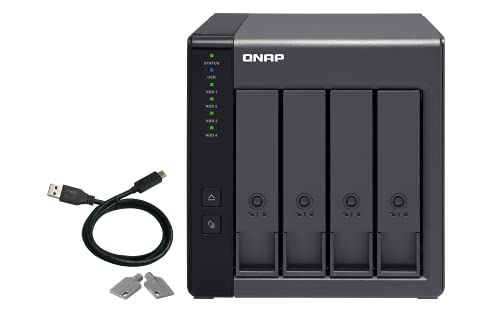
- Four-bay hardware RAID DAS
- Supports RAID 0, 1, 5, JBOD, and individual disks
- Lockable bays; diskless design
Best For: QNAP backup and storage expansion
Best for High-Capacity Desktop Arrays

- Five bays with up to 110TB stated capacity
- Eight RAID and disk-management modes
- Cooling fan, locking mechanism, and 150W power supply
Best For: Large media and project storage
Best for Fast Two-Drive Mirroring

- USB 3.2 Gen 2 up to 10Gbps
- Hardware RAID 1, RAID 0, JBOD, and SINGLE
- Tool-free trays and temperature-controlled fan
Best For: Two-drive mirrored desktop storage
Best Budget Two-Bay Option
CENMATE Aluminum RAID Enclosure

- Four RAID modes with ASM1156R chip
- Supports 2.5-inch and 3.5-inch drives
- USB-A/C 3.0 and aluminum cooling design
Best For: Simple personal or small-business RAID storage
Flexible RAID Storage

- Eight RAID modes, including RAID 5 and Clone
- Supports up to 96TB across four 3.5-inch SATA drives
- USB-A/C connectivity with switch-controlled cooling fans
Best For: Flexible high-capacity SATA storage and backup setups
High-Speed Enterprise Storage
ORICO 5-Bay 20Gbps RAID Enclosure
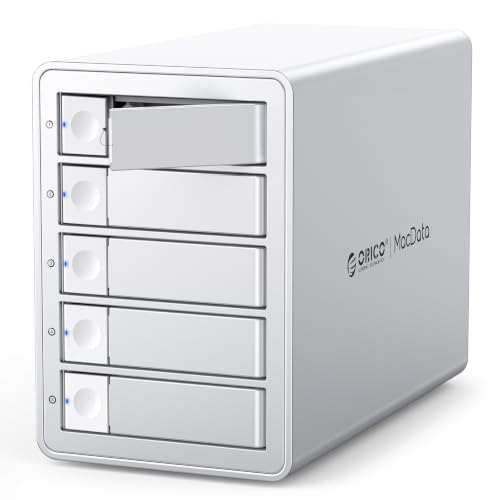
- 20Gbps USB 3.2 Gen 2x2 interface
- Six RAID modes and hot-swappable drive support
- Up to 130TB across five SATA drives
Best For: Large, fast storage arrays for professional workflows
Hybrid Drive Flexibility
CENMATE Hybrid SATA and NVMe RAID Enclosure

- Holds two SATA drives and three M.2 NVMe SSDs
- Four RAID modes with up to 68TB capacity
- Tool-free installation and USB 3.2 Gen 2 connectivity
Best For: Mixed HDD, SATA SSD, and NVMe storage configurations
Best Overall Capacity
ORICO 5-Bay Hardware RAID Enclosure

- Hardware RAID supports RAID 0, 1, 3, 5, 10, JBOD, and Clone modes
- Up to 110TB across five 2.5- or 3.5-inch SATA drives
- 150W built-in supply and 80mm cooling fan
Best For: Large workstation backups and media libraries
Best USB-C Option
Yottamaster 5-Bay RAID Enclosure

- USB 3.1 Type-C connectivity with up to 5Gbps transfer rates
- Supports RAID 0, 1, 3, 5, 10, JBOD, and Clone
- Five bays accommodate up to 110TB total
Best For: USB-C-equipped editing and backup workstations
Best Four-Bay Value

- Eight modes include RAID 1, 3, 5, 10, Clone, Large, and Normal
- Supports up to 80TB across four SATA drives
- Includes USB A/C 3.0 and eSATA connectivity
Best For: Personal or small-office four-drive storage
Best for QNAP NAS Expansion – QNAP TR-004 4-Bay DAS
QNAP TR-004 4 Bay USB Type-C Direct Attached Storage (DAS) with hardware RAID (Diskless)
Check Price On AmazonFor shoppers comparing raid enclosures for data security, the QNAP TR-004 offers four drive bays and hardware-managed RAID in a compact, direct-attached design. It connects over USB Type-C and supports RAID 0, 1, 5, JBOD, and individual disks, but it is diskless and has specific QNAP compatibility limitations.
Best For: QNAP owners needing external backup or additional storage capacity, along with Windows, macOS, or Linux users who want a flexible four-bay DAS.
Pros:
- Hardware RAID supports RAID 0, 1, 5, JBOD, and individual disks.
- Four 3.5-inch SATA bays provide room for scalable storage.
- Lockable drive bays and a metal enclosure add practical physical protection.
- Can serve as external storage for QNAP NAS backup or capacity expansion.
Cons:
- Ships without hard drives.
- Some older QNAP NAS models are not supported.
- The TR-004 is a DAS, and its storage pool cannot be combined with the connected NAS.
The TR-004 is a sensible choice when you want four-bay hardware RAID without setting up a separate NAS. Confirm compatibility with your QNAP model before buying, especially if you plan to use it for NAS expansion.
Best for High-Capacity Desktop Arrays – ORICO 5-Bay RAID Enclosure
The ORICO 5-bay enclosure is built for shoppers seeking raid enclosures for data security with substantial desktop storage capacity. It supports eight RAID modes, up to five 3.5-inch SATA drives, and a claimed maximum capacity of 110TB, while its locking mechanism and cooling design support long-term operation.
Best For: Large project files, high-resolution video storage, and users who need multiple RAID configurations in a Windows, macOS, or Linux-compatible enclosure.
Pros:
- Eight modes include RAID 0, 1, 3, 5, 10, JBOD, CLONE, and CLEAR.
- Five bays support up to 22TB per disk, for a stated 110TB maximum.
- An 80mm cooling fan, vents, and aluminum construction help manage heat.
- Independent safety locking and a 150W built-in power supply suit multi-drive use.
Cons:
- Ships without hard drives.
- Mode switching should be preceded by a data backup.
- USB 3.0 transfer is specified at up to 5Gbps, rather than a faster USB standard.
With five bays and unusually broad RAID support, the ORICO is the most capacity-focused option here. Its locking design and cooling features are useful for a busy desktop array, but buyers should plan their RAID mode and backup strategy carefully.
Best for Fast Two-Drive Mirroring – TERRAMASTER D2-320
For a compact approach to raid enclosures for data security, the TERRAMASTER D2-320 combines two drive bays with USB 3.2 Gen 2 connectivity and hardware RAID. Its RAID 1 mode mirrors data across the drives, while RAID 0, JBOD, and SINGLE provide additional storage configurations.
Best For: Users who want a two-drive RAID 1 backup enclosure with fast USB-C connectivity for Windows, Mac, or Linux systems.
Pros:
- USB 3.2 Gen 2 supports data transfer up to 10Gbps.
- RAID 1 can automatically rebuild data after replacing a damaged drive, according to the supplied notes.
- Supports two 3.5-inch or 2.5-inch SATA HDDs or SSDs, up to 22TB per drive.
- Tool-free trays and temperature-controlled cooling simplify installation and operation.
Cons:
- Only two drive bays are available.
- It is diskless and functions as a DAS, not a NAS.
- RAID 0 speed and capacity benefits do not provide drive redundancy.
The D2-320 is a strong fit when mirrored storage and fast direct-attached transfers matter more than a large bay count. Choose RAID 1 for redundancy, and remember that mirroring is not a substitute for a separate backup.
Best Budget Two-Bay Option – CENMATE Aluminum RAID Enclosure
The CENMATE two-bay enclosure is a straightforward option for shoppers comparing raid enclosures for data security on a personal or small-business desktop. Its ASM1156R chip, four RAID modes, USB A/C 3.0 connectivity, and support for both 2.5-inch and 3.5-inch drives keep the setup flexible.
Best For: Individuals and small businesses wanting a simple two-drive enclosure with RAID 1 support and broad Windows, Mac, and Linux compatibility.
Pros:
- Supports RAID 0, RAID 1, Normal, and JBOD modes.
- Accepts 2.5-inch and 3.5-inch HDDs or SSDs, up to 20TB per drive.
- Includes both USB-A and USB-C 3.0 cable options.
- Aluminum construction and a built-in fan assist with cooling.
Cons:
- The fan may produce approximately 40–50 decibels of noise.
- Changing or designing a RAID array can result in data loss; the reset procedure must be followed.
- USB 3.0 is limited to a stated 5Gbps transfer rate.
The CENMATE offers useful basic RAID flexibility in a compact two-bay format. It is worth considering for straightforward RAID 1 storage, provided you can tolerate the reported fan noise and take care when resetting or changing the array.
Flexible RAID Storage – MAIWO 4-Bay RAID Enclosure
For users comparing raid enclosures for data security, the MAIWO 4-Bay enclosure offers eight RAID modes, including RAID 1/10, RAID 3, RAID 5, Clone, and JBOD. It supports four 3.5-inch SATA drives, up to 96TB of capacity, and USB-A/C 3.1 transfers up to 5Gbps.
Best For: Professionals, businesses, surveillance setups, and power users needing flexible redundancy and large-scale 3.5-inch SATA storage.
Pros:
- Eight RAID configurations provide broad flexibility for capacity, cloning, and redundancy.
- Supports up to 96TB using four drives of up to 24TB each.
- Two switch-controlled cooling fans help manage drive temperatures.
- Includes USB-A to USB-C and USB-C to USB-C cables.
Cons:
- Limited to 5Gbps USB transfer speeds.
- Designed for 3.5-inch SATA drives rather than M.2 NVMe storage.
- Fan control is limited to on or off.
The MAIWO is a practical choice when RAID-mode variety and high-capacity hard-drive support matter more than maximum interface speed. Its cooling system and aluminum casing also suit sustained storage workloads.
High-Speed Enterprise Storage – ORICO 5-Bay 20Gbps RAID Enclosure
Among raid enclosures for data security, the ORICO 5-Bay model stands out for its 20Gbps USB 3.2 Gen 2×2 interface, six RAID modes, and support for up to 130TB. It is built for multi-drive workflows where fast transfers, hot-swapping, and expansion are priorities.
Best For: Video editors, enterprise IT teams, data-management professionals, and AI or research workloads requiring large, fast-access storage.
Pros:
- 20Gbps USB 3.2 Gen 2×2 interface supports high-speed large-file transfers.
- Six modes include RAID 0, 1, 5, 10, JBOD, and Normal.
- Supports five SATA drives and up to 130TB total capacity.
- Hot-swapping, aluminum construction, and a low-noise 45dB fan support ongoing use.
Cons:
- Thunderbolt connections are limited to around 10Gbps according to the supplied notes.
- Changing RAID modes can erase drive contents, so backups are required.
- Its full 20Gbps performance requires a compatible USB4 or USB 3.2 Gen 2×2 connection.
The ORICO is the strongest fit for demanding transfer-heavy environments and very large arrays. Confirm that the host computer supports the required interface before paying for its maximum speed.
Hybrid Drive Flexibility – CENMATE Hybrid SATA and NVMe RAID Enclosure
For buyers seeking raid enclosures for data security with mixed storage, the CENMATE combines two 2.5/3.5-inch SATA drives with three M.2 NVMe SSDs. It supports four RAID modes, up to 68TB, USB 3.2 Gen 2 speeds up to 10Gbps, and tool-free drive installation.
Best For: Users who want one enclosure for high-capacity SATA storage and faster M.2 NVMe drives in a compact hybrid setup.
Pros:
- Hybrid design accommodates two SATA HDDs or SSDs plus three M.2 NVMe SSDs.
- Supports RAID 0, RAID 1, Normal, and JBOD modes.
- Offers up to 68TB total capacity with USB-A/C 3.2 Gen 2 connectivity.
- Tool-free trays and compatibility with Windows, macOS, and Linux simplify setup.
Cons:
- Provides fewer RAID modes than the other listed enclosures.
- The continuously running fan may be noticeable in sound-sensitive environments.
- Changing or configuring RAID can result in data loss, so important files should be backed up.
The CENMATE is a distinctive option when capacity and SSD performance need to coexist in one enclosure. Its always-on fan prioritizes cooling, while the 10Gbps interface keeps it below the ORICO in maximum transfer speed.
Best Overall Capacity – ORICO 5-Bay Hardware RAID Enclosure
For buyers seeking raid enclosures for data security, the ORICO 5-bay enclosure combines hardware RAID flexibility, substantial capacity, and a built-in power supply. It supports up to five 2.5- or 3.5-inch SATA drives, with RAID modes including RAID 1, 3, 5, and 10 for redundancy-focused setups.
Best For: Large desktop backups, video editing, media libraries, and users who want hardware-controlled RAID options.
Pros:
- Supports RAID 0, 1, 3, 5, 10, JBOD, Clone, and Clear modes.
- Offers up to 110TB using five drives rated up to 22TB each.
- 150W built-in power supply is designed to support five high-consumption mechanical drives.
- Aluminum construction, an 80mm fan, and airflow vents support extended operation.
Cons:
- Uses USB 3.0 Type-A rather than USB-C.
- RAID configuration is handled through hardware switches, which may be less convenient than software management.
The ORICO is a strong choice when capacity and flexible hardware RAID are priorities. Its 230MB/s stated transfer rate and integrated power supply make it well suited to a stationary workstation, though buyers should still maintain a separate backup of important data.
Best USB-C Option – Yottamaster 5-Bay RAID Enclosure
The Yottamaster PS500RC3 is one of the more flexible raid enclosures for data security if you prefer USB-C connectivity and five drive bays. It supports RAID 1, 3, 5, and 10, along with JBOD and Clone modes, and works with both 2.5- and 3.5-inch SATA HDDs and SSDs.
Best For: Photographers, video editors, and desktop users who need high-capacity storage with USB-C connectivity.
Pros:
- Supports up to 110TB using five drives of up to 22TB each.
- Offers hardware or software RAID configuration options.
- USB 3.1 Type-C interface supports transfer rates up to 5Gbps.
- Temperature-controlled 80mm fan and aluminum shell help manage heat.
Cons:
- Five-drive operation requires total drive power consumption to stay within 78W.
- New drives may need formatting and partitioning before use.
The Yottamaster stands out for its USB-C interface and removable trays, making drive installation and replacement relatively straightforward. Check the power requirements of your selected drives before buying, particularly if you plan to populate all five bays with power-hungry disks.
Best Four-Bay Value – CENMATE 4-Bay RAID Enclosure
For smaller storage builds, the CENMATE 4-bay enclosure provides multiple RAID modes, USB-A/C 3.0 connectivity, and eSATA in a desktop-focused design. It supports up to four 2.5- or 3.5-inch SATA drives, with RAID 1, 3, 5, and 10 available for redundancy-oriented configurations.
Best For: Personal or small-office storage systems that need four bays and broad connection options.
Pros:
- Supports RAID 0, 1, 3, 5, 10, Clone, Large, and Normal modes.
- Accepts 2.5- and 3.5-inch SATA HDDs and SSDs up to 80TB total.
- Includes USB A/C 3.0 and eSATA cables.
- Aluminum housing and dual fans help dissipate heat.
Cons:
- Fans produce approximately 40–50 decibels, according to the supplied notes.
- Hot-swapping is not supported.
- eSATA multi-bay access depends on RAID support from the computer’s eSATA port.
The CENMATE offers useful connectivity and a broad selection of RAID modes at a lower four-bay capacity. Its setup requires care when changing RAID modes, and its fan noise may make it less suitable for quiet living spaces or recording environments.
How We Picked These Raid Enclosures for Data Security
We focused on diskless enclosures that support widely available 2.5-inch or 3.5-inch SATA HDDs and SSDs. Selection criteria included the number of drive bays, supported RAID modes, host connectivity, cooling, maximum stated capacity, compatibility features, and ease of use. We also included a mix of direct-attached storage designs, hardware RAID models, and flexible enclosures for users who need more than one drive format.
RAID improves availability when a drive fails, but it is not a complete backup. Important files should also be copied to a separate device or cloud destination.
Quick Comparison
- Two-bay models: Best for RAID 1 mirroring, modest capacity, and desktop backups.
- Four-bay models: A balanced choice for larger media libraries, work files, and more flexible RAID layouts.
- Five-bay models: Best when you need high capacity, expansion room, or RAID 5-style storage.
- USB-C and USB 3.2 models: Convenient for modern laptops and desktops, with higher potential throughput.
- eSATA-equipped models: Useful for older workstations or systems that already support eSATA.
Key Buying Factors for Raid Enclosures for Data Security
RAID Level and Drive Count
RAID 1 mirrors data across two drives and prioritizes redundancy, but usable capacity equals one drive. RAID 0 combines drives for speed and capacity without protecting data. JBOD and individual-disk modes offer flexibility but do not provide redundancy. With four or five bays, RAID 5 can offer a practical balance of capacity and single-drive fault tolerance when the enclosure and controller support it.
Drive Compatibility and Capacity
Check whether the enclosure accepts 2.5-inch drives, 3.5-inch drives, or both. Confirm the manufacturer’s maximum capacity and remember that the actual limit may depend on the host operating system, RAID mode, and installed drives. Matching drives from the same capacity class can simplify setup and replacement.
Connection Speed and Compatibility
USB 3.0 is adequate for many backups, while USB 3.2 Gen 2 and Gen 2×2 can reduce transfer times with compatible computers and cables. A faster port does not guarantee faster performance if the drives, controller, or host connection is slower.
Cooling, Noise, and Management
Multiple hard drives generate heat, so a fan and ventilated aluminum enclosure are valuable for sustained transfers. Look for accessible drive installation, clear status indicators, stable power, and simple RAID configuration. Hardware RAID can reduce dependence on operating-system software, but always confirm how the enclosure handles replacement drives and rebuilds.
Who Should Buy Which Raid Enclosures for Data Security?
Choose a two-bay enclosure such as the TERRAMASTER, CENMATE, or hybrid-format option if you mainly need mirrored personal files or a compact desktop backup. The QNAP TR-004 and four-bay CENMATE or MAIWO designs suit photographers, creators, and small offices that need more capacity and multiple RAID choices.
For large media libraries, surveillance archives, or growing project storage, a five-bay ORICO or Yottamaster enclosure provides additional drive capacity. Prioritize USB-C and higher-speed USB models for modern workstations, while users with mixed legacy hardware may prefer a model offering both USB and eSATA. Whatever you choose, test the array, monitor drive health, and maintain an independent backup of irreplaceable data.