The right RAID enclosure can turn several bare SATA drives into a more organized backup system, with added flexibility for capacity, redundancy, and access speed.
These 10 options cover two- to five-bay designs, USB and eSATA connectivity, multiple RAID modes, tool-free installation, and drive support for both 2.5-inch and 3.5-inch disks.
Best 10 Raid Enclosures for Backups Picks for 2026
Best High-Capacity Pick
Yottamaster PS500RC3 5-Bay RAID Enclosure

- Up to 110TB across five SATA drives
- Supports RAID 0/1/3/5/10, JBOD, and CLONE
- USB-C, removable trays, and active cooling
Best For: Large photo, video, and business backup libraries
Best Secure Desktop Option
ORICO 5-Bay RAID HDD Enclosure

- Up to 110TB with five 22TB drives
- Eight RAID and disk-management modes
- 150W internal supply and drive safety locking
Best For: Permanent desktop backup stations
Best for Fast Transfers
ORICO 9958RC3-PRO 20Gbps Enclosure
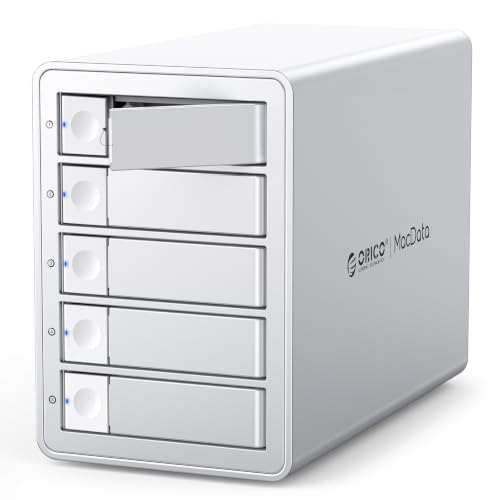
- Up to 130TB across five drives
- USB 3.2 Gen 2x2 rated up to 20Gbps
- Six RAID modes and hot-swapping
Best For: Professional video and enterprise data workflows
Best Compact 4-Bay Value

- Up to 96TB with four 3.5-inch SATA drives
- Eight RAID and storage configurations
- USB-A/USB-C connectivity and dual fans
Best For: Four-drive desktop backup systems
High-Capacity Workstation Pick
ORICO 5-Bay Hardware RAID Enclosure

- Hardware RAID with eight operating modes
- Up to 110TB across five SATA drives
- 150W power supply and active cooling
Best For: Large backups, media libraries, and desktop workstations
Flexible Four-Bay Option

- Eight RAID modes with up to 80TB capacity
- Supports 2.5-inch and 3.5-inch SATA drives
- USB A/C 3.0 and eSATA connectivity
Best For: Four-drive personal or small-business backup systems
Best with Extra Features
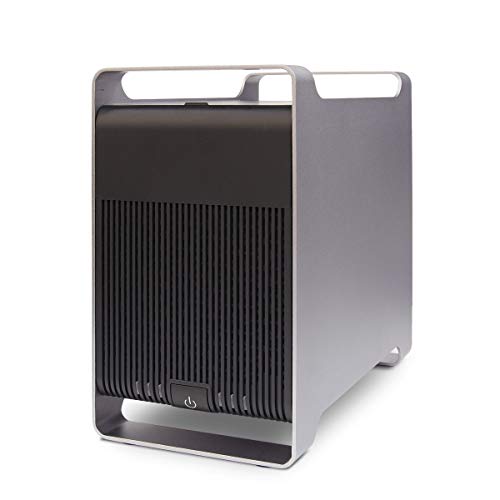
- Five bays for 2.5-inch and 3.5-inch SATA drives
- Supports RAID 0/1/3/5/10, SPAN, and JBOD
- Up to 120TB stated capacity with USB 3.0
Best For: Expanding multi-drive backup storage
Simple Mirrored Backup

- Two bays support 2.5-inch and 3.5-inch SATA drives
- Hardware switch selects RAID 0/1, SINGLE, or LARGE
- Includes cooling fan, hot swapping, and USB A/C
Best For: Compact RAID 1 backup setups
Multi-Drive DAS Value
- Four bays support 2.5-inch and 3.5-inch SATA drives
- USB A/C 3.0 reaches up to 5Gbps under UASP
- Hot-swappable design, but no RAID or NAS support
Best For: Software-managed backups across multiple drives
Best High-Capacity Pick – Yottamaster PS500RC3 5-Bay RAID Enclosure
For shoppers comparing raid enclosures for backups, the Yottamaster PS500RC3 combines five drive bays, flexible RAID modes, and up to 110TB of potential capacity. Its USB-C connection and support for both 2.5-inch and 3.5-inch SATA drives make it a practical DAS for large file collections.
Best For: Photographers, video editors, and home or small-business users managing large backup libraries.
Pros:
- Supports up to five SATA drives and 110TB total capacity.
- Offers RAID 0/1/3/5/10, JBOD, and CLONE modes.
- Aluminum housing, ventilation, and an 80mm temperature-controlled fan help manage heat.
- Works with 2.5-inch and 3.5-inch SATA HDDs and SSDs.
Cons:
- The 5Gbps USB 3.1 interface is slower than newer 20Gbps options.
- Hard drives are not included, and new drives may need formatting and partitioning.
- Total drive power consumption must remain within the stated 78W limit.
This is a well-rounded choice when capacity and RAID flexibility matter more than maximum interface speed. The removable trays and broad drive compatibility also make future upgrades straightforward.
Best Secure Desktop Option – ORICO 5-Bay RAID HDD Enclosure
The ORICO 9858RU3 is one of the more practical raid enclosures for backups when you want five 3.5-inch bays, multiple array modes, and a built-in power supply. It is designed for centralized file storage and supports up to 110TB with compatible drives.
Best For: Desktop backup setups using multiple 3.5-inch hard drives and users who value drive access protection.
Pros:
- Supports eight modes, including RAID 0/1/3/5/10, JBOD, CLONE, and CLEAR.
- Handles up to five 22TB 3.5-inch SATA disks for up to 110TB.
- Includes an 80mm cooling fan, front and rear vents, and a 150W power supply.
- Independent safety locking helps prevent accidental drive removal.
Cons:
- Uses USB 3.0 with a rated 5Gbps interface rather than a newer high-speed standard.
- Supports 3.5-inch drives according to the supplied specifications, limiting smaller-drive flexibility.
- Changing RAID modes can affect data, so backups are recommended beforehand.
Its locking mechanism and higher-power internal supply give this enclosure a security- and stability-focused profile. It is a sensible fit for a permanent desktop backup station rather than a highly portable setup.
Best for Fast Transfers – ORICO 9958RC3-PRO 20Gbps Enclosure
For demanding workflows, the ORICO 9958RC3-PRO stands out among raid enclosures for backups with a USB 3.2 Gen 2×2 interface rated up to 20Gbps. It combines five bays, support for up to 130TB, hot-swapping, and six RAID modes for professional storage and data-management tasks.
Best For: Video producers, enterprise IT teams, and professionals transferring large files over USB4 or compatible USB 3.2 Gen 2×2 connections.
Pros:
- Supports up to five 26TB drives for a stated maximum of 130TB.
- USB 3.2 Gen 2×2 provides up to 20Gbps with compatible host hardware.
- Offers RAID 0/1/5/10, JBOD, and Normal modes.
- Supports 2.5-inch and 3.5-inch SATA drives, hot-swapping, and a 150W power supply.
Cons:
- Thunderbolt connections are limited to about 10Gbps according to the supplied notes.
- Full 20Gbps performance requires a compatible USB4 or USB 3.2 Gen 2×2 port.
- Changing or configuring RAID modes can erase drive contents.
This is the strongest performance-oriented option in the group, provided the host computer supports the required connection. Its capacity, hot-swap support, and compatibility with older-chipset arrays also make it appealing for upgrade projects.
Best Compact 4-Bay Value – MAIWO 4-Bay RAID Enclosure
The MAIWO 4-bay enclosure is a practical choice among raid enclosures for backups when four 3.5-inch drives provide enough capacity. It supports up to 96TB, includes eight RAID configurations, and connects over USB-A or USB-C at speeds up to 5Gbps.
Best For: Professionals, power users, and small backup systems built around 3.5-inch SATA hard drives.
Pros:
- Supports four 3.5-inch SATA drives with up to 96TB total capacity.
- Provides eight configurations, including RAID 0/1/3/5, 1/10, Clone, Large/JBOD, and Normal.
- Includes USB-A to USB-C and USB-C to USB-C cables.
- Two switch-controlled cooling fans help manage drive temperatures.
Cons:
- The 5Gbps interface is slower than the 20Gbps ORICO option.
- Its supplied specifications focus on 3.5-inch SATA drives rather than 2.5-inch support.
- Fan control is manual through an on/off switch rather than temperature-based.
Choose the MAIWO when four bays meet your needs and you want broad RAID flexibility without moving to a five-bay chassis. The included cables and dual cooling fans make it a convenient starting point for a dedicated backup enclosure.
High-Capacity Workstation Pick – ORICO 5-Bay Hardware RAID Enclosure
For demanding backup jobs, the ORICO 5-bay enclosure combines hardware RAID flexibility with up to 110TB of supported capacity. Its USB 3.0 connection, built-in power supply, and cooling system make it a practical choice for desktop storage, media libraries, and large file workflows.
Best For: Large backup projects, video editors, and users who need multiple RAID modes in a single desktop enclosure.
Pros:
- Supports RAID 0, 1, 3, 5, 10, JBOD, Clone, and Clear modes.
- Holds up to five 2.5-inch or 3.5-inch SATA drives, with up to 110TB total capacity.
- Includes a 150W built-in power supply and an 80mm cooling fan for multi-drive operation.
- Works with Windows, Mac, and Linux through USB 3.0.
Cons:
- USB 3.0 is slower than newer USB standards.
- It is a desktop-sized enclosure rather than a portable backup solution.
The ORICO stands out among raid enclosures for backups when capacity and configuration options matter most. Its hardware RAID modes and stable power delivery are especially useful for larger, always-connected storage setups.
Compact Dual-Drive Choice – MAIWO 2-Bay RAID Enclosure
The MAIWO 2-bay enclosure offers a straightforward way to build a compact backup array with two 3.5-inch SATA drives. RAID 0, RAID 1, JBOD, and NORMAL modes let you prioritize speed, redundancy, or independent disk use, while USB Type-C connectivity supports transfers up to 5Gbps.
Best For: Home offices, desktop users, and professionals who want a simple two-drive backup enclosure with RAID 1 support.
Pros:
- Supports RAID 0, RAID 1, JBOD, and NORMAL configurations.
- Provides USB 3.2 Gen 1 transfer speeds up to 5Gbps.
- Includes an independent 12V/4A power supply for stable drive operation.
- Temperature-controlled fan helps cool drives during intensive use.
Cons:
- Designed primarily for 3.5-inch drives; a bracket is required for 2.5-inch drives and is not included.
- Only two drive bays are available, limiting expansion compared with larger enclosures.
For users comparing raid enclosures for backups, the MAIWO is a balanced two-drive option. RAID 1 provides a practical redundancy path, while USB-C and automatic fan control keep everyday file transfers convenient.
Flexible Four-Bay Option – CENMATE 4-Bay RAID Enclosure
The CENMATE 4-bay enclosure is built for users who need more drive flexibility without moving to a NAS. It supports 2.5-inch and 3.5-inch SATA drives, offers eight RAID modes, and connects through USB A/C 3.0 or eSATA for backup and general external storage tasks.
Best For: Personal or small-business users who need four bays, multiple RAID layouts, and up to 80TB of external storage.
Pros:
- Supports RAID 0, 1, 3, 5, 10, Clone, Large, and Normal modes.
- Accepts both 2.5-inch and 3.5-inch SATA HDDs and SSDs.
- Supports up to 80TB total capacity and transfer rates up to 5Gbps.
- Includes USB A/C 3.0 and eSATA cables plus an aluminum enclosure and cooling fans.
Cons:
- Hot-swapping is not supported.
- The fans produce approximately 40–50 decibels, which may be noticeable in quiet spaces.
- eSATA access to multiple bays requires a computer port with RAID functionality.
The CENMATE is a versatile entry in the raid enclosures for backups category, particularly for buyers who want four bays and broad drive compatibility. Its mode-switching process requires care, since changing RAID configurations can result in data loss.
Best with Extra Features – Syba 5-Bay RAID Enclosure
For shoppers comparing raid enclosures for backups, the Syba SY-ENC50122 stands out with five drive bays and broad RAID support. It accepts 2.5-inch and 3.5-inch SATA drives, connects over USB 3.0 or eSATA, and offers a tray-less design for straightforward drive installation.
Best For: Users building a high-capacity multi-drive backup enclosure with flexible RAID options.
Pros:
- Supports up to five drives and a stated maximum capacity of 120TB.
- Offers RAID 0, 1, 3, 5, 10, SPAN, and JBOD modes.
- Tray-less design simplifies drive insertion and removal.
- USB 3.0 supports transfer speeds up to 5Gbps, with UASP support on compatible systems.
Cons:
- eSATA access to multiple drives requires a compatible Port Multiplier with FIS-based switching.
- The enclosure weighs 8 pounds and takes up more space than a two-bay design.
The Syba is a strong fit when capacity and RAID flexibility matter most. Its five-bay layout gives backup users room to expand, although the eSATA requirements should be checked before purchase.
Simple Mirrored Backup – ICY BOX 2-Bay RAID Enclosure
The ICY BOX IB-RD3720-CU3 is a practical choice among raid enclosures for backups when you need a compact two-drive system. Its integrated switch provides RAID 0, RAID 1, SINGLE, and LARGE modes, while the aluminum case, temperature-controlled fan, and USB A/C connectivity support everyday desktop use.
Best For: Individuals and small businesses wanting an easy-to-configure two-drive backup enclosure with RAID 1 mirroring.
Pros:
- Supports two 2.5-inch or 3.5-inch SATA HDDs or SSDs, with up to 48TB stated capacity.
- RAID modes are selected using an integrated DIP switch without software setup.
- RAID 1 can mirror data and supports drive replacement with automatic recovery described by the manufacturer.
- Tool-free trays, hot swapping, status LEDs, and temperature-controlled cooling add convenience.
Cons:
- Two bays provide less expansion room than larger enclosures.
- USB transfer is limited to up to 5Gbps.
With straightforward hardware RAID controls and RAID 1 support, the ICY BOX is well suited to users who want mirrored backups without a complicated setup. Its two-bay format keeps the system relatively compact but limits future drive expansion.
Multi-Drive DAS Value – CENMATE 4-Bay Enclosure
The CENMATE 4-bay enclosure is worth considering alongside raid enclosures for backups if you need several independently accessible drives rather than built-in RAID. It supports 2.5-inch and 3.5-inch SATA HDDs or SSDs, connects through USB 3.0, and includes hot-swappable, tool-free drive access.
Best For: Users who need a four-drive USB DAS for flexible storage without RAID or NAS features.
Pros:
- Four bays support 2.5-inch and 3.5-inch drives with a stated capacity up to 80TB.
- USB A/C 3.0 connectivity supports transfer speeds up to 5Gbps under UASP control.
- Hot-swappable, tool-free design simplifies drive replacement and installation.
- Aluminum construction, a built-in fan, and a 12V power adapter support cooling and stable operation.
Cons:
- This is a DAS enclosure with no RAID or NAS support.
- The fan is rated at approximately 40–50 decibels and may be noticeable in quiet spaces.
- It offers fewer data-protection features than a true RAID enclosure.
The CENMATE makes sense when your backup workflow uses separate drives and software-managed copies. Choose another model if hardware RAID, drive mirroring, or NAS functionality is essential.
How We Picked the Best Raid Enclosures for Backups
We focused on enclosure features that have the greatest effect on real-world backup use: bay count, supported drive sizes, RAID modes, host connectivity, cooling, installation convenience, and maximum stated capacity. The selection includes compact two-bay models for simple redundancy, as well as four- and five-bay enclosures for larger media libraries and multi-drive backup plans.
Because an enclosure’s RAID options and compatibility can vary by model, check the manufacturer’s specifications before buying. RAID improves availability or performance, but it is not a substitute for a separate backup copy.
Quick Comparison
| Best For | Look For | Typical Choice |
|---|---|---|
| Simple mirrored backups | Two bays and RAID 1 | Compact 2-bay enclosure |
| Large photo or video archives | Four or five bays and high capacity | Multi-bay USB enclosure |
| Flexible storage layouts | RAID 0, 1, 5, 10, or JBOD support | Models with several selectable modes |
| Fast transfers | USB-C, USB 3.2 Gen 2×2, or eSATA | High-speed host connection |
| Mixed drive collections | 2.5- and 3.5-inch SATA support | Universal bay design |
Key Buying Factors for Raid Enclosures for Backups
Bay Count and Usable Capacity
Choose the number of bays based on both current drives and planned expansion. Two bays are suitable for a mirrored working backup, while four or five bays provide more room for RAID 5, RAID 10, independent disks, or future upgrades. Remember that usable capacity depends on the selected RAID level and the smallest drive in the array.
RAID Modes and Data Protection
RAID 1 mirrors data across two drives and is usually the simplest choice for backup resilience. RAID 5 can provide efficient capacity with single-drive failure protection, while RAID 10 combines mirroring and striping but generally requires four drives. JBOD or independent mode is useful when you want separate volumes rather than one array. RAID 0 prioritizes speed and capacity but offers no redundancy.
Connections, Cooling, and Installation
USB 3.0 is adequate for many backup routines, while faster USB-C standards or eSATA may reduce transfer times when both the enclosure and computer support them. Active cooling is valuable in multi-drive systems, especially during long backup jobs. Tool-free or hot-swappable bays can make drive replacement easier, but verify whether hot swapping is supported by the enclosure and operating system.
Who Should Buy Which Raid Enclosures for Backups?
Choose a two-bay enclosure if you want a straightforward mirrored backup for documents, photos, or a small workstation. Choose a four-bay model if you need more capacity and several RAID layouts without moving to a larger rack system. Choose a five-bay enclosure for expanding libraries, larger media collections, or a more flexible storage pool.
Prioritize faster USB connectivity if you frequently create full-image backups or move large video files. For occasional scheduled backups, drive capacity, cooling, and dependable RAID support usually matter more than the highest interface speed. Whatever you select, maintain an additional offline or cloud copy of irreplaceable data.