Photographers need more than raw capacity: a dependable enclosure should protect working files, move large image libraries quickly, and remain flexible as drives and projects grow. The best RAID enclosures for photo storage make it easier to organize, edit, and back up large collections without committing to a full network-attached storage system.
This roundup compares 10 four- and five-bay models, along with a compact two-bay option, covering USB-C, Thunderbolt, multiple RAID modes, tool-free installation, and capacities suitable for everything from home archives to demanding professional workflows.
Best 10 Raid Enclosures for Photo Storage Picks for 2026
High-Capacity Choice
Yottamaster PS500RC3 5-Bay RAID Enclosure

- Up to 110TB across five SATA drives
- Supports RAID 0/1/3/5/10, JBOD, and CLONE
- USB-C connectivity with aluminum cooling design
Best For: Large photo and video archives
High-Speed Professional Pick
OWC ThunderBay 4 8TB RAID Storage

- Up to 1074MB/s sustained performance
- Four bays for 2.5-inch or 3.5-inch drives
- Includes three years of SoftRAID Premium
Best For: Thunderbolt photo editing workflows
Versatile Budget Option

- Supports up to 80TB across four SATA drives
- Eight RAID and storage modes
- USB-A/USB-C 3.0 and eSATA connectivity
Best For: Flexible desktop photo storage setups
Fast USB-C Enclosure
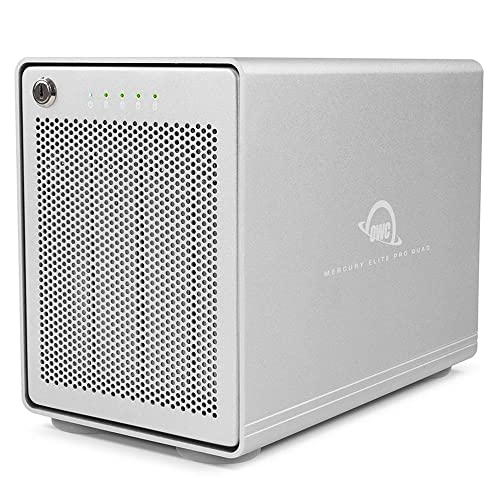
- Four bays for 2.5-inch and 3.5-inch SATA drives
- USB 3.2 10Gbps interface
- Up to 947MB/s performance with software RAID support
Best For: Fast, flexible USB-C photo storage
Best for Easy Setup

- Eight RAID modes for flexible configurations
- Up to 110TB across five 3.5-inch drives
- 80mm fan and 150W built-in power supply
Best For: Large photo libraries and desktop backup setups
Best Flexible Drive Support
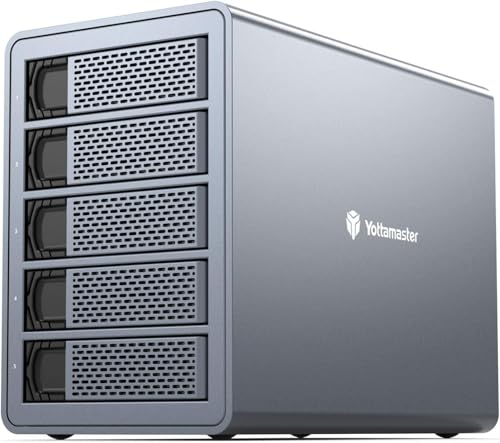
- Supports 2.5-inch and 3.5-inch SATA drives
- Up to 120TB with five 24TB disks
- Hardware RAID modes including RAID 5 and 10
Best For: Photo backup setups using mixed drive formats
Best Compact Four-Bay Option

- Eight RAID modes and up to 96TB capacity
- USB-A/USB-C connectivity at up to 5Gbps
- Two switch-controlled cooling fans
Best For: Four-drive photo archives and professional desktop workflows
Best with Extra Features

- Five bays for 2.5-inch or 3.5-inch SATA drives
- Eight hardware RAID and storage modes
- 150W power supply with active cooling
Best For: Large photo libraries and media workstations
Best Compact Option

- Two bays for 2.5-inch or 3.5-inch drives
- Four modes including RAID 0 and RAID 1
- USB-A and USB-C 3.0 cables included
Best For: Small photo workstations and individual users
Best Four-Bay Balance

- Four 3.5-inch bays with up to 88TB stated capacity
- Eight RAID and storage modes, including RAID 5
- 150W internal supply, cooling fan, and safety lock
Best For: Growing photo archives and multi-drive backups
High-Capacity Choice – Yottamaster PS500RC3 5-Bay RAID Enclosure
For photographers building a large local archive, the Yottamaster PS500RC3 is one of the more flexible raid enclosures for photo storage. Its five bays support up to 110TB total, with hardware RAID modes suited to different capacity and redundancy needs.
Best For: Photographers, video editors, and households or businesses managing large photo and video libraries.
Pros:
- Supports up to five SATA HDDs or SSDs and 110TB total capacity.
- Offers RAID 0/1/3/5/10, JBOD, and CLONE modes.
- Aluminum construction and an automatic 80mm temperature-controlled fan help manage heat.
- USB-C connectivity supports transfer rates up to 5Gbps across Windows, Mac, and Linux systems.
Cons:
- Hard drives are not included.
- Normal five-drive operation requires total drive power consumption of no more than 78W.
The PS500RC3 is a strong fit when capacity and RAID flexibility matter most. Its removable trays simplify drive changes, while the 5Gbps interface is better suited to general photo workflows than the fastest professional transfer demands.
High-Speed Professional Pick – OWC ThunderBay 4 8TB RAID Storage
The OWC ThunderBay 4 is designed for photographers who need fast access to an installed multi-drive array. With dual Thunderbolt 3 ports, configurable RAID, and included SoftRAID Premium, it is a performance-focused option among raid enclosures for photo storage.
Best For: Mac and Windows users with Thunderbolt who regularly move or edit large photo libraries.
Pros:
- Four-drive enclosure supports both 2.5-inch and 3.5-inch drives without an adapter.
- Offers up to 1074MB/s real-world sustained performance.
- Supports RAID 0/1/4/5/10 and includes a three-year SoftRAID Premium subscription.
- Dual Thunderbolt 3 ports support a high-bandwidth workflow.
Cons:
- Requires a computer with Thunderbolt connectivity.
- The listed configuration provides 8TB of installed storage, which may be less expandable than an empty enclosure.
This ThunderBay 4 makes the most sense for users who can take advantage of Thunderbolt speeds and want software-assisted RAID management. It is especially compelling for active editing workflows rather than simple backup storage.
Versatile Budget Option – CENMATE 4-Bay RAID Enclosure
The CENMATE 4-Bay enclosure offers broad drive compatibility and several RAID choices for photographers assembling a desktop archive. Its USB-A/USB-C 3.0 and eSATA connections make it a practical raid enclosure for photo storage, though its eSATA behavior requires careful checking before purchase.
Best For: Users who need a four-drive enclosure with multiple RAID modes and broad Windows, Mac, and Linux compatibility.
Pros:
- Supports four 2.5-inch or 3.5-inch SATA HDDs or SSDs, up to 80TB total.
- Provides eight modes, including RAID 0/1/3/5/10, CLONE, LARGE, and NORMAL.
- Includes USB-A/USB-C 3.0 and eSATA cables plus a 12V power adapter.
- Aluminum construction and built-in fans help with cooling.
Cons:
- Fans operate around 40–50 decibels, which may bother noise-sensitive users.
- Hot-swapping is not supported.
- eSATA access to multiple bays depends on the computer’s eSATA RAID support.
CENMATE is appealing when connection flexibility and RAID variety outweigh acoustic and setup compromises. Buyers should follow the documented mode-switching procedure carefully, since changing RAID modes can result in data loss.
Fast USB-C Enclosure – OWC Mercury Elite Pro Quad
The OWC Mercury Elite Pro Quad is a four-bay enclosure for photographers who want fast USB-C access to their own SATA drives. Its USB 3.2 10Gbps interface and support for software RAID make it a streamlined choice among raid enclosures for photo storage.
Best For: Mac or Windows users with USB-C or Thunderbolt 3 who want a fast, expandable four-drive enclosure.
Pros:
- Four universal bays accept both 2.5-inch and 3.5-inch SATA drives.
- USB-C 10Gbps connectivity works with USB-C and Thunderbolt 3-equipped computers.
- Rated for performance up to 947MB/s.
- Supports software RAID configurations.
Cons:
- Drives are not included in the 0TB enclosure.
- SoftRAID is not included.
- The listed warranty is one year.
This model is a good middle ground for photographers who want more throughput than basic USB 3.0 enclosures provide without moving to a Thunderbolt-only chassis. Plan on supplying separate drives and RAID software if needed.
Best for Easy Setup – ORICO 5-Bay RAID Enclosure
For photographers managing large RAW libraries, this ORICO enclosure is a flexible option among RAID enclosures for photo storage. Its five bays, eight RAID modes, and up to 110TB capacity make it suitable for centralized backups and extensive media collections.
Best For: Photographers and creative teams needing high capacity, multiple RAID configurations, and a desktop-focused storage enclosure.
Pros:
- Supports RAID 0, 1, 3, 5, 10, JBOD, CLONE, and CLEAR modes.
- Holds five 3.5-inch SATA drives, with support for up to 22TB per disk.
- Includes an 80mm cooling fan, front and rear ventilation, and a 150W built-in power supply.
- Works with Windows, macOS, and Linux.
Cons:
- Uses USB 3.0 with a stated transfer rate of up to 5Gbps rather than a faster interface.
- RAID mode switching requires careful preparation and a prior data backup.
- Designed for 3.5-inch SATA disks, limiting drive-format flexibility.
The ORICO is a strong capacity-first choice for photo storage, particularly when five hard drives and broad RAID control matter more than a newer connectivity standard. Its cooling and locking features add practical reassurance for sustained desktop use.
Best Flexible Drive Support – Yottamaster FS5RU3 5-Bay RAID
The Yottamaster FS5RU3 combines five-bay capacity with support for both 2.5-inch and 3.5-inch SATA drives, making it a versatile choice among RAID enclosures for photo storage. It is positioned for photo backup, video workflows, archival storage, and other large media collections.
Best For: Photographers who want flexible drive sizing, removable trays, and up to 120TB of direct-attached storage.
Pros:
- Supports up to five drives and 120TB total capacity using five 24TB disks.
- Accepts both 2.5-inch and 3.5-inch SATA HDDs and SSDs.
- Offers RAID 0, 1, 5, 10, JBOD, CLONE, and Normal modes.
- Uses an aluminum enclosure with an 80mm low-noise fan and ventilation openings.
Cons:
- USB 3.0 provides a maximum stated transfer rate of 5Gbps.
- It is a direct-attached enclosure, so it does not replace a network-attached storage system.
- Drive capacity depends on installing compatible disks separately.
With support for both common SATA drive sizes and the highest stated capacity in this roundup, the Yottamaster offers a practical upgrade path for photographers. Its sleep mode and removable trays are useful for a workstation that balances active editing with long-term archiving.
Best Compact Four-Bay Option – MAIWO 4-Bay RAID Enclosure
For photographers who do not need five bays, the MAIWO provides a more compact route into RAID enclosures for photo storage. It supports eight configurations, USB-A/USB-C connectivity, and up to 96TB using four 3.5-inch SATA drives.
Best For: Professionals and power users who want a four-drive photo archive with flexible RAID modes and active cooling.
Pros:
- Supports Normal, RAID 0, 1, 3, 5, 1/10, Clone, and Large/JBOD modes.
- Holds up to four 24TB 3.5-inch SATA drives for a stated 96TB maximum.
- Includes USB-A to USB-C and USB-C to USB-C cables with transfer speeds up to 5Gbps.
- Uses two switch-controlled cooling fans and includes disk-status LED indicators.
Cons:
- Its four-bay design offers less expansion capacity than the five-bay alternatives.
- Supports 3.5-inch SATA hard disks rather than both 2.5-inch and 3.5-inch drives.
- RAID performance is limited by the stated 5Gbps USB interface.
The MAIWO is a sensible middle ground for a photographer building a sizable archive without filling a five-bay chassis. Its dual fans, status indicators, and included cables make it well suited to a hands-on desktop storage workflow.
Best with Extra Features – ORICO 5-Bay RAID Enclosure
For photographers managing large RAW libraries, video projects, and backups, this ORICO is one of the more expansive RAID enclosures for photo storage. Its five bays, broad RAID support, built-in power supply, and cooling system are suited to a busy desktop workflow.
Best For: Large photo libraries, media workstations, and users who need up to five SATA drives with flexible RAID options.
Pros:
- Supports RAID 0, 1, 3, 5, 10, JBOD, Clone, and Clear modes.
- Holds up to five 2.5-inch or 3.5-inch SATA drives, with up to 110TB total capacity based on the supplied specifications.
- Includes a 150W internal power supply and an 80mm cooling fan for multi-drive operation.
- Works with Windows, Mac, and Linux over USB 3.0.
Cons:
- USB 3.0 limits the connection compared with newer USB standards.
- Its five-bay size may be more than a small photo library requires.
- RAID configuration is handled through hardware switches rather than software management.
The ORICO 5-bay enclosure is the strongest capacity-focused choice here. It makes the most sense when your photo storage needs extend into large media archives and you want several RAID configurations in one desktop unit.
Best Compact Option – CENMATE 2-Bay RAID Enclosure
This CENMATE is a practical starting point for photographers who need a smaller desktop enclosure. Among RAID enclosures for photo storage, it keeps the setup compact while supporting two SATA drives, four operating modes, and both USB-A and USB-C 3.0 cables.
Best For: Individual photographers and small workstations that need a two-drive RAID or JBOD setup.
Pros:
- Supports RAID 0, RAID 1, Normal, and JBOD modes.
- Accepts 2.5-inch and 3.5-inch HDDs or SSDs, up to 20TB per drive.
- Includes USB-A and USB-C 3.0 connectivity with plug-and-play support for Windows, Mac, and Linux.
- Aluminum construction and a built-in fan help manage heat.
Cons:
- The listed fan noise is approximately 40–50 decibels.
- The enclosure is limited to two drives and a stated maximum total capacity of 40TB.
- The notes warn that resetting or redesigning a RAID array can result in data loss.
The CENMATE offers a straightforward two-bay route to mirrored or striped storage without the footprint of a larger enclosure. Its fan noise and RAID-reset precautions are worth considering before placing it in a quiet editing space.
Best Four-Bay Balance – ORICO 4-Bay RAID Enclosure
Photographers who want more expansion than a two-bay unit but do not need five bays may find this ORICO a balanced fit. It combines four drive bays, eight RAID modes, a 150W power supply, and USB 3.0 transfer for direct-attached photo storage.
Best For: Growing photo archives, multi-drive backups, and users who want RAID 5 or other flexible configurations.
Pros:
- Offers RAID 0, 1, 3, 5, 10, JBOD, Clone, and Clear modes.
- Supports four 3.5-inch SATA disks, up to 22TB per disk and 88TB total based on the supplied details.
- Uses a 150W built-in power supply and an 80mm cooling fan.
- Includes a trayless design and independent safety lock for easier access and drive retention.
Cons:
- It supports 3.5-inch drives rather than the 2.5/3.5-inch flexibility of some alternatives.
- USB 3.0 is the only listed host interface.
- RAID setup and changes should be approached carefully because array reconfiguration can affect stored data.
The four-bay ORICO is a versatile middle ground for photographers building a substantial archive. Its RAID 5 and RAID 10 support provide more configuration choice than a basic two-bay enclosure, while the cooling and internal power supply suit multi-drive use.
How We Picked the Best Raid Enclosures for Photo Storage
We focused on direct-attached enclosures that can house multiple SATA hard drives or SSDs and support a practical range of RAID configurations. The selected models were compared by bay count, maximum advertised capacity, host connectivity, drive compatibility, cooling, installation convenience, and flexibility for photographers.
Because an enclosure is only part of a storage system, we also considered whether each design is a sensible fit for primary photo storage, editing work, backup, or archive expansion. Advertised capacity and performance depend on the installed drives, RAID level, computer, cables, and file sizes.
Quick Comparison
- Best for maximum expansion: Five-bay models provide more usable capacity and additional RAID flexibility.
- Best for high-speed editing: Thunderbolt and faster USB-C enclosures are better suited to large RAW catalogs and video-heavy workflows.
- Best for simpler setups: Two- and four-bay units generally require less space, power, and drive investment.
- Best for flexibility: Models with several RAID modes let you balance redundancy, capacity, and speed as your needs change.
Key Buying Factors for Raid Enclosures for Photo Storage
Bay Count and Usable Capacity
More bays allow larger arrays and easier future expansion, but they also increase cost and power use. A two-bay enclosure may be enough for a working mirror, while four or five bays make more sense for large libraries, multiple backups, or RAID 5.
RAID Protection
RAID 1 mirrors data across two drives and is straightforward for important files. RAID 5 can provide better capacity efficiency while tolerating one failed drive, but rebuilding takes time. JBOD and spanning modes may maximize available space, yet they are not substitutes for an independent backup.
Connection Speed
USB 3.0 can handle routine transfers, while USB-C 10Gbps and Thunderbolt connections are preferable for frequent editing directly from the enclosure. Check the computer port, cable standard, and whether the quoted speed is shared across all drives.
Cooling, Noise, and Drive Support
Fans help manage heat during long transfers and rebuilds, especially with several 3.5-inch hard drives. Confirm supported drive sizes, maximum capacity, fan behavior, power requirements, and whether 2.5-inch drives need adapters.
Who Should Buy Which Raid Enclosures for Photo Storage?
Choose a compact two-bay enclosure if you want a simple mirrored photo library or a small desktop backup. Four-bay models are a strong middle ground for enthusiasts and working photographers who need more capacity without a large footprint. Five-bay enclosures suit professionals, studios, and growing archives that benefit from RAID 5 or additional backup targets.
Prioritize Thunderbolt when your computer supports it and you regularly edit large files in place. Choose USB-C when broad compatibility and value matter more. Whichever enclosure you select, maintain at least one separate backup—RAID improves availability after a drive failure, but it does not protect against deletion, theft, malware, or major hardware damage.