The best wireless drawing tablets give artists, students, and creators more freedom to sketch, edit, annotate, and retouch without keeping a USB cable connected at all times. The right model balances pen accuracy, active-area size, shortcut controls, battery life, and software compatibility.
We selected 10 wireless and wireless-ready drawing tablets across compact, medium, shortcut-rich, and budget-friendly designs. Use the guide below to narrow your choice by workflow, device compatibility, and the amount of drawing space you prefer.
Best 10 Wireless Drawing Tablets Picks for 2026
Best Overall

- Battery-free pen with 4,096 pressure levels
- Bluetooth or USB-A connectivity
- Software and training included after registration
Best For: Students, teachers, and versatile everyday creative work
Best for Shortcut-Heavy Workflows
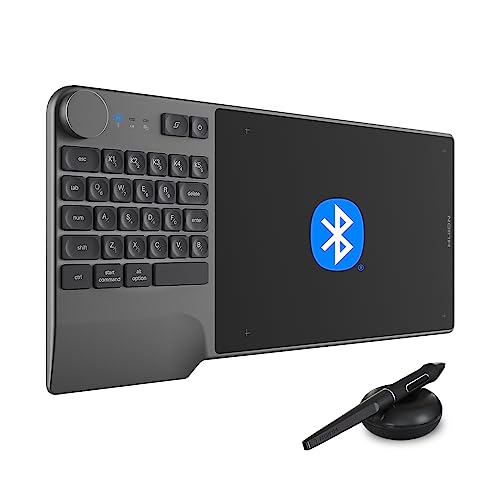
- 23-key keyboard, dial, and 5 customizable keys
- 8,192-level battery-free pen with tilt support
- Bluetooth 5.0 with at least 18 hours of battery life
Best For: Artists and editors who use frequent shortcuts
Best for Custom Controls

- 16,384-level battery-free pen with tilt support
- Dial plus 8 customizable shortcut keys
- Bluetooth 5.0 or USB-C connectivity
Best For: Artists and designers who want extensive tactile controls
Best Minimalist Design

- Spacious 10 x 6.25-inch key-free drawing area
- Up to 24 hours of wireless battery life
- Bluetooth and USB-C with mobile support
Best For: Artists who prefer a clean, portable drawing surface
Best Wireless Mini Tablet
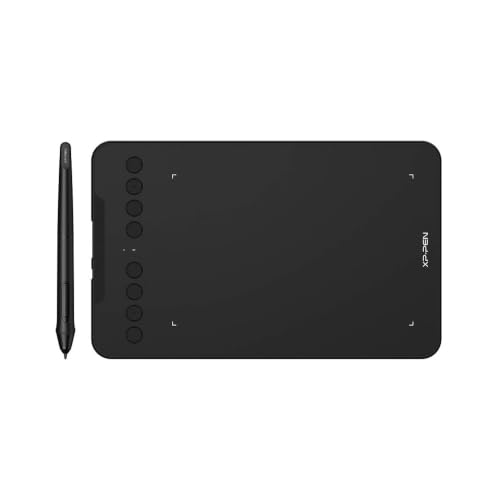
- Bluetooth 5.0 or USB connectivity
- Battery-free, 16,384-level pen with tilt support
- Eight customizable shortcut keys
Best For: Compact wireless drawing, teaching, and remote work
Best Renewed Wireless Tablet

- Bluetooth and USB connectivity
- Compact 6.0-by-3.7-inch active area
- Four programmable ExpressKeys
Best For: Beginners and small desks
Best Large-Surface Drawing Tablet

- Large 10-by-6.25-inch active area
- 16,384-level battery-free stylus with tilt support
- Eight customizable shortcut keys
Best For: Manga, animation, teaching, and spacious wired drawing
Large Workspace Pick

- 10 x 6.25-inch active working area
- Battery-free pen with tilt support
- 28 programmable shortcut controls
Best For: Artists who want a spacious, highly customizable tablet
Beginner-Friendly Choice

- Bluetooth and USB connectivity
- Battery-free pen with tilt recognition
- 8.5 x 5.3-inch active area
Best For: Beginners, students, teachers, and everyday creative work
Wireless Performance Pick
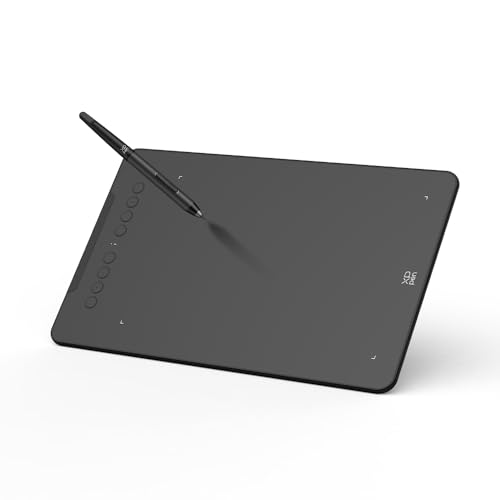
- Bluetooth 5.0 with up to 13 hours of use
- Up to 16,384 pressure levels and 60° tilt
- Eight shortcut keys in a compact design
Best For: Creators who prioritize wireless portability and mobile use
Best Overall – Wacom Intuos Medium
The Wacom Intuos Medium is a dependable choice among wireless drawing tablets for creators who want a familiar pen-on-paper feel, straightforward software compatibility, and a battery-free stylus. Bluetooth connectivity keeps your workspace tidy, while USB-A provides a wired alternative.
Best For: Students, teachers, and creators who want a versatile medium-size tablet for drawing, photo editing, design, and document markup.
Pros:
- Battery-free, pressure-sensitive Wacom Pen 4K with 4,096 pressure levels
- Bluetooth and USB-A connectivity for flexible setup options
- Works with Mac, Windows, Chromebook, and a wide range of creative software
- Includes access to creative software and Wacom online training after registration
Cons:
- Only four built-in ExpressKeys
- Uses a USB-A cable rather than USB-C
Its established brand, compact 8.5 x 5.31-inch active area, and included software make the Intuos Medium a balanced wireless drawing tablet for general creative work and learning.
Best for Shortcut-Heavy Workflows – Huion Inspiroy Keydial KD200
The Huion Inspiroy Keydial KD200 stands out among wireless drawing tablets by combining a drawing surface with a shortcut keyboard, dial, and customizable keys. Bluetooth 5.0 supports a clutter-free setup, and its battery is rated for at least 18 hours of use.
Best For: Artists, designers, editors, and teachers who rely on frequent shortcuts, dial controls, and extended wireless sessions.
Pros:
- Includes 23 keyboard keys, a dial, and 5 customizable press keys
- Battery-free pen supports 8,192 pressure levels and 60-degree tilt
- Bluetooth 5.0 works with Mac, PC, and Android devices up to 33 feet away
- Ergonomic wrist rest and paper-like surface support longer sessions
Cons:
- The keyboard-and-dial layout may be more than casual users need
- Wireless battery life requires approximately 1.2 hours of charging
For users who want controls directly beside the drawing area, the KD200 offers a productivity-focused design without requiring a separate shortcut keyboard.
Best for Custom Controls – GAOMON WH851
The GAOMON WH851 is a wireless drawing tablet for users who want extensive pressure sensitivity and tactile controls. It supports Bluetooth 5.0 or USB-C, adds a central dial and eight customizable keys, and offers up to 18 hours of battery operation.
Best For: Digital artists, designers, and annotators who want detailed pen input and plenty of programmable controls.
Pros:
- Battery-free AP519 pen provides 16,384 pressure levels and tilt support
- Central dial and 8 customizable keys streamline zooming, brush sizing, and scrolling
- Supports wired USB-C and wireless Bluetooth 5.0 connections
- Compatible with Windows, Mac, and Android, with adjustable aspect ratios
Cons:
- Active area is smaller than some medium-format alternatives at 8 x 5 inches
- Wireless battery life is rated at up to 18 hours
The WH851 is a strong fit when control layout matters as much as drawing performance, particularly for workflows that benefit from a dial and multiple assigned shortcuts.
Best Minimalist Design – HUION Inspiroy Frego Medium
The HUION Inspiroy Frego Medium takes a clean approach to wireless drawing tablets, leaving out physical shortcut keys for a spacious 10 x 6.25-inch canvas. Bluetooth and USB-C connectivity provide setup flexibility, while the battery supports up to 24 hours of use.
Best For: Artists who prefer an uncluttered drawing surface, portable design, and compatibility with computers and mobile devices.
Pros:
- Large 10 x 6.25-inch working area with a minimalist, key-free surface
- Up to 24 hours of battery life and Bluetooth or USB-C connectivity
- Battery-free PW550S stylus offers 8,192 pressure levels, tilt support, and two side keys
- Supports Windows, macOS, Android, Linux, and selected iPhone/iPad apps
Cons:
- No physical tablet shortcut keys
- Bluetooth support has more specific operating-system requirements than wired mode
Choose the Frego Medium if you value a broad, uninterrupted workspace and long wireless runtime more than built-in shortcut buttons.
Best Wireless Mini Tablet – XP-Pen Deco mini7W
The XP-Pen Deco mini7W is a compact choice for shoppers comparing wireless drawing tablets for desktop, laptop, Android, or ChromeOS use. It supports Bluetooth 5.0 or a USB connection, while its battery-free pen and eight programmable keys keep everyday drawing, teaching, and editing convenient.
Best For: Online teaching, remote work, mobile drawing, and creators who want a small wireless tablet.
Pros:
- Bluetooth 5.0 and USB connectivity provide flexible setup options.
- Battery-free pen offers 16,384 pressure levels and 60-degree tilt support.
- Eight customizable shortcut keys can streamline common tasks.
- Supports Windows, macOS, Android, ChromeOS, and Linux.
Cons:
- The compact 7-inch work area may feel limiting for users who prefer a larger canvas.
- Some mobile setups may require adapters or aspect-ratio adjustment.
Choose this model when portability and wireless flexibility matter more than maximum workspace. Its broad compatibility and strong pen specifications make it a practical all-purpose option.
Best Renewed Wireless Tablet – Wacom Intuos CTL4100WLK0
The renewed Wacom Intuos CTL4100WLK0 is a space-conscious option among wireless drawing tablets. Its Bluetooth connection, battery-free pen, and ambidextrous design suit basic drawing, photo editing, and shortcut-driven workflows on compatible Windows, macOS, or ChromeOS computers.
Best For: Beginners, students, and users with limited desk space who want a compact renewed Wacom tablet.
Pros:
- Bluetooth and USB connectivity support wireless or wired use.
- Compact design includes a 6.0-by-3.7-inch active area.
- Four programmable ExpressKeys provide quick access to shortcuts.
- Battery-free pen delivers 4,096 pressure levels and works for left- or right-handed users.
Cons:
- Its 4,096 pressure levels are lower than those of several newer competing tablets.
- The smaller active area may not suit expansive illustration work.
- As a renewed product, condition may vary compared with a new tablet.
This Wacom is a sensible pick for straightforward computer-based drawing where desk space and brand familiarity are priorities. Consider a larger or higher-sensitivity model for detailed illustration or broad hand movement.
Best Large-Surface Drawing Tablet – XP-Pen Deco 01 V3
The XP-Pen Deco 01 V3 is a large, wired option for shoppers seeking wireless drawing tablets alternatives with more room for illustration. Its 10-by-6.25-inch active area, battery-free stylus, 16,384 pressure levels, and eight shortcut keys are aimed at artists, students, educators, and hobbyists.
Best For: Manga, animation, concept art, remote teaching, and users who prefer a generous drawing surface.
Pros:
- Large 10-by-6.25-inch active area provides generous workspace.
- Battery-free stylus includes 16,384 pressure levels and 60-degree tilt support.
- Eight customizable shortcut keys and an ambidextrous layout support efficient workflows.
- Works with Windows, macOS, Android, ChromeOS, Linux, and popular design software.
Cons:
- This model uses USB rather than Bluetooth wireless connectivity.
- Its larger footprint is less convenient for very limited desks or travel.
- Android users may need to adjust aspect ratio for precise mapping.
If workspace is your main priority, the Deco 01 V3 offers more drawing room than compact tablets while retaining a slim, portable build. It is best viewed as a strong wired alternative when wireless operation is not essential.
Large Workspace Pick – HUION Inspiroy H1060P
The HUION Inspiroy H1060P is a practical choice among wireless drawing tablets for artists who prefer a larger working area and extensive shortcut controls. Its 10 x 6.25-inch surface, battery-free stylus, tilt support, and programmable keys suit drawing, painting, writing, and photo-editing workflows.
Best For: Artists, illustrators, and hobbyists who want a spacious tablet with many customizable controls.
Pros:
- Large 10 x 6.25-inch working area in a slim 10mm design
- Battery-free stylus with 8,192 pressure levels and ±60° tilt support
- 12 programmable press keys plus 16 programmable soft keys
- Supports Windows, macOS, Android, Linux Ubuntu, and common creative software
Cons:
- Uses USB connectivity rather than built-in wireless operation
- Requires a USB adapter for connection to a Mac computer
- iPhone and iPad are not currently supported
The H1060P stands out when workspace and shortcut access matter more than portability. Its symmetrical design also lets left-handed users rotate the tablet through the driver.
Beginner-Friendly Choice – Wacom One Medium
The Wacom One Medium is an approachable option for shoppers comparing wireless drawing tablets for digital art, photo editing, teaching, or remote work. It combines Bluetooth connectivity with a battery-free pen, an 8.5 x 5.3-inch active area, and simple pen-based shortcut controls.
Best For: Creative beginners, students, teachers, and office users seeking an easy-to-use multi-platform tablet.
Pros:
- Bluetooth and USB connectivity for Windows, Mac, Chromebook, and Android devices
- Battery-free pen with natural tilt recognition and virtually lag-free tracking
- Two customizable pen switches for shortcuts such as undo or copy/paste
- Includes a power adapter, USB-C cable, and creative software
Cons:
- Provides 4,096 pressure levels, fewer than some competing models
- Only two customizable shortcut switches are built into the pen
- Some devices require a second USB-A adapter
With its straightforward controls and wireless connectivity, the Wacom One Medium is well suited to first-time tablet users who value a familiar pen-on-paper feel over a large number of shortcut keys.
Wireless Performance Pick – XPPen Deco mini7W V2
The XPPen Deco mini7W V2 is a compact wireless drawing tablet designed for creators who want Bluetooth freedom without giving up shortcut keys or mobile compatibility. It offers Bluetooth 5.0, a battery-free stylus, tilt support, customizable controls, and a wired USB-C fallback.
Best For: Mobile creators, digital artists, students, and remote workers who need a compact wireless tablet.
Pros:
- Bluetooth 5.0 supports up to 13 hours of continuous work per charge
- Battery-free stylus with up to 16,384 pressure levels and 60° tilt support
- Eight customizable shortcut keys and a durable L-shaped USB-C port
- Supports Windows, macOS, Android, ChromeOS, Linux, and selected iOS use through ibis Paint
Cons:
- Compact 7 x 4.37-inch format provides less workspace than larger tablets
- Wireless operation requires charging the tablet
- iOS support is limited to ibis Paint
The Deco mini7W V2 is a strong fit when portability and wireless convenience are priorities. Its mobile-mapping app is especially useful for matching the active area to an Android screen ratio.
How We Picked the Best Wireless Drawing Tablets
We compared these Wireless Drawing Tablets by looking at the features that affect everyday creative work: connection options, active drawing area, pressure sensitivity, shortcut controls, pen performance, compatibility, portability, and overall value. Models with Bluetooth or another wireless mode can reduce desk clutter, while wired fallback is useful when you need uninterrupted use or want to preserve battery life.
We also included different sizes and control layouts. Compact tablets suit travel, small desks, and occasional annotation; medium and larger surfaces generally feel more natural for illustration, photo editing, and extended sessions. Shortcut keys and dials can speed up zooming, brush-size changes, undo commands, and other repetitive actions.
Quick Comparison
- Best for a familiar, dependable setup: Wacom Intuos models offer a straightforward pen-tablet workflow and bundled software.
- Best for shortcut-heavy workflows: The Huion Inspiroy Keydial KD200 combines programmable controls with a dial-focused design.
- Best for larger drawing areas: The Huion H1060P and Frego provide more room for broad strokes and detailed work.
- Best for portability: The XPPen Deco mini7W models and compact Wacom option are easier to pack and use in smaller workspaces.
- Best for wireless flexibility: Bluetooth-equipped Wacom, Huion, GAOMON, and XPPen models let you switch between a cleaner wireless desk and a wired connection.
Key Buying Factors for Wireless Drawing Tablets
Active Area and Size
Do not confuse the tablet’s overall dimensions with its active drawing area. A larger active area gives your hand more room and can feel better for illustration, but a compact tablet is easier to transport. Match the size to your monitor setup and available desk space.
Pressure Sensitivity and Pen Feel
Higher pressure ratings can provide finer input resolution, but pen calibration, driver quality, and surface feel matter just as much. Look for a battery-free pen when possible, since it avoids charging interruptions and keeps the setup simpler.
Wireless Connection and Compatibility
Check whether the tablet uses Bluetooth, a proprietary wireless receiver, or both. Confirm operating-system and application support before buying, especially if you use ChromeOS, Linux, an iPad, or a specialized art program. A wired mode is valuable for troubleshooting and low-latency work.
Shortcut Keys, Dials, and Battery Life
Programmable keys are helpful for frequent commands, while a dial can make zooming and brush adjustments faster. If you work away from a desk often, verify charging requirements, wireless runtime, receiver storage, and whether the tablet can be used while charging.
Who Should Buy Which Wireless Drawing Tablets?
Choose a compact XPPen Deco mini7W if you need an affordable, portable tablet for notes, online teaching, light editing, or travel. Choose a medium Wacom Intuos or Wacom One if you want a simple, established setup for learning, illustration, and general creative work.
Choose a Huion Inspiroy Frego, H1060P, or GAOMON WH851 if you prefer a larger workspace for drawing and want extra physical controls. Choose the Keydial KD200 if quick access to shortcuts and a dedicated dial matters more than having the smallest possible footprint. The renewed Wacom Intuos can make sense for shoppers prioritizing brand familiarity and value, provided the seller’s condition policy and warranty meet your expectations.