The right enclosure can turn an unused SATA drive into a practical backup destination without the cost of a complete external drive. The best options also make it easier to reuse drives, expand capacity, and move data between systems.
These 10 hard drive enclosures for backups cover compact 2.5-inch SSD and HDD cases, 3.5-inch desktop-drive enclosures, docking stations, and multi-bay designs. Use the guide below to match the format, connectivity, cooling, and capacity you actually need.
Best 10 Hard Drive Enclosures for Backups Picks for 2026
Best SATA Drive Dock
Sabrent 2.5/3.5-Inch USB 3.0 Dock

- Supports bare 2.5-inch and 3.5-inch SATA drives
- Tool-free hot-swappable design
- Includes 12V adapter for 3.5-inch drives
Best For: Single-drive SATA backups and drive access
Best Multi-Drive Backup Enclosure
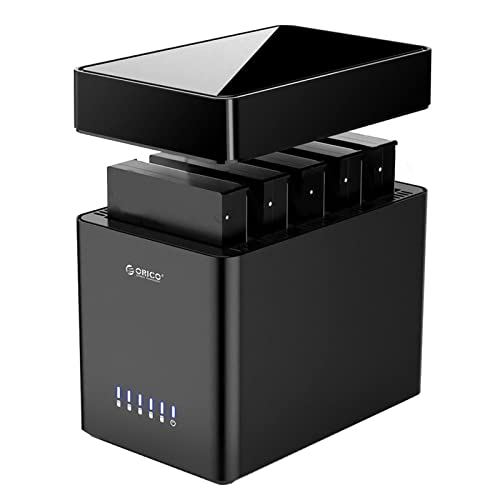
- Five bays for 2.5-inch and 3.5-inch SATA drives
- Supports up to 110TB total capacity
- Fan cooling and included 12V/6.5A adapter
Best For: Large desktop backup and storage expansion
Best Compact 2.5-Inch Enclosure
Sabrent Tool-Free SATA USB 3.0 Case

- Designed for 2.5-inch SATA HDDs and SSDs
- Tool-free and hot-swappable
- Compact design with USB 3.0 and UASP
Best For: Portable backups from a notebook drive or SATA SSD
Best Ventilated Single-Drive Case
CLAVOOP 3.5-Inch USB 3.0 Enclosure

- Supports 2.5-inch and 3.5-inch SATA drives
- Includes 12V/2A adapter and USB 3.0 cable
- Ventilation, padding, and auto-sleep features
Best For: Single-drive backups and SATA data recovery
Fan-Cooled Backup Dock
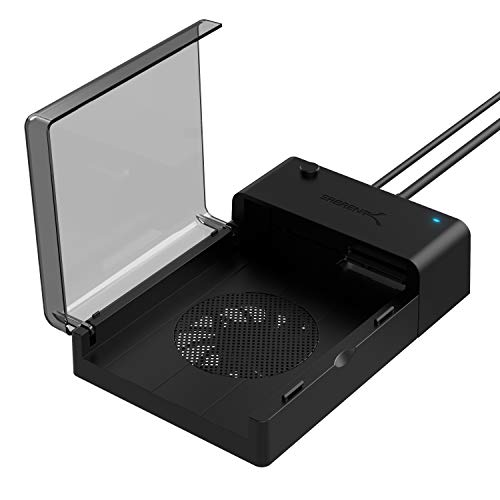
- Supports 2.5-inch and 3.5-inch SATA drives
- Built-in cooling fan and hot-swappable use
- Up to 22TB capacity; cloning software included
Best For: Rotating desktop and laptop drives during backups
Large-Capacity Backup Case
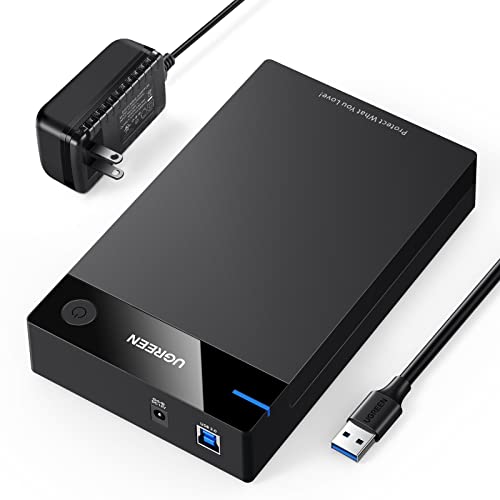
- Fits 2.5-inch and 3.5-inch SATA drives
- Supports up to 20TB with UASP over USB 3.0
- Includes 12V power adapter and shock protection
Best For: High-capacity desktop-drive backups and media storage
Portable Laptop Backup Enclosure

- Designed for 2.5-inch SATA HDDs and SSDs
- UASP-enabled USB 3.0 supports up to 5Gbps
- Compact case with EVA foam and protection features
Best For: Laptop-drive recovery and portable backups
Best Multi-Drive Pick
CENMATE 2-Bay Aluminum Enclosure

- Two-bay support for 2.5-inch and 3.5-inch SATA drives
- Tool-free installation with hot-swapping
- USB 3.0, cooling fan, and daisy-chain expansion
Best For: Desktop backup users managing multiple drives
Best Single-Drive Versatility

- Supports SATA drives up to 24TB
- Includes detachable USB-A/USB-C cable
- Aluminum housing with vents and removable stand
Best For: Single-drive backups across USB-A and USB-C devices
Best Portable 2.5-Inch Option
BENFEI Tool-Free SATA Enclosure

- Compact enclosure for 2.5-inch SATA drives
- USB-C and USB-A connectivity with UASP
- Tool-free setup and support for drives up to 6TB
Best For: Portable laptop backups using 2.5-inch drives
Best SATA Drive Dock – Sabrent 2.5/3.5-Inch USB 3.0 Dock
For shoppers comparing hard drive enclosures for backups, this Sabrent docking station is a straightforward option for bare SATA drives. Its tool-free, lay-flat design supports both 2.5-inch and 3.5-inch SATA HDDs and SSDs, while USB 3.0 and UASP support help provide practical transfer performance.
Best For: Backing up or accessing bare 2.5-inch and 3.5-inch SATA drives one at a time.
Pros:
- Supports SATA I/II/III 2.5-inch and 3.5-inch drives.
- Tool-free, plug-and-play design with hot-swapping.
- Includes the required 12V adapter for 3.5-inch drives.
- Works with Windows, macOS, and Linux.
Cons:
- Does not support IDE/PATA, M.2, SAS, or drives already inside USB enclosures.
- Uses a USB Type-A host cable rather than USB-C.
- Only one drive can be used at a time.
This is a practical single-drive backup dock when you already have bare SATA storage and want easy swapping. Confirm the drive connector and ensure you have a USB-A port or compatible adapter before ordering.
Best Multi-Drive Backup Enclosure – ORICO 5-Bay USB 3.0 Enclosure
This ORICO enclosure is designed for expanding backup storage with up to five 2.5-inch or 3.5-inch SATA drives. Its magnetic, screw-free cover, included high-capacity power adapter, fan, and status indicators make it suited to a larger desktop backup setup.
Best For: Home storage expansion, multi-drive backups, and users managing several SATA drives in one enclosure.
Pros:
- Five bays support 2.5-inch and 3.5-inch SATA HDDs and SSDs.
- Supports up to 110TB total, with up to 22TB per drive.
- Includes a 60mm fan and ventilation openings for heat dissipation.
- Magnetic cover enables tool-free drive installation.
Cons:
- Linux systems may read only one drive at a time.
- Uses USB 3.0 Type-B and USB-A connectivity, not USB-C.
- The enclosure is relatively large and heavy for a desktop accessory.
With five bays and substantial power capacity, the ORICO is the most expandable choice here for hard drive enclosures for backups. It is better suited to a stationary workspace than a compact, portable backup kit.
Best Compact 2.5-Inch Enclosure – Sabrent Tool-Free SATA USB 3.0 Case
For a compact backup enclosure for a notebook drive or SATA SSD, this Sabrent case keeps installation simple. It is designed specifically for 2.5-inch SATA storage, supports USB 3.0 transfer rates up to 5Gbps, and includes UASP support for compatible systems.
Best For: Portable backups using a single 2.5-inch SATA HDD or SSD.
Pros:
- Small, lightweight enclosure for 2.5-inch SATA drives.
- Tool-free installation with plug-and-play operation.
- Supports UASP and USB 3.0 speeds up to 5Gbps.
- Backward compatible with USB 2.0 and USB 1.1.
Cons:
- Does not accommodate 3.5-inch drives.
- Supports SATA storage only, not IDE or M.2 drives.
- Performance depends on the USB port, drive, and host system.
This is a sensible low-bulk option when your backup drive is a standard 2.5-inch SATA model. Its size and bus-powered-style enclosure format make it more convenient for laptop users than larger desktop docks.
Best Ventilated Single-Drive Case – CLAVOOP 3.5-Inch USB 3.0 Enclosure
The CLAVOOP enclosure offers a lay-flat way to connect one bare SATA drive for backup or data recovery. It supports 3.5-inch and 2.5-inch SATA HDDs and SSDs, includes a 12V/2A power adapter, and adds ventilation, shock-protection padding, and an auto-sleep feature.
Best For: Single-drive backups and data recovery with 3.5-inch or 2.5-inch SATA storage.
Pros:
- Supports 2.5-inch and 3.5-inch SATA I/II/III drives up to 20TB.
- Includes USB 3.0 cable and 12V/2A power adapter.
- Ventilation holes, non-slip pads, and shock-proof sponges support stable operation.
- Plug-and-play design with UASP support and auto-sleep.
Cons:
- Does not support IDE, mSATA, or M.2 drives.
- Holds only one drive at a time.
- Actual transfer speeds vary with the drive and host device.
Among these hard drive enclosures for backups, this model stands out for its ventilation and protective physical design while retaining a simple single-drive workflow. Verify that your disk is SATA before purchasing, especially if you are working with an older or compact drive format.
Fan-Cooled Backup Dock – Sabrent USB 3.0 SATA Dock
For backups involving either desktop or laptop SATA drives, this Sabrent dock is a flexible choice among hard drive enclosures for backups. It supports both 2.5-inch and 3.5-inch drives, adds active cooling, and connects through USB 3.0 for straightforward file transfers.
Best For: Users who want a hot-swappable dock for backing up both 2.5-inch and 3.5-inch SATA HDDs or SSDs.
Pros:
- Supports standard 2.5-inch and 3.5-inch SATA drives, with capacities up to 22TB.
- Built-in cooling fan helps manage drive temperatures during use.
- Plug-and-play, hot-swappable operation requires no drivers.
- Includes access to Acronis True Image for Sabrent cloning and migration.
Cons:
- Holds one drive at a time.
- USB 3.0 limits the connection to up to 5Gbps, even though the SATA bus supports up to 6Gbps.
- The open dock design offers less enclosure-style protection than a fully enclosed case.
The integrated fan and broad drive compatibility make this a practical backup dock for rotating bare drives. It is especially useful if you need to clone or access both desktop and laptop SATA storage without installing a drive permanently.
Large-Capacity Backup Case – UGREEN 2.5/3.5-Inch Enclosure
This UGREEN model is a versatile option among hard drive enclosures for backups when you need to use either a 2.5-inch or 3.5-inch SATA drive externally. Its USB 3.0 connection, included power adapter, and support for drives up to 20TB make it suited to high-capacity backup storage.
Best For: Desktop-drive backups, large media libraries, and users who need compatibility with computers, consoles, routers, or TVs.
Pros:
- Accepts both 2.5-inch and 3.5-inch SATA HDDs and SSDs up to 20TB.
- UASP support can provide faster transfers than standard USB 3.0 on compatible systems.
- Includes a 12V power adapter for stable operation with larger drives.
- Ventilation holes and soft rubber strips support heat dissipation and shock protection.
Cons:
- Only one drive can be installed at a time.
- 3.5-inch drives require the separate power adapter, reducing portability.
- You should safely eject the drive before unplugging it to help avoid data loss.
With broad system compatibility and support for high-capacity disks, this enclosure is a solid choice for a stationary backup setup. The included power supply is a practical advantage for 3.5-inch drives, while UASP can improve transfer performance when the host system supports it.
Portable Laptop Backup Enclosure – UGREEN 2.5-Inch USB 3.0 Case
For portable backups and file recovery, this compact UGREEN case is one of the simpler hard drive enclosures for backups. It is designed for 2.5-inch, 7mm or 9.5mm SATA HDDs and SSDs, connects over USB 3.0, and supports plug-and-play use with common desktop and mobile operating systems.
Best For: Recovering files from older laptop drives, reusing 2.5-inch storage, and carrying a compact backup drive.
Pros:
- Supports 2.5-inch SATA HDDs and SSDs up to 6TB.
- USB 3.0 and UASP provide up to 5Gbps transfer rates on compatible systems.
- Short-circuit and over-current protection help safeguard the installed drive.
- EVA foam helps protect the drive from shakes and scratches.
Cons:
- It does not include an HDD or SSD.
- It supports only 2.5-inch drives, not desktop-sized 3.5-inch models.
- Drives with screws may need those screws removed to fit.
This enclosure is a good match for lightweight backup work and accessing data from retired laptop drives. Its 6TB limit and 2.5-inch-only design make it less suitable for large desktop disks, but the compact format and protective features are useful for mobile storage.
Best Multi-Drive Pick – CENMATE 2-Bay Aluminum Enclosure
For backups that involve multiple SATA drives, the CENMATE is a practical choice among hard drive enclosures for backups. Its two bays accommodate 2.5-inch and 3.5-inch HDDs or SSDs, while tool-free installation, hot swapping, USB 3.0, and USB-A/C connectivity simplify routine storage management.
Best For: Users who need a two-drive desktop enclosure for expanding backup storage.
Pros:
- Supports two 2.5-inch or 3.5-inch SATA drives, up to 20TB per drive.
- Tool-free trays and hot swapping make drive changes convenient.
- Aluminum construction and a built-in fan help with heat management.
- USB 3.0 and daisy-chain expansion support broader storage setups.
Cons:
- It does not provide RAID or NAS functionality.
- The fan operates at roughly 40–50 decibels, which may be noticeable in quiet spaces.
The CENMATE offers useful capacity and expansion features for a desktop backup workflow, especially when you regularly rotate or add drives. Its active cooling and dual-bay design are useful advantages, though users seeking silent operation or RAID should consider another type of enclosure.
Best Single-Drive Versatility – RSHTECH USB-C SATA Enclosure
The RSHTECH is a straightforward option for connecting one SATA drive to modern and legacy computers. For hard drive enclosures for backups, it combines a 3.5-inch drive enclosure with a detachable USB-A/USB-C cable, UASP support, aluminum housing, and a removable vertical stand.
Best For: Backup users who want one-drive support with flexible USB-A and USB-C connectivity.
Pros:
- Supports 2.5-inch and 3.5-inch SATA HDDs or SSDs up to 24TB.
- The included cable works with USB-A and USB-C host ports.
- UASP support and the ASM1153E chip are designed for faster, stable transfers.
- Aluminum housing, vents, and a removable stand support flexible placement.
Cons:
- It supports only one drive at a time.
- It lacks the multi-drive expansion and hot-swap features highlighted by some larger enclosures.
RSHTECH suits a simple backup arrangement where one internal drive is used as external storage. Its sleep function, activity indicators, power button, and dual-connector cable add convenience without requiring a more complex multi-bay setup.
Best Portable 2.5-Inch Option – BENFEI Tool-Free SATA Enclosure
For compact backup drives, the BENFEI provides a simple way to turn a 2.5-inch SATA HDD or SSD into USB storage. It is a convenient pick among hard drive enclosures for backups, with tool-free installation, USB Type-C and Type-A connectivity, UASP support, and a lightweight design.
Best For: Laptop users and anyone using a 2.5-inch drive for portable file transfers or backups.
Pros:
- Tool-free, plug-and-play installation requires no driver.
- Supports USB Type-C and Type-A connections.
- UASP support enables transfers up to 5Gbps and is backward compatible with USB 2.0 and 1.1.
- Supports 7mm and 9.5mm 2.5-inch drives up to 6TB.
Cons:
- It supports only 2.5-inch drives and one drive at a time.
- The supported capacity is limited to 6TB.
- It is not designed for 3.5-inch desktop drives.
The BENFEI is a compact, low-fuss solution for SSD-based backups and drive transfers. Its integrated cable and lightweight 0.09kg design make it convenient for laptop bags, while its 2.5-inch and 6TB limits make it less suitable for large desktop backup drives.
How We Picked the Best Hard Drive Enclosures for Backups
We focused on enclosure designs that make backup storage practical, dependable, and easy to manage. The selection includes single-drive cases for simple setups, docks for frequently swapping bare drives, and multi-bay enclosures for users who need more capacity or separate backup disks.
We also considered drive compatibility, USB connectivity, tool-free installation, cooling, portability, power requirements, and useful features such as hot swapping. Because enclosure performance depends on the installed drive and host port, advertised interface speeds are treated as maximums rather than guaranteed transfer rates.
Quick Comparison
| Enclosure type | Best for | What to check |
|---|---|---|
| 2.5-inch USB enclosure | Portable SSD or laptop HDD backups | Drive thickness, bus power, USB-C or USB-A cable |
| 3.5-inch enclosure or dock | Desktop HDDs and high-capacity storage | External power supply, cooling, SATA support |
| Multi-bay enclosure | Several drives or larger backup libraries | Bay layout, independent drive access, cooling, capacity limits |
| Drive dock | Frequent drive swaps and troubleshooting | Open-slot safety, dust protection, hot-swap behavior |
Key Buying Factors for Hard Drive Enclosures for Backups
Drive Size and Power
Confirm whether the enclosure supports 2.5-inch drives, 3.5-inch drives, or both. Most 2.5-inch SATA SSDs and laptop HDDs can run from USB power, while 3.5-inch desktop drives usually require a separate power adapter.
Connection and Real-World Speed
USB 3.0 and USB 3.2 Gen 1 commonly provide up to 5Gbps of link bandwidth, but the drive, computer, cable, and file sizes affect actual results. USB-C describes the connector shape, not necessarily a faster protocol, so check the stated transfer standard.
Cooling and Continuous Use
For occasional backups, a compact passive enclosure may be sufficient. Large desktop HDDs, repeated imaging jobs, and multi-drive workloads benefit from ventilation or a built-in fan. Keep the enclosure in an open area and avoid blocking vents.
Installation and Protection
Tool-free cases are convenient for routine drive replacement, while enclosed designs offer better protection from dust and accidental contact. If you swap bare drives often, a dock is usually faster than a sealed case, but it provides less physical protection.
Who Should Buy Which Hard Drive Enclosures for Backups?
Choose a 2.5-inch enclosure if you are backing up a laptop drive, SATA SSD, or compact portable disk and want a lightweight setup. Choose a 3.5-inch enclosure or dock for larger desktop HDDs and high-capacity backup storage. Choose a multi-bay model if you maintain several drives or want a more organized backup station. Choose a fan-cooled design for long transfers and frequent use, particularly with multiple or high-capacity HDDs.
Before buying, verify your drive’s SATA format, thickness, required power, computer ports, and intended backup schedule. For important files, the enclosure is only one part of the plan: keep more than one copy and, when possible, store at least one backup separately from the original data.