Choosing the right external storage can help a small business expand capacity without immediately investing in a full NAS or server. The best RAID enclosures for small businesses make it easier to combine multiple SATA drives, protect against a single-drive failure, and connect shared or backup storage to existing computers.
This roundup compares 10 two-, four-, and five-bay enclosures with different RAID modes, drive formats, connection standards, cooling systems, and capacity limits. Use the guide below to narrow the options by workload, budget, and required level of redundancy.
Best 10 Raid Enclosures for Small Businesses Picks for 2026
High-Capacity Pick
Yottamaster PS500RC3 5-Bay RAID Enclosure

- Five bays with up to 110TB stated capacity
- Supports RAID 0/1/3/5/10, JBOD, and CLONE
- USB-C, aluminum housing, and temperature-controlled fan
Best For: Large business files, media projects, and expandable storage
Professional 4-Bay Option
MAIWO 4-Bay SATA RAID Enclosure

- Four bays and up to 96TB stated capacity
- Eight storage modes, including RAID 5 and Clone
- USB-A/C connectivity with dual cooling fans
Best For: Office storage, surveillance, and workstation backups
Compact Business Pick
CENMATE 2-Bay USB RAID Enclosure

- Two bays support 2.5-inch and 3.5-inch drives
- Provides RAID 0, RAID 1, Normal, and JBOD
- USB-A/C 3.0 and compatibility with Windows, Mac, and Linux
Best For: Small teams needing compact two-drive storage
Hot-Swap Choice
Syba SY-ENC50118 5-Bay RAID Enclosure

- Tray-less hot-swap access for five drives
- Supports RAID 0/1/3/5/10, Span, and JBOD
- 150W power supply and USB 3.0 up to 5Gbps
Best For: Teams that frequently swap or maintain multiple drives
High-Capacity Workstation RAID

- Hardware RAID with eight configuration modes
- Supports five 2.5-inch or 3.5-inch SATA drives
- 150W power supply with active cooling
Best For: Large backups, media libraries, and creative workstations
Versatile Desktop DAS

- Eight RAID modes for flexible storage layouts
- Supports up to four drives and 80TB
- USB-A/C 3.0 and eSATA connectivity
Best For: Mixed-interface office workstations and desktop backups
Secure Expansion DAS
ORICO 4-Bay 88TB RAID Enclosure

- Eight RAID modes for backup and expansion flexibility
- Supports four 3.5-inch drives up to 88TB
- 150W supply, cooling fan, and safety lock
Best For: Large desktop backups and engineering or video files
Best Overall
ICY BOX 2-Bay Aluminum RAID Enclosure

- Supports 2.5-inch and 3.5-inch SATA drives
- Four switch-selectable RAID modes
- Active cooling and hot-swappable trays
Best For: Small offices needing flexible drive support and RAID 1 mirroring
Best Compact Option
MAIWO Dual-Bay 2.5-Inch RAID Enclosure

- Compact enclosure for two 2.5-inch SATA drives
- Four RAID modes including RAID 1
- Tool-free design with hot swapping
Best For: Portable business storage using 2.5-inch HDDs or SSDs
Best for Speed
MAIWO Aluminum 10Gbps RAID Enclosure
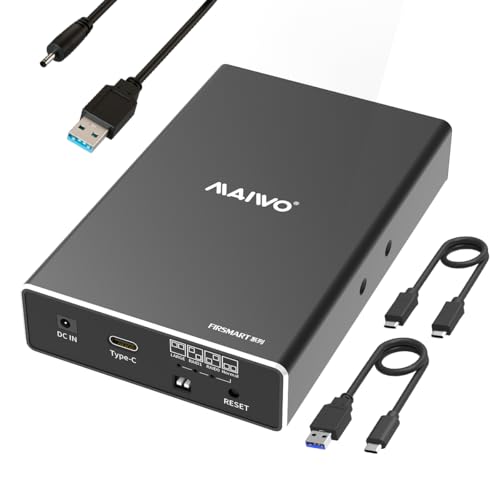
- USB 3.1 Gen 2 supports up to 10Gbps
- Four RAID modes for speed or redundancy
- Aluminum case with included power cable
Best For: File-heavy workflows using two 2.5-inch drives
High-Capacity Pick – Yottamaster PS500RC3 5-Bay RAID Enclosure
For small businesses comparing RAID enclosures for small businesses, the Yottamaster PS500RC3 stands out when expansion room and flexible drive configurations matter. Its five bays support 2.5-inch and 3.5-inch SATA HDDs or SSDs, with up to 110TB of stated capacity and USB-C connectivity.
Best For: Businesses, photographers, and video editors managing large files and needing multiple RAID options.
Pros:
- Supports up to five drives and 110TB total capacity.
- Offers RAID 0/1/3/5/10, JBOD, and CLONE modes.
- Aluminum construction and temperature-controlled 80mm fan help with cooling.
- Works with Windows, Mac, and Linux through USB-C at up to 5Gbps.
Cons:
- Drive power consumption must remain within the stated 78W limit.
- New drives may need formatting and partitioning before use.
This is the most expandable option in the group, particularly for data-heavy workflows. Check drive power requirements and back up important data before changing RAID configurations.
Professional 4-Bay Option – MAIWO 4-Bay SATA RAID Enclosure
The MAIWO 4-Bay enclosure is a practical choice among RAID enclosures for small businesses that need several 3.5-inch SATA drives and a broad selection of storage modes. It supports up to four drives, 96TB of stated capacity, USB-A/C connectivity, and drive-status LED indicators.
Best For: Small offices, surveillance setups, and professional workstations using 3.5-inch SATA hard drives.
Pros:
- Supports Normal, RAID 0, 3, 5, 1/10, Clone, and Large/JBOD modes.
- Accommodates up to four 24TB drives for a stated 96TB maximum.
- Includes USB-A to USB-C and USB-C to USB-C cables.
- Two built-in fans provide cooling and can be controlled with a switch.
Cons:
- Designed for 3.5-inch SATA drives rather than 2.5-inch drives.
- Fan control is on or off, rather than automatic speed adjustment.
With four bays and extensive RAID flexibility, the MAIWO balances capacity and configurability without moving to a larger five-bay enclosure. It is best suited to teams already standardizing on desktop-size SATA hard drives.
Compact Business Pick – CENMATE 2-Bay USB RAID Enclosure
For smaller teams seeking straightforward RAID enclosures for small businesses, the CENMATE two-bay model offers a compact way to combine or mirror SATA storage. It supports 2.5-inch and 3.5-inch HDDs or SSDs, four RAID modes, and USB-A/C 3.0 connections at up to 5Gbps.
Best For: Small offices and individuals needing a compact two-drive backup or shared external storage setup.
Pros:
- Supports RAID 0, RAID 1, Normal, and JBOD.
- Accepts both 2.5-inch and 3.5-inch SATA HDDs and SSDs.
- Aluminum-alloy enclosure and built-in fan support heat management.
- Compatible with Windows, Mac, and Linux.
Cons:
- Two bays provide less expansion than the four- and five-bay alternatives.
- The fan is rated around 40–50 decibels and may be noticeable in quiet spaces.
- Changing or resetting a RAID array can result in data loss.
The CENMATE is a sensible entry point when a business needs basic redundancy or capacity without a large enclosure. Its smaller footprint is useful, but buyers should account for the stated fan noise and follow the reset instructions carefully.
Hot-Swap Choice – Syba SY-ENC50118 5-Bay RAID Enclosure
The Syba SY-ENC50118 is worth considering when evaluating RAID enclosures for small businesses that prioritize quick drive changes. Its five-bay, tray-less hot-swap design supports 2.5-inch and 3.5-inch SATA drives, multiple RAID levels, and USB 3.0 connectivity up to 5Gbps.
Best For: Businesses that regularly replace or reorganize drives and need broad RAID support.
Pros:
- Tray-less hot-swap design allows drives to be inserted or removed without tools or trays.
- Supports RAID 0, 1, 3, 5, 10, Span, and JBOD.
- Five bays support drives up to 24TB each according to the supplied notes.
- 150W power supply supports multiple high-performance drives.
Cons:
- Uses USB 3.0 rather than USB-C as the primary listed interface.
- Simultaneous multi-drive access through eSATA requires a compatible port multiplier with FIS-based switching.
- The supplied specifications list 10TB as memory storage capacity, so buyers should verify the intended capacity configuration.
The Syba is the most service-oriented option here, with convenient tool-less hot swapping and a strong selection of RAID modes. Verify host eSATA requirements and capacity details before deploying it in a business workflow.
High-Capacity Workstation RAID – 5-Bay ORICO 130TB Enclosure
For small businesses needing substantial desktop storage, this ORICO 5-bay enclosure combines hardware RAID flexibility with support for both 2.5-inch and 3.5-inch SATA drives. Its built-in power supply, USB 3.0 connectivity, and active cooling make it suited to backups, media libraries, and demanding workstation workflows.
Best For: Small offices, creative teams, and workstations managing large backup sets or media collections.
Pros:
- Supports RAID 0, 1, 3, 5, 10, JBOD, Clone, and Clear modes through hardware controls.
- Accommodates five 2.5-inch or 3.5-inch SATA drives, with up to 110TB stated total capacity.
- 150W internal power supply and an 80mm fan help support multi-drive, long-duration operation.
Cons:
- Uses USB 3.0 Type-A rather than a newer USB-C data interface.
- Its 5-bay design may be more storage than a very small office currently needs.
Choose this model when capacity and hardware-level RAID options matter more than a compact footprint. It is particularly practical for businesses that want a flexible direct-attached storage setup without moving to a NAS.
Versatile Desktop DAS – CENMATE 4-Bay RAID Enclosure
This CENMATE enclosure is a practical option for small businesses seeking raid enclosures for small businesses with mixed connectivity needs. It supports four 2.5-inch or 3.5-inch drives, offers eight RAID modes, and includes USB-A, USB-C, and eSATA cabling for flexible desktop deployment.
Best For: Small offices and individual workstations that need expandable, direct-attached storage with multiple connection options.
Pros:
- Supports RAID 0, 1, 3, 5, 10, Clone, Large, and Normal modes.
- Works with up to four drives and a stated maximum capacity of 80TB.
- Includes USB 3.0 and eSATA connectivity plus USB-A/C cabling.
Cons:
- Hot-swapping is not supported.
- RAID mode changes require powering down and manually adjusting the mode controls; changing modes may cause data loss.
- The fans are rated around 40–50 decibels, which may be noticeable in quiet offices.
The CENMATE stands out for its broad interface support and configurable RAID modes, but it requires careful setup. Confirm that the host computer’s eSATA port supports RAID if you plan to access multiple bays over eSATA.
Secure Expansion DAS – ORICO 4-Bay 88TB RAID Enclosure
For businesses that want a straightforward 3.5-inch drive expansion system, this ORICO 4-bay enclosure provides eight RAID modes, USB 3.0 transfer, and a built-in 150W power supply. The aluminum chassis, cooling fan, and independent safety lock are useful additions for centralized desktop backups and shared work files.
Best For: Small business desktops handling large engineering files, high-definition video, or centralized backup storage.
Pros:
- Offers RAID 0, 1, 3, 5, 10, JBOD, Clone, and Clear configurations.
- Supports four 3.5-inch SATA drives with a stated maximum capacity of 88TB.
- Includes a 150W internal power supply, 80mm fan, ventilation, and a safety lock.
Cons:
- Supports 3.5-inch drives only, limiting compatibility with 2.5-inch storage.
- Connectivity is through USB 3.0, without USB-C or eSATA listed.
- RAID functionality is handled through the enclosure’s configuration rather than NAS networking.
This model is a strong fit when a business wants high-capacity direct-attached storage and physical drive security. Its four-bay layout is easier to size for a small office than a larger five-bay system, while still leaving room for substantial expansion.
Best Overall – ICY BOX 2-Bay Aluminum RAID Enclosure
For small businesses seeking raid enclosures for small businesses, the ICY BOX is a flexible desktop option with support for both 2.5-inch and 3.5-inch SATA drives. Its four RAID modes, aluminum housing, active cooling, and USB 3.0 connectivity make it suitable for shared backups, working files, and general external storage.
Best For: Small offices that need flexible drive sizes, RAID 1 mirroring, and a cooled two-bay enclosure.
Pros:
- Supports 2.5-inch and 3.5-inch SATA HDDs and SSDs, with up to 30TB per drive listed.
- Offers RAID 0, RAID 1, SINGLE, and LARGE modes through an integrated switch.
- Temperature-controlled fan, status LEDs, hot swapping, and tool-free trays support easier operation.
- USB A and USB-C cables and compatibility with Windows, macOS, and Linux are included.
Cons:
- USB 3.0 transfer speeds are limited to up to 5Gbps.
- The larger enclosure and cooling fan may be more than needed for a highly portable setup.
The ICY BOX stands out when a business wants broad drive compatibility and straightforward RAID control. Choose RAID 1 for mirrored protection, or use RAID 0, SINGLE, or LARGE when performance or capacity flexibility matters more.
Best Compact Option – MAIWO Dual-Bay 2.5-Inch RAID Enclosure
The MAIWO K25682 is a compact choice among raid enclosures for small businesses, designed for two 2.5-inch SATA SSDs or HDDs. With four RAID modes, tool-free setup, and USB 3.0 connectivity, it suits businesses that want portable external storage without a larger desktop enclosure.
Best For: Small teams using 2.5-inch drives for portable backups, file transfers, and photography storage.
Pros:
- Supports two 2.5-inch 7mm or 9.5mm SATA drives, with 16TB total capacity listed.
- Provides RAID 0, RAID 1, LARGE/JBOD, and NORMAL modes.
- Tool-free sliding closure, hot swapping, LED indicators, and plug-and-play setup simplify use.
- Compact, lightweight ABS enclosure measures about 5.20 by 3.11 by 1.06 inches.
Cons:
- Only 2.5-inch drives are supported.
- The high-strength ABS case is less substantial than an aluminum enclosure.
- USB 3.0 performance depends on compatible hardware and UASP support.
This MAIWO model is a practical space-saving solution for businesses already using 2.5-inch drives. Its compact design and simple controls are useful for mobile workflows, while RAID 1 adds a mirrored-storage option for important files.
Best for Speed – MAIWO Aluminum 10Gbps RAID Enclosure
Businesses prioritizing faster transfers may prefer this MAIWO enclosure, which pairs two 2.5-inch SATA bays with USB 3.1 Gen 2 connectivity. Among raid enclosures for small businesses, it is a compact option for moving larger files, especially when RAID 0 and compatible 10Gbps equipment are used.
Best For: Small businesses transferring large files from two 2.5-inch SSDs or HDDs.
Pros:
- USB 3.1 Gen 2 supports transfer rates up to 10Gbps, with RAID 0 performance noted.
- Supports RAID 0, RAID 1, LARGE/JBOD, and NORMAL/PM modes.
- Aluminum alloy case, tool-free installation, hot swapping, and plug-and-play operation add convenience.
- Includes USB-C-to-A and USB-C-to-C data cables plus an independent power cable.
Cons:
- Supports only 2.5-inch 7mm and 9.5mm SATA drives.
- An additional power connection is required.
- Total supported capacity is listed as 16TB, or 8TB per bay.
The MAIWO K25272C is the strongest fit here when interface speed is a priority. It offers RAID 1 for mirrored storage or RAID 0 for faster transfers, provided the host computer, drives, and cables can support the 10Gbps connection.
How We Picked the Best Raid Enclosures for Small Businesses
We focused on practical features that affect day-to-day business storage rather than headline specifications alone. The selection includes two-bay models for compact backups and mirrored storage, plus four- and five-bay units for larger archives, media libraries, workstation storage, and multi-drive expansion.
We compared supported RAID modes, SATA drive compatibility, maximum stated capacity, USB and eSATA connectivity, cooling, hot-swap or tool-less access, and compatibility with common Windows and macOS workflows. Because an enclosure is only part of a storage system, we also considered how straightforward each design is to install, replace, and maintain.
Quick Comparison
| Best for | Recommended bay count | What to prioritize |
|---|---|---|
| Simple mirrored backups | 2 bays | RAID 1, quiet cooling, easy drive replacement |
| General office expansion | 4 bays | Flexible RAID modes, USB-C or USB 3.0, active cooling |
| Large local archives | 5 bays | High capacity, RAID 5 support where available, cooling, stable connectivity |
| Portable or compact SSD storage | 2 bays | 2.5-inch support, UASP, USB 3.x, low power draw |
Key Buying Factors for Raid Enclosures for Small Businesses
Bay Count and Capacity
Choose the number of bays based on both current storage and likely expansion. Two bays are usually enough for a mirrored document backup, while four or five bays provide more usable capacity and greater flexibility. Check the manufacturer’s capacity limit, but remember that actual usable space depends on the RAID level and drive sizes.
RAID Modes and Redundancy
RAID 1 mirrors data across two drives and is the simplest choice for protecting against one drive failure. RAID 0 improves combined performance and capacity but offers no redundancy. JBOD or normal modes can expose drives separately. Some four- and five-bay enclosures offer additional modes, but verify whether configuration is controlled by hardware switches, software, or the host operating system.
Connectivity and Performance
USB 3.0 is suitable for many backup and office tasks, while USB-C connectors can simplify modern laptop and workstation connections. USB 3.1 Gen 2 may offer higher bandwidth, although real-world speed still depends on the drives, RAID mode, cables, and host port. UASP support can improve performance with compatible systems.
Cooling, Noise, and Maintenance
Multiple hard drives generate heat during sustained use, so a fan is valuable for larger arrays and continuous workloads. Look for accessible drive bays, tool-less trays, hot-swap support, and clear status indicators if staff may need to replace drives without technical assistance.
Who Should Buy Which Raid Enclosures for Small Businesses?
Choose a two-bay enclosure if your priority is affordable RAID 1 protection for office files, client records, or a second backup target. A four-bay model is a better fit for growing businesses that need more capacity, several RAID options, or a balance of redundancy and performance. Select a five-bay enclosure when you maintain large media, project, or backup archives and want room to expand.
Before buying, confirm drive size compatibility, operating-system support, cable requirements, and the enclosure’s RAID implementation. RAID is not a substitute for backups: keep an additional copy disconnected or stored elsewhere, and test recovery procedures periodically.