The best hard drive docking stations for Mac make it easier to access bare SATA drives, clone disks, recover files, and expand storage without installing drives in an enclosure.
We compare 10 practical options across USB-C and USB 3.0 connectivity, single- and dual-bay designs, cloning features, and support for both 2.5-inch and 3.5-inch drives.
Best 10 Hard Drive Docking Stations for Mac Picks for 2026
Best Dual-Bay SATA Cloner

- Dual bays for 2.5-inch and 3.5-inch SATA drives
- Offline cloning without a computer
- USB 3.0 with support for drives up to 10TB
Best For: SATA drive access and offline cloning
Best Multi-Format USB-C Dock

- Reads M.2 NVMe and 2.5/3.5-inch SATA drives
- USB 3.2 Gen 2 supports up to 10Gbps
- Includes USB-C and USB-A connection cables
Best For: Mixed NVMe and SATA drive collections
Best USB-C Dual-Bay Dock

- Mounts two 2.5/3.5-inch SATA drives at once
- Offline cloning requires no computer
- Tool-free hot-swap design with USB-C
Best For: Two-drive SATA transfers and cloning
Best Lay-Flat USB 3.0 Dock
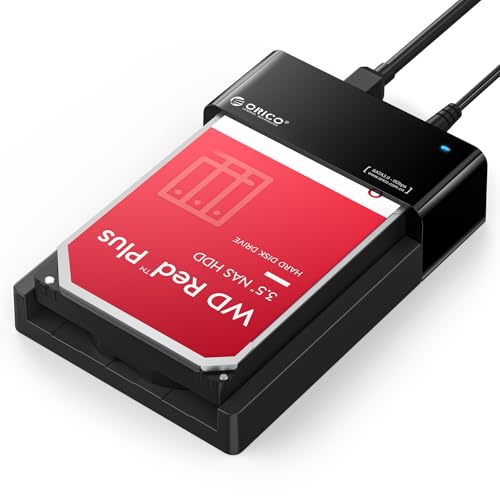
- Supports one 2.5/3.5-inch SATA drive
- UASP and USB 3.0 up to 5Gbps
- Tool-free lay-flat design with up to 24TB support
Best For: Simple single-drive SATA access on Mac
Best Simple SATA Pick
Sabrent USB 3.0 Single-Bay Dock

- Handles bare 2.5-inch and 3.5-inch SATA drives
- Tool-free and hot-swappable
- Includes 12V power adapter for 3.5-inch drives
Best For: Single-drive access on Macs with USB-A or an adapter
Best for Cloning

- Reads two 2.5-inch or 3.5-inch drives simultaneously
- Clones drives without a computer
- Powered by a 12V/2.5A adapter
Best For: Drive migration and two-drive backup workflows
Best High-Speed USB-C Option

- Offers up to 10Gbps USB-C connectivity
- Includes USB-C and USB-A connection cables
- Supports 2.5-inch, 3.5-inch, and 20TB-plus SATA drives
Best For: Fast, flexible single-drive access on modern Macs
Best All-in-One Pick
YOTUO 1TB USB-C Hard Drive Dock

- Built-in 1TB storage
- USB and SD/TF expansion
- Compact USB-C design
Best For: USB-C Mac users needing storage and hub ports
Best Simple Pick
ORICO USB-C Dual-Bay SATA Dock

- Dual-bay 2.5/3.5-inch SATA support
- Offline drive-cloning function
- USB-C and USB-A connectivity
Best For: Mac users cloning or managing two SATA drives
Best Dual-Bay SATA Cloner – Sabrent EC-HD2B
For users comparing hard drive docking stations for Mac, the SABRENT EC-HD2B is a straightforward dual-bay option for standard 2.5-inch and 3.5-inch SATA hard drives or SSDs. It connects over USB 3.0, requires no drivers, and can clone drives offline.
Best For: Mac users who need to access two SATA drives or make offline drive copies.
Pros:
- Supports both 2.5-inch and 3.5-inch SATA HDDs and SSDs.
- Dual bays allow two drives to be connected at once.
- Offline cloning works without a computer.
- Supports drives up to 10TB per bay and USB 3.0 transfer speeds up to 5Gbps.
Cons:
- Supports SATA drives but not M.2 NVMe drives.
- Offline cloning speed is listed at up to 60Mbps.
This dock is a practical choice for SATA-based backups, drive migration, and occasional cloning. Its included power supply and USB 3.0 cable make it ready for desktop or laptop use.
Best Multi-Format USB-C Dock – Sabrent DS-UFNC
The SABRENT DS-UFNC is one of the more versatile hard drive docking stations for Mac because it reads both M.2 PCIe NVMe SSDs and 2.5-inch or 3.5-inch SATA drives. Its USB-C 10Gbps connection, tool-free design, and included USB-C and USB-A cables suit newer and older computers.
Best For: Mac users who work with both NVMe SSDs and SATA drives and want fast, flexible drive access.
Pros:
- Supports M.2 NVMe and 2.5-inch or 3.5-inch SATA drives.
- USB 3.2 Gen 2 supports transfer rates up to 10Gbps.
- Includes USB-C-to-USB-C and USB-A-to-USB-C cables.
- Offers tool-free offline cloning with a progress indicator.
Cons:
- Drives are not included.
- Offline cloning requires a target drive equal to or larger than the source.
- Actual performance depends on the installed drive.
Choose this model if your storage collection includes multiple drive formats. The included 12V adapter supports 3.5-inch drives, while the lay-flat hinged design simplifies drive swaps.
Best USB-C Dual-Bay Dock – Sabrent EC-CH2B
The SABRENT EC-CH2B is a dual-bay SATA dock for Mac users who want to mount two bare drives simultaneously. It supports tool-free, hot-swappable 2.5-inch and 3.5-inch SATA HDDs and SSDs, and its offline cloner can copy one SATA drive to another without a computer.
Best For: Mac owners who need two-drive file access, SATA drive transfers, or simple offline cloning.
Pros:
- Reads and writes two SATA drives as separate drives when connected to a computer.
- Supports both 2.5-inch and 3.5-inch SATA HDDs and SSDs.
- Includes a USB-C cable and supports USB 3.0 speeds up to 5Gbps.
- Tool-free, hot-swappable design with an access LED for each bay.
Cons:
- Does not support IDE/PATA, M.2, or NVMe drives.
- The included cable is USB-C on the computer side; a USB-C-to-USB-A cable is not included.
- Offline cloning runs at up to 60Mbps.
This is a focused SATA solution rather than a universal dock. It makes the most sense when you regularly handle two bare SATA drives and have a compatible USB-C connection available.
Best Lay-Flat USB 3.0 Dock – ORICO SATA Dock
The ORICO lay-flat dock is a practical entry for shoppers seeking hard drive docking stations for Mac with simple plug-and-play access. It supports one 2.5-inch or 3.5-inch SATA drive, uses USB 3.0 with UASP, and includes the power adapter, cable, and adapter converter.
Best For: Mac users who want a compact, tool-free dock for accessing or swapping a single SATA drive.
Pros:
- Supports 2.5-inch and 3.5-inch SATA I/II/III HDDs and SSDs.
- Handles a single drive capacity of up to 24TB.
- USB 3.0 with UASP supports transfer rates up to 5Gbps.
- Lay-flat, tool-free design supports convenient hot-swapping.
Cons:
- Supports one drive at a time.
- Uses USB 3.0 Type-A rather than USB-C.
- Does not list offline cloning functionality.
Its broad operating-system compatibility and included accessories make setup uncomplicated. The lay-flat construction is also designed to promote passive airflow during longer data-access sessions.
Best Simple SATA Pick – Sabrent USB 3.0 Single-Bay Dock
If you need hard drive docking stations for Mac and use a single bare SATA drive at a time, this Sabrent dock offers a straightforward, tool-free setup. It supports 2.5-inch and 3.5-inch SATA HDDs and SSDs, with USB 3.0 connectivity and an included power adapter.
Best For: Mac users with one bare 2.5-inch or 3.5-inch SATA drive who want an affordable, simple swap-and-access dock.
Pros:
- Supports SATA I/II/III 2.5-inch and 3.5-inch drives.
- Tool-free, hot-swappable design with power and activity LED.
- Includes the required 12V adapter for 3.5-inch drives.
- Works with macOS without additional drivers.
Cons:
- Uses a USB Type-A host cable, so USB-C-only Macs need an adapter.
- Supports SATA drives only—not IDE/PATA, M.2, SAS, or USB-enclosed drives.
- USB bridge does not pass through S.M.A.R.T. diagnostics.
This is a practical single-drive reader for basic backups, file transfers, and drive recovery tasks. Confirm your Mac has a compatible USB connection and that the drive has a standard SATA edge connector before buying.
Best for Cloning – Benfei USB-C Dual-Bay Dock
For Mac owners comparing hard drive docking stations for Mac with a focus on backups or migration, the Benfei dual-bay dock adds useful flexibility. It can read and write two 2.5-inch or 3.5-inch HDDs or SSDs at once and supports offline cloning without a computer.
Best For: Users who regularly copy, migrate, or back up one SATA drive to another and want USB-C connectivity with two bays.
Pros:
- Dual bays allow simultaneous access to two 2.5-inch or 3.5-inch drives.
- One-button offline cloning works without a PC or Mac.
- Dedicated 12V/2.5A power supply supports two 3.5-inch drives.
- Includes UASP support and an 18-month warranty.
Cons:
- Offline cloning requires the target drive to be at least as large as the source.
- The supplied details do not specify support for non-SATA drive formats.
- Users should switch off power before connecting or disconnecting drives.
The standout feature is its computer-free cloning function, making it useful for drive upgrades and duplicate backups. Its USB-C interface suits newer Macs, while the powered dual-bay design is better suited to planned desktop use than casual single-drive access.
Best High-Speed USB-C Option – Sabrent 10Gbps SATA Dock
This Sabrent model is a strong choice among hard drive docking stations for Mac when you want a modern USB-C connection and higher interface bandwidth. It accepts bare 2.5-inch and 3.5-inch SATA HDDs or SSDs, supports up to 10Gbps, and includes both USB-C and USB-A connection options.
Best For: Mac users who want a fast, flexible single-bay dock for SATA SSDs and HDDs, especially with USB-C ports.
Pros:
- USB 3.2 Gen 2×1 interface supports up to 10Gbps.
- Includes USB-C-to-C and USB-A-to-C cables.
- Supports 2.5-inch and 3.5-inch SATA drives, including capacities of 20TB and larger.
- Tool-free, hot-swappable design works with macOS without drivers.
Cons:
- It is a single-bay dock, so it cannot access two drives at once.
- 3.5-inch drives require wall power through the included adapter.
- Its higher interface speed does not guarantee that mechanical HDDs will reach 10Gbps.
With broad cable compatibility and a 10Gbps interface, this is the most versatile single-drive option in the group for newer Macs. It remains limited to SATA drives, but the retractable dust cover and quick tool-less swapping add practical everyday convenience.
Best All-in-One Pick – YOTUO 1TB USB-C Hard Drive Dock
For shoppers comparing hard drive docking stations for Mac, the YOTUO combines built-in storage with everyday port expansion. Its 1TB drive, USB ports, and SD/TF card readers make it a compact option for backups, file access, and connecting accessories to compatible Macs.
Best For: Mac users with USB-C ports who want storage and hub functionality in one portable device.
Pros:
- Combines a 1TB external hard drive with a multiport docking station.
- Includes USB-C, USB 3.0, USB 2.0, SD, and TF card connectivity.
- Compact, lightweight design supports portable workflows.
- Supports macOS along with Windows and Linux.
Cons:
- Apple devices must have a USB-C port; Lightning-to-USB-C adapters do not resolve compatibility.
- Its integrated drive provides less flexibility than a dock with a user-replaceable drive bay.
The YOTUO is a practical choice when you want a simple Mac storage-and-connectivity setup rather than a dedicated drive-reader dock. Verify that your Mac has the required USB-C connection before buying.
Best Simple SATA Dock – SABRENT USB 3.0 Drive Dock
The SABRENT is a straightforward choice among hard drive docking stations for Mac when you already have a bare SATA drive. It accepts both 2.5-inch and 3.5-inch SATA HDDs or SSDs and connects over USB 3.0 with UASP for transfer speeds up to 5Gbps.
Best For: Mac users who need to read, swap, or initialize one bare 2.5-inch or 3.5-inch SATA drive at a time.
Pros:
- Supports standard 2.5-inch and 3.5-inch SATA HDDs and SSDs.
- USB 3.0 with UASP offers transfer rates up to 5Gbps.
- Includes the required AC adapter and USB 3.0 cable.
- Hot-swapping and LED indicators simplify drive access and monitoring.
Cons:
- Supports one drive at a time.
- Requires external AC power rather than USB bus power.
- Does not support SAS or M.2 NVMe drives.
Choose this dock for uncomplicated SATA access and drive changes. A new or blank drive must first be initialized in macOS Disk Utility, and the dock automatically sleeps after 30 minutes of idle time.
Best Simple Pick – ORICO USB-C Dual-Bay SATA Dock
The ORICO dual-bay dock stands out among hard drive docking stations for Mac for users who need to work with two SATA drives or make an offline clone. Its USB-C and USB-A connectivity, UASP support, and dual-bay design suit backups, drive transfers, and multi-drive workflows.
Best For: Mac users who need dual-drive access or offline cloning of 2.5-inch and 3.5-inch SATA HDDs and SSDs.
Pros:
- Holds two 2.5-inch or 3.5-inch SATA drives simultaneously.
- Supports offline cloning without requiring a computer.
- USB-C and USB-A connectivity supports flexible host connections.
- Supports UASP and TRIM with transfer rates up to 5Gbps.
Cons:
- The target disk must have greater capacity than the source disk for cloning.
- Offline cloning requires the included power supply and correct drive placement.
- It is larger and heavier than a single-bay dock.
The ORICO is the most capable option here for two-drive tasks, especially cloning and simultaneous access. Its 10-minute auto-sleep feature can help reduce idle energy use, while the included USB-C-to-A/C cable supports varied Mac setups.
How We Picked the Best Hard Drive Docking Stations for Mac
We focused on docks that can connect bare internal drives to a Mac with minimal setup. The selection includes single-bay models for occasional access, dual-bay docks for drive-to-drive cloning, and faster USB-C options for newer Macs. We also considered compatibility with 2.5-inch and 3.5-inch SATA HDDs and SSDs, UASP support, tool-free operation, power requirements, and practical features such as offline cloning or built-in card readers.
Before buying, verify the dock’s connector and operating requirements. A USB-C plug does not automatically mean 10Gbps performance, and a bus-powered dock may not reliably run a 3.5-inch hard drive.
Quick Comparison
| Best For | Recommended Type | Key Feature |
|---|---|---|
| Fast transfers | USB-C 10Gbps dock | Higher interface bandwidth for compatible Macs and SSDs |
| Disk cloning | Dual-bay cloner | Standalone drive-to-drive copying |
| Mixed drive sizes | 2.5/3.5-inch SATA dock | Works with laptop and desktop drives |
| Occasional file access | Single-bay dock | Smaller, simpler, and usually less expensive |
| Extra connectivity | Docking station with hub ports | May add USB, SD, or TF card access |
Key Buying Factors for Hard Drive Docking Stations for Mac
Connection Speed and Mac Ports
USB 3.0 is sufficient for many hard drives, whose mechanical performance is often the limiting factor. USB-C 10Gbps is a better match for SATA SSDs and newer Macs, but the Mac, cable, dock, and drive must all support the faster standard to benefit.
Drive Compatibility and Power
Check whether the dock accepts SATA drives and supports both 2.5-inch and 3.5-inch formats. Desktop-size 3.5-inch drives generally require an external power adapter. Confirm that the included power supply is appropriate for sustained use.
Cloning and Data Protection
Offline cloning can copy one drive to another without a computer, which is useful for upgrades and backups. It normally erases the destination drive, so confirm drive orientation, capacity, and clone status before starting. For routine Mac backups, use the dock with Time Machine or another backup tool rather than relying on cloning alone.
Mac Compatibility and File Systems
Most SATA docks function as standard USB storage devices on macOS. The drive’s file system is a separate issue: macOS can read many formats but may need additional software to write to NTFS. Reformat only after confirming that existing data is backed up.
Who Should Buy Which Hard Drive Docking Stations for Mac?
- Choose a USB-C 10Gbps model if you use a recent Mac and want the best practical speed for SATA SSDs.
- Choose a dual-bay cloner if you regularly migrate drives, maintain offline copies, or work with multiple disks.
- Choose a basic single-bay dock for occasional file recovery, drive testing, or inexpensive access to spare SATA drives.
- Choose a hub-style model if SD cards and additional USB connectivity are as important as drive access.
For most buyers, the right dock is determined first by drive size and Mac port type, then by speed and cloning needs. Prioritize a reliable power supply and clear status indicators over features you will rarely use.