Upgrading or duplicating a drive is easier when the enclosure can clone data without a computer. The best hard drive enclosures with offline cloning support practical workflows ranging from single-drive replacements to multi-disk backups and SSD migrations.
This roundup compares 10 options across NVMe, SATA, 2.5-inch, and 3.5-inch compatibility, with attention to cloning modes, connection speeds, bay layouts, and everyday usability.
Best 10 Hard Drive Enclosure with Offline Cloning Picks for 2026
Best RAID-Capable Pick
Dual-Bay NVMe Enclosure with Offline Cloning

- RAID 0/1, JBOD, and Clone modes
- Tool-free dual M.2 2280 installation
- 20Gbps transfers with aluminum housing
Best For: NVMe users wanting cloning and RAID flexibility
Best SATA Value
Dual-Bay HDD/SSD Dock and Cloner

- Handles 2.5-inch and 3.5-inch SATA drives
- Offline cloning needs no computer
- USB 3.0 plug-and-play connection
Best For: Straightforward SATA drive cloning and access
Best High-Speed NVMe Pick
USB4 Dual-Drive Cloning Enclosure
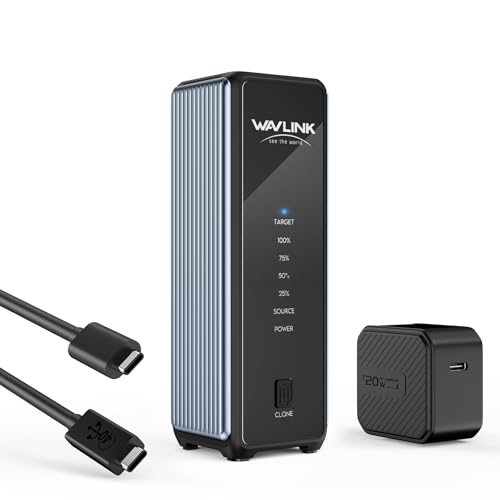
- 40Gbps USB4 connection
- Supports four M.2 sizes up to 8TB each
- Active cooling and one-click cloning
Best For: Fast NVMe migrations and demanding transfers
Best Multi-Drive Dock
Four-Bay SATA Enclosure with Cloning

- Four trayless SATA drive bays
- Offline cloning with progress LEDs
- USB 3.0 connection and external power
Best For: Managing and cloning multiple SATA drives
Best NVMe Cloning Dock
ACASIS Dual-Bay M.2 NVMe Cloner

- Offline cloning without a computer
- 20Gbps USB 3.2 Gen 2x2 support
- Tool-free, aluminum dual-bay design
Best For: NVMe SSD upgrades and duplication
Best SATA Drive Dock

- Offline SATA cloning without a computer
- Supports 2.5-inch and 3.5-inch drives
- Reads and writes two drives over USB
Best For: SATA HDD and SSD duplication
Best Cross-Format Cloner
GRAUGEAR M.2 and SATA Drive Dock

- Clones between NVMe and SATA drives
- Supports 2.5-inch and 3.5-inch SATA media
- Three-speed fan improves cooling control
Best For: Mixed-format drive migration and backups
Fast NVMe Cloning
Dual-Bay 20Gbps M.2 NVMe Enclosure

- Dual bays support M Key and B+M Key NVMe SSDs
- One-button offline cloning without a host computer
- USB 3.2 Gen 2x2 supports transfers up to 20Gbps
Best For: M.2 NVMe users who want fast cloning and transfers
Maximum Drive Flexibility
Triple-Bay NVMe and SATA Cloner

- Accepts M.2 NVMe, 2.5-inch SATA, and 3.5-inch SATA drives
- One-touch offline cloning between supported drive types
- Three tool-free bays support simultaneous drive access
Best For: Mixed-drive workflows and frequent data migrations
Compact Multi-Drive Cloning

- Supports M.2 NVMe plus 2.5-inch and 3.5-inch SATA drives
- Offline cloning works without a host computer
- Compact tool-free design with USB speeds up to 10Gbps
Best For: Portable multi-format cloning and drive access
Best RAID-Capable Pick – Dual-Bay NVMe Enclosure with Offline Cloning
This dual-bay M.2 enclosure is a versatile choice when you need a hard drive enclosure with offline cloning plus RAID flexibility. It supports PCIe NVMe 2280 SSDs, 20Gbps transfers, and tool-free drive installation for easier upgrades and duplication.
Best For: Users who want offline cloning, RAID 0/1 or JBOD modes, and a portable dual-NVMe setup.
Pros:
- Supports RAID 0, RAID 1, JBOD, and direct Clone mode.
- Tool-free cover simplifies SSD installation and replacement.
- 20Gbps transfer rate and aluminum housing support demanding workloads.
- Auxiliary USB-C input helps stabilize dual high-capacity SSD setups.
Cons:
- Designed for M.2 2280 NVMe SSDs rather than standard SATA drives.
- RAID and cloning features may be more than needed for basic external storage.
Choose this model if you want one enclosure for duplication, performance-focused RAID, and redundant storage. RAID 1 is particularly useful when keeping an automatic second copy of important files is a priority.
Best SATA Value – Dual-Bay HDD/SSD Dock and Cloner
The SABRENT EC-HD2B is a straightforward hard drive enclosure with offline cloning for standard 2.5- and 3.5-inch SATA drives. Its dual-bay dock works without drivers and can clone drives directly, making it practical for upgrades, backups, and drive testing.
Best For: Home users and technicians working with standard SATA HDDs and SSDs up to 10TB per supported drive.
Pros:
- Supports both 2.5-inch and 3.5-inch SATA HDDs and SSDs.
- Offline cloning works without a computer or additional software.
- Plug-and-play USB 3.0 connectivity requires no drivers.
- Supports drives up to 10TB and includes a power supply and USB cable.
Cons:
- USB 3.0 transfer speeds are limited to up to 5Gbps.
- Offline cloning is listed at up to 60Mbps, so large duplications may take time.
- Not intended for M.2 NVMe SSDs.
This is a sensible option when compatibility with conventional SATA drives matters more than maximum interface speed. It offers a simple two-drive workflow for cloning and computer-connected storage.
Best High-Speed NVMe Pick – USB4 Dual-Drive Cloning Enclosure
The WAVLINK dual-NVMe enclosure combines a hard drive enclosure with offline cloning and a high-bandwidth USB4 connection. It supports multiple M.2 sizes, active cooling, and up to 8TB per drive, making it suited to fast SSD migrations and heavy file transfers.
Best For: Users who need high-speed NVMe transfers, broad M.2 compatibility, and one-click offline cloning.
Pros:
- USB4 supports up to 40Gbps, with listed read speeds up to 3300MB/s.
- Supports M-key and B&M-key NVMe SSDs in 2230, 2242, 2260, and 2280 sizes.
- Active cooling, vents, and aluminum housing help manage heat.
- Works with Windows, macOS, Android, and iOS systems.
Cons:
- Offline cloning requires the target SSD to be at least as large as the source.
- The target SSD is formatted during cloning, so its data must be backed up first.
- Maximum performance depends on the connected host and interface.
This model stands out for users upgrading NVMe storage who also want modern connectivity. Its cooling system and wide size support add practicality, while the cloning requirements should be checked before starting a migration.
Best Multi-Drive Dock – Four-Bay SATA Enclosure with Cloning
The SABRENT DS-U3B4 is a hard drive enclosure with offline cloning designed for managing several SATA drives at once. Its four trayless bays accept 2.5- and 3.5-inch HDDs or SSDs, while USB 3.0 connects the dock to a desktop or laptop.
Best For: Users who need to access, back up, or organize up to four SATA drives from a single powered dock.
Pros:
- Four bays support 2.5-inch and 3.5-inch SATA HDDs and SSDs.
- Offline clone function duplicates drives without a computer.
- Trayless design allows direct drive insertion without tools.
- LED indicators show cloning progress, and the external adapter supports multi-drive operation.
Cons:
- USB 3.0 tops out at up to 5Gbps.
- It supports SATA drives rather than M.2 NVMe SSDs.
- The four-bay design is less compact than a two-drive dock.
If you regularly handle multiple SATA drives, the four-bay layout is more useful than a compact enclosure. It is especially practical for drive access and backups, while the offline clone feature adds a convenient computer-free duplication option.
Best NVMe Cloning Dock – ACASIS Dual-Bay M.2 NVMe Cloner
If you need a hard drive enclosure with offline cloning for M.2 NVMe upgrades, this ACASIS dual-bay dock copies one drive to another without a computer. Its tool-free design supports common M.2 sizes and adds an aluminum body for heat dissipation.
Best For: NVMe SSD upgrades, system-drive duplication, and users who want fast USB-C connectivity.
Pros:
- Offline one-button cloning requires no computer, software, or drivers.
- Supports two M.2 NVMe SSDs in 2230, 2242, 2260, and 2280 sizes.
- Offers up to 20Gbps over compatible USB 3.2 Gen 2×2 devices and supports drives up to 8TB.
- Tool-free installation and an aluminum design help simplify use and heat management.
Cons:
- Supports NVMe drives only; SATA SSDs are not compatible.
- The target drive must have greater capacity than the source for offline cloning.
- S.M.A.R.T. monitoring and TRIM are unavailable during offline cloning.
This is a strong choice when you specifically need an NVMe-focused hard drive enclosure with offline cloning. Confirm drive compatibility and use additional cooling for large cloning jobs.
Best SATA Drive Dock – SABRENT Dual-Bay SATA Cloner
The SABRENT EC-CH2B is a straightforward hard drive enclosure with offline cloning for bare SATA drives. It handles both 2.5-inch and 3.5-inch SATA HDDs and SSDs, with one-button duplication and separate drive access when connected to a computer.
Best For: SATA drive cloning, file transfers between two bare drives, and desktop or laptop upgrades.
Pros:
- Clones one SATA drive to another without a connected computer.
- Accepts both 2.5-inch and 3.5-inch SATA HDDs and SSDs.
- Both bays can be read and written simultaneously over USB.
- Tool-free, hot-swappable bays include an activity LED for each drive.
Cons:
- Offline cloning runs at up to 60MBps by design.
- Does not support IDE/PATA, Molex-powered, M.2, or NVMe drives.
- The included cable is USB-C on the dock end; a USB-C-to-USB-A cable may be needed for some computers.
Choose this dock if your drives use standard SATA connectors and you value broad 2.5-inch/3.5-inch compatibility. Its limitations are clear, but it is less suitable for M.2 or NVMe storage.
Best Cross-Format Cloner – GRAUGEAR M.2 and SATA Drive Dock
For mixed-storage setups, the GRAUGEAR dock is a versatile hard drive enclosure with offline cloning that can copy between an M.2 NVMe SSD and a SATA drive without a computer. It also works as a connected reader for simultaneous drive access.
Best For: Cross-format drive migrations, mixed NVMe and SATA storage, and users who want active cooling.
Pros:
- Supports offline cloning between an M.2 NVMe SSD and a SATA drive.
- Accepts M.2 NVMe, M.2 SATA, 2.5-inch SATA, and 3.5-inch SATA drives.
- Provides up to 10Gbps for NVMe and up to 6Gbps for SATA connections.
- Built-in three-speed cooling fan offers off, low, and high settings.
Cons:
- Offline cloning requires a specific button sequence to activate the process.
- It provides one M.2 NVMe slot and one SATA slot, rather than two bays of each type.
- The dock uses a 12V power input and is less compact than a simple portable enclosure.
This is the most flexible option here for migrating between NVMe and SATA formats. Its cooling controls and broad compatibility make it especially practical for repeated backups, upgrades, or larger desktop drives.
Fast NVMe Cloning – Dual-Bay 20Gbps M.2 NVMe Enclosure
For shoppers seeking a hard drive enclosure with offline cloning for M.2 drives, the Rosewill RS-N2-CL combines two NVMe bays with a one-button standalone cloning function. Its USB 3.2 Gen 2×2 connection supports transfer speeds up to 20Gbps when paired with compatible hardware.
Best For: Users cloning or accessing two M.2 NVMe SSDs who prioritize high-speed USB-C connectivity.
Pros:
- Supports both M Key and B+M Key NVMe SSDs.
- Performs offline cloning with a single button press.
- Includes 20Gbps USB-C and 10Gbps USB-A cables.
- Built-in S.M.A.R.T. monitoring and TRIM support help manage drive health and efficiency.
Cons:
- Designed for M.2 NVMe drives rather than 2.5-inch or 3.5-inch SATA drives.
- Its 20Gbps performance depends on a compatible host connection and drive.
This is a focused choice for M.2 users who want fast transfers and straightforward offline duplication. The dual-bay design adds flexibility, while the included power adapter supports its docking and cloning setup.
Maximum Drive Flexibility – Triple-Bay NVMe and SATA Cloner
The ICY BOX TripleBay is a versatile hard drive enclosure with offline cloning for mixed storage collections. It accepts M.2 PCIe NVMe drives plus 2.5-inch and 3.5-inch SATA SSDs and HDDs, allowing direct cloning between several drive types without installing software.
Best For: Professionals and mixed-environment users managing NVMe, SATA SSD, and hard disk drives in one docking station.
Pros:
- Three independent bays allow multiple drives to be connected at once.
- Supports NVMe-to-NVMe and SATA-to-NVMe cloning.
- One-touch offline cloning requires no software or computer setup.
- Includes a USB-C/USB-A combo cable and a 24-month warranty.
Cons:
- USB 3.2 Gen 2 is rated for up to 10Gbps, below the speed of newer 20Gbps enclosures.
- The larger range of supported drive types may be more than a single-drive user needs.
Choose this model when compatibility and capacity for multiple drive formats matter more than maximum interface speed. Its tool-free triple-bay layout is particularly practical for data migration and recurring drive-management tasks.
Compact Multi-Drive Cloning – Triple-Bay NVMe and SATA Dock
The Rosewill RS-N2S-CL is a compact hard drive enclosure with offline cloning that works with M.2 NVMe drives as well as 2.5-inch and 3.5-inch HDDs and SSDs. It doubles as a docking station and duplicator, with tool-free drive installation and USB 3.2 Gen 2×1 connectivity up to 10Gbps.
Best For: Users who need a portable, multi-format dock for cloning and accessing drives across Windows, macOS, Linux, Android, or iOS setups.
Pros:
- Supports M.2 NVMe, 2.5-inch SATA, and 3.5-inch SATA drives.
- Performs offline HDD and SSD cloning without a host computer.
- Three-bay design works as both a reader and docking station.
- Compact, lightweight construction and tool-free installation improve portability.
Cons:
- Its rated transfer speed is up to 10Gbps rather than 20Gbps.
- Includes a one-year warranty, shorter than some competing options in this group.
This Rosewill dock is a practical middle ground for shoppers who want broad drive compatibility in a compact enclosure. It is especially useful when offline cloning and cross-platform access are more important than top-end USB speed.
How We Picked the Best Hard Drive Enclosure with Offline Cloning
We focused on enclosures and docking stations that support standalone, computer-free cloning rather than simple USB storage access alone. The selection covers dual-bay, triple-bay, and four-bay designs, along with dedicated NVMe models and versatile docks that accept both M.2 and conventional SATA drives.
We also compared interface speeds, drive compatibility, cloning flexibility, RAID or JBOD support where available, tool-free installation, and the practical value of each design. A faster USB connection can improve file transfers, but it does not automatically make offline cloning faster if the source or destination drive is slower.
Quick Comparison
- Best for multiple 2.5-inch and 3.5-inch drives: Choose a multi-bay SATA dock, especially a four-bay model, when capacity and simultaneous drive access matter most.
- Best for M.2 NVMe upgrades: A dedicated dual-bay NVMe enclosure is usually simpler and faster for cloning compatible PCIe SSDs.
- Best for mixed drive collections: Hybrid M.2 and SATA docks provide broader compatibility but may involve more limits on simultaneous use or cloning combinations.
- Best for high-speed transfers: Look for USB-C 20Gbps or 40Gbps models, while confirming that your computer, cable, and drives support the advertised rate.
Key Buying Factors for a Hard Drive Enclosure with Offline Cloning
Drive Type and Physical Fit
Check whether you need M.2 NVMe, M.2 SATA, 2.5-inch SATA, 3.5-inch SATA, or a combination. M.2 drives also vary by key type and length, so confirm support for formats such as 2230, 2242, 2260, and 2280 before buying.
Cloning Layout and Capacity
Standalone cloning normally requires a source drive and a destination drive, with the destination typically needing equal or greater capacity. Some docks clone one disk at a time, while others support multiple bays, RAID modes, or broader duplication workflows. Always back up important data because cloning can overwrite the destination.
Connection Speed and Compatibility
USB 3.0, 10Gbps, 20Gbps, and 40Gbps ratings describe the host connection, not guaranteed real-world drive performance. Use a suitable USB-C or USB-A port and cable, and remember that SATA SSDs and hard drives may remain the performance bottleneck.
Power and Cooling
Bus-powered NVMe enclosures are convenient, while docks for 3.5-inch drives generally require an external power adapter. For repeated cloning or long transfers, ventilation, heat management, and stable power are more important than a headline speed rating.
Who Should Buy Which Hard Drive Enclosure with Offline Cloning?
Choose a dedicated NVMe cloner if you are upgrading an M.2 PCIe SSD and want the smallest, most focused solution. Choose a dual-bay SATA dock for routine cloning between 2.5-inch or 3.5-inch drives. Choose a four-bay model if you manage several bare drives, consolidate storage, or need convenient access to multiple disks.
Choose a hybrid M.2 and SATA dock when compatibility is more valuable than a minimal design. It suits households, technicians, and small offices with varied drive types. Before ordering, verify the exact cloning modes, supported drive capacities, included power supply, and whether the advertised offline function works with the drive combination you plan to use.