The best RAID enclosures for Mac make it easier to expand storage, protect important files, and manage multiple SATA drives without building a full NAS. The right model depends on your preferred RAID level, drive size, connection speed, and workflow.
We selected 10 options ranging from compact two-bay enclosures to high-capacity five-bay designs, so you can match the hardware to your Mac, budget, and storage plans.
Best 10 Raid Enclosures for Mac Picks for 2026
Flexible Four-Bay RAID
CENMATE 4-Bay Aluminum RAID Enclosure

- Four bays support 2.5- and 3.5-inch SATA drives
- Eight hardware RAID and storage modes
- USB-A/USB-C 3.0 and eSATA connectivity
Best For: High-capacity Mac DAS setups needing flexible hardware RAID
Quiet High-Speed DAS
TerraMaster D4-320 4-Bay Enclosure

- USB 3.2 Gen 2 supports up to 10Gbps
- Four individual disks with no built-in RAID
- Hot-swappable, tool-free trays and quiet cooling
Best For: Fast, flexible Mac storage without hardware RAID
Professional Four-Bay RAID
MAIWO 4-Bay SATA RAID Enclosure

- Eight RAID and storage modes
- Up to 96TB with four 24TB drives
- Dual switch-controlled cooling fans
Best For: Large Mac backup and media libraries using 3.5-inch drives
Compact 10Gbps RAID
CENMATE 2-Bay Aluminum RAID Enclosure

- Two bays support 2.5- and 3.5-inch SATA drives
- USB 3.2 Gen 2 offers up to 10Gbps
- RAID 0, RAID 1, Normal, and JBOD modes
Best For: Compact Mac storage setups needing basic RAID flexibility
Best High-Capacity RAID Pick

- Eight RAID modes for flexible storage setups
- Up to 88TB with four 22TB drives
- 150W supply and active cooling
Best For: Large Mac backups, media libraries, and project storage
Best Simple Dual-Bay Option

- Supports 2.5-inch and 3.5-inch SATA drives
- Tool-free installation and hot swapping
- USB A/C 3.0 and daisy-chain expansion
Best For: Simple Mac storage expansion without RAID
Best Five-Bay Workstation Choice

- Eight hardware RAID modes
- Up to 110TB across five drives
- 150W power supply with active cooling
Best For: Large Mac workstations, media libraries, and backup projects
Best Balanced 2-Bay RAID
Compact ICY BOX RAID Enclosure

- Four selectable RAID modes
- Supports 2.5-inch and 3.5-inch SATA drives
- Cooling fan, hot swap, and USB-C support
Best For: Mac users seeking flexible two-drive storage
Best High-Capacity Option
Yottamaster 5-Bay RAID Enclosure
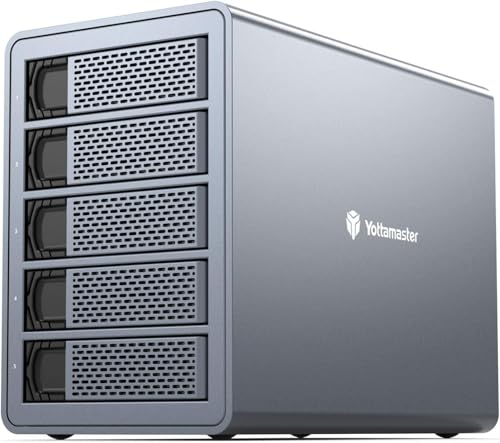
- Up to 120TB across five bays
- Supports RAID 0/1/5/10, JBOD, and CLONE
- 80mm fan and aluminum housing
Best For: Mac users with large media or archive libraries
Best Simple 2-Bay Value
CENMATE Aluminum RAID Enclosure

- Four RAID and storage modes
- Supports 2.5-inch and 3.5-inch SATA drives
- USB-A/C 3.0 and built-in cooling fan
Best For: Basic Mac storage setups on a two-drive scale
Flexible Four-Bay RAID – CENMATE 4-Bay Aluminum RAID Enclosure
For shoppers comparing RAID enclosures for Mac, this CENMATE model offers four bays, support for 2.5- and 3.5-inch SATA drives, and USB-A/USB-C 3.0 connectivity. It supports up to 80TB total and includes eight selectable modes, though RAID configuration is handled on the enclosure rather than through macOS software.
Best For: Mac users who need a high-capacity four-drive DAS with multiple hardware RAID options.
Pros:
- Supports four 2.5- or 3.5-inch SATA HDDs or SSDs, up to 80TB total.
- Offers RAID 0, 1, 3, 5, 10, Clone, Large, and Normal modes.
- Includes USB-A, USB-C, and eSATA connectivity plus a 12V power adapter.
- Aluminum construction and dual fans help with cooling.
Cons:
- Fan noise is approximately 40–50 dB.
- Hot-swapping is not supported.
- Switching RAID modes requires powering down, using a screwdriver, and resetting the enclosure; changing modes may erase data.
This is a feature-rich option for users who want several hardware RAID layouts in one enclosure. Mac compatibility is listed, but buyers should plan RAID changes carefully and confirm their Mac’s eSATA support if using that connection.
Quiet High-Speed DAS – TerraMaster D4-320 4-Bay Enclosure
The TerraMaster D4-320 is worth considering among RAID enclosures for Mac if you want fast, quiet external storage rather than built-in RAID. Its USB 3.2 Gen 2 connection reaches up to 10Gbps, supports four individual disks, and works with Macs through USB-C and compatible Thunderbolt ports.
Best For: Mac users who want a fast four-drive JBOD/DAS enclosure with hot-swappable disks.
Pros:
- USB 3.2 Gen 2 provides up to 10Gbps theoretical transfer speed.
- Supports four individual 3.5-inch HDDs, 2.5-inch HDDs, or 2.5-inch SATA SSDs.
- Hot swapping and tool-free trays simplify drive replacement.
- Temperature-controlled cooling, sound-absorbing panels, and vibration damping support quieter operation.
Cons:
- It has no built-in RAID function.
- Actual speed depends on the installed drives and host connection.
- The enclosure is plastic rather than aluminum.
The D4-320 is a strong fit when your Mac workflow benefits from separate disks, easy drive access, and higher USB bandwidth. Choose a different model if you specifically need hardware RAID modes inside the enclosure.
Professional Four-Bay RAID – MAIWO 4-Bay SATA RAID Enclosure
For Mac users evaluating RAID enclosures for Mac, the MAIWO four-bay enclosure combines eight RAID and storage modes with USB-A/USB-C connectivity and capacity up to 96TB. It is designed for 3.5-inch SATA drives and includes two switch-controlled fans for active cooling.
Best For: Professionals and power users building a large four-drive backup, media, surveillance, or workstation storage system.
Pros:
- Supports Normal, RAID 0, 1/10, 3, 5, Clone, and Large/JBOD modes.
- Accommodates up to four 24TB 3.5-inch SATA drives for a stated 96TB maximum.
- USB-A to USB-C and USB-C to USB-C cables are included.
- Two fans can be switched on or off to manage cooling and noise.
Cons:
- Transfer speeds are limited to up to 5Gbps.
- The supplied information specifies 3.5-inch SATA drive support, not 2.5-inch drive support.
- Warranty and return terms place several responsibilities on the buyer, including return shipping in some cases.
The MAIWO stands out for capacity and RAID flexibility, making it a practical choice for demanding Mac storage setups. Its 5Gbps interface is less suited to buyers prioritizing maximum external transfer speed.
Compact 10Gbps RAID – CENMATE 2-Bay Aluminum RAID Enclosure
This compact CENMATE enclosure is a straightforward option among RAID enclosures for Mac when two drive bays are enough. Its ASM1352R chip, USB 3.2 Gen 2 interface, aluminum body, and support for 2.5- and 3.5-inch SATA drives provide a flexible external storage setup with transfer speeds up to 10Gbps.
Best For: Mac users seeking a smaller two-drive enclosure with basic RAID, JBOD, or independent-disk modes.
Pros:
- USB 3.2 Gen 2 supports up to 10Gbps transfer speeds.
- Works with 2.5- and 3.5-inch SATA HDDs and SSDs.
- Supports RAID 0, RAID 1, Normal, and JBOD modes.
- Aluminum construction and a built-in fan assist with cooling.
Cons:
- Two bays provide less expansion capacity than four-bay alternatives.
- Fan noise is approximately 40–50 dB.
- Changing RAID settings requires resetting the array, and designing RAID may result in data loss.
The two-bay design keeps this enclosure compact while retaining useful RAID functionality and broad drive compatibility. It is best for smaller Mac workspaces, but buyers needing a larger media or backup pool should consider a four-bay model.
Best High-Capacity RAID Pick – ORICO 4-Bay RAID Enclosure
If you need raid enclosures for Mac with substantial capacity and flexible data-management options, the ORICO 9848RU3 is a strong four-bay choice. It supports eight RAID modes, accommodates four 3.5-inch SATA drives, and offers USB 3.0 connectivity for backups and file transfers.
Best For: Mac users managing large video libraries, project files, or multi-drive backups who want hardware RAID flexibility.
Pros:
- Supports RAID 0, 1, 3, 5, 10, JBOD, Clone, and Clear modes.
- Supports up to 22TB per drive and up to 88TB total.
- Built-in 150W power supply supports multi-drive operation.
- Aluminum enclosure, 80mm fan, and front/rear ventilation help manage heat.
Cons:
- Designed for 3.5-inch SATA drives rather than a mix of drive sizes.
- USB 3.0 is slower than newer USB-C or USB 3.2 interfaces.
Its combination of eight RAID modes, large stated capacity, and built-in cooling makes this a practical Mac DAS enclosure for users who prioritize expansion and storage control over the newest connection standard.
Best Simple Dual-Bay Option – CENMATE 2-Bay SATA Enclosure
For Mac users who want a straightforward dual-drive enclosure rather than RAID or NAS features, the CENMATE 2 Bay offers tool-free installation and hot swapping. It supports both 2.5-inch and 3.5-inch SATA HDDs and SSDs, with USB A/C 3.0 cables included for flexible connectivity.
Best For: Home and office users who need simple external drive expansion, easy drive changes, and daisy-chain capacity growth.
Pros:
- Supports 2.5-inch and 3.5-inch SATA HDDs and SSDs.
- Tool-free trays and hot swapping simplify drive installation and replacement.
- USB 3.0 supports transfers up to 5Gbps.
- Daisy chaining can expand storage through up to three devices.
Cons:
- It does not support RAID or NAS functionality.
- The built-in fan is rated around 40–50 decibels and may be noticeable.
- Maximum capacity is listed as 20TB per drive.
This is a convenient choice among raid enclosures for Mac only if your priority is flexible, independent drive storage rather than RAID protection. Its broad drive-size support and tool-free design keep everyday upgrades simple.
Best Five-Bay Workstation Choice – ORICO 5-Bay RAID Enclosure
The ORICO 5-Bay RAID enclosure is built for Mac workstations that need more drive bays and substantial storage capacity. Its hardware RAID controller supports eight modes, while the 150W internal power supply and active cooling are designed for stable multi-drive operation.
Best For: Creative professionals, media-heavy workflows, and large backup projects requiring five SATA drives in one desktop DAS unit.
Pros:
- Supports RAID 0, 1, 3, 5, 10, JBOD, Clone, and Clear modes.
- Accommodates 2.5-inch and 3.5-inch SATA HDDs and SSDs.
- Supports up to 22TB per drive and up to 110TB total.
- 150W built-in power supply and 80mm fan support sustained multi-drive use.
Cons:
- Uses USB 3.0 Type-A rather than a newer high-bandwidth interface.
- Its five-bay capacity may be more than needed for basic home storage.
With the largest bay count and highest stated capacity in this roundup, this ORICO model is suited to users who need a centralized Mac storage station for extensive backups, media libraries, or demanding desktop workflows.
Best Balanced 2-Bay RAID – Compact ICY BOX RAID Enclosure
For shoppers comparing RAID enclosures for Mac, the ICY BOX 2-bay model offers a flexible way to combine or protect two SATA drives. It supports 2.5-inch and 3.5-inch HDDs or SSDs, four selectable RAID modes, USB 3.0 connectivity, and plug-and-play use with macOS.
Best For: Mac users who want a compact, versatile two-drive enclosure with RAID 0, RAID 1, SINGLE, and LARGE modes.
Pros:
- Supports RAID 0, RAID 1, SINGLE, and LARGE configurations through an integrated switch.
- Accepts both 2.5-inch and 3.5-inch SATA HDDs and SSDs, with up to 48TB total capacity listed.
- Includes temperature-controlled cooling, status LEDs, hot swapping, and tool-free drive installation.
- Comes with USB Type-C to Type-C/A connectivity at up to 5Gbps.
Cons:
- It has only two drive bays, limiting expansion compared with larger enclosures.
- RAID performance is limited by the listed 5Gbps USB connection.
The ICY BOX is a practical middle ground for Mac backups, mirrored storage, or a simple multi-drive desktop setup. Its hardware RAID controls and cooling system add convenience without requiring RAID software.
Best High-Capacity Option – Yottamaster 5-Bay RAID Enclosure
Among RAID enclosures for Mac, the Yottamaster FS5RU3 stands out for users who need several drives in one desktop unit. Its five bays support up to 120TB, multiple hardware RAID modes, and both 2.5-inch and 3.5-inch SATA HDDs or SSDs.
Best For: MacBook and desktop users managing large video, photo, archival, surveillance, or business data collections.
Pros:
- Five bays provide up to 120TB of listed storage capacity using five 24TB drives.
- Supports RAID 0, 1, 5, 10, JBOD, CLONE, and Normal modes.
- Aluminum construction, removable trays, ventilation openings, and an 80mm low-noise fan support extended operation.
- USB 3.0 delivers listed transfer speeds up to 5Gbps and supports Mac, Windows, and Linux.
Cons:
- The enclosure is larger and more storage-oriented than a compact two-bay model.
- It uses a USB 3.0 Type-B connection rather than the USB-C connection included with some alternatives.
- Drive screws are required to secure disks to the removable trays.
The Yottamaster is the strongest choice here for capacity and RAID flexibility. Its five-bay design is well suited to demanding workflows, though the 5Gbps interface may be a consideration for users moving very large files frequently.
Best Simple 2-Bay Value – CENMATE Aluminum RAID Enclosure
The CENMATE is a straightforward option for Mac users comparing RAID enclosures for Mac on a smaller scale. This two-bay aluminum enclosure accepts 2.5-inch and 3.5-inch SATA drives, offers four modes, and connects through USB 3.0 with both USB-A and USB-C cable support.
Best For: Users who want an uncomplicated two-drive enclosure for mirrored, combined, or independent storage and do not mind fan noise.
Pros:
- Supports RAID 0, RAID 1, Normal, and JBOD modes.
- Works with 2.5-inch and 3.5-inch SATA HDDs or SSDs, with up to 40TB listed total capacity.
- Aluminum construction and a built-in fan help with heat dissipation.
- Includes USB-A and USB-C 3.0 connectivity with plug-and-play support for Mac, Windows, and Linux.
Cons:
- The manufacturer notes fan noise of approximately 40–50 decibels.
- Changing or resetting the RAID array requires following the supplied reset procedure and may result in data loss.
- It has two bays and a listed maximum of 20TB per drive, offering less expansion than the five-bay option.
CENMATE covers the essential features for a basic Mac desktop storage setup, including hardware RAID modes and dual USB cable compatibility. Its main trade-off is the potentially noticeable fan noise, so it is better suited to workspaces where acoustics are not a priority.
How We Picked the Best Raid Enclosures for Mac
We compared these enclosures by looking at the features that matter most in everyday Mac storage workflows: bay count, supported 2.5-inch and 3.5-inch SATA drives, RAID modes, interface speed, cooling, installation, and maximum capacity. We also considered whether each enclosure supports USB-C, USB-A, eSATA, hot swapping, tool-free installation, or diskless use.
Because RAID enclosures vary widely, no single model is ideal for every buyer. A two-bay enclosure may be easier to place beside a MacBook, while a four- or five-bay unit offers more capacity and flexibility for media libraries, backups, and working files.
Quick Comparison
| Priority | Look For | Best Fit |
|---|---|---|
| Simple mirrored storage | Two bays and RAID 1 | Photographers, home users, and backup-focused buyers |
| More usable capacity | Four or five bays with multiple RAID modes | Video editors and large media libraries |
| Fast transfers | USB 3.0, USB-C, or 10Gbps support | Users moving large files frequently |
| Easy installation | Tool-free trays or hot-swappable bays | Users who change or upgrade drives often |
| Quiet, sustained operation | Cooling fan and aluminum enclosure | Always-connected desktop storage |
Key Buying Factors for Raid Enclosures for Mac
Bay Count and Drive Compatibility
Two-bay models are compact and can create a mirrored RAID 1 array, but four- and five-bay enclosures provide more capacity and additional RAID layouts. Check whether the enclosure accepts both 2.5-inch and 3.5-inch SATA drives, and confirm the maximum supported capacity before purchasing high-capacity disks.
RAID Modes and Data Protection
RAID 0 can improve performance and combine drives but offers no redundancy. RAID 1 mirrors data for better protection, while larger enclosures may support RAID 5, RAID 10, JBOD, or other modes. RAID is not a substitute for a separate backup, especially for irreplaceable files.
Connection Speed and Mac Compatibility
USB 3.0 is sufficient for many backup tasks, while 10Gbps USB-C can reduce transfer times with compatible drives and a suitable Mac port. A fast enclosure cannot exceed the speed of its drives, cable, or computer connection, so verify the complete setup.
Cooling, Noise, and Installation
Fans help manage heat during long transfers, but fan noise may matter in a studio or office. Tool-free bays simplify upgrades, and hot-swappable support can make drive replacement easier. Always eject the array properly before removing disks.
Who Should Buy Which Raid Enclosures for Mac?
Choose a compact two-bay enclosure if you want an uncomplicated desktop backup, a mirrored photo archive, or a small expansion for a MacBook or iMac. Choose a four-bay model if you need a stronger balance of capacity, redundancy, and flexibility for creative projects. A five-bay enclosure is better for large video libraries, extensive backups, or users who expect their storage needs to grow.
For frequent large-file transfers, prioritize 10Gbps connectivity and a short, high-quality cable. For safer everyday storage, prioritize RAID 1 or another redundant configuration and maintain a second backup elsewhere. Before buying, confirm your Mac’s ports, the enclosure’s RAID-management method, supported disk capacities, and whether drives are included.