Finding the best laptops for students means balancing price, portability, battery life, storage, and the software required for schoolwork. This roundup includes practical Windows laptops and Chromebooks for note-taking, research, video calls, documents, and everyday browsing.
Before choosing, check your school’s app requirements and decide whether you need Windows compatibility, Microsoft 365, a touchscreen, or simply a reliable browser-based computer.
Best 10 Laptops for Students Picks for 2026
Best All-Around Student Laptop

- 16GB RAM and 256GB NVMe SSD
- 15.6-inch FHD IPS anti-glare display
- USB-C, HDMI, Wi-Fi 6, and numeric keypad
Best For: Windows-based schoolwork and multitasking
Best Budget Chromebook

- Compact 11.6-inch design weighs 2.9 pounds
- Chrome OS for browser-based schoolwork
- Listed battery life of up to 14 hours
Best For: Light online coursework and portability
Best Windows Everyday Laptop

- Intel N150 processor with Windows 11 Home
- Includes one-year Microsoft 365 Personal
- Lightweight 3.24-pound design with Wi-Fi 6
Best For: Documents, online classes, and video calls
Best Touchscreen Chromebook
Lenovo 14-inch FHD Touch Chromebook

- 14-inch Full HD IPS touchscreen
- Lightweight 2.86-pound design
- Chrome OS with Wi-Fi 6 and privacy-shutter webcam
Best For: Touch-enabled online learning and cloud-based schoolwork
Best All-Around Student Pick

- Intel N150 handles everyday school tasks
- Microsoft 365 and 1TB OneDrive included
- Lightweight design with long battery life
Best For: Students wanting a portable Windows laptop for coursework and productivity
Best Budget Large-Screen Option
PADIX 15.6-Inch Student Laptop

- 15.6-inch Full HD anti-glare display
- Quiet fanless Windows 11 operation
- TF card expansion up to 1TB
Best For: Students who prefer a larger screen for basic schoolwork
Best Chromebook for Battery Life
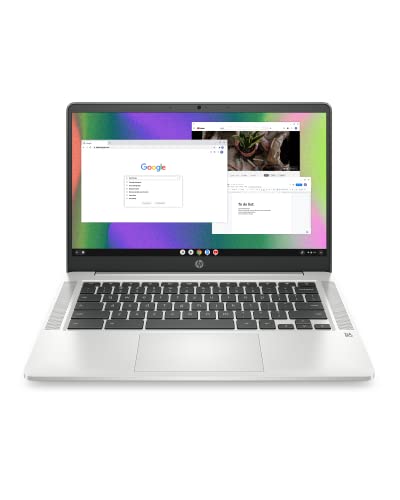
- Up to 14 hours of battery life
- Chrome OS with Google Play app access
- Quad-core processor for everyday assignments
Best For: Students using browser-based coursework and Google services
Flexible Student Workstation
HP 14-inch Windows 11 Pro Laptop

- Windows 11 Pro and Microsoft Office included
- Intel N150 processor with 128GB UFS storage
- 500GB external drive and useful accessories included
Best For: Office-based schoolwork, web apps, and online classes
Streamlined Everyday Pick
HP 14-inch Windows 11 Home Laptop

- 1-year Microsoft 365 Personal subscription included
- Intel N150 processor and 4GB RAM
- Fast Charge and 720p webcam for mobile study
Best For: Everyday coursework, Microsoft 365, and video calls
Simple ChromeOS Companion
HP 14-inch Chromebook for Students

- ChromeOS with quad-core Intel Celeron N4120
- 14-inch anti-glare HD display and privacy webcam
- 64GB eMMC storage with Microsoft Office 2024 listed
Best For: Browser-based schoolwork and basic student computing
Best All-Around Student Laptop – Acer Aspire Lite 15
The Acer Aspire Lite 15 is a capable choice among laptops for students who need a larger screen, ample memory, and Windows compatibility for everyday schoolwork. Its Intel N150 processor, 16GB of RAM, 256GB NVMe SSD, and included Microsoft software support browsing, documents, video calls, and multitasking.
Best For: Students who want a Windows laptop for office work, online learning, streaming, and handling many browser tabs.
Pros:
- 16GB RAM and a 256GB NVMe SSD support responsive multitasking and quick file access.
- 15.6-inch anti-glare FHD IPS display offers sharp 1920 x 1080 resolution and wide viewing angles.
- Useful connectivity includes USB-C, two USB-A ports, HDMI 2.1, Wi-Fi 6, and Bluetooth 5.2.
- Full-size keyboard with numeric keypad is practical for spreadsheets and data entry.
Cons:
- Integrated Intel UHD Graphics is intended for everyday computing rather than demanding graphics work.
- At 3.9 pounds, it is less lightweight than smaller student laptops.
- The listing notes cloud storage and software inclusions, but local SSD storage is limited to 256GB.
With its strong memory capacity, sharp display, and broad port selection, the Aspire Lite 15 is a versatile option for school and home productivity. It is best suited to students prioritizing multitasking and screen space over minimal weight.
Best Budget Chromebook – Dell Chromebook 11 3100
The renewed Dell Chromebook 11 3100 is a compact, straightforward option among laptops for students who mainly use web apps and Chrome OS. Its 11.6-inch display, 4GB of RAM, lightweight 2.9-pound design, and listed 14-hour battery life favor portability and basic daily use.
Best For: Students who need an inexpensive, small Chromebook for web browsing, cloud-based assignments, and light school tasks.
Pros:
- Compact 11.6-inch form factor and 2.9-pound weight are convenient for commuting.
- Chrome OS provides a simple environment for browser-based work and compatible apps.
- Listed battery life is up to 14 hours, supporting extended study sessions away from an outlet.
- Bluetooth, Wi-Fi, and multiple USB connections support common accessories.
Cons:
- 4GB RAM and 16GB flash storage are limited for demanding multitasking or locally stored files.
- The 1366 x 768 display provides less workspace and sharpness than Full HD models.
- As a renewed product, it includes a limited 90-day warranty.
This Dell is best viewed as a basic, portable Chromebook rather than a full desktop replacement. It makes sense for students whose coursework is primarily online and who rely on cloud storage.
Best Windows Everyday Laptop – HP 14 Everyday Laptop
The HP Everyday Laptop is a practical Windows choice among laptops for students who need tools such as Word, Excel, and PowerPoint. Its Intel N150 processor, 128GB UFS storage, Copilot integration, 720p webcam, and included one-year Microsoft 365 Personal subscription cover common academic and communication needs.
Best For: Students who want a lightweight Windows laptop for documents, online classes, video calls, browsing, and everyday productivity.
Pros:
- Intel N150 quad-core processor is designed for browsing, streaming, documents, and video calls.
- Includes a one-year Microsoft 365 Personal subscription with Word, Excel, PowerPoint, and OneDrive.
- Lightweight 3.24-pound chassis has a slim 0.71-inch profile and a 14-inch anti-glare display.
- Wi-Fi 6, Bluetooth 5.4, USB-C, two USB-A ports, HDMI, and an SD card reader provide flexible connectivity.
Cons:
- 4GB of RAM may limit heavier multitasking with many applications or browser tabs.
- The 1366 x 768 display is less detailed than the Full HD screens on some alternatives.
- 128GB of UFS storage provides less local capacity than larger SSD-equipped laptops.
The HP balances portability and everyday Windows features, making it a sensible fit for general coursework. Its modest memory and storage suggest keeping expectations focused on productivity rather than intensive creative or technical workloads.
Best Touchscreen Chromebook – Lenovo 14-inch FHD Touch Chromebook
The Lenovo Flagship Chromebook combines a 14-inch Full HD touchscreen with Chrome OS in a slim, 2.86-pound design. For students comparing laptops for students, it offers convenient touch navigation, an octa-core MediaTek processor, Wi-Fi 6, and features suited to online classes and cloud-based assignments.
Best For: Students who prefer a lightweight touchscreen Chromebook for Google Classroom, web apps, video calls, and media.
Pros:
- 14-inch 1920 x 1080 IPS touchscreen provides sharp resolution and wide viewing angles.
- Octa-core MediaTek Kompanio 520 processor is designed for everyday Chromebook use.
- At 2.86 pounds and 0.73 inches thick, it is easy to carry between classes.
- Includes a webcam privacy shutter, dual-array microphones, Wi-Fi 6, and Bluetooth 5.1.
Cons:
- 4GB RAM and 64GB eMMC storage may feel restrictive for extensive local files or heavier multitasking.
- Chrome OS may not support desktop applications that require Windows or macOS.
- Port selection is limited to one USB-A, one USB-C, a microSD reader, and a headset jack.
The Lenovo is an appealing student Chromebook when display quality and portability matter. Its touchscreen and Full HD panel add flexibility, while the modest memory and storage make it most appropriate for cloud-first workflows.
Best All-Around Student Pick – HP Everyday Slim Laptop
For students who want a Windows laptop for schoolwork, browsing, streaming, and office tasks, this 14-inch HP model offers a practical balance of portability and everyday performance. Its Intel N150 processor, Microsoft 365 inclusion, and 1TB OneDrive storage make it especially convenient for coursework and file management.
Best For: Students who need a lightweight Windows laptop with Microsoft 365 and cloud storage included.
Pros:
- Intel N150 processor is suited to browsing, online classes, office work, and streaming.
- Includes Microsoft 365 and 1TB OneDrive cloud storage.
- Lightweight 3.24-pound design with up to 11 hours of video playback.
- Useful selection of ports, including USB-C, USB-A, HDMI, and an SD card reader.
Cons:
- Only 4GB of RAM is installed.
- The 14-inch display is HD and rated at 1366×768 maximum resolution.
This HP is a strong fit for students prioritizing portability, Windows compatibility, and productivity software over demanding creative or gaming workloads.
Best Budget Large-Screen Option – PADIX 15.6-Inch Student Laptop
This PADIX laptop is a straightforward choice among laptops for students who prefer a larger screen for documents, spreadsheets, online classes, and video playback. It combines a 15.6-inch Full HD display with Windows 11, fanless operation, and several modern connectivity options.
Best For: Budget-conscious students who want a larger Full HD display for basic school and home-office tasks.
Pros:
- 15.6-inch 1920×1080 anti-glare display provides more workspace than smaller models.
- Two full-featured USB-C ports support data, charging, and dual-monitor output.
- Fanless design provides quiet operation for study environments.
- Storage can be expanded by up to 1TB with a TF card.
Cons:
- Intel Celeron N4020 and 4GB RAM are intended for basic tasks rather than demanding workloads.
- 128GB eMMC storage is less flexible than a traditional SSD.
- The 38Wh battery is smaller than some alternatives in this roundup.
Choose this model if screen size and quiet operation matter most and your schoolwork centers on web apps, documents, email, and video calls.
Best Chromebook for Battery Life – HP Chromebook 14
Students who mainly use browser-based assignments, Google services, and streaming may find this HP Chromebook a simple and dependable option. Chrome OS, a quad-core Celeron processor, and up to 14 hours of battery life make it well suited to portable school use.
Best For: Students whose coursework relies on web apps, Chrome, Google services, and Android apps.
Pros:
- Up to 14 hours of battery life supports extended school days.
- Chrome OS provides automatic updates, security features, and access to Google Play apps.
- Quad-core Intel Celeron N4120 processor is designed for everyday assignments and browsing.
- HP Fast Charge can reach 50% from empty in approximately 45 minutes.
Cons:
- 64GB eMMC storage is limited compared with the other listed laptops.
- The 14-inch display uses a 1366×768 HD resolution.
- Chrome OS may not support Windows-only desktop software.
This Chromebook makes the most sense for students comfortable working in a browser and prioritizing battery endurance, portability, and low-maintenance software.
Flexible Student Workstation – HP 14-inch Windows 11 Pro Laptop
For students who want a Windows laptop for schoolwork, this HP 14-inch model combines an Intel N150 processor with Windows 11 Pro, Microsoft Office, and a bundled accessory kit. Its 128GB UFS storage is supplemented by a 500GB portable external drive, although the 4GB of memory is best suited to everyday productivity rather than demanding multitasking.
Best For: Students needing Office-ready Windows productivity with extra bundled storage and accessories.
Pros:
- Windows 11 Pro and Microsoft Office support school and productivity tasks.
- Intel N150 quad-core processor reaches speeds up to 3.6 GHz for everyday computing.
- Includes a 500GB external drive, wireless mouse, earbuds, HDMI cable, and USB extension cord.
- 14-inch anti-glare display, 720p camera, and dual-array microphones suit online classes.
Cons:
- 4GB RAM may limit heavier multitasking.
- The 1366 x 768 display is less detailed than a Full HD panel.
- Internal storage is 128GB UFS; the additional 500GB is external.
This is a practical choice among laptops for students who value included software and accessories. It makes the most sense for documents, web apps, video calls, and presentations rather than intensive creative workloads.
Streamlined Everyday Pick – HP 14-inch Windows 11 Home Laptop
This HP 14-inch notebook is a straightforward option for students who need Windows 11 Home, a Microsoft 365 Personal subscription, and dependable tools for everyday computing. The Intel N150 processor, anti-glare HD screen, and fast-charge feature support classes, assignments, browsing, and video calls.
Best For: Students seeking a compact Windows laptop with Microsoft 365 and convenient charging.
Pros:
- Includes a 1-year Microsoft 365 Personal subscription.
- Intel N150 processor provides up to 3.6 GHz Turbo Boost with four cores and four threads.
- Micro-edge, anti-glare 14-inch display and HP True Vision 720p camera suit study and video chat.
- HP Fast Charge reaches approximately 50% in 45 minutes, according to the supplied specifications.
Cons:
- 4GB onboard RAM is modest for extensive multitasking.
- 128GB UFS storage may require careful file management.
- The HD resolution is 1366 x 768 rather than Full HD.
Among laptops for students, this model favors simplicity and portability over high-end performance. It is well matched to coursework, Microsoft 365 tasks, streaming, and communication, provided your workload stays relatively light.
Simple ChromeOS Companion – HP 14-inch Chromebook for Students
This HP Chromebook is designed for students who primarily work online and want a simple, portable computer. ChromeOS, a quad-core Intel Celeron N4120 processor, 4GB RAM, and 64GB eMMC storage provide a basic setup for browsing, web-based schoolwork, video calls, and compatible accessories.
Best For: Students who mainly use browser-based tools and want a straightforward ChromeOS laptop.
Pros:
- ChromeOS offers a focused environment for web-based learning and everyday tasks.
- Quad-core Intel Celeron N4120 processor boosts up to 2.6 GHz.
- 14-inch anti-glare HD display, webcam with privacy feature, and HDMI connectivity support study use.
- Includes Microsoft Office 2024 according to the supplied product details.
Cons:
- 64GB eMMC storage is limited compared with many Windows laptops.
- 4GB RAM and the Celeron processor are intended for basic workloads.
- ChromeOS may not support desktop applications designed specifically for Windows.
This is one of the more basic laptops for students, making it a fit for browser-centered assignments and communication. Consider it when simplicity and portability matter more than local storage or demanding software.
How We Picked These Laptops for Students
We focused on the features that matter most for school and college use: processor capability, memory, storage, display size, operating system, portability, battery claims, connectivity, and included software. The selection covers budget-friendly Chromebooks, entry-level Windows laptops, and models that bundle Microsoft 365 or cloud storage.
Because specifications vary widely, treat advertised battery life and performance as starting points rather than guarantees. Real-world results depend on screen brightness, applications, Wi-Fi use, video calls, and background processes.
Quick Comparison
| Best For | Recommended Type | What to Look For |
|---|---|---|
| Web-based schoolwork | Chromebook | At least 4GB RAM, dependable Wi-Fi, and sufficient storage for offline files |
| Microsoft Office and Windows apps | Windows laptop | Windows 11, 8GB RAM if possible, SSD or UFS storage, and Microsoft 365 access |
| Portability | 11- to 14-inch laptop | Lower weight, durable construction, webcam, and long battery life |
| More comfortable multitasking | 15.6-inch laptop | More screen space, 8GB or more RAM, and an SSD |
Key Buying Factors for Laptops for Students
Operating System and App Compatibility
Chromebooks run ChromeOS and work especially well with browser-based tools, Google Workspace, streaming, and lightweight school portals. Choose Windows when you need desktop Office applications, specialized programs, local utilities, or broader compatibility with school software.
Memory and Storage
Four gigabytes of RAM is suitable for basic browsing and documents, but 8GB provides a smoother experience when using many tabs, video meetings, and productivity apps together. Storage listed as eMMC or UFS is generally aimed at affordable systems; an SSD usually feels faster and is preferable for frequent local file work. Cloud storage can help, but it is not a full replacement for local capacity or reliable internet access.
Screen, Size, and Connectivity
A 14-inch display is a useful compromise between portability and workspace, while a 15.6-inch screen is better for split-screen reading and assignments. Check resolution, keyboard comfort, webcam quality, USB ports, HDMI, and headphone connectivity before buying accessories.
Durability and Support
Students carry laptops between classrooms, libraries, and home, so weight, hinge quality, warranty coverage, and return policies matter. Confirm the keyboard layout, charger type, upgrade options, and the manufacturer’s support terms.
Who Should Buy Which Laptops for Students?
- Choose a Chromebook if most coursework happens online and you want a simple, affordable computer with low maintenance.
- Choose a Windows laptop if your classes require Microsoft Office desktop tools, Windows-only applications, or more flexible software installation.
- Choose a compact 11- or 14-inch model if portability is your priority and you mainly write, browse, and attend video classes.
- Choose a 15.6-inch model if you value a larger workspace for spreadsheets, research, and side-by-side documents.
- Prioritize more RAM and SSD storage if you expect to multitask heavily, keep many files locally, or use the laptop beyond basic schoolwork.
Finally, verify the exact configuration before ordering. Listings may differ by storage type, included subscriptions, processor generation, and operating-system edition, even when product names appear similar.