The right enclosure can turn an unused SSD into a fast, portable backup drive without the cost of a new external SSD. The best choice depends on your drive type, connection speed, cooling needs, and whether you want a compact enclosure or a flexible dock.
We compared 10 practical options spanning NVMe and SATA drives, USB-C and USB-A connectivity, tool-free designs, multi-drive support, and high-speed backup performance.
Best 10 SSD Enclosures for Backups Picks for 2026
Best Flexible Fit
SABRENT Tool-Free M.2 Enclosure

- Supports NVMe and SATA M.2 drives
- Tool-free, compact aluminum design
- 10Gbps USB-C connection
Best For: Bare M.2 backup drives in several sizes
Best for High-Speed Backups

- USB4 transfer rates up to 40Gbps
- Built-in fan for sustained workloads
- Supports Thunderbolt 4 and 3
Best For: Large, frequent backups on USB4 or Thunderbolt systems
Best for Bare SATA Drives

- Handles 2.5- and 3.5-inch SATA drives
- Tool-free hot-swapping design
- Includes 12V power adapter
Best For: Rotating bare SATA HDDs and SSDs for backups
Best Portable NVMe Pick

- 10Gbps NVMe performance
- Includes USB-C and USB-A cables
- Tool-free with protective silicone case
Best For: Portable NVMe backups across USB-C and USB-A computers
Best Dual-Bay Backup Enclosure

- Holds two 2.5-inch or 3.5-inch SATA drives
- Tool-free, hot-swappable design
- USB 3.0 and daisy-chain expansion
Best For: Expandable desktop backups using multiple SATA drives
Best Portable NVMe Backup Enclosure

- 10Gbps USB-C connectivity
- Tool-free support for M.2 NVMe sizes 2230–2280
- Compact aluminum design with thermal pad
Best For: Fast, portable backups using a single NVMe SSD
Best Value SATA Backup Enclosure
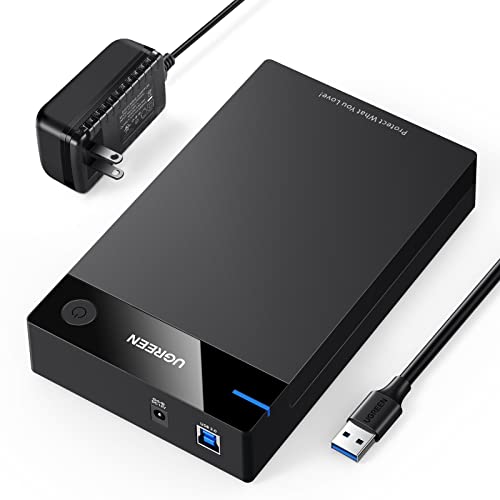
- Supports SATA HDDs and SSDs up to 20TB
- USB 3.0 with UASP and included power adapter
- Works across major desktop OS platforms
Best For: Simple single-drive backups using existing SATA storage
Fast NVMe Backup Pick
FIDECO M.2 NVMe USB-C Enclosure

- Supports four common M.2 NVMe lengths
- USB 3.2 Gen 2 and UASP support
- Tool-free, travel-friendly design
Best For: Portable backups from compatible M.2 NVMe SSDs
Versatile SATA Backup Case
UGREEN 2.5-Inch USB 3.0 Enclosure

- Fits 7mm and 9.5mm 2.5-inch SATA drives
- Supports drives up to 6TB
- Includes UASP and protective foam
Best For: Backups and recovery using 2.5-inch SATA SSDs or HDDs
Simple Tool-Free Backup Option
SABRENT 2.5-Inch SATA Enclosure

- Tool-free installation
- Up to 5Gbps over USB 3.0
- Plug-and-play and hot-swappable
Best For: Simple backups using 2.5-inch SATA SSDs or hard drives
Best Flexible Fit – SABRENT Tool-Free M.2 Enclosure
For shoppers comparing ssd enclosures for backups, this SABRENT model is a flexible choice when you already have a bare M.2 drive. It supports both NVMe and SATA M.2 SSDs in common lengths and connects over USB 3.2 Type-C at up to 10Gbps.
Best For: Users who want one compact enclosure for bare M.2 NVMe or SATA SSDs.
Pros:
- Supports M.2 NVMe and SATA drives in 2242, 2260, and 2280 sizes.
- Tool-free installation makes drive swaps quick.
- Slim aluminum build includes a thermal pad and an 8-inch Type-C cable.
Cons:
- SSD is not included.
- Does not support 2.5-inch SATA, mSATA, or drives with pre-installed heatsinks.
- Maximum performance depends on the connected USB port.
This is a practical all-rounder for backup drives if your SSD is a bare M.2 model. Its main advantage is broad M.2 protocol support, though buyers should verify the drive has no heatsink and matches a supported size.
Best for High-Speed Backups – ACASIS 40Gbps NVMe Enclosure
This ACASIS enclosure is aimed at demanding backup workflows that benefit from more than standard 10Gbps USB performance. Its USB4 connection, Intel JHL7440 chip, and built-in fan are designed to support sustained transfers from an M.2 NVMe SSD.
Best For: Power users transferring large backup files, video projects, or other data-heavy workloads.
Pros:
- USB4 interface supports up to 40Gbps and is compatible with Thunderbolt 4 and 3.
- Built-in cooling fan and ventilation help manage heat during heavy use.
- Supports M.2 sizes 2230, 2242, 2260, and 2280 across Mac, Windows, and Linux systems.
Cons:
- Supports NVMe M.2 drives only, not SATA M.2 SSDs.
- Peak speeds require compatible USB4 or Thunderbolt hardware.
- The fan must be activated with its switch and may be unnecessary for light backups.
Choose this model when backup speed and thermal control matter more than simplicity or price. With slower host hardware, it can still function through backward compatibility, but its headline performance is intended for USB4 and Thunderbolt systems.
Best for Bare SATA Drives – SABRENT USB 3.0 Drive Dock
For traditional hard drives and SATA SSDs, this SABRENT docking station offers a simple way to connect a bare drive for backups. Its open, tool-free bay accepts both 2.5-inch and 3.5-inch SATA drives and supports hot-swapping without a reboot.
Best For: Users backing up bare 2.5-inch or 3.5-inch SATA drives, especially desktop HDDs.
Pros:
- Accepts both 2.5-inch and 3.5-inch SATA I/II/III drives.
- Tool-free, plug-and-play design supports drive swapping.
- Includes a required 12V adapter for 3.5-inch drives and supports UASP.
Cons:
- Uses USB 3.0 Type-A rather than USB-C.
- Does not support M.2, IDE/PATA, SAS, or drives already inside USB enclosures.
- 3.5-inch drives require a wall outlet through the included power adapter.
This dock is a strong fit for straightforward SATA backup work, particularly when you rotate multiple bare drives. It is less suitable for newer M.2 SSDs or USB-C-only computers, and mechanical HDD speeds will generally remain limited by the drive itself.
Best Portable NVMe Pick – UGREEN USB-C M.2 Enclosure
UGREEN’s 10Gbps enclosure is a portable option for NVMe-based backups, with a tool-free latch, aluminum body, and protective silicone case. It supports common M.2 sizes and includes both USB-C and USB-A cables for easier connection to different computers.
Best For: Travelers and everyday users who need a compact NVMe backup enclosure with broad device compatibility.
Pros:
- Supports NVMe M.2 drives in 2230, 2242, 2260, and 2280 sizes.
- Tool-free installation and plug-and-play operation simplify setup.
- Includes USB-C and USB-A cables, a silicone case, and thermal pad.
Cons:
- Does not support SATA NGFF or mSATA SSDs.
- 10Gbps performance requires a compatible USB 3.2 Gen 2 connection and cable.
- SSD is not included.
This is a well-rounded choice for portable NVMe backup storage when you value easy installation and flexible cabling. Confirm that your SSD uses the NVMe protocol, since SATA M.2 drives are not compatible with this enclosure.
Best Dual-Bay Backup Enclosure – CENMATE 2-Bay SATA Enclosure
For backups that need more than a single drive, the CENMATE 2-bay enclosure supports both 2.5-inch and 3.5-inch SATA HDDs and SSDs. Its USB 3.0 connection, tool-free trays, hot-swapping, and aluminum construction make it a practical choice for desktop backup storage, while the built-in fan helps manage heat during extended transfers.
Best For: Individuals or small businesses building a flexible, two-drive backup setup with up to 20TB per drive.
Pros:
- Supports two 2.5-inch or 3.5-inch SATA drives, with up to 20TB per drive.
- Tool-free installation and hot-swapping simplify drive replacement.
- USB 3.0 supports transfer rates up to 5Gbps and includes USB-A/C connectivity.
- Aluminum housing and a built-in fan help with heat management.
Cons:
- It does not support RAID or NAS functionality.
- The fan produces approximately 40–50 decibels of noise.
Choose this model when expandable, two-drive capacity matters more than silent operation or RAID features. Daisy-chain support can also help expand storage with compatible additional devices.
Best Portable NVMe Backup Enclosure – SABRENT USB-C NVMe Enclosure
The SABRENT USB-C NVMe enclosure is designed for fast, portable backups from an M.2 PCIe NVMe SSD. Its tool-free flip-open design, USB 3.2 Gen 2 connection, and aluminum-assisted thermal pad make it convenient for moving large files, cloning drives, or using an SSD as compact external storage.
Best For: Users who need fast, lightweight backups from a compatible M.2 NVMe SSD.
Pros:
- USB 3.2 Gen 2 supports speeds up to 10Gbps.
- Tool-free flip-open installation makes inserting and removing the SSD simple.
- Supports M.2 NVMe sizes 2230, 2242, 2260, and 2280.
- Thermal pad and aluminum construction help transfer heat during longer workloads.
Cons:
- Supports NVMe drives only and is not compatible with M.2 SATA SSDs.
- Designed for one SSD rather than multiple-drive backup storage.
This is a strong fit for mobile workflows where speed and size matter. Confirm that your SSD is an NVMe model before buying, since M.2 SATA drives are not supported.
Best Value SATA Backup Enclosure – UGREEN 2.5/3.5-Inch SATA Case
The UGREEN external enclosure offers a straightforward way to turn a 2.5-inch or 3.5-inch SATA HDD or SSD into external backup storage. It includes a 12V power adapter for stable operation with larger 3.5-inch drives, supports up to 20TB, and uses USB 3.0 with UASP for faster transfers than traditional USB 3.0 readers.
Best For: Home users who want a simple, broadly compatible enclosure for one SATA HDD or SSD.
Pros:
- Supports 2.5-inch and 3.5-inch SATA drives up to 20TB.
- USB 3.0 and UASP provide transfer speeds up to 5Gbps.
- Includes a 12V/2A power adapter for dependable 3.5-inch drive operation.
- Tool-free plug-and-play setup works with Windows, macOS, Linux, and selected consoles.
Cons:
- Supports one drive at a time.
- Uses a USB-A-to-B cable rather than USB-C.
- Requires safely removing the drive before unplugging to help avoid data loss.
For routine computer backups, this enclosure covers the essentials without the complexity of multi-bay storage. Its broad SATA compatibility and included power adapter make it especially practical for repurposing existing desktop drives.
Fast NVMe Backup Pick – FIDECO M.2 NVMe USB-C Enclosure
For fast portable ssd enclosures for backups, the FIDECO M.2 NVMe enclosure is designed for compatible NVMe drives and USB 3.2 Gen 2 connections. Its tool-free sandwich design supports several M.2 lengths while helping the thermal pad contact the drive.
Best For: Users backing up data from M.2 NVMe SSDs who want a compact, 10Gbps-capable enclosure.
Pros:
- Supports M.2 NVMe drives with M or M+B keys in 2230, 2242, 2260, and 2280 sizes.
- USB 3.2 Gen 2 supports transfer rates up to 10Gbps in theory, with UASP and TRIM support.
- Tool-free sandwich design and included USB-C cable with USB-A adapter simplify setup and travel.
- Compatible with Windows, Mac OS, and Linux.
Cons:
- Does not support M.2 SATA SSDs.
- Only one SSD can be installed at a time.
- New SSDs may need to be initialized before the computer recognizes them.
This is a strong choice when your backup drive is an NVMe M.2 model. Confirm the drive type before buying, since M.2 SATA drives are not supported.
Versatile SATA Backup Case – UGREEN 2.5-Inch USB 3.0 Enclosure
The UGREEN enclosure is a practical option for ssd enclosures for backups when you use a standard 2.5-inch SATA SSD or hard drive. It connects through USB 3.0, includes UASP support, and is designed for drives up to 6TB.
Best For: Backing up or recovering data from 2.5-inch 7mm or 9.5mm SATA drives.
Pros:
- Supports 2.5-inch SATA SSDs and HDDs up to 6TB.
- USB 3.0 offers up to 5Gbps transfer rates, with UASP for accelerated transmission on compatible computers.
- Plug-and-play compatibility with Windows, Linux, and Mac OS 8.0 or later.
- EVA foam and built-in electrical protections help guard the drive and data.
Cons:
- It is an enclosure only; the SSD or HDD is not included.
- Uses a USB 3.0 connection rather than a faster USB 3.2 Gen 2 interface.
- Drives with screws may need those screws removed to fit.
Choose this model for broad compatibility with older laptop drives and SATA SSDs. It is especially useful for file recovery, storage expansion, or routine backups when 5Gbps USB performance is sufficient.
Simple Tool-Free Backup Option – SABRENT 2.5-Inch SATA Enclosure
The SABRENT EC-UASP keeps backup setup straightforward for standard 2.5-inch SATA drives. As one of the simpler ssd enclosures for backups, it offers tool-free installation, plug-and-play use, and up to 5Gbps transfers over USB 3.0.
Best For: Users who want an uncomplicated enclosure for a 2.5-inch SATA SSD or notebook hard drive.
Pros:
- Tool-free design makes drive installation quick and simple.
- Supports standard 2.5-inch SATA and SATA II hard drives and SSDs.
- USB 3.0 provides up to 5Gbps transfers, while USB 2.0 and 1.1 are supported at lower speeds.
- Hot-swappable, plug-and-play operation requires no drivers.
Cons:
- Limited to 2.5-inch SATA-family drives; M.2 NVMe drives are not supported.
- USB 3.0 tops out at 5Gbps, below newer 10Gbps enclosure interfaces.
- The enclosure uses a plastic construction.
For straightforward SATA-based backups, the EC-UASP covers the essentials without requiring tools or drivers. It is a sensible fit for repurposing a notebook drive or SSD as removable storage.
How We Picked the Best SSD Enclosures for Backups
We focused on enclosure designs that make backup storage practical, dependable, and easy to use. The selection includes cases for M.2 NVMe SSDs, 2.5-inch SATA drives, 3.5-inch SATA drives, and docks that can accommodate more than one drive type. We also considered interface speed, tool-free installation, cooling, portability, compatibility, and useful features such as hot-swapping and USB-C connectivity.
Advertised transfer rates are maximum interface speeds rather than guaranteed file-copy performance. Real-world results depend on the SSD, computer port, cable, file sizes, and thermal conditions.
Quick Comparison
| Best For | Recommended Type | Key Advantage |
|---|---|---|
| Portable NVMe backups | USB-C NVMe enclosure | Compact size and high performance |
| Maximum transfer speed | 40Gbps NVMe enclosure | Higher bandwidth for compatible systems |
| Older 2.5-inch SATA SSDs | 2.5-inch SATA enclosure | Simple, affordable reuse |
| 3.5-inch hard drives | Powered SATA dock or enclosure | Supports larger desktop drives |
| Multiple backup drives | Dual-bay enclosure | Flexible drive access and expansion |
Key Buying Factors for SSD Enclosures for Backups
Drive Compatibility
Check whether your SSD is NVMe or SATA before buying. M.2 drives can look similar while using different protocols, and an NVMe-only enclosure will not work with a SATA M.2 drive. For 2.5-inch and 3.5-inch drives, verify SATA support and the required power connection.
USB Speed and Port Compatibility
USB 3.0 and 5Gbps enclosures are sufficient for many SATA SSDs, whose internal limits are lower. NVMe drives benefit from 10Gbps USB 3.2 Gen 2 or faster connections. A 40Gbps enclosure can be worthwhile for compatible computers, but it may cost more and will not reach its rated speed through a slower port.
Cooling and Sustained Transfers
Large backups can generate heat, especially with high-performance NVMe drives. Aluminum shells help dissipate heat, while built-in fans provide additional cooling during long transfers. For occasional file copies, passive cooling is often simpler and quieter.
Ease of Use and Portability
Tool-free designs are convenient when swapping drives, while compact sandwich-style cases are better for travel. Docks and desktop enclosures are less portable but usually offer easier access to bare drives and more flexible compatibility.
Who Should Buy Which SSD Enclosures for Backups?
Choose a compact USB-C NVMe enclosure if you are repurposing an M.2 PCIe SSD for fast, portable backups. Select a 2.5-inch SATA enclosure for an older laptop SSD or a low-cost backup drive. A powered dock or desktop enclosure is the better fit for 3.5-inch hard drives, which require more power than USB alone typically provides.
If you regularly rotate several drives, consider a docking station or dual-bay model. For the best balance of speed, simplicity, and portability, a 10Gbps NVMe enclosure is a strong all-around option—provided your SSD and computer use compatible connectors and protocols.