Fast external storage can make a noticeable difference when editing high-bitrate footage, moving project files, or working across multiple computers. The right enclosure lets you reuse an NVMe SSD while balancing speed, cooling, portability, and compatibility.
This roundup compares 10 SSD enclosures for video editing, including compact USB 3.2 models, 40Gbps USB4 options, an 80Gbps enclosure, and multi-drive storage designed for demanding workflows.
Best 10 SSD Enclosures for Video Editing Picks for 2026
Best Premium Portable Design
OWC Express 1M2 NVMe Enclosure

- Up to 3,836 MB/s listed real-world performance
- Quiet heat-dissipating metal design
- Supports 2230, 2242, and 2280 NVMe drives
Best For: Mobile editors building a quiet portable setup
Best for iPhone ProRes

- Supports direct 4K ProRes storage
- 10Gbps USB-C connectivity
- Built-in adjustable magnetic phone stand
Best For: Mobile creators recording ProRes on USB-C iPhones
Best Stable 40Gbps Performance
Yottamaster M.2 NVMe Enclosure

- 40Gbps Thunderbolt 4 and USB4 support
- Active fan and ASM2464PD controller
- Tool-free installation for four NVMe sizes
Best For: Editors handling sustained 4K workloads
Best Value NVMe Pick

- 10 Gbps USB-C interface with over 900 MB/s possible
- Supports four M.2 NVMe sizes up to 8TB
- Compact design with USB-C and USB-A cables
Best For: Portable NVMe editing storage on USB 3.1 Gen 2 systems
Best Active-Cooling Option
ACASIS 40Gbps M.2 NVMe Enclosure

- 40Gbps performance with up to 2805/2734 MB/s tested speeds
- Built-in fan helps manage heat during heavy workloads
- Supports Thunderbolt, USB4, Windows, Mac, and Linux
Best For: High-speed editing transfers on compatible Thunderbolt or USB4 systems
Fastest Future-Ready Pick
ACASIS 80Gbps M.2 NVMe Enclosure

- Up to 6000 MB/s with compatible hardware
- 80Gbps, PCIe 5.0, and 60W PD support
- Automatic fan cooling and tool-free installation
Best For: Professional editing workflows using Thunderbolt 5 or USB4 V2
Best Multi-Drive Pick
TERRAMASTER D4 SSD NVMe Enclosure

- Four M.2 NVMe bays with up to 32TB capacity
- 40Gbps connection with speeds up to 3,224MB/s
- Tool-free, hot-swappable design with active cooling
Best For: Multi-drive video editing storage and large file transfers
Best Portable 4-Bay Dock

- Four NVMe bays with up to 32TB total storage
- 40Gbps USB 4.0 interface for fast transfers
- Compact, shock-resistant, and fan-cooled design
Best For: Portable 4K/8K media work and DIT transfers
Best Single-Drive Option
UGREEN 40Gbps M.2 NVMe Enclosure
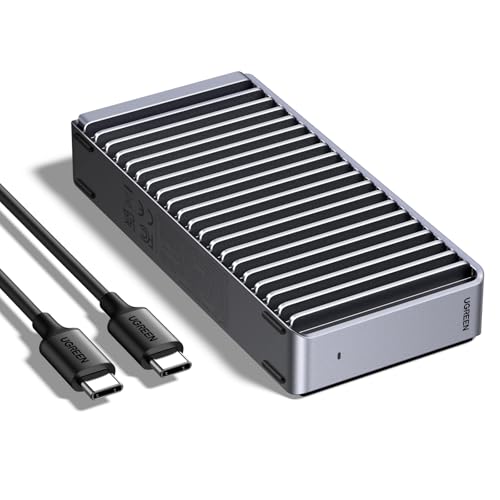
- Up to 3,600MB/s with compatible Thunderbolt 4 hardware
- Supports common M.2 NVMe sizes up to 8TB
- Compact, quiet, fanless aluminum design
Best For: Portable single-drive editing and fast project transfers
Best USB4 Speed – Sabrent USB4 NVMe Enclosure
For demanding video editing workflows, the Sabrent USB4 NVMe enclosure combines high throughput with active cooling. It supports up to 3,900 MB/s over USB4 and accepts PCIe NVMe drives in several M.2 sizes, though SATA M.2 SSDs are not compatible.
Best For: Video editors and creators using USB4 or Thunderbolt systems who want fast, portable scratch or project storage.
Pros:
- Up to 3,900 MB/s over USB4 and up to 2,700 MB/s with Thunderbolt 3/4
- Tool-free support for 2230, 2242, 2260, and 2280 PCIe NVMe SSDs
- Integrated active cooling fan helps maintain performance during large transfers
- Works with Windows and macOS without drivers or external power
Cons:
- Supports PCIe NVMe drives only, not SATA M.2 SSDs
- Full performance requires a compatible USB4 host and cable
This is a strong choice among SSD enclosures for video editing when sustained performance and broad USB-C compatibility matter. Its active fan is useful for long transfers, while the tool-free design simplifies drive installation.
Best Premium Portable Design – OWC Express 1M2 NVMe Enclosure
The OWC Express 1M2 is a compact, bus-powered option for video editors who want to install their own NVMe SSD. Its heat-dissipating metal design is intended to keep the drive cool quietly, and the enclosure works with USB4, Thunderbolt, and USB-C devices.
Best For: Mobile editors who need a rugged, palm-sized enclosure with flexible NVMe drive compatibility.
Pros:
- Up to 3,836 MB/s real-world performance is listed by the manufacturer
- Supports user-supplied M.2 2230, 2242, and 2280 NVMe SSDs
- Patented heat-dissipating design cools the drive without a fan
- Includes a 40Gb/s USB-C cable and screwdriver
Cons:
- It is an enclosure only, so an NVMe SSD must be supplied separately
- Actual performance depends on the SSD, host, and connection
With its quiet cooling approach and included accessories, the Express 1M2 is a practical pick for portable editing setups. It offers strong connectivity across modern computers while leaving drive capacity and model selection up to you.
Best for iPhone ProRes – ACASIS Magnetic SSD Enclosure
The ACASIS magnetic SSD enclosure is designed for creators recording and editing 4K footage on USB-C phones and tablets. Along with a 10Gbps NVMe enclosure, it provides a dual-sided magnetic phone stand for hands-free filming, viewing, or calls.
Best For: iPhone and mobile creators who want to record 4K ProRes footage directly to external NVMe storage.
Pros:
- Supports direct 4K footage storage and is rated for up to 8TB SSD capacity
- 10Gbps USB-C connectivity suits high-bitrate 4K workflows
- Combines an NVMe enclosure with a magnetic phone stand
- Aircraft-grade aluminum body offers adjustable viewing angles and silicone pads
Cons:
- SSD is not included
- External power is recommended for drives over 1TB or multiple connected devices
- Requires formatting before first use; exFAT is needed for Windows and macOS compatibility
This model stands out among SSD enclosures for video editing because it is built around a mobile capture workflow rather than maximum desktop speed. Its 10Gbps interface and integrated stand make it especially convenient for phone-based ProRes creators.
Best Stable 40Gbps Performance – Yottamaster M.2 NVMe Enclosure
The Yottamaster M.2 NVMe enclosure targets sustained editing workloads with a 40Gbps interface, ASM2464PD controller, and active cooling fan. Its tool-free transparent cover makes installation quick while allowing you to see the activity light and fan status.
Best For: Editors using Thunderbolt 4 or USB4 systems who need stable external NVMe storage for 4K projects.
Pros:
- 40Gbps connectivity with typical sustained speeds listed at 2,800–3,200 MB/s
- Active cooling fan and aluminum construction support heavy workloads
- Tool-free installation for 2230, 2242, 2260, and 2280 NVMe SSDs
- ASM2464PD controller provides overcurrent and overheating protection
Cons:
- Best results require a 40Gbps-rated cable and compatible host
- SSD is not included
- Actual speeds vary with the SSD, computer, file size, and operating conditions
For video editing, the Yottamaster offers a useful balance of speed, cooling, and easy installation. The transparent cover and visible fan status are practical touches for users who regularly monitor external storage during long transfers.
Best Value NVMe Pick – ORICO M.2 NVMe SSD Enclosure
If you need practical SSD enclosures for video editing without moving to Thunderbolt-class hardware, the ORICO M2PV is a compact USB 3.1 Gen 2 option. Its 10 Gbps interface can deliver over 900 MB/s with a high-performance NVMe drive, while included USB-C and USB-A connectivity makes it easy to use with different hosts.
Best For: Editors who want a portable, affordable enclosure for PCIe NVMe M.2 drives and everyday project transfers.
Pros:
- Up to 10 Gbps theoretical transfer speed and over 900 MB/s with suitable NVMe media.
- Supports 2230, 2242, 2260, and 2280 PCIe NVMe M-Key SSDs up to 8TB.
- Includes USB-C to USB-C and USB-C to USB-A connectivity, plus a thermal pad.
- Compact aluminum-and-plastic design supports portability and heat dissipation.
Cons:
- Only supports PCIe NVMe M.2 SSDs; M.2 SATA and PCIe AHCI drives are not supported.
- It is limited to USB 3.1 Gen 2 speeds rather than 40Gbps or 80Gbps connectivity.
- Requires formatting before a new SSD can be used.
The ORICO is a sensible entry point for editing proxies, smaller project libraries, and backups. Choose it when broad cable compatibility and low weight matter more than maximum sustained throughput.
Best Active-Cooling Option – ACASIS 40Gbps M.2 NVMe Enclosure
For demanding SSD enclosures for video editing, the ACASIS TBU405 Pro combines a 40Gbps connection with an integrated cooling fan. It is designed for sustained workloads, with support for Thunderbolt 4, Thunderbolt 3, USB4, and slower USB standards, making it a strong fit for compatible Mac and PC editing setups.
Best For: Video editors who need faster transfers and active cooling for large files, media libraries, and demanding workstation workloads.
Pros:
- 40Gbps USB4 performance with tested read/write speeds up to 2805/2734 MB/s using a Samsung 980 Pro on a MacBook.
- Built-in fan and heat-dissipation holes help reduce thermal throttling during heavy workloads.
- Compatible with M.2 NVMe sizes 2230, 2242, 2260, and 2280.
- Works with M1/M2/M3 Pro and Max Macs, iPad Pro, Windows, and Linux systems.
Cons:
- Maximum performance depends on a compatible 40Gbps, Thunderbolt, or USB4 host.
- The fan must be activated with its switch.
- It supports NVMe drives, not a broad range of M.2 drive types.
The TBU405 Pro is a clear step up from standard 10Gbps enclosures when project transfers and sustained performance are priorities. Its active cooling is particularly useful for editors moving large footage files, though the higher-speed interface requires suitable host hardware.
Fastest Future-Ready Pick – ACASIS 80Gbps M.2 NVMe Enclosure
The ACASIS TB501 Max targets top-tier SSD enclosures for video editing with an 80Gbps interface, PCIe 5.0 SSD support, and intelligent active cooling. It can reach up to 6000 MB/s with suitable hardware and also provides up to 60W power delivery, making it useful for high-performance mobile editing setups.
Best For: Professionals with Thunderbolt 5 or USB4 V2 systems who want maximum external NVMe speed and single-cable workstation convenience.
Pros:
- Supports up to 80Gbps connectivity and speeds up to 6000 MB/s with compatible SSD and host hardware.
- Supports PCIe 5.0 SSDs and includes an intelligent fan that adjusts cooling according to temperature.
- Up to 60W PD can power a compatible laptop while accessing external storage.
- Tool-free installation, thermal pads, size adapter, and an 80Gbps cable are included.
Cons:
- It is not compatible with Thunderbolt 3 devices.
- Exceeding 3000 MB/s requires a PCIe 4.0 x4 NVMe 1.4-or-newer SSD and suitable host hardware.
- The enclosure may become warm during sustained transfers and needs good ventilation.
The TB501 Max is the most capable option here for future-facing editing systems, especially when 80Gbps connectivity and laptop power delivery are useful. Its performance benefits depend heavily on the SSD, cable, and host supporting the required standards.
Best Multi-Drive Pick – TERRAMASTER D4 SSD NVMe Enclosure
For demanding workflows, the TERRAMASTER D4 is one of the most capable ssd enclosures for video editing. Its four M.2 NVMe bays, 40Gbps USB-C connection, and support for up to 32TB make it suitable for large project libraries and high-speed file transfers.
Best For: Editors who need four individually managed NVMe drives and substantial desktop or travel-friendly storage capacity.
Pros:
- Supports four M.2 NVMe 2280 SSDs and up to 32TB total capacity.
- Advertised speeds reach up to 3,224MB/s with four 990 PRO SSDs.
- Temperature-controlled cooling, tool-free installation, and hot-swappable bays.
- Works with Windows, macOS, Linux, Android, and iOS devices.
Cons:
- It has no built-in RAID; software RAID requires third-party tools.
- SSD storage is not included.
The D4 is a strong choice when expandable, multi-drive NVMe storage matters more than a simple one-disk setup. Its cooling and hot-swap features also suit sustained editing workloads.
Best Portable 4-Bay Dock – ORICO 8848U4 NVMe Enclosure
The ORICO 8848U4 is a compact all-flash option among ssd enclosures for video editing, combining four NVMe bays with a 40Gbps USB 4.0 interface. It is designed for editors and DIT professionals who need portable, high-capacity storage without mechanical-drive noise.
Best For: Portable 4K/8K editing workflows, media transfers, and users who want up to four NVMe drives in a compact enclosure.
Pros:
- Supports four M-Key NVMe SSDs in 2230, 2242, 2260, or 2280 sizes.
- Provides up to 32TB total capacity and up to 40Gbps bandwidth.
- Solid-state design is compact, shock-resistant, and quieter than mechanical storage.
- Aluminum housing, cooling fan, and ventilation support sustained operation.
Cons:
- Single-disk read and write speed is listed at up to 10Gbps.
- SSDs are not included.
- The product carries a one-year warranty.
Choose the ORICO when portability and four-drive capacity are priorities. Its all-flash construction makes it practical for moving editing media between workstations, while active cooling supports longer sessions.
Best Single-Drive Option – UGREEN 40Gbps M.2 NVMe Enclosure
The UGREEN 40Gbps enclosure is a straightforward single-drive choice for ssd enclosures for video editing. It supports common M.2 NVMe sizes, uses a USB-C connection, and provides a compact aluminum body for editors who need portable project storage.
Best For: Mobile editors who need one portable NVMe drive for project files, playback, and fast transfers.
Pros:
- ASM2464PD controller enables advertised speeds up to 3,600MB/s with compatible hardware.
- Supports 2230, 2242, 2260, and 2280 NVMe drives up to 8TB.
- Fanless double-sided fin design provides quiet heat dissipation.
- Compatible with USB4, USB 3.2, USB 3.1, USB 3.0, and Thunderbolt 3/4.
Cons:
- It supports only one SSD and does not include storage.
- Thunderbolt 4 cables and devices are required to reach the advertised 3,600MB/s speed.
- It does not support SATA NGFF or mSATA SSDs, and thicker SSDs may require thinner thermal pads.
The UGREEN is the simplest option here for a single fast scratch or project drive. Its fanless cooling keeps operation quiet, but achieving peak performance depends on the host connection and compatible cable.
How We Picked the Best SSD Enclosures for Video Editing
We focused on enclosures that can support sustained file transfers and practical editing workflows rather than only quoting peak sequential speeds. The selection covers USB 3.2 Gen 2, USB4, Thunderbolt-compatible, and USB4 V2/TB5-oriented designs, along with single-drive and multi-drive formats.
We also considered NVMe format support, cooling, tool-free installation, portability, expansion features, and the likelihood that an enclosure will work well with modern Mac and Windows editing systems. Because real-world performance depends on the installed SSD, host port, cable, thermals, and filesystem, advertised speeds should be treated as best-case figures.
Quick Comparison
| Type | Best for | Typical advantage | Trade-off |
|---|---|---|---|
| 10Gbps USB 3.2 | General editing and backups | Broad compatibility and lower cost | Slower large-file transfers |
| 40Gbps USB4 or Thunderbolt-compatible | 4K editing and frequent media transfers | Much higher bandwidth | Requires a compatible host and cable |
| 80Gbps USB4 V2/TB5-oriented | Newer high-performance systems | Highest potential throughput | Limited benefit on older computers |
| Multi-bay enclosure | Editors managing several SSDs | Large capacity and centralized storage | Less portable and often diskless |
Key Buying Factors for SSD Enclosures for Video Editing
Host Bandwidth and Compatibility
Check the ports on the computer, dock, or tablet you will actually use. A 40Gbps enclosure connected to a 10Gbps USB port will operate at the slower link speed. Thunderbolt and USB4 support can also vary by system, so confirm the manufacturer’s compatibility notes before buying.
Sustained Speed and Cooling
Video workloads often involve large, continuous transfers that can expose thermal throttling. Aluminum bodies, thermal pads, heatsinks, and active cooling can help an NVMe SSD maintain performance. A fan-equipped model may be preferable for long exports, though it can add noise and bulk.
SSD Size and Physical Fit
Verify support for your drive’s M.2 length, such as 2230, 2242, 2260, or 2280, and confirm whether the enclosure accepts NVMe PCIe drives rather than SATA M.2 drives. Capacity limits also matter when installing high-capacity SSDs.
Workflow Features
Tool-free access is useful when swapping project drives, while magnetic stands, phone-oriented designs, power delivery, and multi-bay layouts may suit specialized setups. Use a quality USB-C cable rated for the enclosure’s advertised speed.
Who Should Buy Which SSD Enclosures for Video Editing?
Choose a 10Gbps model such as the ORICO USB 3.1 Gen 2 enclosure if you want dependable compatibility for proxies, backups, and moderate editing at a lower cost. For frequent 4K work, a 40Gbps option from Sabrent, OWC, Yottamaster, ACASIS, or UGREEN offers a stronger balance of speed and portability.
Editors using newer USB4 V2 or Thunderbolt 5 systems may benefit from the ACASIS 80Gbps enclosure, provided the rest of the workflow supports its bandwidth. If cooling is a priority during sustained transfers, consider the ACASIS 40Gbps model with a fan. For teams or users managing several NVMe drives, the TerraMaster D4 or ORICO all-flash docking station provides more capacity and organization, but these are less convenient for travel.